
Misterdownloadmanager
Free IDM alternative in Rust, with torrents and video downloads.
Replaces Internet Download Manager
Who it's for
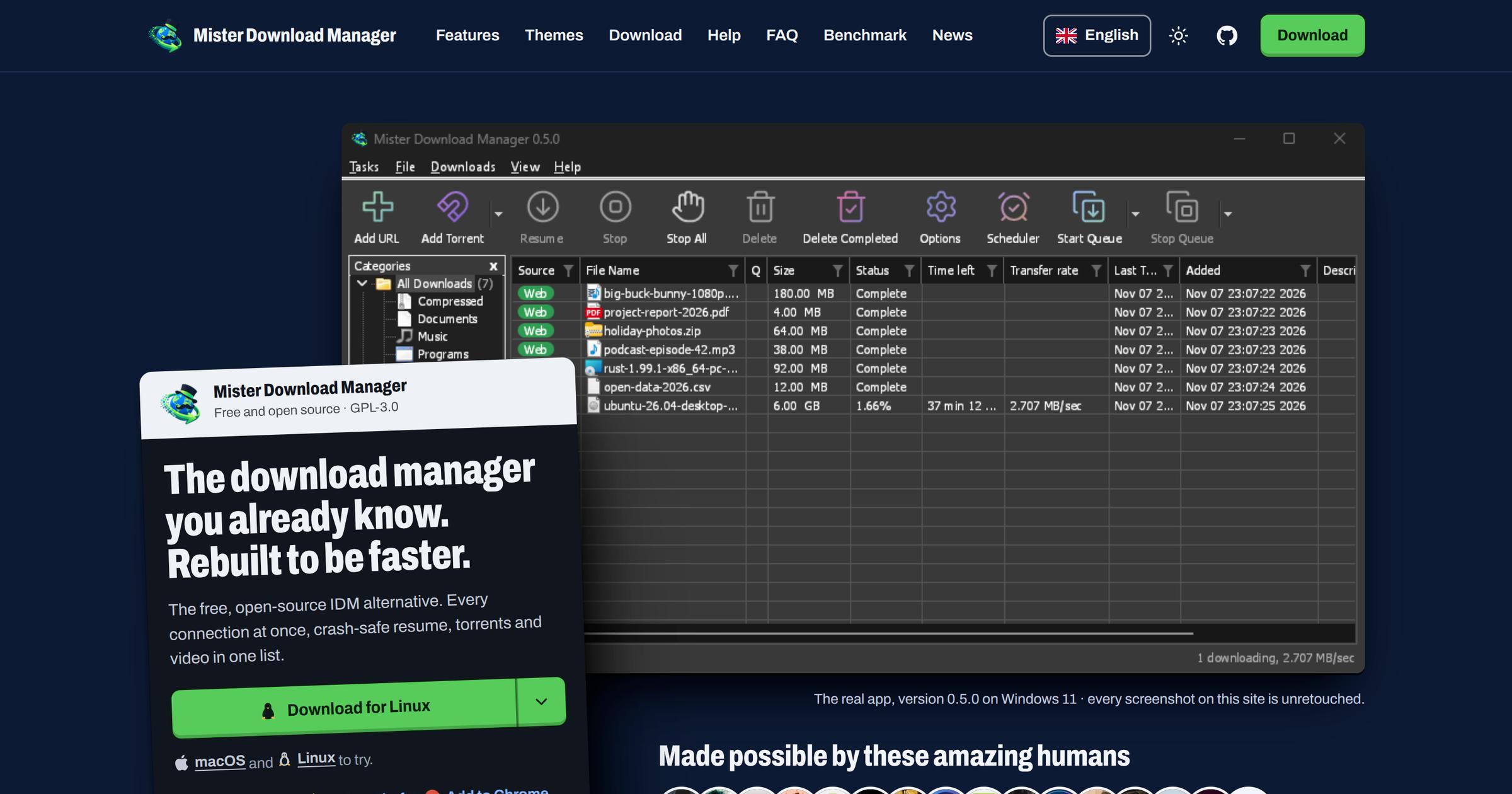
MDM replicates IDM's toolbar, category list, progress window and browser button. IDM list import reads your existing IDM queue with each download's address, referrer and cookies. If IDM's licence cost or nag screens were the reason to switch, MDM covers the same workflow for free.
If you rely on IDM's vendor support or specific site-compatibility fixes that only IDM provides, MDM is still a new project (0.5.0) and some edge cases are still being resolved.
Magnet links and .torrent files sit alongside HTTP and FTP downloads in the same queue with the same scheduler and speed limiter. No separate torrent client is needed. Debrid service links from Real-Debrid, AllDebrid or Premiumize can also be fed directly into MDM.
If you need a full-featured torrent client with private tracker support, seeding ratio management, or a large plugin ecosystem, a dedicated client like qBittorrent is a better fit.
Paste any YouTube, Vimeo, TikTok or gallery page address and MDM downloads the video at the quality you choose, using yt-dlp internally. Batch downloads and an RSS torrent feed let you automate recurring downloads. Archives (ZIP, TAR, 7z, RAR) extract automatically as they arrive.
If you need command-line scripting hooks for video download automation, calling yt-dlp directly gives more flexibility than MDM's GUI wrapper.
MDM's server mode runs without a window on a NAS, in Docker, or on Unraid. You feed it downloads from a phone or browser over the local network. The scheduler starts downloads overnight and can shut the machine down when finished. It also exposes an MCP API for assistant tools.
If your NAS runs Linux exclusively and browser extension integration is a priority, note that Flatpak browsers cannot connect to MDM on Linux yet.
The problem
Internet Download Manager has been the standard Windows download accelerator for years, but it charges a licence fee after a 30-day trial, displays nag screens until you pay, and does not support torrents or magnet links. For users who download large files regularly, those gaps mean paying an ongoing licence fee while also maintaining a separate torrent client. Video downloads add another complication. Extracting video from YouTube, Vimeo, TikTok and thousands of other sites requires a separate tool or a browser extension that may break whenever a site updates its interface. Managing file downloads across three separate applications, paying for one, and tolerating nag screens in another, turns a background task into an ongoing maintenance burden.
How it works
Files are split across up to 128 simultaneous connections and re-split as the download progresses. In a published benchmark on the same hardware against the same test server, MDM downloaded a 1 GiB file in 1.0 second versus IDM's 5.5 seconds, and a 256 KiB file in 0.03 seconds versus IDM's 3.1 seconds. Results are Mann-Whitney p < 0.001.
Magnet links and .torrent files sit in the same download list as HTTP and FTP files. You pick which files to download from a torrent, watch each piece fill in real time, and queue or schedule torrents alongside your other downloads. IDM does not offer torrent or magnet link support.
Paste a web page address and MDM lists the available video qualities, up to 4K, from YouTube, Vimeo, TikTok and over a thousand other sites. It uses yt-dlp under the hood and ffmpeg to merge picture and sound. Image gallery downloads let you save every photo from a gallery page into its own folder.
Extensions for Chrome, Edge, Brave, Opera, Vivaldi and Firefox intercept any download you click and send it to MDM automatically. The Chrome Web Store extension works across Chromium browsers; the Firefox add-on is on Mozilla's store. Both come bundled with the MDM installer or install separately from the stores.
MDM writes progress continuously and resumes exactly where it stopped after a crash or power loss, without re-downloading the whole file. The scheduler starts and stops queues by the clock (say, 2 a.m. to 7 a.m.) and can shut the computer down when the queue finishes.
MDM runs without a visible window on a NAS, in Docker, or on Unraid, fed from a phone or browser over the local network. It also exposes a local API that Claude, Cursor, VS Code and other MCP assistants can use to list, add, pause and resume downloads.
Features
- Up to 128 parallel connections per file
- Built-in torrent and magnet link support
- Video downloads via yt-dlp
- Browser extensions for six browsers
- Crash-safe resume and scheduler
- Server mode and MCP assistant support
How to install
Download the Windows installer, portable build, or macOS and Linux packages from GitHub Releases: https://github.com/anefzaoui/misterdownloadmanager/releases/latest
Recommended for this setup
Strengths
- Free forever, GPL-3.0 licensed: MDM costs nothing, with no trial limit, no nag screen, no paid edition, and no registration key. The GPL-3.0 license means the source is public, every release is built from that source via GitHub Actions on GitHub's servers, and each file carries a published SHA-256 checksum for verification.
- Faster than IDM in published benchmarks: On the same PC against the same local test server, MDM downloaded a 1 GiB file in 1.0 second (IDM: 5.5 seconds), a 256 KiB file in 0.03 seconds (IDM: 3.1 seconds), and completed a server-limited two-connection download in 12.6 seconds (IDM: 15.9 seconds after opening 480 connections). Benchmark uses alternating runs with Mann-Whitney p < 0.001; raw data is published.
- 86 interface languages, including right-to-left: MDM ships with every display language Windows 11 offers, 86 in total, compared to about 40 for IDM distributed as separate downloads. Arabic, Hebrew, Persian, Urdu and Uyghur render in a fully mirrored right-to-left window. The language is detected from the system and can be changed at any time in View, then Language.
- Written from scratch in Rust, independent of IDM: MDM is an independent project with no code or artwork from IDM, confirmed by the README. Rust's memory safety eliminates a whole class of crashes and security bugs common in download managers. The source is public on GitHub, and every release is built from it on GitHub's servers using GitHub Actions.
Trade-offs
- macOS and Linux support is experimental: Windows 10 and 11 is the stable operating system. macOS builds (Apple Silicon and Intel .dmg) are not notarized, so the first launch requires a right-click Open to bypass Gatekeeper. Linux runs on Ubuntu 24.04, Debian 12 and Fedora with GNOME, KDE, Xfce and Cinnamon, but screen readers such as Orca cannot read its windows yet, and Flatpak browsers cannot connect to MDM on Linux.
- Windows installer is not yet code-signed: The first time you run the MDM installer, Windows Defender may show a 'Windows protected your PC' warning because the binary is not yet code-signed. The README instructs users to click More info, then Run anyway. The source is public and all files include SHA-256 checksums so users can verify what they are installing.
- Early-stage project with 56 open issues: MDM 0.5.0 launched in late 2026 and has 56 open GitHub issues at the time of writing. As a new project it is actively developed but some features, translations (most are machine-translated and need native speaker review per the product website), and browser integration edge cases are still maturing.
Tech stack
FAQ
Yes. MDM is free under the GPL-3.0 license with no paid edition, no trial period, no licence key, no nag screen, and no ads. The product website states it is free for everyone, forever. GitHub Sponsors is offered as an optional way to support the developer, not a required subscription.
macOS and Linux builds are available but marked experimental. macOS builds (Apple Silicon and Intel .dmg) are not notarized, so the first launch requires a right-click Open to bypass Gatekeeper. Linux builds include an AppImage, .deb for Ubuntu and Debian, and .rpm for Fedora. Screen readers such as Orca cannot read MDM's windows yet on Linux, and Flatpak browsers cannot connect to it. Windows 10 and 11 is the stable operating system.
Yes. MDM includes an IDM list import feature that reads your existing IDM queue with each download's address, referrer and cookies. This is listed among MDM's 27 features on the product website under 'Moving from IDM'.
The installer (setup.exe) installs MDM, connects it to your browsers and prompts for language on first run. The portable download (portable.zip) runs from any folder or USB stick with no installation, keeping all settings in its own directory. The installer is recommended if you want browser extension integration set up automatically; the portable build suits USB stick use or systems where you prefer not to install software.
MDM uses yt-dlp internally to list available qualities from YouTube, Vimeo, TikTok and over a thousand other sites. You paste the page address, choose a quality up to 4K, and MDM downloads the video. ffmpeg merges picture and sound when needed. Video downloads sit in the same queue as your other downloads and can be scheduled or speed-limited like any file.