Memos
Self-hosted note timeline with per-memo privacy, zero telemetry
Replaces Google Keep, Evernote, Standard Notes
Who it's for
If you want fast note capture with a chronological feed, search, and tags, without a subscription or your notes stored on someone else's server, Memos covers that workflow directly. The single-command Docker install takes under a minute.
If you need to share structured documents with a team, assign tasks, or build a linked knowledge base, Memos' single-timeline design will feel limiting.
The Markdown-first composer and tag system suit developers who log daily work, save TIL snippets, or bookmark code examples. The Web Clipper saves pages as source-linked Markdown directly into the timeline from the browser.
If you need a full second-brain system with bidirectional links and graph views, a dedicated tool like Logseq or Obsidian serves that use case better.
Memos supports multiple user accounts with separate timelines on one instance. SQLite covers single-user setups; PostgreSQL or MySQL is recommended for multi-user installs. A single Docker container handles the full stack.
If your team needs task assignment, project boards, or real-time document collaboration, Memos' scope is deliberately narrower than a full workspace tool.
The problem
Most note-taking apps keep your data on their servers, change their pricing unpredictably, and send usage analytics back to their own servers whether you want them to or not. Evernote has raised prices and removed features from its free tier over the years. Notion charges per seat for team features. Google Keep offers no export path, no self-hosting, and no control over data retention. The larger issue is that notes accumulate trust over time: years of meeting notes, reading highlights, and daily logs become harder to abandon as they grow. When a service changes its pricing or gets acquired, your archive is held hostage. A tool that runs on your own infrastructure, sends no telemetry, and gives you a full export at any time removes that dependency entirely.
How it works
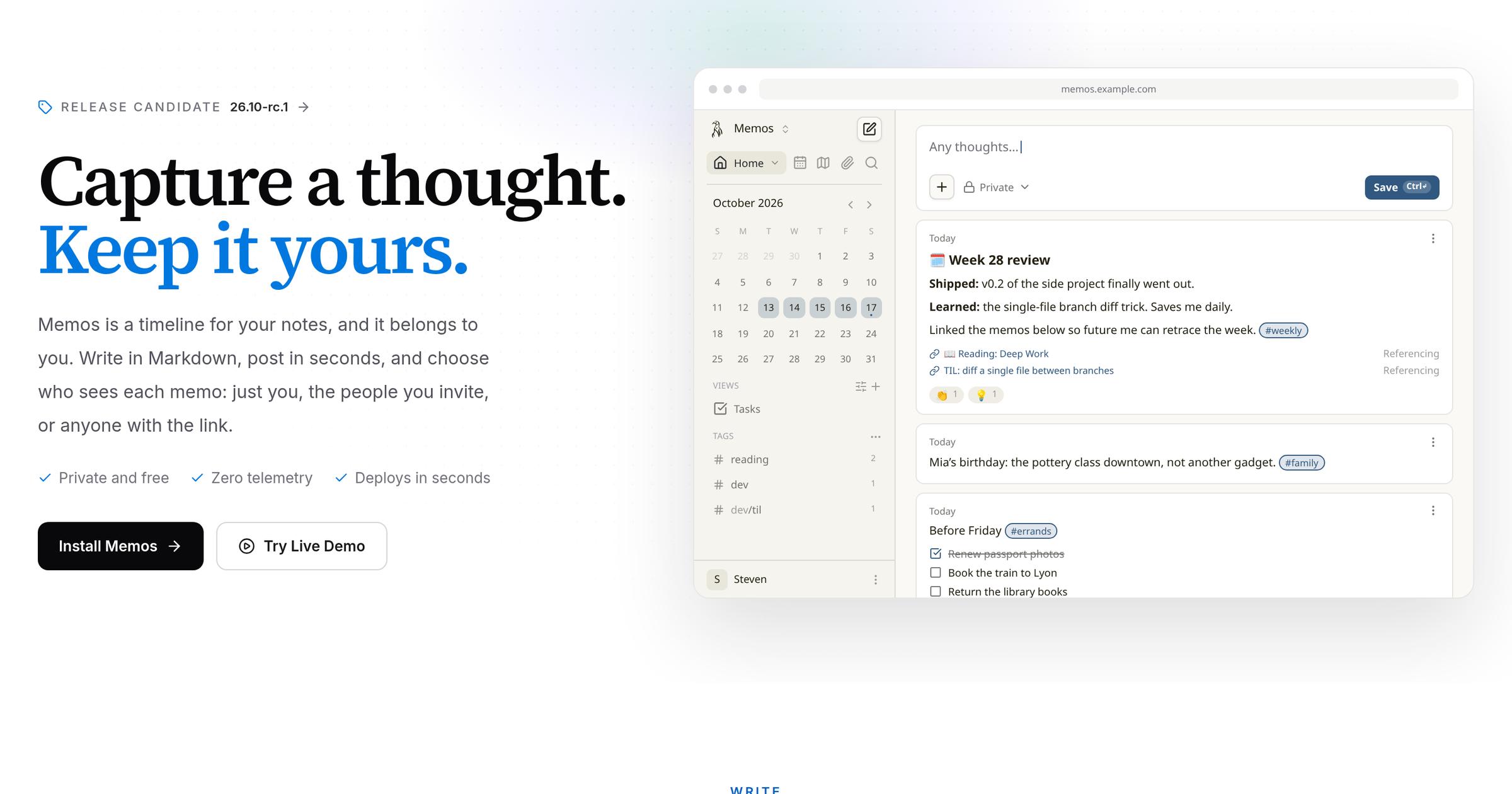
Each memo has its own visibility setting. New memos default to private. You can share a single memo with signed-in users or make it publicly accessible by link without changing the visibility of any other memo in your timeline.
Memos displays entries chronologically. The built-in calendar view shows every day you wrote something and lets you jump to that day's entries. A map view plots memos that include a saved location. There are no folders to navigate.
Memos are written in Markdown, including lists, code blocks, and checklists. Tags are inline with #hashtag syntax. You can save frequently used tag filters as named views for quick access later.
The Memos software sends no usage data or analytics to any external server. Your memos live in the database of the instance you run. You can export your entire archive as a ZIP file at any time.
The Memos Web Clipper for Chrome and Firefox saves pages, selections, and images directly into your Memos instance as source-linked Markdown. A Telegram integration lets you send memos from outside the app without opening a browser.
Memos defaults to SQLite for single-user installs, requiring no separate database setup. MySQL and PostgreSQL are supported for teams running a shared instance or preferring a managed database backend.
Features
- Per-memo visibility: private, invite-only, or public
- Timeline with calendar and map views
- Markdown writing with inline #tag organization
- Zero telemetry with full data export
- Web Clipper browser extension and Telegram integration
- SQLite, MySQL, and PostgreSQL database support
How to install
Self-hosting uses Docker with a local folder for persistent storage.
docker run -d \
  --name memos \
  -p 5230:5230 \
  -v ~/.memos:/var/opt/memos \
  neosmemo/memos:stable
Recommended for this setup
Strengths
- 63,000+ GitHub stars, actively maintained: With over 63,000 GitHub stars and a last commit pushed on October 16, 2026, Memos has a large contributor base and regular releases. The project uses calendar versioning (YY.MM.N), with stable Docker tags that follow each release automatically.
- MIT license with no commercial restrictions: The MIT license means you can run Memos commercially, fork it, and modify it without restriction. Unlike source-available tools in the note-taking space, there is no hosted-service clause or commercial-use limit.
- One Docker command to start, no reverse proxy required: Self-hosting Memos requires a single docker run command. No Compose file, no reverse proxy, no separate database service for single-user installs. The server starts on port 5230 and stores data in a local folder you specify.
- Private by default with per-memo sharing controls: Every new memo is private until you choose otherwise. You share individual memos, not your entire account. This is the opposite of most collaborative note tools that require explicit privacy settings per collection or notebook.
Trade-offs
- No block-based editor or structured document pages: Memos is a timeline for short notes, not a page-based editor. If you need nested documents, database views, or wiki-style pages like Notion provides, Memos is not that tool. It is designed for quick capture, not structured knowledge bases.
- Self-hosting responsibility falls entirely on you: There is no managed cloud version of Memos; you host it yourself. Backups, upgrades, and server availability are your responsibility. Upgrading from releases before v0.31.0 requires a specific migration step documented in the upgrade guide.
Tech stack
FAQ
Yes. Memos is MIT licensed and free to self-host with no license fee. Hosting may still cost money depending on your server or provider. There is no managed cloud version, so self-hosting is the only path to running Memos.
Memos supports SQLite (the default, no extra setup needed), MySQL, and PostgreSQL. For a single-user install, SQLite is sufficient. Teams sharing an instance typically prefer MySQL or PostgreSQL for concurrent access and managed backups.
Yes. Memos lets you export your entire archive as a ZIP file containing your notes in Markdown format, so you can move to another tool without losing your data.
Yes. Each memo has its own visibility setting: private (the default), visible to signed-in users, or public by link. You control sharing per memo without changing the visibility of any other memo on your timeline.
Notion is a workspace tool with pages, databases, and block editors. Memos is a timeline for short, fast notes. Memos deploys in one Docker command, sends no telemetry, and has no subscription fee, but it does not replace Notion's document and project management capabilities.