Linkwarden
Self-hosted bookmark manager with archiving and team collaboration
Replaces Raindrop Io, Diigo, Pinboard
Who it's for
Academic researchers, journalists, and analysts who cite web sources need archives that hold up. Linkwarden's three-format capture preserves pages in a form that stays accessible for citation and re-reading even years after the original disappears from the web. Annotation support lets you mark up sources in context.
Your research sources are mostly academic papers in PDF form, behind institutional access, or already in a stable repository. Linkwarden's strength is archiving live web pages; if your sources are static files you already hold, a document manager fits better.
Engineering teams save documentation links, stack answers, and tool pages in shared browser bookmarks that go stale. Linkwarden's shared collections and preservation give teams a durable internal resource with search and annotation, reducing time spent re-finding content that has moved or disappeared.
Your team primarily wants a knowledge base with notes, structured documents, and wikis. Linkwarden is a bookmark manager with annotation; a tool like Outline or Obsidian serves document-centric knowledge work better.
Users running a NAS or home server who want a self-hosted alternative to Raindrop.io get full control over their archive with no monthly subscription. The iOS and Android apps and browser extensions provide the same capture-on-the-go experience as the cloud services they replace.
You want a simple read-later queue with minimal setup and no server to maintain. Linkwarden's self-hosting overhead is real; a hosted service is simpler for lightweight reading lists.
The problem
Browser bookmarks are fragile. A link you saved two years ago may now return a 404, point to a parked domain, or display content edited beyond recognition. Read-later cloud services store text extracts of some articles, but their archives are inconsistent and there is no guarantee the copy stays available if the service shuts down or changes its terms. For teams, the problem runs deeper. Shared bookmarks in a browser sync are single-user by design. Raindrop.io and Diigo offer collaboration, but your collection lives on their infrastructure at a subscription cost that grows with your team. If the service changes its pricing or shuts down, your research goes with it. Self-hosters and privacy-conscious users have had no good option that archives reliably in multiple formats, supports multiple users, and keeps every saved copy on hardware they control.
How it works
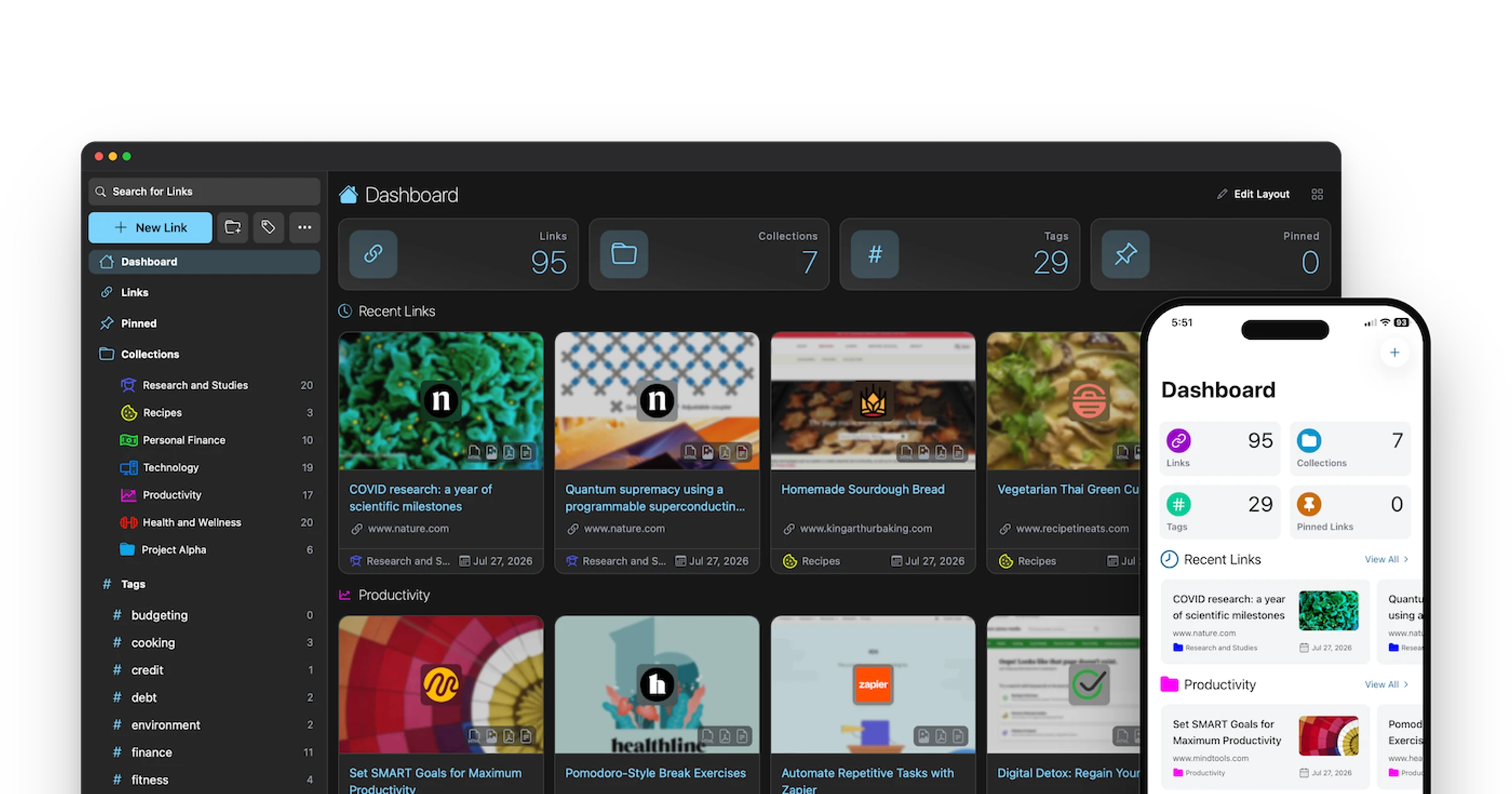
Every saved link triggers an automatic background capture producing a screenshot, PDF, and single HTML file. All three copies are stored on your server, so the original content remains accessible even after the source URL disappears or changes. If the PDF renderer misses dynamic content, the HTML copy catches it.
A built-in reader view strips away navigation, ads, and surrounding UI so you can read saved articles cleanly. You can adjust font style, highlight passages, and add inline annotations directly in Linkwarden. Notes and highlights are stored with the bookmark and persist across sessions.
Collections can be shared with specific users at configurable permission levels, covering read-only access, contributor rights, and admin control. Teams use shared collections for research, content planning, or link curation without exposing their entire bookmark library. Public sharing is also available for collections you want to publish externally.
An optional local AI tagging feature reads each saved link's content and assigns tags automatically without sending data to an external service. Combined with full-text search across all saved content and advanced search operators, it keeps large bookmark libraries organized without manual work. Both features run against your locally archived copies, not live URLs.
Open-source browser extensions for Chrome, Safari, and Firefox let you save any page to Linkwarden with one click while browsing. Floccus browser sync imports your existing browser bookmarks and keeps them in step with Linkwarden collections, so you can migrate without losing your history.
Features
- Full-page preservation in three formats
- Reader view with text highlighting and annotation
- Team collections with per-member permissions
- Local AI tagging and full-text search
- Browser extensions and Floccus bookmark sync
Recommended for this setup
Strengths
- Full data ownership on your own hardware: Every archived copy lives on your own server or NAS. Unlike Raindrop.io or Pinboard, your archives are not hosted on a third party's infrastructure. If a service shuts down, changes pricing, or restricts exports, you are not affected. Your bookmark database is a Postgres file you control and can back up independently.
- Three archival formats give more coverage than single-format competitors: Screenshot, PDF, and HTML capture together provide more coverage than tools that save only one format. Raindrop.io stores a snapshot but does not offer multi-format archiving. Linkwarden's three-way capture means content that fails in one format is covered by another.
- Team collaboration built into the self-hosted install: Multi-user support with per-collection permissions is built in and does not require a paid tier upgrade. Teams can share and contribute to collections on a single self-hosted instance with configurable access levels. SSO integration is available for Enterprise and self-hosted users who need centralized authentication.
- Active development with 20,312 stars and 892 forks: The project was last pushed in October 2026 and has 20,312 GitHub stars and 892 forks, reflecting ongoing development and wide community adoption. AGPL-3.0 licensing means you can run it internally for any commercial team at no cost; the restriction applies only if you offer it as a hosted service to others.
Trade-offs
- 649 open issues reflect a growing backlog: The GitHub tracker shows 649 open issues (excluding pull requests). For a self-hosted deployment used for critical archiving, this means some edge cases may not receive prompt fixes. Reviewing relevant open issues before major upgrades is advisable, particularly for workflows that depend on consistent PDF or HTML capture.
- Docker and Postgres setup required for self-hosting: Self-hosting Linkwarden requires Docker, a Postgres database, and some server configuration. The official docs cover the setup, but users without server administration experience will face a steeper learning curve compared to signing up for a managed service. The Cloud option removes this overhead at the cost of data leaving your hardware.
- AGPL-3.0 restricts redistribution as a managed service: AGPL-3.0 is permissive for self-hosters: you can run Linkwarden for any internal team, including commercial teams, at no cost. The restriction applies only if you offer Linkwarden as a hosted service to external users; in that case, the AGPL requires you to publish your source code modifications. This does not affect typical self-hosters or internal team deployments.
Tech stack
FAQ
Both. Linkwarden offers an official Cloud service at linkwarden.app/#pricing for teams who do not want to manage infrastructure. The self-hosted path is free under the AGPL-3.0 license; setup follows the official documentation at docs.linkwarden.app/self-hosting/installation. The Cloud subscription directly funds ongoing development.
AGPL-3.0 allows you to run Linkwarden internally for any commercial team without paying a license fee. You can run it on a private server, modify the source code, and use it freely as long as you are not offering it as a hosted service to external users. If you deploy a modified version as a service to others, the AGPL requires you to publish those modifications.
Every time you save a link, Linkwarden automatically captures the page as a screenshot, a PDF, and a single HTML file. These three copies are stored on your server. If the original URL later returns a 404 or the content changes, you still have the archived versions. You can also optionally send the URL to the Wayback Machine (archive.org) for an additional public snapshot.
Yes. Linkwarden supports importing standard browser bookmark exports. For ongoing sync, the Floccus browser extension keeps your browser bookmarks in step with Linkwarden collections. You can also export your Linkwarden library at any time from the settings.
Official iOS and Android apps are available on the App Store and Google Play. They require a Linkwarden account, either on the Cloud service or a self-hosted instance. An APK outside Google Play is available through the linkwarden/builds repository on GitHub for users who prefer sideloading.