
Koel
Self-hosted music streaming with smart playlists and mobile apps
Replaces Spotify, Apple Music, Youtube Music
Who it's for
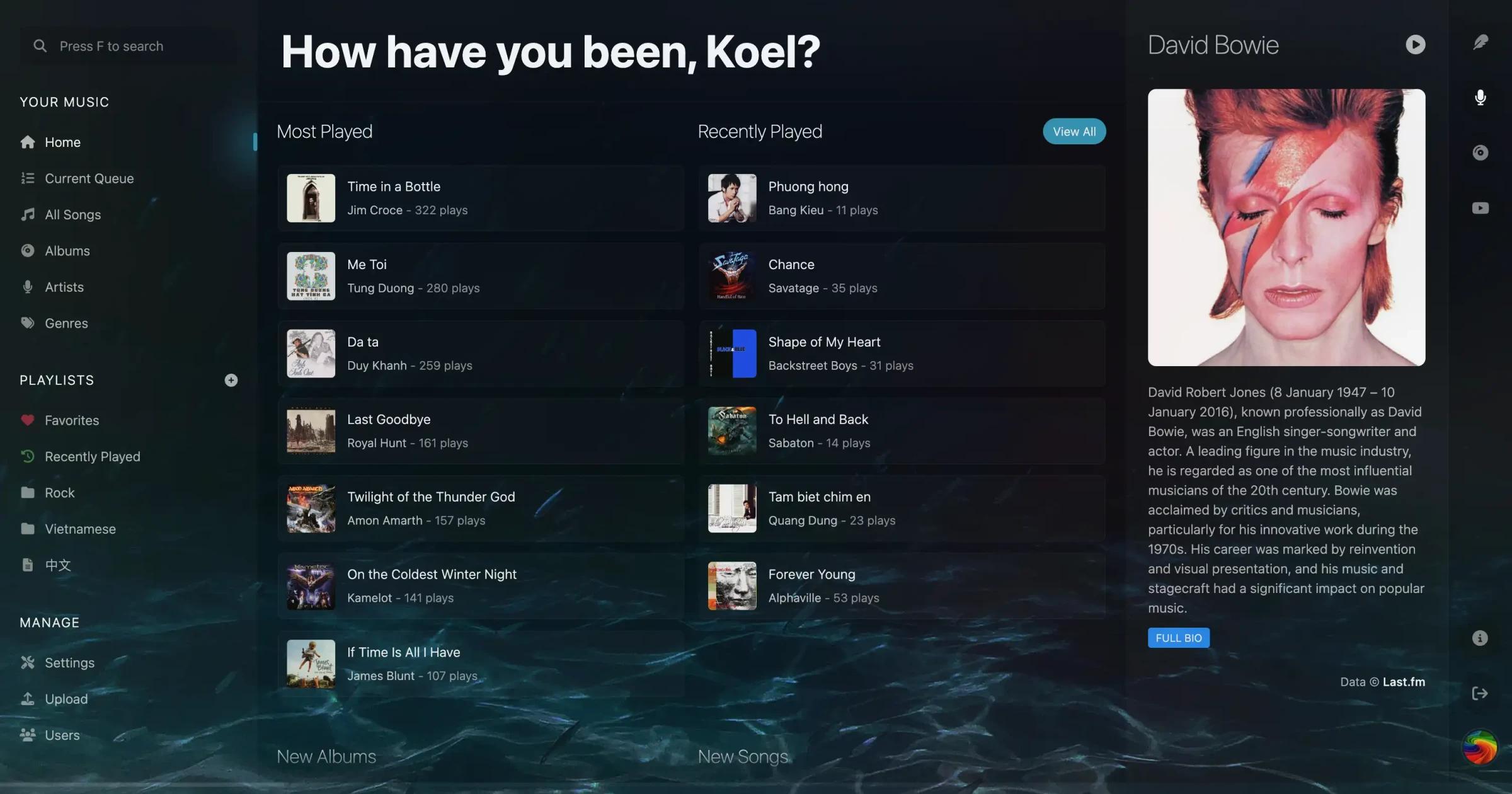
Koel scans your local music files and makes them available from any browser or Subsonic client, so you can reach your full archive from a phone, work computer, or tablet without copying files manually. Smart playlists and metadata enrichment via Last.fm and MusicBrainz make large libraries more browsable.
You primarily listen to music you do not own locally. Koel does not connect to streaming catalogs; it serves files you already have on disk. If your library is small or consists mostly of albums available on Spotify, a self-hosted server adds overhead for little gain.
Koel supports transparent lossless audio pass-through, which means your FLAC files reach the browser or Koel Player app without quality loss. Combined with a built-in equalizer, this gives audio-focused users quality control that subscription services with compressed audio do not offer.
Your listening is primarily on mobile with a limited data plan. Lossless FLAC files are significantly larger than compressed formats, so streaming them over a mobile connection uses more data than a compressed stream would.
Koel supports multiple user accounts on a single installation, each with their own playlists and favorites. The Community version works well for households where everyone streams from the same shared music library and wants individual listening history without paying a streaming service.
Each person in the household needs a completely separate music collection rather than shared access. Per-user individual libraries are a Koel Plus feature, so households needing strict collection separation require a Koel Plus purchase.
For listeners who primarily stream music they already own or could purchase, Koel replaces a recurring subscription with a self-hosted server. Integrations with Last.fm, Spotify (for metadata), and YouTube pull in album art and related content automatically so the library feels complete.
You rely on streaming primarily for music discovery or regularly listen to new releases before purchasing. Koel serves only files you own locally and has no access to licensed catalog content.
The problem
Music streaming subscriptions charge a monthly fee to access a catalog you do not own. When a label pulls an album or a service discontinues, your playlists and listening history stay on their servers but your music is gone. For listeners who have spent years building a local collection of FLAC files, vinyl rips, or digital purchases that streaming services do not carry, there is no clean way to access that library from a phone, another computer, or a browser without setting up your own server. Managing a large local music library across devices also means dealing with inconsistent metadata, missing album art, and no smart playlist support. Commercial desktop players solve the local playback problem but do not give you streaming access when you are away from the machine where the files live.
How it works
Koel speaks the Subsonic and OpenSubsonic API protocol, so you can point any compatible mobile or desktop client directly at your library. You are not limited to the web interface; any Subsonic-compatible client works with Koel without additional setup or plugins.
Create dynamic playlists that update automatically based on rules you define, or organize playlists into folders for a tidier library. Both features are included in the Community version with no cost and no limits on the number of playlists.
Koel integrates with Last.fm, MusicBrainz, Wikipedia, Spotify, and YouTube to automatically pull in album art, artist biographies, and music videos. Your library fills in the details without requiring manual tagging for most mainstream releases.
Koel passes lossless audio files to the browser without transcoding, preserving quality for FLAC and other lossless formats. A built-in equalizer and visualizer let you tune playback in the browser without a separate desktop application.
The official Koel Player app is available for both iOS and Android and connects directly to your Koel server with no additional configuration. It delivers a native app experience for your library beyond what the mobile browser version provides.
Koel includes an AI assistant that responds to natural-language commands for search and playback control, part of the core installation alongside scrobbling, podcasts, and radio support as documented in the project README.
Features
- Subsonic and OpenSubsonic API
- Smart Playlists and Playlist Folders
- Metadata Enrichment via Third-Party Services
- Transparent Lossless Audio Pass-Through
- Koel Player for iOS and Android
- AI Assistant with Natural-Language Commands
Recommended for this setup
Strengths
- MIT License with No Subscription Fees: The Community version is MIT licensed, which means you can self-host it commercially, fork it, and modify it without licensing restrictions. There is no freemium cap on songs, users, or playback hours in the self-hosted version, unlike cloud-based streaming services that charge per month.
- Actively Maintained with a Low Issue Count: Koel has over 17,000 GitHub stars and a commit history spanning more than a decade, with a last push in October 2026. With only 14 open issues at the time of writing, the project keeps its backlog clean and has shown long-term commitment to maintenance.
- Client Freedom via Subsonic API: Subsonic API support means you are not locked into the Koel web interface. Any Subsonic-compatible client on iOS, Android, or desktop can connect directly to your server, giving you the client experience you prefer without changing the backend.
- One-Time Purchase for Premium Features: Koel Plus costs a one-time fee with no recurring subscription. Cloud storage drivers, SSO, white labeling, and per-user individual libraries are yours permanently after purchase, which beats per-seat pricing for organizations hosting their own instance.
Trade-offs
- PHP and Laravel Stack Adds Setup Complexity: Koel runs on PHP with Laravel, which means your server needs a PHP runtime, Composer, and a relational database. This is more involved than tools with single-container deployment paths. Users unfamiliar with the PHP ecosystem may find initial setup and upgrades more demanding.
- Cloud Storage and Individual Libraries Require Koel Plus: Storing your music on Amazon S3, Nextcloud, ownCloud, or Dropbox requires purchasing Koel Plus. The Community version assumes you serve files from local storage on the server. Per-user individual libraries, where each household member has a separate collection rather than shared access, are also a Koel Plus feature.
Tech stack
FAQ
The Community version is MIT licensed and free to self-host permanently. There are no caps on songs, users, or playback hours in the free tier. Koel Plus is an optional paid upgrade that adds cloud storage drivers (Amazon S3, Nextcloud, ownCloud, Dropbox), per-user individual libraries, SSO, and white labeling for a one-time purchase with no recurring fees.
Yes. The official Koel Player app is available for both iOS and Android and connects directly to your Koel server. Koel also speaks the Subsonic and OpenSubsonic API, so any Subsonic-compatible mobile client works as well. Both options are available without purchasing Koel Plus.
Koel (the Community version) is MIT licensed and free forever. It includes music streaming, smart playlists, multi-user support, podcast and radio playback, equalizer, Subsonic API, and mobile app support. Koel Plus adds cloud storage drivers for Amazon S3, Nextcloud, ownCloud, and Dropbox; per-user individual libraries; music collaboration; custom themes; SSO; proxy auth; media browser; and white labeling. Koel Plus is a one-time purchase with no subscription.
Koel and Spotify serve different needs. Spotify licenses access to a large catalog on its own infrastructure; Koel streams music you already own from a server you control. Koel has no monthly fee in the Community version but requires your own files and a PHP server. If your collection includes purchases or vinyl rips that Spotify does not carry, Koel is the better fit. If you primarily want catalog discovery and new releases, Spotify remains the more practical choice.
Yes. Koel includes both podcast and radio support in the Community version without any additional purchase or plugin. Podcast management and radio streaming are part of the default installation alongside music library features.