
Kaset
Native macOS app for YouTube Music and YouTube, with EQ and lyrics.
Replaces Apple Music
Who it's for
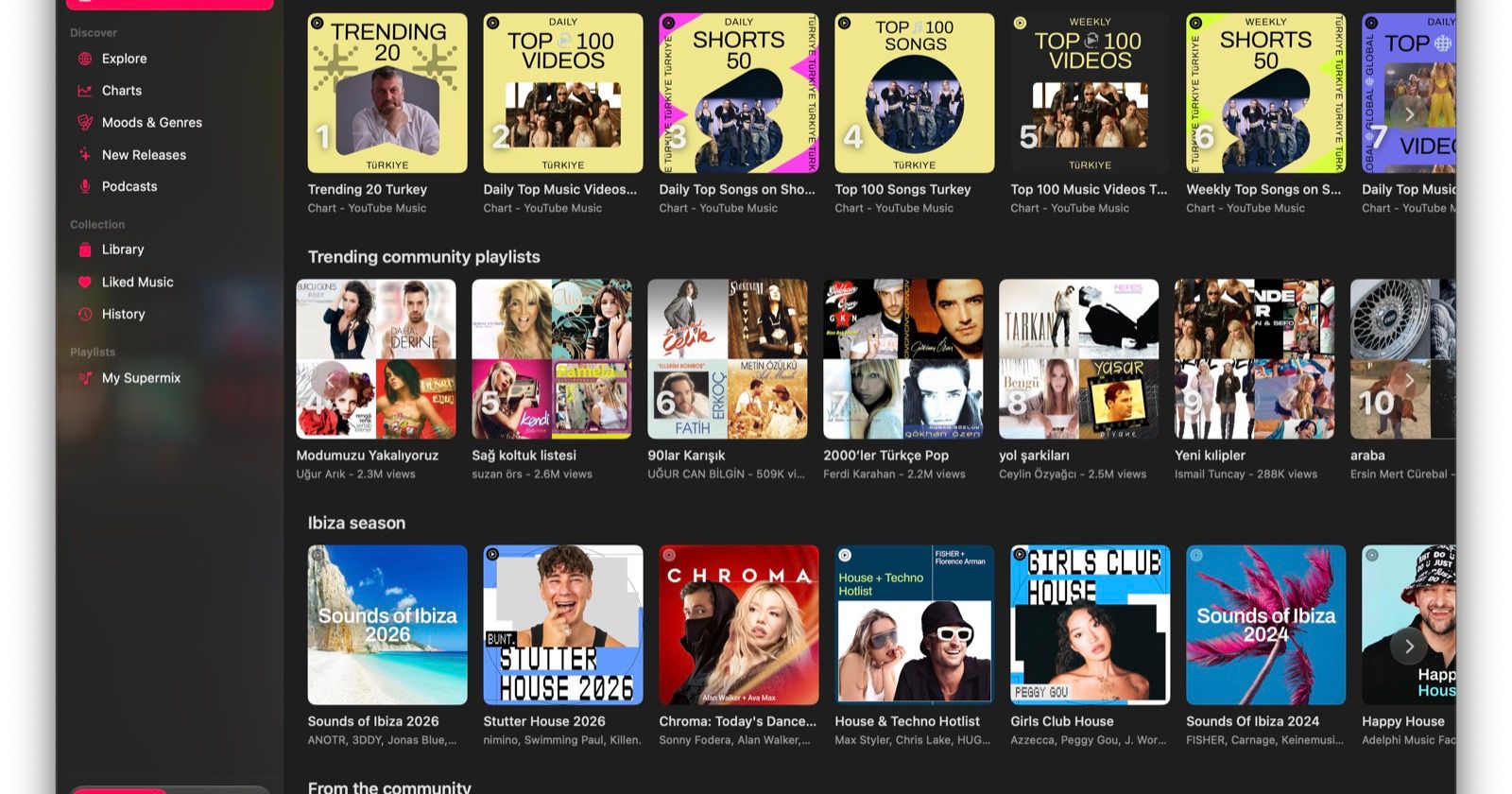
Kaset delivers the full YouTube Music experience in a proper Mac window: your library, playlists, podcasts, smart shuffle, and EQ. For users whose music lives on YouTube Music rather than Apple Music or Spotify, Kaset is the only native macOS client available.
Skip if your music library is on Apple Music, Spotify, or another streaming service. Kaset plays YouTube Music and YouTube only; it cannot access other streaming catalogs.
Kaset's AppleScript support and URL scheme let you control playback from Raycast, Alfred, or macOS Shortcuts. You can trigger playback, switch playlists, or open a specific YouTube video from any automation context. Apple Intelligence integration on macOS 26 enables natural language playback commands.
Skip if you need broad cross-platform support. Kaset is macOS-only and requires macOS 15.4 or later; there is no Windows or Linux version.
Side B gives YouTube subscriptions, Shorts, Watch Later, and history in a clean native window. The Liquid Glass player bar handles captions, quality, picture-in-picture, and AirPlay. SponsorBlock can be loaded as a WebKit extension to skip sponsorship segments.
Skip if you need Chromecast or non-AirPlay casting. Kaset supports AirPlay but not other casting protocols.
The problem
Using YouTube Music on macOS means living in a browser tab: media keys work inconsistently, there is no Control Center Now Playing widget, no picture-in-picture, and no way to apply an equalizer to the audio output. YouTube's official apps are iOS-first, and no first-party macOS client exists for YouTube Music or YouTube. The gap deepens for users who also watch YouTube: switching between a music tab and a video tab is clunky, and browser UI adds clutter around content. Users who want native controls, subscription and history navigation, or AirPlay from a YouTube video have no official path on macOS.
How it works
Kaset puts YouTube Music (Side A) and YouTube (Side B) in a single window with a sidebar toggle. Side A gives your full YouTube Music library, playlists, podcasts, and smart shuffle. Side B shows your subscriptions, Shorts, Watch Later, and history. One click flips between them.
A system-wide 6-band parametric EQ is applied directly to WebKit playback output, so it affects what you hear from Kaset without touching other audio on your Mac. Spotify-style presets are built in, and you can adjust individual bands at 60, 150, and 400 Hz, 1 kHz, 2.4 kHz, and 15 kHz.
Lyrics display with line-by-line highlighting as a song plays, using timing data when available. On macOS 26 with Apple Intelligence, Kaset can explain lyrics and analyze their mood on device, without sending data to a third-party service.
Load standard WebKit extensions such as uBlock Origin Lite and SponsorBlock. Extensions work on both YouTube Music and YouTube. Nothing is bundled; you install only what you choose.
Kaset is scriptable via AppleScript, making it compatible with Raycast, Alfred, and macOS Shortcuts. You can control playback, play specific playlists, and run actions from other apps or scripts. A URL scheme (kaset://play?v=VIDEO_ID) lets any app open a specific video directly.
Now Playing appears in Control Center and responds to media keys. A Dock menu gives quick playback controls. Music continues playing when the window is closed. The app supports 18 languages and haptic feedback on Force Touch trackpads.
Features
- Side A and Side B in one app
- 6-band parametric equalizer
- Synced lyrics with Apple Intelligence explanations
- WebKit extensions on both sides
- AppleScript and Shortcuts automation
- Full macOS system integration
How to install
Install Kaset on macOS 15.4 or later via Homebrew, which handles the quarantine flag automatically.
brew install sozercan/repo/kasetOr download the .dmg installer directly from GitHub Releases: https://github.com/sozercan/kaset/releases/latest
Recommended for this setup
Strengths
- MIT license, free to download: Kaset is MIT-licensed and costs nothing to download and use. Unlike subscription music apps, there is no per-user fee and no account required beyond your existing Google account. The source code is public on GitHub and can be audited or forked.
- Native Swift app, not a browser wrapper: Kaset is written in Swift and SwiftUI with Apple's Liquid Glass APIs. It behaves like a Mac app: media keys, Control Center Now Playing, picture-in-picture, and AirPlay all work natively. This distinguishes it from browser-based or Electron-wrapped alternatives that lack proper system integration.
- Smart shuffle and queue management: Beyond a plain shuffle toggle, Kaset blends suggested tracks into the queue based on what is currently playing, with configurable cadence. You can reorder, clear, and inspect the queue at any time. This level of queue control is not available in YouTube Music's web player.
Trade-offs
- Not signed with an Apple Developer ID: Kaset is not signed or notarized by Apple, so macOS shows a warning on first launch. The Homebrew install handles this automatically. If you download the .dmg directly, you must approve it manually in System Settings > Privacy and Security. This is a one-time step, but it adds friction for less technical users.
- 102 open issues as of November 2026: Kaset had 102 open issues on GitHub at the time this pack was generated (from the GitHub issues API, pull requests excluded). First released in December 2025, it is a relatively new project. The maintainer is active and the issue tracker is open, but some edge cases and feature requests remain unresolved.
- Full playback requires YouTube Music Premium: Kaset plays DRM-protected YouTube Music content via your existing Premium subscription. Without a Premium subscription, YouTube Music playback is limited to free-tier content. Users on the free tier will find Side A less functional than Side B, which works with a standard Google account.
Tech stack
FAQ
Yes. Kaset is free to download and MIT-licensed. There is no subscription fee for the app itself. To use YouTube Music's full library and Premium playback, you need an existing YouTube Music Premium subscription from Google. The YouTube side (Side B) works with a free Google account.
Side B (YouTube) works with a free Google account. Side A (YouTube Music) can browse and play free-tier content, but Premium features like offline playback and ad-free listening require a YouTube Music Premium subscription. Kaset does not add or remove any subscription tier from what Google offers.
No. Kaset is an unofficial, community-built app and is not affiliated with YouTube or Google Inc. 'YouTube', 'YouTube Music', and the YouTube logo are registered trademarks of Google Inc. The app uses publicly available web interfaces.
Kaset requires macOS 15.4 (Sequoia) or later. Apple Intelligence features, including on-device lyrics explanations and natural language playback commands, require macOS 26 or later. Kaset will not run on macOS 14 or earlier.
Install Kaset via Homebrew by running `brew install sozercan/repo/kaset` in Terminal. Homebrew clears the quarantine flag automatically, so no security warning appears. If you download the .dmg directly, go to System Settings > Privacy and Security and click 'Open Anyway' after the first failed launch attempt.