
Yuvomi
Self-hosted family planner: calendar, tasks, meals, budget, health.
Replaces —
Who it's for
A household using separate apps for shared calendars, meal planning, grocery lists, budgeting, and chore tracking can replace all of them with one Docker container. Members join through invite links; children get accounts with module access limited by their role, and a kitchen tablet running wall mode shows the day plan at readable distance.
Skip Yuvomi if your household's shared needs are limited to a calendar and shopping list. Simpler managed apps are easier to set up and maintain for that narrower scope.
For operators who already run a NAS with TrueNAS SCALE, Umbrel, or Unraid, Yuvomi is available in the app catalog and installs from the UI with no terminal. The SQLite database fits on any volume and the container runs on a Raspberry Pi 4/5. Total running cost is electricity.
Skip Yuvomi if your household members are unwilling to use a self-hosted app accessed through an invite link. A managed service removes the onboarding friction entirely.
The Health module stores vitals, medications, preventive care, lab results, activity, cycle tracking, fasting, and nutrition logs per member, private by default, on your own server. SQLCipher encryption is available when DB_ENCRYPTION_KEY is set at install. No data leaves your network unless you enable a feature that requires it.
Skip Yuvomi's Health module if you need integration with wearable devices or fitness platforms. It is a manual-entry and file-import log, not a sync target for Apple Health or Google Fit.
The Budget module tracks 61 currencies, shared expenses, and debt simplification between members, covering the main use case of splitting household costs. Tasks with subtasks, priorities, and recurring schedules let one person assign chores without verbal reminders, and the calendar syncs two-way with Google and CalDAV calendars either person already uses.
Skip Yuvomi if detailed financial reporting or bank account syncing matters more than self-hosting. Dedicated budgeting tools offer bank feeds and richer reporting that Yuvomi's Budget module does not.
The problem
Most households spread their shared life across half a dozen apps, each requiring its own account, its own subscription, and its own copy of your data on a server you do not control. A calendar app does not know what is for dinner. A grocery list does not connect to the meal planner. A budgeting app cannot see the receipt filed in the document manager. The person who holds all these connections in their head is doing invisible work every day just to keep things synchronized. Each new subscription adds another account, another fee, and another data silo with no link to the others.
How it works
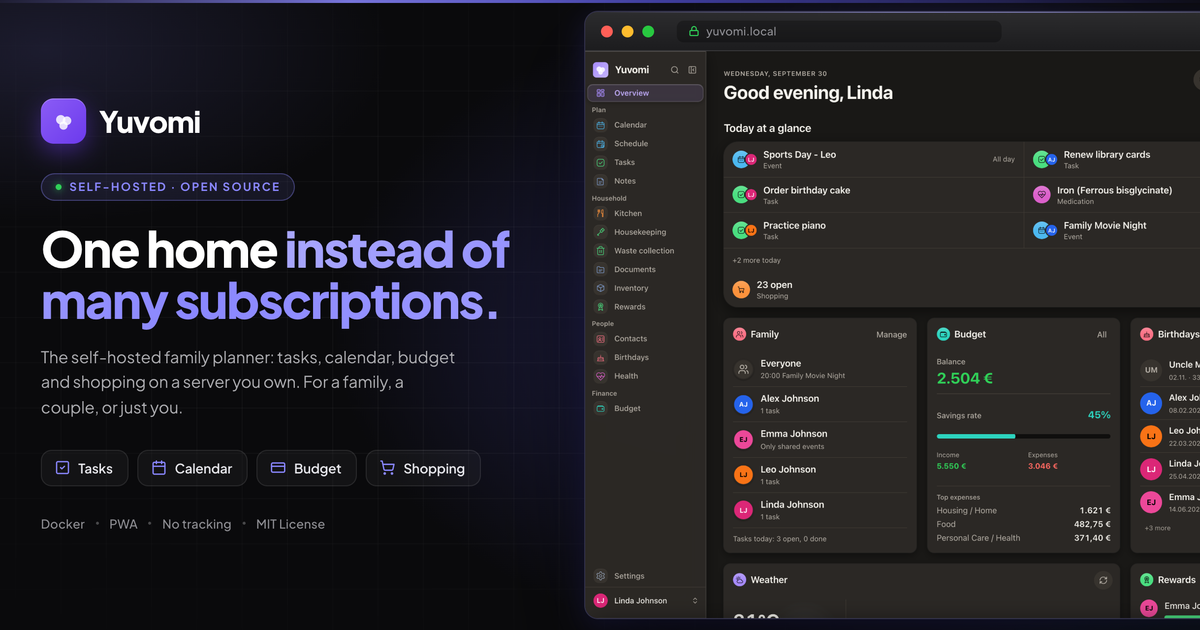
The 20 modules pass information between each other. The week's meal plan exports its ingredients to the shared shopping list in one action, sorted by aisle, with the next seven days pre-selected. A ticked-off chore credits points to whoever did it, and those points spend in a reward catalog parents control. A receipt uploads once and attaches to the budget entry and the inventory record at the same time.
The app installs on any phone or tablet from the browser: tap Install when it appears, or on iPhone choose Share then Add to Home Screen. It stays readable offline for the last shopping list opened, and push notifications arrive even when the app is closed (requires HTTPS on the server). A wall-mode dashboard designed for a kitchen tablet shows today's plan and allows one-tap task check-in.
All 20 modules ship with the container: Tasks (Kanban, subtasks, recurring chores), Calendar (two-way Google and CalDAV sync), Budget (61 currencies, savings goals, shared cost splitting with debt simplification), Health (vitals, medications, cycle tracking, nutrition), Documents, Inventory, and more. Admins switch off modules household-wide; disabled modules disappear from the menu for every member.
All data lives in one SQLite file on your own disk. Database encryption is available through SQLCipher; set DB_ENCRYPTION_KEY in the .env file before first start, as it cannot be added to an existing database. The app makes one outbound call by default: a version check against the GitHub releases API, which can be blocked without any loss of function. Every other external connection requires explicit opt-in.
API tokens give scripts and integrations authenticated access to Yuvomi's data, documented against an OpenAPI 3.1 spec. The /mcp endpoint lets an AI agent (such as Claude Desktop) drive the API in plain language. Home Assistant integration is one documented use case. Extension modules with their own dashboard widgets, permissions, and translations can be added from GitHub by an admin.
Features
- Modules that share data without retyping
- Progressive Web App on every device, no app store needed
- 20 configurable modules, hide what you do not use
- Zero trackers, single SQLite file, optional encryption
- OpenAPI 3.1 spec and built-in MCP endpoint
How to install
Deploy Yuvomi with Docker Compose after editing the included .env file to set your SESSION_SECRET and optional DB_ENCRYPTION_KEY.
curl -O https://raw.githubusercontent.com/ulsklyc/yuvomi/main/docker-compose.yml
curl -O https://raw.githubusercontent.com/ulsklyc/yuvomi/main/.env.example
cp .env.example .env
docker compose up -d
Recommended for this setup
Strengths
- MIT license and single-file data portability: The MIT license allows private, team, and commercial use without restriction. All data lives in one SQLite file: copying it to another machine is a complete export. If the project stops, the container already running keeps working on your hardware unchanged, with no dependency on any Yuvomi server. There is no cloud component in the stack.
- Replaces multiple paid apps in one container: The website lists six distinct paid app categories that Yuvomi replaces: a task and to-do app, a family calendar, a meal planner, a grocery list app, a budgeting tool, and a document manager. Covering all six in one self-hosted container eliminates multiple subscriptions and per-app data silos. The modules share data across these categories, which separate apps cannot do.
- Native support for TrueNAS, Umbrel, and Unraid: Yuvomi is listed in the TrueNAS SCALE, Umbrel, and Unraid app catalogs. Users on those platforms install it from a UI with no terminal required. The container image runs on amd64 and arm64 (Raspberry Pi 4/5) and requires 256 MB RAM minimum, making it practical on low-power hardware that many home server operators already own.
- 27 languages in the base image: The interface ships in 27 languages with no language pack download required. All 27 are included in the base container image, covering multi-language households and use outside English-speaking markets. The invite flow and per-member settings work independently of the admin's language choice.
Trade-offs
- 126 open issues on a project created in March 2026: The GitHub repository was created in March 2026 and had 126 open issues as of November 2026. For a project this young, that count reflects active use and reporting, but the surface area of 20 modules means edge cases surface quickly. Users should expect occasional rough edges, particularly in less-used modules such as Housekeeping, Inventory, and Waste Collection.
- Encryption key must be set at first install: Database encryption via SQLCipher is optional but cannot be added to an existing unencrypted database. It must be configured before first start by setting DB_ENCRYPTION_KEY in the .env file. Losing that key makes the database unrecoverable. For households storing health records or financial data, this is a real setup step that managed apps handle automatically.
Tech stack
FAQ
Yes. Yuvomi is MIT licensed and free to self-host. You provide the server; there is no subscription, no paid tier, and no feature locked behind a paywall. The container image runs on any Docker host, a Raspberry Pi 4/5, or a home NAS.
Yes. Only the person setting it up interacts with a server. Other members join through an invite link valid for seven days, pick a password, and add the app to their phone's home screen from the browser. No app store download and no server knowledge is required for anyone else. Children without phones get an account created directly by an admin.
Yes. Yuvomi is a Progressive Web App that installs on any phone from the browser, including iPhone and iPad. On iOS, tap Share then Add to Home Screen. Push notifications require your server to be running HTTPS; without it, in-app notifications still work. The last shopping list opened stays readable without a network connection.
All data lives in one SQLite file on your own server at /data/yuvomi.db. Documents can optionally be stored in a local folder, on WebDAV, or in Google Drive. No data is sent to the Yuvomi project's servers; the only outbound call the app makes by default is a version check against GitHub, which can be blocked. The backup module can upload scheduled archives to Nextcloud or any WebDAV target.
The MIT license means the container already running on your hardware keeps working indefinitely, with no dependency on any Yuvomi server. You own the code and the data. The documented OpenAPI lets you pull data out in structured form if you later need to move it to another tool.