Tabame
Windows desktop shell for launching, screen capture, audio, and vault.
Replaces —
Who it's for
Developers who switch between editors, browser tabs, terminals, and documentation can replace their launcher, window manager, and clipboard history with Tabame's single-popup surface. The prefix routing in the Launcher covers Notion and Obsidian search, CLI snippets, and recent files without leaving the keyboard.
Tabame runs on Windows only. If you primarily use macOS or Linux, this tool does not apply. Raycast covers a similar launcher and workflow automation role on macOS.
FancyShot, Screen Draw, screen recording to .mp4 with system audio and microphone, Spotlight, and the color picker are all accessible from the same QuickMenu hotkey. Creators who currently switch between a snipping tool, a drawing overlay, and a screen recorder can consolidate into one hotkey layer.
If you need cross-platform screen tools for a team with mixed Mac and Windows setups, tool parity will be an issue since Tabame is Windows-only.
Tabame covers the most frequently used PowerToys features: window snapping (QuickSnap), color picker, screen ruler, always-on-top, and keyboard shortcuts, and adds a full launcher and audio routing layer. For users who find PowerToys Run too limited, Tabame's prefix-routed launcher with plugin extensibility is a direct replacement.
If you rely on PowerToys-specific utilities that Tabame does not include, such as the Hosts File Editor or environment variable manager, you may need to keep PowerToys alongside Tabame.
The plugin protocol's stdin/stdout JSON contract is documented in the repo and designed to be AI-scaffoldable. Developers can build integrations against any API-backed service and have them appear in the Launcher under a custom keyword. Drop a folder in, reopen the Launcher, and the integration is live with no build step.
If you need a plugin ecosystem with a large gallery of community-maintained packages, the official plugin gallery is still small with a handful of first-party examples as starting points.
The problem
Windows power users typically run a separate launcher, audio manager, screenshot tool, clipboard history app, and window snapper at the same time. Each utility claims a tray slot, a startup entry, and its own hotkey. The result is a desktop that takes longer to navigate than the work it is supposed to support. Capturing a screen region and immediately marking it up requires at least two applications and a file save in between. Managing per-app audio volume on Windows means diving into system settings or running a third-party mixer. None of these tools share a surface, so power users end up with a pile of context switches that add friction to every session.
How it works
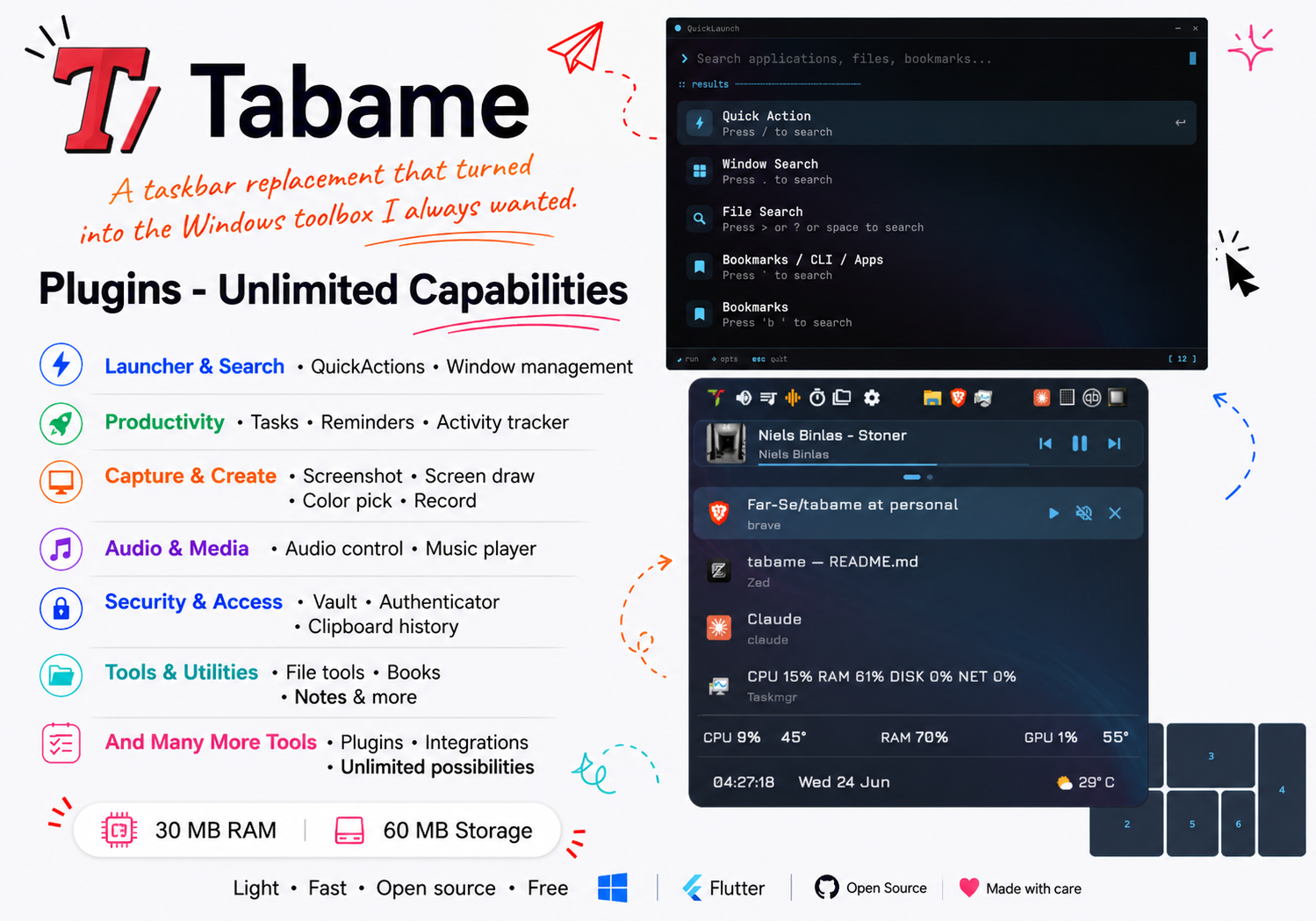
The Launcher opens with a single hotkey and blends results from files, windows, and apps by default. Type a prefix to narrow scope: '.' for open windows, ',' for browser tabs, 'n' for Notion documents, or 'o' for Obsidian notes. Deep file search indexes folders with configurable recursion depth and extension filters, and re-indexes automatically on changes.
FancyShot captures a screen region directly into a built-in editor where you can blur, add text, draw rulers, or mark up with shapes before saving or copying to clipboard. Screen Draw adds pen, highlight, shapes, arrows, and step counters as a live overlay. OCR grabs text from any screen region straight to the clipboard. All tools are accessible from the QuickMenu without switching applications.
The QuickMenu top bar shows the active audio output device with left-click to manage devices, right-click to switch output, and scroll to adjust volume. Per-app volume controls sit beside each window in the taskbar list. The music panel supports both a local indexed library and Subsonic-compatible remote libraries, with session memory so the last playback context is recovered on reopen.
The Vault stores API keys and secrets using PBE with AES-CBC encryption, accessible from the Launcher or a QuickMenu button. The Authenticator generates one-time passwords and accepts backup files or QR scans, with optional file encryption. Both tools run entirely locally with no cloud sync or account requirement.
Any Python, Node.js, or Bun script becomes a Launcher extension by dropping a folder into the plugins directory and reopening the Launcher. Tabame sends JSON events (init, query, select, action, close) on stdin and renders whatever frames the script returns on stdout. The full protocol spec lives in the repo at plugins/TABAME_PLUGIN_SKILL.md, designed so an AI assistant can scaffold a new plugin from a plain description.
The taskbar section of the QuickMenu lists open windows with per-window audio controls, a mute indicator, and the monitor number. Drag a window left or right to send it to a different virtual desktop instantly. Right-click for always-on-top, force-close, or window hooking. QuickSnap opens a zone picker to snap any window into a custom layout without leaving the keyboard.
Features
- Keyboard-first launcher with prefix routing
- Screen annotation and capture suite
- Audio routing and media control
- Credentials vault with AES-CBC encryption
- Plugin system using stdin/stdout JSON protocol
- QuickMenu window management with virtual desktops
How to install
Install from source by cloning the repo and building with Flutter for Windows.
git clone https://github.com/Far-Se/tabame
flutter build windows
Recommended for this setup
Strengths
- MIT license with no cloud dependency: Tabame is MIT-licensed, runs entirely on the local machine, and stores all data locally. There is no account required, no telemetry by default, and no subscription. Unlike paid desktop launchers or commercial utility suites that route data through vendor infrastructure, Tabame keeps every credential, clipboard entry, and activity log on your own machine.
- Low memory and CPU footprint: At idle the app uses around 20 MB of RAM and 0% CPU, according to the README, and peaks at around 70 MB with 3% CPU when actively in use. For a tool that replaces five or more separate running utilities, the consolidated footprint is typically lower than the sum of the utilities it displaces.
- Extensible with any scripting language, no SDK required: The plugin protocol is language-agnostic: Python, Node.js, or Bun scripts work out of the box. The full spec lives in the repo, designed so an AI coding assistant can scaffold a plugin from a plain description of the desired behavior. Drop a plugin folder into the plugins directory, reopen the Launcher, and the integration is live with no restart required.
- Actively maintained with fast issue resolution: The repo shows continuous commits since 2022 with the last push in October 2026 and zero open issues, suggesting the maintainer closes bugs promptly. Nightly builds are available alongside stable releases on the GitHub releases page for users who want the latest changes before they reach the stable channel.
Trade-offs
- Windows-only; no macOS or Linux support: Tabame is built for Windows and does not run on macOS or Linux. The Flutter codebase is not configured for cross-platform builds, and several features depend on Windows-specific APIs for window management and audio routing. Teams on mixed operating systems will need separate tools for non-Windows members.
- Single-maintainer project: With 9 forks and one primary author, the project's development pace depends on one person's availability. The repo has been consistently active since 2022, but adopting Tabame as a required workflow dependency carries a bus-factor risk. There is no commercial support, no SLA, and no paid support tier.
- Known render glitch under heavy CPU load: The README documents a known rendering bug: if Tabame draws incorrectly when the CPU is under heavy load (near 100%), right-clicking the Tabame logo area forces a full redraw. This is a Flutter rendering issue under stress, not a data loss risk, but it can interrupt a session at the worst possible time.
Tech stack
FAQ
Yes. Tabame is MIT-licensed and free to download, use, modify, and redistribute. There is no paid tier, no subscription, and no feature gating. The Microsoft Store version and the GitHub ZIP release are both free, and the source code is publicly available under the MIT license.
No. Tabame is Windows-only. The Flutter codebase is not configured for cross-platform builds, and several features depend on Windows-specific APIs for window management, audio routing, and system integration. Raycast is the closest macOS equivalent for the launcher and workflow automation portion of Tabame's feature set.
The simplest path is the Microsoft Store, which provides automatic updates. Alternatively, download the ZIP archive from the GitHub releases page, extract it to any folder, and run tabame.exe. No administrator prompt is required for the ZIP install. You can also build from source: install Flutter for Windows, clone the repo, and run flutter build windows from the project root.
Yes. Tabame's plugin system runs any Python, Node.js, or Bun script as a Launcher extension. Create a folder containing your script and a plugin.json, drop it into the plugins directory inside the Tabame application support folder, and reopen the Launcher. The full protocol spec is in plugins/TABAME_PLUGIN_SKILL.md in the repo, with working examples in the plugins/echo, plugins/linear, and plugins/caniuse folders.
The Vault uses PBE (Password-Based Encryption) with AES-CBC to store API keys and secrets. The Authenticator also supports optional file encryption using the same method. Both store data locally on your machine with no cloud sync. The README warns not to lose your vault password, as the encryption is one-way and there is no recovery path without it.