Streak
Private, offline habit tracker for Android, Windows, and Linux.
Replaces Habitify, Productive Habit Tracker
Who it's for
Streak is built for one person on one device. Log habits with one tap, track streaks via the year-view activity grid, and run Pomodoro sessions for habits that need focused time. All data stays local; no account is required and no server is involved.
You track habits on multiple devices and need changes to sync automatically. Streak has no sync server; moving history to a second device requires exporting a backup file and importing it manually.
On Android, Streak does not request the internet permission at all, making it a natural fit for users who review app permissions carefully. Installation is available from F-Droid and IzzyOnDroid without a Google Play account.
You rely on Google Fit or Apple Health integration for habit data. Streak logs to its own local storage only and has no health platform sync.
Streak imports exports from Loop Habit Tracker, HabitKit, Habitica, and HabitBull, preserving past history and streaks. Three visual themes (Classic, Minimal, Express) and configurable accent colors cover a range of aesthetic preferences.
Your history is in Habitify or Productive specifically. Streak's documented import list covers Loop, HabitKit, Habitica, and HabitBull; Habitify and Productive are not in it.
Streak is listed on F-Droid and IzzyOnDroid with automatic update tracking. Users who prefer FOSS app stores can install and maintain the app without direct GitHub interaction or manual APK sideloading.
You need Google Play Store availability for work MDM policy or compliance reasons. Streak is not on Google Play.
The problem
Habit tracking apps ask for more than they give. Most charge a monthly subscription to unlock basic statistics, cloud sync, or more than a handful of habits. You create an account, share your data with their servers, and accept recurring billing to keep using what you already set up. For privacy-conscious users, the problem runs deeper. Every tap you record reflects your health routines, sleep patterns, and productivity habits. Most trackers have no self-hosted path and no offline mode. If the service shuts down or raises prices, your history goes with it.
How it works
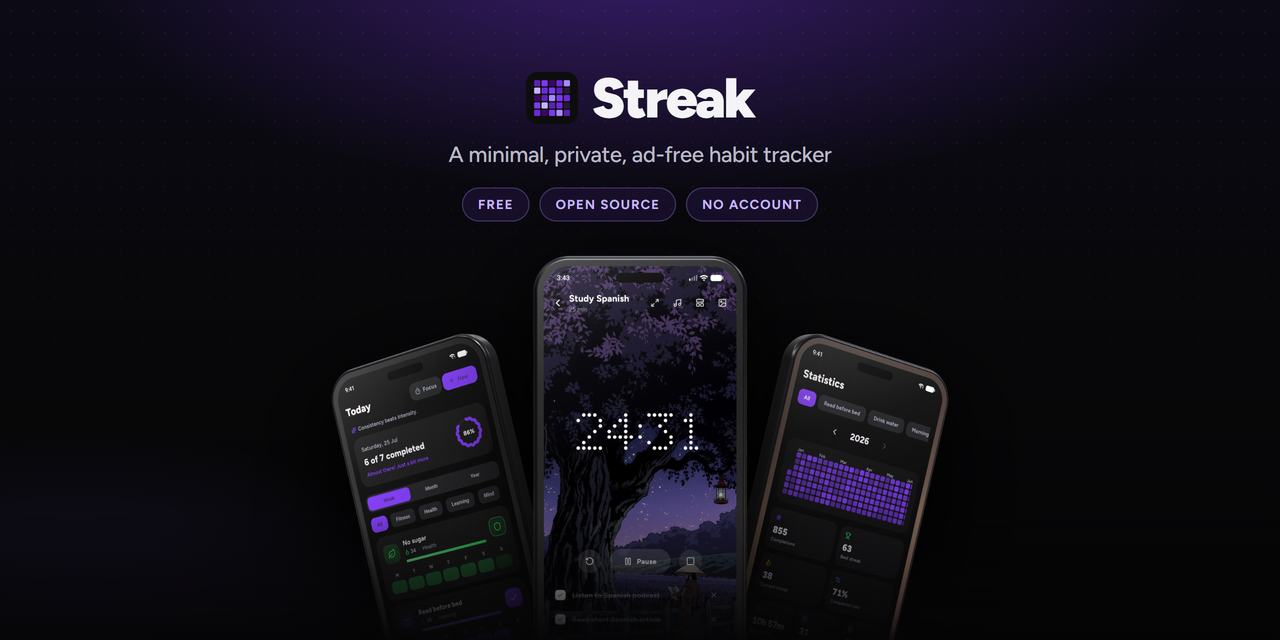
Mark a habit from the main list, a home-screen widget, or directly from the notification. Three home-screen widget types display habit progress, today's schedule, or an activity grid; each can be updated without opening the app. Widgets support custom colors, photos, opacity, and border styling.
Track binary habits (done or not), avoid habits with relapse counting, and amount habits where you set a unit and daily goal such as pages read or glasses of water. Schedules run daily, X times per week or month, on chosen weekdays, or every N days. Fill in past days by tapping any date.
A GitHub-style grid shows the full year at a glance. Per-habit statistics include current and best streaks, completion rate, a strength score, and a streak evolution chart over time. A shareable progress card exports as a polished image in several sizes.
A timer ties to a habit and counts its session minutes toward the daily goal. Runs Pomodoro rounds with short breaks or a single long stretch. Three clock styles (Circle, Flip, Dots), built-in ambient sounds (rain, brown noise, fire), and custom audio tracks are all supported.
Reads exports from Loop Habit Tracker, HabitKit, Habitica, and HabitBull with history and streaks preserved. Any CSV file with a habit column and a date column also works as a fallback. Backup and restore use a single file you keep; automatic backups run daily or weekly to a folder of your choosing.
Classic, Minimal, and Express each use different typography, shapes, and motion. Accent color, app background (solid, gradient, dots, OLED true-black, or a custom photo), launcher icon, cover photos per habit, and a profile photo are all configurable.
Features
- One-tap logging from list, widget, or notification
- Three habit types with flexible schedules
- Year-view activity grid and streak statistics
- Pomodoro focus timer with ambient sound
- Import from Loop, HabitKit, Habitica, and HabitBull
- Three visual themes and configurable home-screen widgets
Recommended for this setup
Strengths
- No internet permission on Android: On Android, Streak does not request the internet permission at all. The README describes this as a core rule, not a setting. Your habits cannot be sent to any server because there is no network pathway. Apps with optional offline modes typically still include analytics SDKs; Streak has no such component.
- No paid tier, no ads, no account: Every feature is available from day one with no upgrade prompts, no in-app purchases, and no account to create. Compared to Habitify and Productive, which restrict analytics or unlimited habits to paid subscribers, Streak gives complete access without a subscription.
- Import from four popular habit trackers: Streak reads exports from Loop Habit Tracker, HabitKit, Habitica, and HabitBull with history and streaks intact. Any CSV with a habit column and a date column works as a fallback. Switching to a privacy-first app does not require starting your tracking history from zero.
- Active development with GPL-3.0 license: The repository was created in June 2026 and last pushed October 14, 2026, with 42 open issues showing active community engagement. The GPL-3.0 license (with an attribution requirement under section 7(b)) lets anyone inspect, modify, or run the app without restriction on personal use.
Trade-offs
- No automatic cross-device sync: Streak has no sync server. Moving habits to a second device means exporting a backup file and copying it manually. The README states directly: if you want your habits on two devices, sync that folder yourself. There is no automatic iCloud, Google Drive, or WebDAV sync built in.
- No iOS or macOS support yet: Android, Windows, and Linux are fully supported. iOS is listed as in progress and macOS as planned in the README, but neither has a release available yet. Users on iPhone or Mac cannot use Streak currently.
- Linux build is new with rough edges: The README notes the Linux build has only just landed and warns to expect some rough edges. Reminders only ring while the app is open on Linux. Users relying on Linux for daily habit tracking should check the GitHub issue tracker before committing to it.
Tech stack
FAQ
No. Streak stores data locally and has no sync server. To move your habits to a second device, export a backup file and import it on the other device. The README suggests syncing your backup folder via a cloud drive app you set up yourself as a manual workaround.
Not yet. iOS support is listed as in progress and macOS as planned in the README, but neither platform has a release. Android, Windows, and Linux are fully supported as of version 2.3.0.
F-Droid is the recommended path: it installs the app and keeps it updated automatically. IzzyOnDroid and OpenAPK are also supported. Direct APK files for each phone architecture are on the GitHub Releases page. Streak is not on Google Play.
Yes. Streak reads exports from Loop Habit Tracker, HabitKit, Habitica, and HabitBull, preserving your past history and streaks. Any CSV file with a habit column and a date column also works as a general fallback.
Streak is released under the GNU GPL v3 with an additional attribution requirement permitted by GPL-3.0 section 7(b). You can run, modify, and distribute the app freely for personal use. The GPL-3.0 requires distributing source code for any modified version you share publicly. The attribution term requires preserving the original author credits in modified versions.