
FreeTube
Ad-free desktop YouTube client with local-only data and no tracking.
Replaces Youtube Premium
Who it's for
FreeTube blocks Google's cookies and JavaScript from logging your viewing habits. All subscriptions and watch history stay on your device. You can follow hundreds of channels and build a complete watch history without contributing any behavioral data to Google's ad network.
If you rely heavily on YouTube's Shorts feed, live chat, or community tab, FreeTube's support for those features is limited in the current beta version.
YouTube Premium costs $13.99 per month or more depending on region. FreeTube removes pre-roll and mid-roll ads at no cost and adds SponsorBlock to skip in-video sponsor reads, giving a cleaner viewing experience than the paid subscription for desktop use.
YouTube Premium includes mobile ad-free playback, background audio on Android and iOS, and YouTube Music. If those are your main reasons for a subscription, FreeTube does not replace them.
FreeTube lets you browse YouTube Trending and search results without a logged-in account shaping what surfaces. Your search history is not fed back into recommendations, so you can assess what new viewers actually see when they search a topic in your niche.
If you need YouTube Studio analytics, channel management, or upload workflows, FreeTube has no creator-side tooling.
The problem
Watching YouTube through a browser or the official app means accepting Google's tracking. Cookies and JavaScript log every video you watch, every channel you subscribe to, and every search you run, feeding that data into Google's advertising network. Ad blockers remove the advertisements but leave the tracking in place, and the only official path to an ad-free experience is a paid YouTube Premium subscription tied to a Google account. For users who prioritize privacy or simply want to keep their viewing habits off Google's servers, there is no first-party way to watch YouTube without giving up personal data. The tracking is continuous, account-linked, and cross-device, meaning even logged-out sessions contribute to a profile Google can associate with your identity over time.
How it works
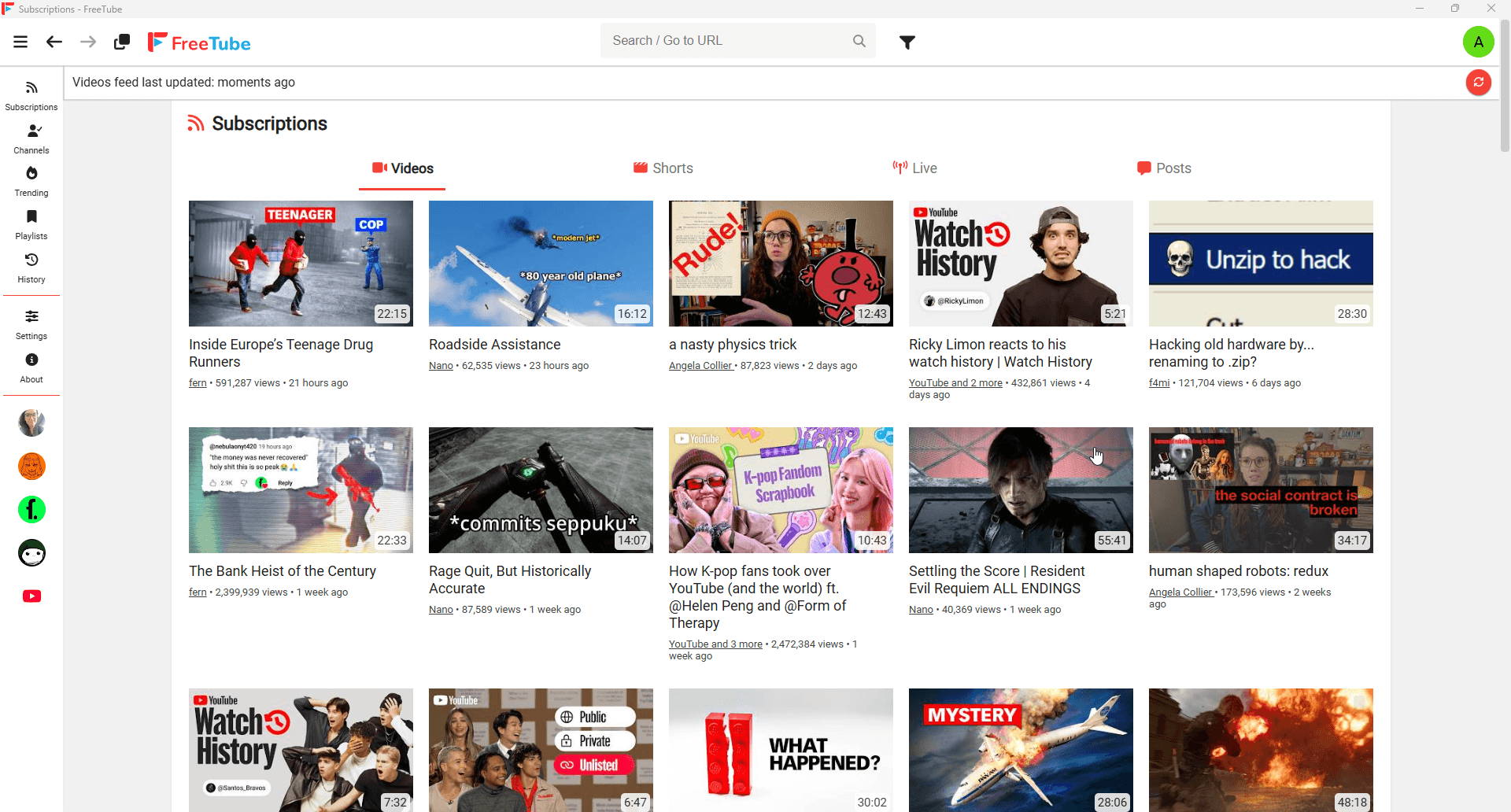
All subscriptions, watch history, and playlists are saved to a file on your device. Nothing is sent to FreeTube's servers or YouTube. You can organize channels into separate Profiles to create focused feeds, and all of that data persists across app updates without a cloud account.
FreeTube fetches video data using either its built-in local extractor or the optional Invidious API. Neither path uses YouTube's official APIs or sends cookies. Switching between them is a single setting change, letting you fall back to the other if one stops working after a YouTube update.
Videos play without pre-roll or mid-roll ads. The integrated SponsorBlock support lets you skip sponsor segments, self-promotion, and filler inside videos using community-submitted timestamps. DeArrow replaces clickbait titles and thumbnails with community-sourced versions.
You can import your existing YouTube subscriptions directly into FreeTube, so you do not have to rebuild your channel list from scratch. Export and import are also supported between FreeTube installations, making it straightforward to move your data to a new machine.
The LibRedirect and RedirectTube extensions can open YouTube links from any website directly in FreeTube on supported builds. Clicking a YouTube link in your browser routes it to FreeTube automatically. The extensions work on both Firefox and Chromium-based browsers.
FreeTube includes a picture-in-picture mini player for watching while working in other windows. Videos can also be routed to an external media player of your choice, which is useful if you prefer VLC or mpv for their codec support or playback controls.
Features
- Local subscription and history storage
- Two-extractor content fetching
- Ad-free playback with SponsorBlock and DeArrow
- Subscription import from YouTube
- Browser extension redirect support
- Mini player and external player routing
How to install
Download the installer for Windows (.exe), macOS (.dmg), or Linux (.deb, .rpm, .AppImage) from GitHub Releases: https://github.com/FreeTubeApp/FreeTube/releases/latest
Recommended for this setup
Strengths
- No Google account required: You can subscribe to channels, build playlists, and track your watch history without creating or signing into a Google account. Subscriptions persist across app updates because they are stored in a local file rather than tied to a cloud profile that requires account access.
- 22,252 stars and active development since 2018: With 22,252 GitHub stars, 1,561 forks, and a last commit on 2026-10-30, FreeTube has maintained consistent development for eight years. It supports multiple languages via Weblate and has an active community on Matrix, reducing the risk of abandonment that affects smaller open source projects.
- AGPL-3.0 license with full source access: The AGPL-3.0 license guarantees you can read, build, and modify the code. Unlike proprietary desktop apps, you are not dependent on the developer to continue shipping updates or to not introduce tracking of their own in a future release.
- Distraction-free viewing controls: FreeTube's settings let you hide specific UI elements, show only family-friendly content, and disable the recommendation feed. These controls let you shape the app around your actual use case rather than YouTube's engagement-maximizing defaults.
Trade-offs
- Your IP address is still visible to YouTube: FreeTube blocks cookies and JavaScript tracking but does not hide your IP from YouTube's servers. The README explicitly recommends using a VPN or Tor if full network anonymity is needed. Without one, YouTube can associate your video requests with your IP address, which may be sufficient to infer identity.
- Beta status with 280 open issues: FreeTube carries 280 open issues and the README marks the project as currently in Beta. Some features may be missing or behave unexpectedly. Users who need a fully stable experience on edge-case configurations, such as unusual Linux distributions or ARM64 hardware, should test before relying on it daily.
- No mobile sync and no official API: FreeTube is desktop-only. It does not sync subscriptions or history to a phone or tablet. The Invidious API it optionally uses is a third-party project; if your chosen Invidious instance goes offline, you need to switch to a different instance or fall back to the local extractor.
Tech stack
FAQ
No. FreeTube blocks Google's cookies and JavaScript, so Google cannot track you through those mechanisms. However, YouTube can still see your IP address when you request videos. The README recommends using a VPN or Tor for full network anonymity. FreeTube stores nothing on its own servers; your watch data stays on your device.
Yes. FreeTube supports importing subscriptions directly from YouTube. You can export your subscription list from YouTube's settings and then import it into FreeTube to reconstruct your feed without a Google account. Export from FreeTube is also supported, making it easy to move your data between installations.
The built-in local extractor fetches YouTube content directly using FreeTube's own code, without any third-party server. The Invidious API option routes requests through an Invidious instance instead, which adds a layer of indirection between you and YouTube. The local extractor is the default; the Invidious option is useful if the local extractor breaks after a YouTube update, since the two can diverge in timing when YouTube changes its response format.
Yes. FreeTube distributes packages for Ubuntu and Debian (.deb), Fedora and Red Hat (.rpm), and several other Linux distributions. It is also available on Flathub as a Flatpak, which works across most major Linux distributions. AppImage builds are provided for distributions not covered by the packaged formats.
AGPL-3.0 lets you run, study, share, and modify FreeTube for personal or organizational use without restriction. If you distribute a modified version as a public network service, you must publish your changes under the same AGPL-3.0 license. Running it on your own machine for personal use has no such requirement.