Cuicuit
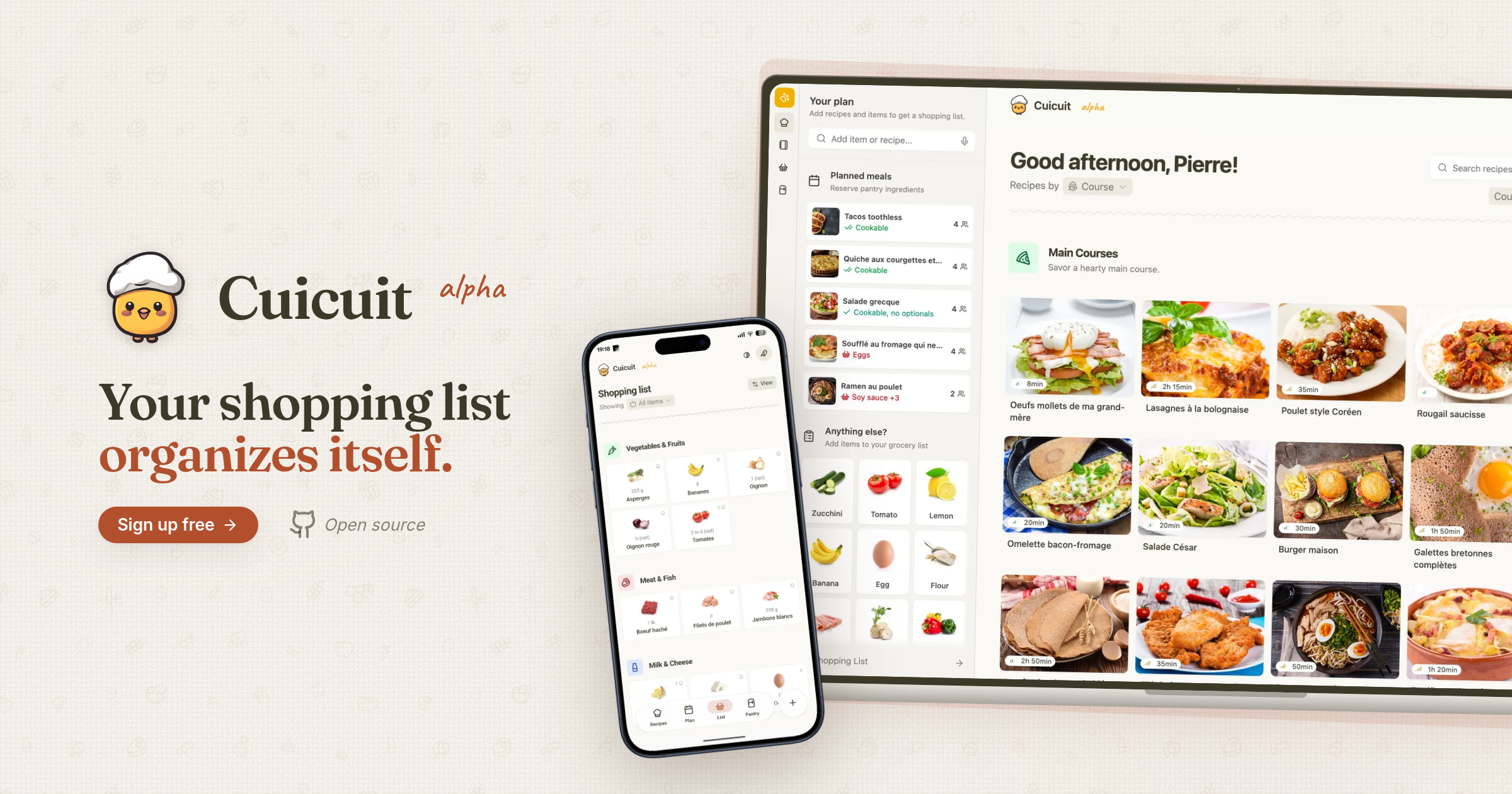
Meal planner that builds your grocery list automatically.
Replaces Paprika Recipe Manager, Plan To Eat, Whisk
Who it's for
Cuicuit's shared household spaces let two or more people add meals and items to the same plan from separate devices. One person adds a recipe from their phone; the other sees it on theirs. The merged, aisle-sorted list means both people work from the same organized list at the store without a separate coordination step.
You shop entirely alone with no need for shared access. The tool works fine for solo users, but the shared household feature adds no value, and a simpler notes app may involve less initial setup for the same outcome.
If you regularly save recipes from YouTube, TikTok, Instagram, and food blogs but struggle to consolidate them into a plan, Cuicuit's import handles all of those sources from one paste. Your recipe gallery grows as you browse, and meals you actually want to cook stay in one place rather than scattered across saved posts.
Your recipes come entirely from one source, such as a single cookbook or one website. Cuicuit's broad import coverage is most useful when sources are spread across different platforms.
The REST API (documented at /api/v1/docs on a local instance) and MCP server expose every core operation: reading your meal plan, listing grocery items, adding recipes. These are the same operations the web UI uses. You can query your own data from scripts, automate recipe imports, or connect your shopping list to an LLM assistant.
You need a production-ready API with SLAs and versioning guarantees. Cuicuit is in alpha; the API structure may change between releases without notice.
Cuicuit is AGPL-3.0 and a Docker self-hosting path is on the roadmap for early 2027. Users who want their meal planning data on their own infrastructure can use the cloud version to evaluate the tool now and migrate to self-hosted once the release lands.
You need self-hosting today. The Docker release has not shipped and has no confirmed date beyond early 2027, once the cloud version stabilizes.
The problem
Most recipe and meal planning apps ask you to schedule meals on a weekly calendar before they produce a shopping list. You block out time to fill in seven days, reconcile ingredients across overlapping recipes, and build the list as a separate step. Real cooking decisions do not happen that way: you see a recipe mid-week, you notice you are out of something, and you want to capture both without rebuilding the whole plan. The result is usually a half-filled calendar that falls apart by Thursday, or a return to a notes app and a hand-compiled grocery list. Paid tools like Paprika and Plan to Eat raise the ceiling on what the app can do, but they still organize everything around the calendar and charge ongoing fees for the privilege.
How it works
Paste a link from YouTube, TikTok, Instagram, X, Facebook, or any food blog and Cuicuit extracts ingredients, quantities, and steps. Pasting plain text works too. The app uses schema.org/Recipe structured data when available and AI extraction when the page lacks markup. This covers the import sources most recipe managers require a separate browser extension for.
Add meals to a plan without assigning them to specific days. There is no calendar grid to fill. Drop in recipes and extra items as you think of them, and the app accumulates them until you are ready to shop. This matches how most people actually decide what to cook, rather than forcing a structured weekly planning session.
Ingredients from all planned meals and extra items merge into a single shopping list, grouped by aisle in the order you walk the store. Each item links back to the meal it belongs to. Items already marked off update the cookability state for the meals that needed them.
Each meal in the plan shows whether you already have everything you need to cook it, based on what remains unchecked on your shopping list. Badges update as you tick off purchases. This removes the separate pantry-check step that most planners require before you can commit to a meal.
Create one or more isolated household spaces (for example, home and a parent's house) and invite other users to share them. Plans, recipes, and shopping lists sync across all members. Useful for couples or families who shop from different phones but maintain one shared grocery list.
Every database operation in Cuicuit is available through a REST API (documented at /api/v1/docs on a local instance) and an MCP server. Both share the same operations as the web app, so you can query your meal plan or shopping list from external tools, automate recipe imports, or connect to an LLM client.
Features
- Recipe import from any URL or text
- Dateless meal plan
- Aisle-sorted grocery list
- Cookability badges
- Shared household spaces
- REST API and MCP server
How to install
Local setup requires Node.js, npm, and a Supabase instance for the Postgres database.
git clone https://github.com/MadeInPierre/cuicuit.git
npm install
cp .env.example .env
supabase start
npm run dev
Recommended for this setup
Strengths
- No calendar required to generate a shopping list: Unlike Paprika, Plan to Eat, and most meal planning apps, Cuicuit does not require you to assign meals to specific days before generating a list. The dateless plan accumulates meals and items as you add them. For households that decide meals a few days before shopping rather than planning a full week in advance, this is the core differentiator.
- Free cloud version with no subscription: All planning, shopping list, and sharing features are free in the cloud with no subscription. Recipe imports use community-funded credits called seeds (up to 20 per week from the shared pool), so the import mechanism has a usage ceiling but core functionality does not. Plan to Eat charges an annual fee; Paprika charges a one-time app purchase per platform.
- Open source under AGPL-3.0 with API access: The full codebase is on GitHub. The REST API and MCP server expose every core operation, documented within the repo. Whisk and Plan to Eat are proprietary with no public codebase. Cuicuit's open source license also means a Docker self-hosting path is on the roadmap, which the proprietary alternatives do not offer.
- Broad recipe import without a browser extension: Cuicuit parses recipes from YouTube, TikTok, Instagram, X, Facebook, and arbitrary food blogs in a single paste, from within the app. Paprika requires its own browser extension to clip recipes from websites. Cuicuit handles the same task using AI to fill gaps when structured recipe markup is missing.
Trade-offs
- Alpha status with known rough edges: The README warns that Cuicuit is in alpha, and the GitHub repo has 17 open issues as of October 2026. The core loop of adding meals and generating a shopping list works and the developer uses it daily, but expect occasional bugs and incomplete features. The roadmap is actively shaped through Discord and GitHub feedback, so issues get addressed, but this is not production-grade software yet.
- Self-hosting not yet available: A Docker Compose self-hosting option is planned for early 2027, but no release has shipped. The README notes the developer is stabilizing the hosted version before releasing a self-hosted build. If self-hosting is a requirement today, Cuicuit does not meet it. Users who need their data on their own infrastructure must wait for the Docker release or run from source.
- Recipe imports depend on community seed credits: Each recipe import costs one seed. Free users get up to 20 shared seeds per week from the community pool, which is replenished by supporter contributions. If the community pool runs out, you wait until a supporter tops it up. Power users who import many recipes weekly will hit this ceiling. Paying supporters get their own seed balance separate from the community pool.
Tech stack
FAQ
Not yet. Cuicuit is open source (AGPL-3.0) and a Docker Compose self-hosting release is planned, but it has not shipped as of October 2026. The developer is stabilizing the hosted version first. The current target is early 2027, though the README notes this is a target, not a confirmed date. Watch the GitHub releases page for updates.
Yes. All core features (meal planning, shopping lists, shared households, recipe storage) are free in the cloud with no subscription. Recipe imports use credits called seeds: free users can draw up to 20 shared seeds per week from the community pool. If the pool runs out, you wait or contribute to get your own seeds. Planning, shopping lists, and sharing stay free regardless.
Cuicuit accepts links from YouTube, TikTok, Instagram, X, Facebook, and any website or food blog. You can also paste raw text. The app uses schema.org/Recipe structured data when available and falls back to AI extraction when the page lacks markup. This covers most common recipe sources without needing a browser extension.
Paprika and Plan to Eat both organize around a weekly calendar: you schedule meals to specific days and the shopping list builds from that schedule. Cuicuit uses a dateless plan instead, so you add meals as you think of them without filling a calendar. Paprika charges a one-time purchase per platform; Plan to Eat charges an annual subscription. Cuicuit's core features are free in the cloud.
AGPL-3.0 lets you run Cuicuit yourself, modify it, and use it internally for personal or team purposes at no charge. If you distribute a modified version or offer it as a hosted service to others, you must release your modifications under the same license. This means you can self-host it for your own household but cannot resell it as a managed service without open-sourcing your changes.