
Alexandrie
Self-hosted knowledge base with offline sync, Kanban, and OIDC/SSO
Replaces Notion, Confluence, Obsidian
Who it's for
Alexandrie supports a comparable document hierarchy (teams, workspaces, pages, nested documents) with a 5-level access model similar to Confluence's space and page restrictions. The OIDC/SSO integration connects to whatever identity provider the organization already uses. The built-in Kanban boards cover sprint documentation alongside written specs.
Your team relies on Confluence's Jira integration, roadmap views, or marketplace plugins that have no equivalent in Alexandrie.
The offline-first PWA keeps notes accessible without a connection, and server sync handles reconciliation when you reconnect. The extended Markdown engine handles LaTeX for academic writing, code snippets, and technical diagrams without third-party plugins.
You only need a local notes app with no team collaboration; plain file-based editors like Obsidian are lighter and have a larger plugin ecosystem for solo use.
For teams hitting Notion's per-seat costs as the organization grows, Alexandrie offers a similar nested document structure with block-style editing and full-text search. The Docker deployment runs on any entry-level VPS and serves any number of users with no additional licensing cost.
Your team depends heavily on Notion's third-party integrations, relational database views, or API connections to external services, none of which have direct equivalents in Alexandrie.
OIDC support means Alexandrie can sit behind a corporate identity provider and grant access through existing user accounts. The 5-level permission model controls document access by team or workspace, making it appropriate for multi-department internal documentation with strict access boundaries.
You need AD/LDAP (non-OIDC) authentication; Alexandrie documents OIDC support but not direct LDAP or Active Directory integration.
The problem
Knowledge management tools trap teams in an expensive cycle: Notion bills per seat as headcount grows, Confluence charges for cloud hosting and advanced features, and Obsidian's sync and publishing capabilities require paid plans. The more your team relies on these tools, the harder it becomes to leave. Migrating notes, pages, and documents to another format is a project, not a button click. For teams that need OIDC-based SSO, granular workspace permissions, and a Markdown editor that handles LaTeX and technical diagrams, the only options in the paid market are enterprise plans priced for larger organizations. Small engineering teams and self-hosting organizations end up either overpaying for features they barely use or piecing together multiple tools to get the same result.
How it works
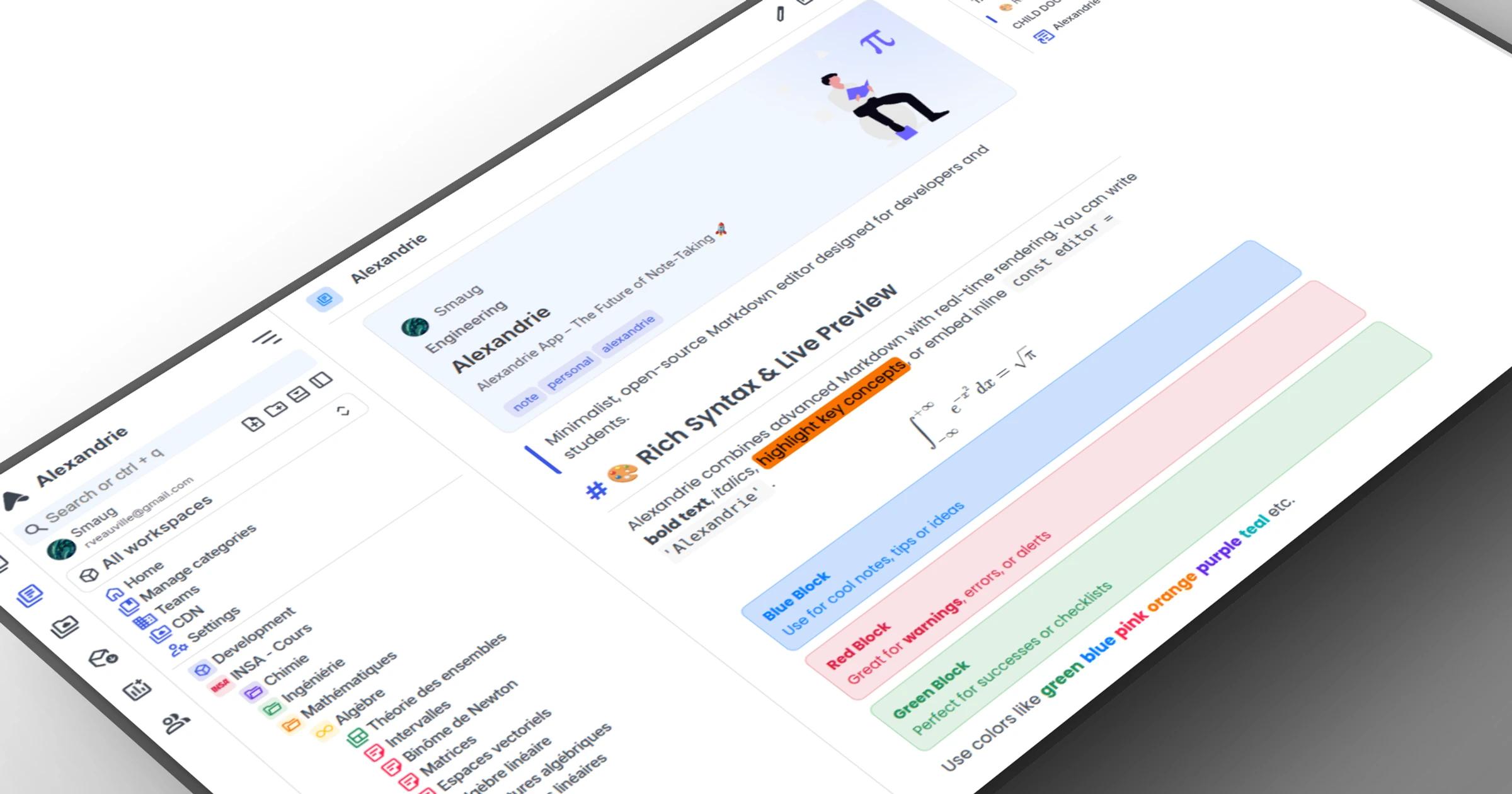
Built on CodeMirror 6, the editor supports LaTeX math, custom containers, interactive checkboxes, inline diagram building, and a speech-to-text dictation mode. A snippet manager lets teams save and reuse frequently used templates or code fragments. Unlike basic Markdown editors, it handles academic and technical writing natively without plugins.
Alexandrie installs on desktop and mobile as a Progressive Web App, keeping notes and documents accessible when offline. Changes sync back to the server when your connection returns. No separate mobile app is required; the same codebase works on every device through the browser.
Teams, Workspaces, Categories, and nested Documents form the organizational hierarchy in Alexandrie's multi-tenant architecture. Each user can be assigned None, Read, Write, Admin, or Owner permissions at any level. Temporary invitation codes and custom scope configuration are built in for team onboarding.
Alexandrie supports OpenID Connect (OIDC) authentication, integrating with existing identity providers such as Google Workspace, Keycloak, Okta, and others. SSO removes the need to manage a separate user store for teams that already have a central identity infrastructure. The self-hosted setup retains full control over auth configuration.
Media uploads and attachments connect to any S3-compatible object store: AWS S3, MinIO, Garage, RustFS, or any other compatible endpoint. Automated full-system backup and restore pipelines are built into the platform. A ZIP import/export tool covers selective node backups or full platform state migration.
Features
- Extended Markdown Editor with Diagrams
- Offline-First PWA
- Multi-Tenant Workspaces with 5-Level Access
- OIDC/SSO Integration
- S3-Compatible Storage and Automated Backups
How to install
Self-host Alexandrie by deploying via Docker Compose with a configured .env file.
curl -O https://raw.githubusercontent.com/Smaug6739/Alexandrie/main/.env.example
curl -O https://raw.githubusercontent.com/Smaug6739/Alexandrie/main/docker-compose.yml
cp .env.example .env
docker compose up -d
Recommended for this setup
Strengths
- MIT License, No Per-Seat Costs: Alexandrie's MIT license means there are no usage fees, block limits, or seat-based billing on the self-hosted version. Unlike Notion (which charges per member) or Confluence Cloud (which has seat tiers), running Alexandrie on your own server is a flat infrastructure cost regardless of how many people use it.
- One-Command Docker Deploy: The entire stack deploys with `docker compose up -d` after downloading two config files and filling a single `.env` file. There is no separate database setup step; the Docker Compose configuration handles the full stack. This makes initial deployment significantly faster than tools that require manual server configuration.
- Actively Maintained with Recent Commits: With 3,518 GitHub stars, 275 forks, and a last push on 2026-10-30, the project is actively developed. 32 open issues reflects a healthy project with active triage rather than an abandoned one. The Go backend and Vue frontend are both current-generation choices with good long-term support trajectories.
- Kanban Boards Built into Every Workspace: Every workspace includes integrated Kanban boards, so teams can manage project tasks in the same context as their documentation. This removes the need for a separate task-tracking tool when the use case is developer docs or project wikis with light project tracking needs.
Trade-offs
- Requires Docker and Server Management: Alexandrie is a server-side application with no cloud-hosted option. Getting started requires a machine with Docker installed and a basic understanding of environment configuration through a `.env` file. Teams without a VPS or self-hosting experience face an initial setup step before they can use it.
- Sparse Official Documentation: The project's main documentation lives in the GitHub README. There is no embedded docs portal with detailed configuration references for OIDC setup, S3 tuning, or backup/restore paths. Teams that need extended configuration help may rely on the Discord community and community contributions.
- Vue and Nuxt Frontend Limits Customization: The frontend is built in Vue and Nuxt, and the backend in Go. Self-hosting through Docker Compose is straightforward, but any fork or UI customization requires Vue.js and Nuxt knowledge. Organizations with no JavaScript-familiar engineers will find contributing or extending the codebase harder than with more common stacks.
Tech stack
FAQ
Yes. Alexandrie is MIT licensed, which means the self-hosted version is free to use for any purpose including commercial teams. There is no cloud-hosted offering; all usage runs on infrastructure you control. The only cost is your server.
Yes. Alexandrie supports a similar nested document structure with team workspaces, block-style Markdown editing, and full-text search. Unlike Notion, it runs on your own server with no per-seat fees and no block limits. The main trade-off is that you manage the deployment.
Alexandrie includes built-in backup and restore pipelines for the full platform state. You can also export selective nodes or entire workspace states as ZIP files from the interface. For media and attachments, S3-compatible storage handles retention through your object store's own policies.
Yes. Alexandrie supports OpenID Connect (OIDC), which works with identity providers including Google Workspace, Keycloak, Okta, and any other OIDC-compliant provider. This makes it suitable for organizations that already centralize authentication through an identity platform.
The Docker Compose stack runs on any Linux server with Docker installed. An entry-level VPS is enough for small teams. Larger teams with heavy media uploads should size the S3-compatible storage separately, as file storage is decoupled from the application server.