
Muxin
One app for all your machines, AI agent sessions, desktops, and MCP.
Replaces Royal Tsx, Conductor
Who it's for
If you run Claude Code or Codex on several machines simultaneously, Muxin gives you a single window to see each agent's activity, review its git diff, approve a pull request, or send it a follow-up prompt. The Activity timeline shows every command every agent ran across your fleet, with exit codes and output.
If you run agents on a single machine and are comfortable with your existing terminal workflow, Muxin adds overhead without meaningful benefit.
Muxin installs and monitors self-hosted GitHub Actions runners with minimal friction. The app shows which runners are busy, idle, or offline, which queued jobs cannot be picked up, and lets you start or stop runners from the UI. Install runners on any SSH-accessible machine in one step without touching the machine directly.
If you use GitHub-hosted runners exclusively or manage runners with a dedicated CI platform, Muxin's runner management adds no value.
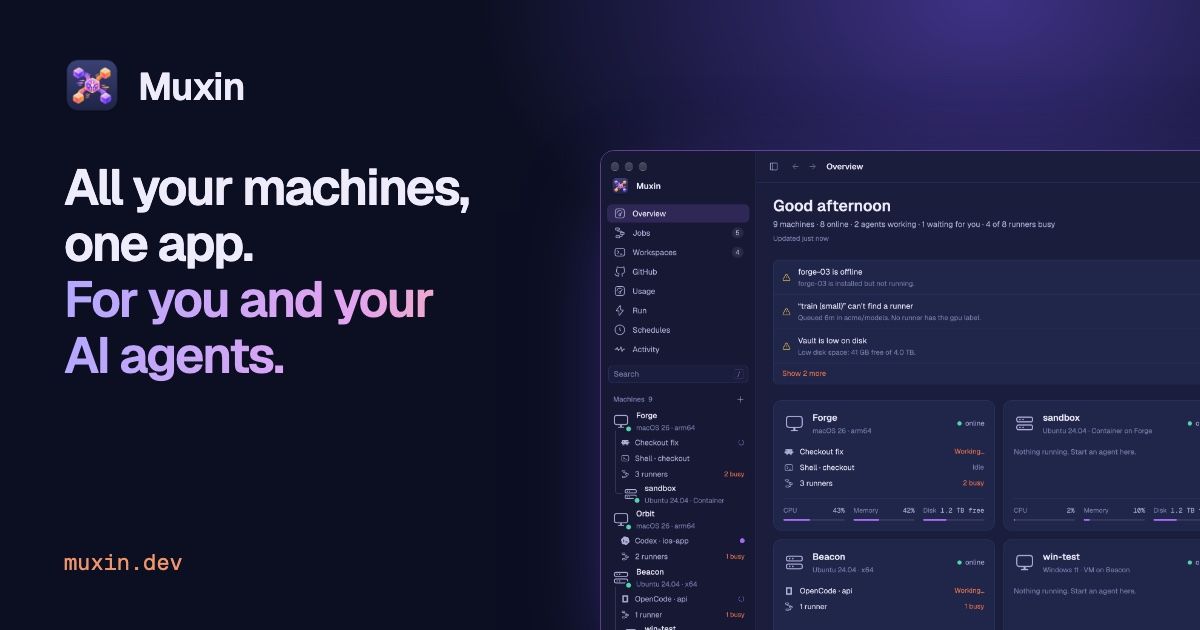
Muxin is designed for people who own several machines and want them all visible at once. Its overview shows CPU, memory, disk, running agents, open ports, and Docker containers for each machine at a glance. File transfer, live desktops, and the shared clipboard remove the friction of moving data between boxes.
If you manage a large fleet of identical servers or need enterprise features like role-based access control or audit logs, Muxin's current version is not built for that scale.
Muxin ships an MCP server with 80+ tools covering machines, sessions, files, logs, GitHub, runners, Docker, and schedules. The --demo flag lets agents practice on simulated machines without touching anything real. The CLI exposes every capability with --json output for scripting and integration testing.
If your agents only need a single machine and you already have an MCP setup for it, adding Muxin for its MCP server alone may be unnecessary.
The problem
Developers working with multiple machines face the same fragmentation problem every day: separate SSH terminals for each box, a different tool to check logs, another to manage Docker containers, and no unified view of which AI agents are running and what they have changed. The overhead compounds quickly once the machine count grows past two or three. The situation worsens when AI coding agents enter the picture. Agents like Claude Code or Codex run on specific machines, write to specific branches, and produce output you need to review before shipping. Tracking which agent is waiting for input, what it changed, and where the pull request stands requires checking multiple windows and tools. When agents are running on remote or headless machines, coordinating their work becomes a real operational overhead.
How it works
Run Claude Code, Codex, OpenCode, Gemini CLI, Amp, Pi, or a plain shell on any machine in your fleet from a real terminal inside the app. Sessions keep running on the machine after you close the window, so you can pick up where an agent left off without re-launching. The sidebar shows each session with a spinner while the agent works and a colored dot when it needs your input.
See any Linux or Mac machine's screen live alongside its terminal, at resolutions from 720p to 4K. You can take the mouse and keyboard when you need to, add a virtual monitor to a headless machine, or open a single application from a machine in its own window as if it ran on your computer.
Muxin ships a built-in Model Context Protocol server that exposes your entire machine fleet to AI agents. With a one-time muxin mcp setup, Claude Code, Codex, and any other MCP client can read logs, check services, start sessions, copy files, and run commands across your machines. Muxin tells agents to request your approval before making changes.
Watch your self-hosted GitHub Actions runners from inside the app: which are busy, idle, or offline, and which queued jobs have no runner to take them. Install runners on any machine in one step. Your GitHub issues and pull requests appear in the app, and one click hands an issue to a running agent on the machine you choose.
Copy files and folders between any two machines in your fleet, including ones that cannot directly reach each other, through a two-pane dialog. The shared clipboard lets you copy text on your computer and paste it on any machine's screen, and copy back the other way.
See every machine's running services, Docker containers, and Compose projects with live CPU and memory readings. Start, stop, restart, or open a shell inside individual containers. Open a Compose project to see its services as a diagram. Works with systemd, Homebrew, Windows services, and Docker.
Features
- Agent Sessions on Any Machine
- Live Desktops with Mouse and Keyboard
- MCP Server with 80+ Tools for AI Agents
- GitHub Runner and Issue Management
- File Transfer and Shared Clipboard
- Docker, Compose, and Service Management
How to install
Install Muxin on macOS or Linux using the Homebrew cask.
brew install --cask lumarylabsllc/tap/muxinDownload the signed macOS .dmg, Linux packages (.deb, .rpm, AppImage), or Windows installer from GitHub Releases: https://github.com/LumaryLabsLLC/muxin/releases/latest
Recommended for this setup
Strengths
- Agent-First Design with MCP Integration: Unlike Royal TSX and most remote management tools, Muxin was designed from the start for AI coding agent workflows. Its 80-tool MCP server and scriptable CLI let agents check machine health, start sessions, read logs, and ship pull requests without leaving their context. Every command an agent runs appears in the app's Activity view.
- Native Performance with No Machine Setup Required: Muxin is built in Rust using GPUI, the GPU-accelerated framework behind the Zed editor. It requires no manual configuration on managed machines: if you can SSH in with a key, Muxin installs its own lightweight agent over SSH and keeps it updated automatically. This gives native app speed without Electron overhead.
- Apache-2.0 License with No Paid Tier: Muxin is free and Apache-2.0 licensed. You can use it commercially, modify it, and redistribute it without restriction. There is no paid tier, per-seat pricing, or managed-cloud dependency. The source is on GitHub at LumaryLabsLLC/muxin.
- Uses Infrastructure You Already Have: Muxin reads your existing ~/.ssh/config aliases and SSH keys, uses your Tailscale network for machines away from home, and reuses your gh auth login for GitHub access. No new accounts, no agents to pre-install on your machines, and no network reconfiguration.
Trade-offs
- Very New Project with Limited Community Resources: Muxin launched in October 2026 and had 383 GitHub stars at review time. As a young project with 3 open issues, the API surface will change, some workflows may be rough at the edges, and community resources like third-party guides and integrations are limited. The Windows installer is not yet signed, which triggers a security warning on Windows 11 requiring an extra click to proceed.
- Full Desktop App Required on the Controlling Machine: Muxin requires installing the full desktop app on your primary machine. There is no web dashboard or browser-only interface for full fleet management. The session-sharing feature gives view or input access to individual sessions in a browser, but it is not a substitute for the full app.
- Cloud Machine Provisioning Limited to DigitalOcean: Creating cloud machines from within Muxin currently works only with DigitalOcean. If you primarily use AWS, GCP, Azure, or Hetzner, you add those machines via SSH like any other host but cannot provision new ones from inside the app.
Tech stack
FAQ
Yes. Muxin is free and open source under the Apache License 2.0. There is no paid tier, no usage-based pricing, and no managed cloud service. The code is on GitHub. You can use it commercially without restriction.
For terminal sessions, Muxin supports Claude Code, Codex, OpenCode, Gemini CLI, Amp, Pi, and any plain shell. For agent-to-Muxin integration via MCP, the muxin mcp server works with any MCP client, including Claude Code, Codex, and Claude Desktop. The CLI with --json output is available for agents that do not support MCP.
No manual setup is needed on managed machines. If you can SSH into a machine with a key, Muxin installs its own small agent over SSH and keeps it updated automatically. On Windows machines you manage, you need to enable OpenSSH Server first.
The desktop app runs on macOS 12 or later (Apple silicon and Intel), Linux (x86_64 and arm64 with glibc 2.35 or newer, available as .deb, .rpm, AppImage, AUR, or a rootless tar.gz installer), and Windows 11. It can manage any Mac, Linux, or Windows machine reachable over SSH.
Royal TSX is a paid remote connection manager with broad protocol support (RDP, VNC, SSH, FTP, and more), suited for teams managing heterogeneous server environments. Muxin is designed for developer and AI agent workflows: its MCP server, Git integration, GitHub runner management, and agent session tracking are not features Royal TSX offers. Royal TSX is the better fit when you need multi-protocol remote desktop management; Muxin is the better fit for developers running AI coding agents across their machines.