T3 Code
Control your coding agents from one interface
Replaces Conductor, Claude Code
Who it's for
T3 Code gives you a native iOS or Android app that connects to the agent server on your machine. Start a session before you leave, monitor progress from your phone, and review the output when you return.
You only work at a single fixed workstation and never need to monitor or interact with a running session from a different device.
Each agent thread gets its own branch in T3 Code. You can run a Codex session and a Claude Code session in parallel from the same interface, review both outputs, and ship whichever produces better results first.
Your workflow is a single sequential session. If you run one agent at a time and finish before starting the next, T3 Code adds interface overhead with limited benefit.
The one-button PR flow auto-generates the title, body, and changelog from the agent thread, then opens the pull request on GitHub. This works with your existing GitHub credentials; no extra tokens or setup beyond what the README documents.
Your team has its own PR automation or your workflow requires manual review of the git diff before committing. T3 Code's one-button path assumes the diff is ready to push.
The MIT license and public GitHub repo mean you can fork T3 Code, swap in a different UI, add an agent the team has not officially supported yet, or self-host a modified version for your team. The codebase is mostly TypeScript.
You need enterprise support, a hosted managed service, or a stable API surface. The project is early and the team is not accepting large contributions yet.
The problem
AI coding agents are powerful but terminal-bound. When you start a Claude Code or Codex session on your laptop, you are locked to that machine for the duration. There is no mobile app to check on a running session, no way to hand off a thread to a second machine, and no native flow to turn a finished session into a pull request without writing git commands yourself. Managing multiple agent threads at once compounds the problem. You end up with separate terminal windows for different sessions, no unified view of what each agent is working on, and a manual merge step at the end of every thread. Teams that want to run agents in parallel face friction that grows with each session they add.
How it works
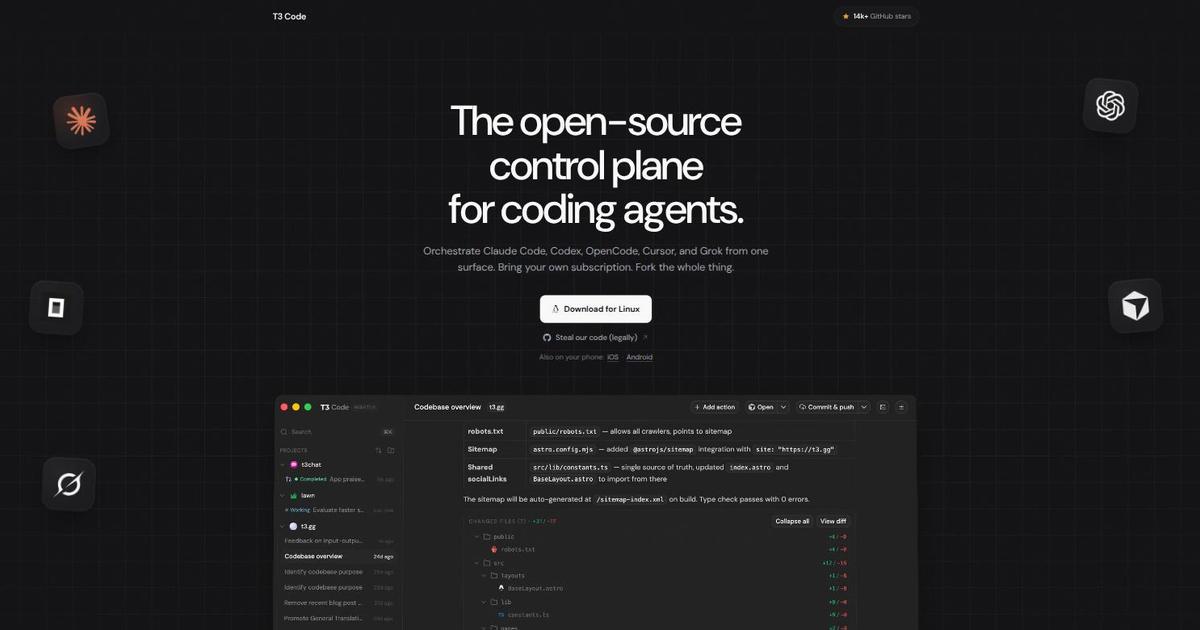
Connects to Claude Code, OpenAI Codex, Cursor, Grok Build, OpenCode, and Google Antigravity from a single interface. If the agent is installed and authenticated on your machine, T3 Code can start and manage sessions for it. Switch models mid-thread without reopening a terminal.
A native iOS app, an Android app, a web interface, and an Electron desktop app all connect to the T3 Code server running on your machine. Start a session from the desktop, check its progress from your phone, and review the output from a browser on another machine.
When an agent thread is ready to ship, a single button commits the changes, pushes to a branch, and opens a pull request on GitHub with an auto-generated title, body, and changelog. The flow supports draft PRs, stacked PRs, and amend PRs. No terminal commands required after the agent finishes.
T3 Code does not resell tokens or add quota caps. Plug in your existing Claude Code, Codex, Cursor, or other subscriptions using the credentials you already have. T3 Code orchestrates the agents; your plan and usage limits stay unchanged.
T3 Code is MIT licensed with over 22,000 GitHub stars. The full codebase is on GitHub under pingdotgg/t3code. Fork it, modify the UI, wire in additional agents, and ship your own build. The MIT license permits redistribution and commercial use.
Features
- Multi-agent control from one surface
- Mobile, web, and desktop access
- One-button GitHub PR creation
- Bring your own agent subscription
- MIT licensed and fully forkable
How to install
Install T3 Code via npx to run the server immediately, or use a desktop package manager for a persistent install.
npx t3@latest
brew install --cask t3-code
winget install T3Tools.T3Code
Recommended for this setup
Strengths
- Works with six agents, not just one: Claude Code, Codex, Cursor, Grok Build, OpenCode, and Google Antigravity are all supported in one interface. This matters when different projects use different agents, or when you want to run multiple models in parallel on the same task without switching terminal windows.
- Remote access from any device: T3 Code's server runs on your machine; the iOS, Android, and web clients connect to it remotely. You can start an agent session from your desktop, step away, and monitor progress from your phone. Both iOS and Android apps are documented in the README alongside the desktop and web clients.
- MIT license with no token markup: T3 Code does not profit from your agent usage. You pay Anthropic, OpenAI, or your other provider directly at the rates you agreed to. The MIT license also means you can fork the product if the team's direction diverges from what you need.
Trade-offs
- Early stage: 1,834 open issues as of September 2026: The project was created in February 2026 and the README warns explicitly: "We are very very early in this project. Expect bugs." The GitHub repo has 1,834 open issues against 22,000+ stars. The team is mostly not accepting contributions yet; only small fixes may be considered, not large features.
- Requires pre-installed and authenticated agents: T3 Code has no AI coding capability of its own. You must install and authenticate at least one supported agent before T3 Code can do anything. For developers who do not already pay for Claude Code, Codex, or another supported agent, this adds a prerequisite step before setup.
- Electron desktop app and a Node.js 22.16+ server: The desktop client is Electron-based, and the npx path needs Node.js 22.16+, 23.11+, or 24.10+ on the machine that runs the server. If you want a lightweight native client or you are pinned to an older Node release, T3 Code will not fit without extra setup.
Tech stack
FAQ
No. T3 Code is a control plane that sits around Claude Code and other agents, not a replacement for them. Claude Code still does the actual coding work. T3 Code gives you a mobile app, web app, and desktop client to start and manage those Claude Code sessions from anywhere, plus a one-button PR flow when a session is done. The two tools work together.
As of the repository's last update, T3 Code supports Claude Code, OpenAI Codex, Cursor, Grok Build, OpenCode, and Google Antigravity. Each agent must be installed and authenticated on your machine before T3 Code can connect to it. The README notes that more agents are being added regularly.
Yes. T3 Code is MIT licensed and free to run on your own machine. You pay nothing to T3 Code itself. What you do pay for are the underlying agent subscriptions you bring to it: Claude Code, Codex, or whichever agents you use. T3 Code does not resell tokens or add fees on top of those subscriptions.
The quickest path is `npx t3@latest`, which starts the server without a permanent install (requires Node.js 22.16+, 23.11+, or 24.10+). For a persistent desktop app, macOS users can run `brew install --cask t3-code` and Windows users can run `winget install T3Tools.T3Code`. You need at least one supported agent installed and authenticated before starting.
The README warns explicitly that the project is very early and to expect bugs. It was created in February 2026 and has over 1,800 open issues. The team is not accepting most contributions yet. If you need a production-stable control plane, check back later; if you are comfortable with early-access software and can live with rough edges, it is actively maintained and has a strong following.