Colspan
Self-hosted email template builder, 78 blocks, no account needed
Replaces Stripo, Beefree, Unlayer, Topol Io
Who it's for
Colspan's static build and AGPL-3.0 license make it forkable as the foundation for a client-facing template editor. Teams can extend the block catalog, adjust the design system, and serve the editor under their own domain. The commercial license removes AGPL obligations for teams embedding it in a closed-source product.
Extending the block catalog or rebranding the editor requires forking the source. If you need a ready-made embeddable SDK with a documented API rather than a forkable app, Colspan's current architecture requires more engineering work to integrate.
The 78-block library and visual editor cover most transactional and marketing email layouts. Exporting to HTML lets designers hand off tested templates to their email platform without rebuilding them in a proprietary editor, and JSON export preserves the editable structure for future revisions.
If your team relies on a specific ESP's native template system and needs direct one-click export to that platform, Colspan's export-and-upload workflow adds a manual step that paid editors with ESP integrations skip.
Colspan deploys as a static build behind any web server, with no database or auth server required. Teams already running self-hosted infrastructure can add the email editor without introducing a new managed service subscription or cloud dependency.
Skip if your team needs multi-user template libraries, real-time collaboration, or server-side template storage. Colspan's localStorage model is single-browser by default; shared team access requires forking and building a storage backend.
The problem
Paid email template editors tie your workflow to a cloud account. Your templates live in the vendor's database, and if you stop subscribing, access stops too. Platforms like Stripo, Beefree, and Unlayer are subscription products run by the vendor. For teams building transactional emails, marketing templates, or white-labeled campaigns for clients, that vendor dependency creates a real constraint. When exported HTML does not match your email client's requirements, there is no direct way to alter the export pipeline itself.
How it works
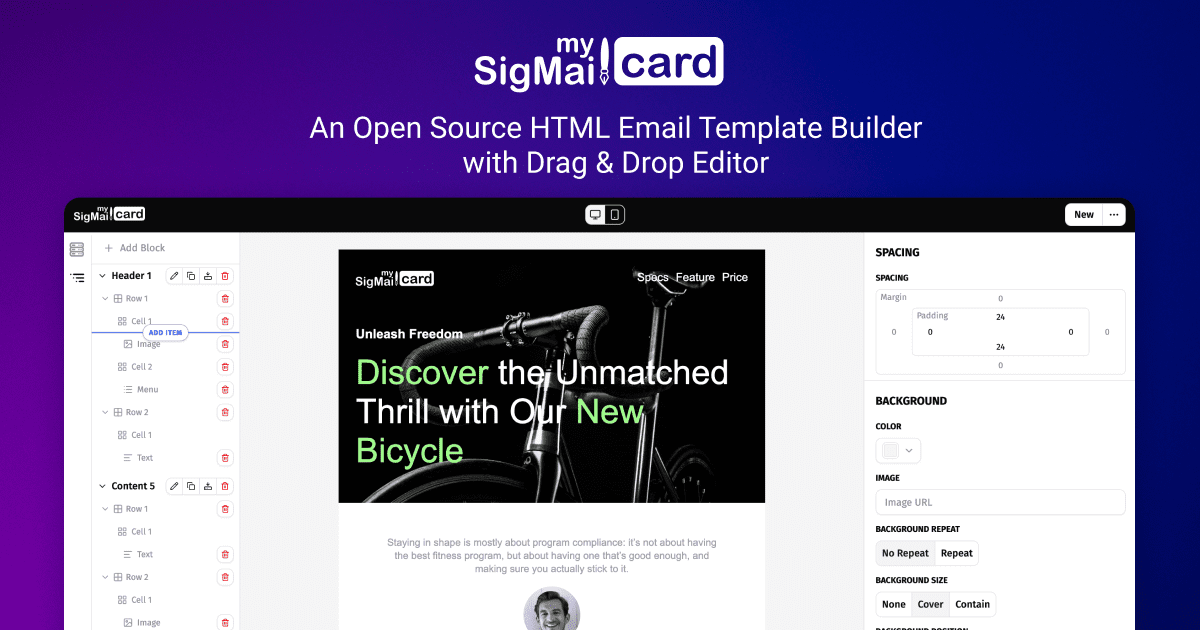
The block library covers menu (8), header (10), content (16), feature (8), call-to-action (12), e-commerce (7), transactional (9), and footer (8) presets. Each block decomposes into rows, cells, and atoms, so a custom layout is built by nesting rather than writing HTML. All 78 presets ship in the public release with no paywall.
Switch the canvas between 600 px (desktop) and 375 px (mobile) to see how columns reflow. Each row has independent controls: stack columns vertically or hide the row entirely on small screens. The preview renders in a Shadow DOM to isolate editor styles from template styles.
Export the finished template as email-optimized table-based HTML with inline styles, built to render consistently across Gmail, Outlook, and Apple Mail. Save it as JSON to import and continue editing later. JSON import supports two modes: replace the current canvas entirely, or append the imported blocks to the existing template, with validation and sanitization on the way in.
Colspan runs entirely in the browser as a static Vue app. Templates autosave to localStorage and restore on reload, with no cloud storage or server-side history. The editor opens straight to a canvas with no login or account creation.
Every element is visible in a component tree (Block, Row, Cell, Atom). You can add, move, copy, rename, or delete any node, and the tree and canvas stay in sync. Text atoms support rich formatting: bold, italic, underline, strikethrough, per-atom font size, color, and alignment, with Google Fonts support.
Background color or image, padding, font, and preheader text are set once at the template level rather than per block. This keeps a consistent style across all blocks without overriding individual elements, and changes propagate across the template immediately.
Features
- 78 preset blocks across 8 categories
- Desktop and mobile preview modes
- HTML and JSON export
- Client-side, no account or server
- Component tree and in-place editing
- Template-wide design controls
How to install
Self-hosting deploys the app as a static build behind any web server.
git clone https://github.com/colspan-dev/colspan
cd colspan
pnpm install
pnpm build
Recommended for this setup
Strengths
- Static deployment with no server dependencies: Colspan is a Vue app that compiles to a static build. It deploys behind any web server or CDN, with no database and no auth server required; the app runs in the visitor's browser with Google Fonts loaded for font support. Teams that already manage static hosting can add the email editor to their stack with a single build output.
- AGPL-3.0 with a commercial license path: Under AGPL-3.0, you can self-host, use internally, and fork the code as long as changes stay open source. For teams embedding Colspan in a proprietary SaaS or internal tool without the AGPL obligations, a separate commercial license is available from the author.
- Portable templates via JSON export: JSON export is designed for re-import: append blocks to an existing template or replace the canvas entirely, with validation on the way in. If you stop using Colspan, your templates remain usable as structured data rather than locked in a proprietary cloud format.
Trade-offs
- No arbitrary HTML import: Colspan can import only templates previously exported from Colspan as JSON. Existing HTML emails from other tools, from ESPs, or hand-crafted cannot be imported and edited on the canvas. Teams migrating a large template library from another editor will need to rebuild those templates from scratch using Colspan's block catalog.
- No built-in email sending: Colspan builds and exports templates only. It has no sending, contact management, or delivery analytics. Plugging templates into an ESP requires copying the exported HTML or JSON into a separate platform, which adds a manual step to any sending workflow.
- Single-browser localStorage storage: Templates persist in browser localStorage with no server-side storage, no multi-device sync, and no shared team library. A developer forking the project can build persistent storage into a custom deployment, but out of the box the model does not scale to teams sharing templates across browsers.
- Core rewrite in progress: The README notes that the codebase is being rewritten from scratch with modern web standards, and architectural decisions are still in flux. Direct code contributions are described as 'tricky at this stage.' Teams forking or extending Colspan during the rewrite period may find the underlying structure shifting.
Tech stack
FAQ
No. Colspan can only import templates that were previously exported from Colspan as JSON. Arbitrary HTML from other tools or ESPs cannot be imported and edited on the canvas. If you have existing templates from another editor, you will need to rebuild them using Colspan's block catalog.
Under AGPL-3.0, yes. You can self-host Colspan and use it for commercial purposes, including internal team use, without paying a license fee. The AGPL requirement kicks in when you distribute a modified version over a network as a SaaS: those source changes must be released under the same license. For embedding Colspan in a proprietary closed-source product without opening your source code, the author offers a separate commercial license.
No. Colspan builds and exports email templates only. Sending, list management, and delivery analytics are handled by your email platform. Take the HTML export from Colspan and upload it to your ESP of choice.
Templates autosave to your browser's localStorage. There is no cloud storage, server-side history, or account required. Export as JSON to save a portable copy outside the browser. If you clear browser storage or switch to a different browser, the localStorage version will be lost unless you have an exported JSON backup.
Yes. Colspan was formerly called MySigMail Card and was hosted at card.mysigmail.com. The project was renamed in version 0.18.0, released in October 2026. Old links from card.mysigmail.com redirect to colspan.dev.