
VvvebJs
Open source drag-and-drop page builder for Bootstrap 5 sites
Replaces Unlayer, Webflow, Framer
Who it's for
VvvebJs loads via a JavaScript init call and points the builder at any HTML page or template. The init API controls which pages, component libraries, and UI panels the editor exposes, giving developers full control over the editing surface.
Teams that need a fully managed hosting platform with CDN, form submission, and user accounts built in. VvvebJs provides the editor; you build or integrate the surrounding infrastructure.
Agencies can build a Bootstrap 5 template, configure the component library to expose the right blocks, and hand clients a browser-based editing interface that saves pages back to a PHP or Node server without any third-party subscription.
Clients who need live collaboration, multi-user version history, or cloud-synced asset management out of the box. VvvebJs saves files to a server but has no built-in multi-user workflows.
The related Vvveb CMS project, maintained in a separate repository, shows a full-featured CMS built on VvvebJs. Teams building their own CMS can use VvvebJs for the visual editing layer and wire in their own content storage, user auth, and routing.
Teams evaluating complete, ready-to-run CMS options. VvvebJs is a library, not a standalone CMS. The full Vvveb CMS project may be a better starting point for turnkey content management.
The problem
Building a custom visual page editor from scratch means implementing drag-and-drop logic, a component library, inline text editing, image management, and undo/redo, each as a separate front-end problem. Most teams that need this capability for a CMS or content tool end up paying for hosted commercial tools like Webflow, handing over data control and paying recurring fees for a capability they need to own. The alternative is assembling third-party drag-and-drop libraries with a build pipeline, which adds maintenance overhead and brittle dependencies. Development teams building white-labeled or embedded editors often find no direct path between a full custom build and a proprietary subscription.
How it works
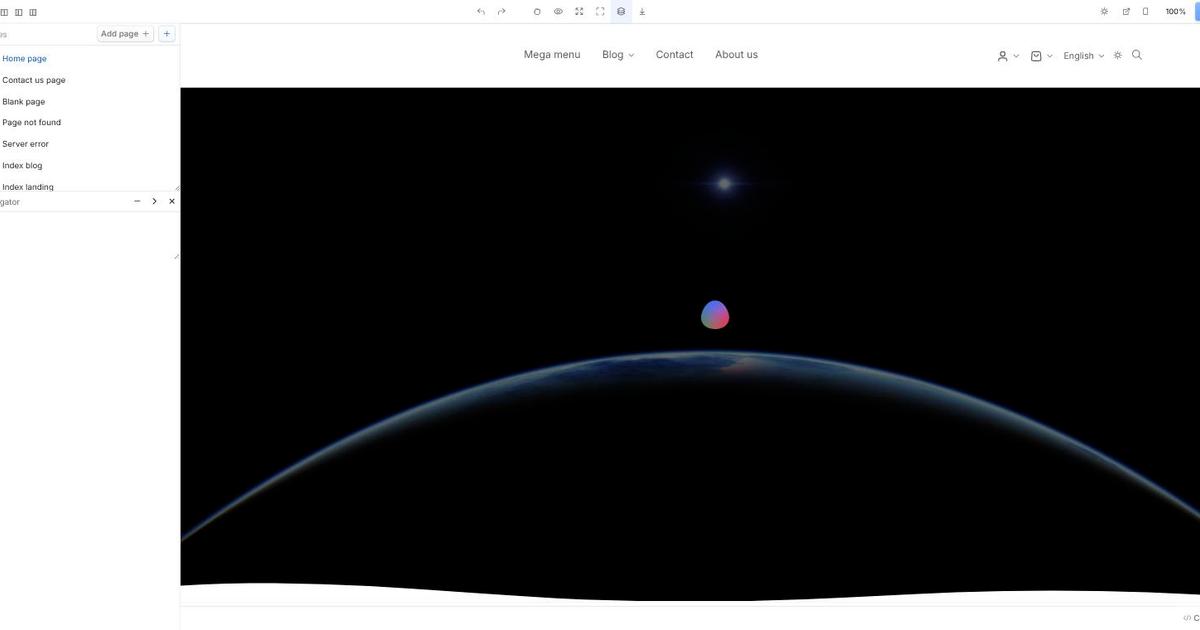
Drag Bootstrap 5 components, content blocks, and layout sections directly onto the page canvas with live preview. The side panel shows the selected element's CSS properties, class list, and editable content inline. No page reload or separate build step is needed to see changes.
An embedded code editor lets users view and edit the raw HTML and CSS of any selected element without leaving the page. Changes apply instantly to the canvas. An optional CKEditor plugin replaces the built-in text editor for richer inline text formatting.
Full undo/redo history covers every drag, drop, and property change in an editing session. A file manager panel shows the full DOM hierarchy of the page, and a breadcrumb bar tracks the selected element's position in the tree, making it easier to select and edit nested elements.
Ships with a full library of Bootstrap 5 UI components and a separate widgets set covering YouTube embeds, Google Maps, Chart.js charts, and animate-on-scroll effects. An SVG icon component bundles hundreds of free icons. Custom component modules load at init time through the JavaScript API.
Pages download as standalone HTML or as a full zip archive including all assets, using the built-in zip plugin. Server-side saving works via save.php for PHP hosts or save.js for a Node.js Express handler, both included in the repository.
A theme editor controls global typography and color palette variables that cascade across all pages using a shared template. The full Google Fonts list is built in for font selection. Templates save as either a site-wide default or a page-specific override.
Features
- Drag-and-drop component and block editing
- Live code editor with CodeMirror integration
- Undo/redo and element tree navigation
- Bootstrap 5 component library with widgets
- Page export, zip download, and server save
- Global theme and Google Fonts typography editor
How to install
Self-hosting uses Docker with a built-in PHP environment, or a Git clone served through any web server.
docker run -p 8080:80 vvveb/vvvebjsRecommended for this setup
Strengths
- No runtime dependencies and no build tools: The core library is vanilla JavaScript with no npm packages in the runtime path. Setting up the editor requires cloning the repository and opening a file through a web server, not running a build pipeline. This makes it straightforward to integrate into PHP projects, plain static sites, and legacy codebases.
- Apache 2.0 license for commercial use: Apache 2.0 allows commercial use, modification, and distribution without a fee. Unlike AGPL-licensed tools that require open-sourcing derivatives, you can embed VvvebJs in a commercial product or service without license restrictions. The 8,679 GitHub stars and 1,836 forks reflect wide adoption.
- Docker deployment with a single command: The official Docker image (vvveb/vvvebjs) runs the full editor on port 8080 with a single command. No Kubernetes setup required. The same configuration runs on any VPS or shared PHP hosting environment, keeping the barrier to self-hosting low.
- Extensible component and input system: New components and input types are added by writing JavaScript modules that the builder loads at init time, using the same API as the built-in Bootstrap 5 and widget libraries. A React wrapper is available as a separate community package for teams building React applications.
Trade-offs
- Page saving requires a PHP or Node server: The editor opens and edits HTML in the browser, but saving pages back to disk requires a running PHP (save.php) or Node.js Express (save.js) process. Purely static hosting on S3 or a CDN is not enough for a production save workflow. Teams on shared PHP hosting are covered, but serverless deployments need an additional backend component.
- 304 open issues with documentation gaps: The GitHub repository has 304 open issues. The community wiki documents core usage, but advanced integration scenarios and custom component authoring are covered mainly through GitHub Discussions and third-party tutorials. Teams building production integrations should expect to read source code to fill documentation gaps.
- Editor only, no CMS or hosting layer included: VvvebJs provides the editing interface and component library but does not include content storage, user management, page routing, or hosting. Webflow and Framer include those layers by default. Teams deploying VvvebJs in a product need to build or integrate those capabilities separately.
Tech stack
FAQ
Yes. VvvebJs is licensed under Apache 2.0, which allows commercial use, modification, and distribution without a fee. You can embed it in a commercial product, ship it to clients, or run it as part of a hosted service without a separate license agreement.
The editor opens and renders from static files, so you can run and test it using any local web server such as Apache, Nginx, or XAMPP. Saving pages back to disk requires PHP (save.php) or Node.js (save.js), both included in the repository. Image uploads also need a server-side script. A purely static frontend deployment is not enough for a full production workflow.
Webflow is a hosted platform managing CDN, CMS, forms, and user accounts under a subscription. VvvebJs is a self-hosted JavaScript library covering the editing interface only. VvvebJs costs nothing to run on your own server, but you handle infrastructure yourself. Webflow is the better choice when you want everything managed; VvvebJs suits teams that need a customizable editor embedded in their own product or want to avoid subscription fees.
Yes. The component system loads JavaScript modules at init time, following the same structure as the built-in Bootstrap 5 and widget libraries. The README includes a JavaScript initialization example, and the project wiki documents the component API for adding new inputs and component types.
Run the official Docker image, which starts the editor and a PHP environment at http://localhost:8080/editor.php. For local development without Docker, clone the repository and open editor.html through a web server like Apache or XAMPP. Chrome can also open it directly using the --disable-web-security flag for quick visual testing without a server.