
PocketBase
Run a self-hosted BaaS from one executable binary.
Replaces Firebase
Who it's for
PocketBase delivers a complete backend in a single download, letting a solo developer skip provisioning a database, configuring auth, and setting up file storage separately. The JavaScript SDK works with Vue, React, Angular, and Svelte. A functional backend can be running in under an hour on any $5/month VPS.
Your project is a production service with SLA requirements or expected high-write concurrency. PocketBase is not recommended for production-critical workloads before v1.0.
Internal tools typically need simple data storage, basic authentication, and maybe file uploads. PocketBase covers all of this out of the box with a built-in admin UI and no infrastructure overhead. A single small server is sufficient for most internal tooling use cases, with the admin dashboard handling all data operations.
Your internal tool needs to be highly available across multiple regions or integrate with an existing Postgres-based data warehouse.
PocketBase ships an official Dart SDK with first-class Flutter support, making it one of the few self-hosted backends with a native Flutter integration. Authentication, realtime subscriptions, and file uploads all work from the Dart SDK without bridging through a JavaScript layer.
Your Flutter app requires enterprise-grade uptime guarantees or a managed backend with vendor support contracts.
PocketBase lets developers validate data models, authentication flows, and API shapes with minimal upfront investment. The admin dashboard provides immediate data inspection and the schema evolves through the UI as requirements change. The Go embedding path offers a migration route when the prototype is ready for a production-grade backend.
Your prototype needs to handle production traffic volumes from day one or requires high-volume concurrent writes during testing.
The problem
Setting up a backend for a new project typically means provisioning a database, configuring an auth system, wiring file storage, and deploying an API layer as separate services with separate maintenance costs. Firebase and Supabase solve this with managed platforms, but you trade data ownership for convenience: your data lives on their infrastructure, your schema evolves on their timeline, and costs grow unpredictably as traffic increases. For indie developers and small teams, this is often the wrong tradeoff. A side project or internal tool does not need cloud-scale infrastructure. It needs something that works today, stores data somewhere you control, and does not require a DevOps team to run. The operational overhead of a multi-service backend setup disproportionately punishes smaller projects.
How it works
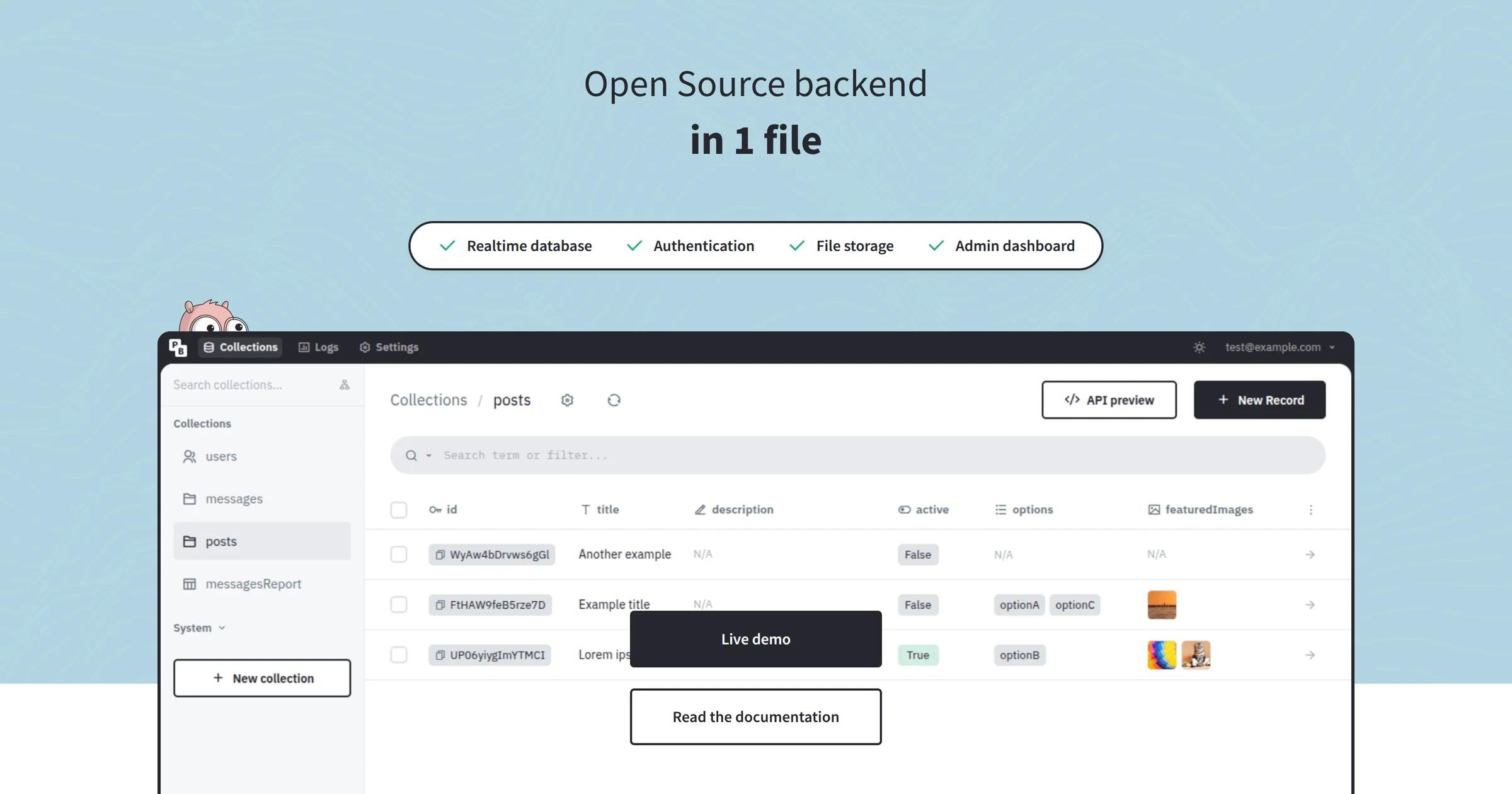
The entire backend ships as one executable file (about 12MB) with no external runtime, database, or dependency requirements. Download it, run `./pocketbase serve`, and the backend is live on port 8090. No Node.js, no Docker, no Postgres install required.
All data is stored in an embedded SQLite database managed from the admin dashboard. Create collections, define field types (text, number, date, relation, file, JSON), and set validation rules through the UI without writing migrations by hand. The database file lives in `pb_data/` alongside the executable.
Clients subscribe to collection or record changes via a built-in realtime API. Changes broadcast automatically to connected subscribers, making it practical to build live-updating dashboards or collaborative features without a separate WebSocket layer. The JavaScript and Dart SDKs expose this as a first-class API.
Handles email/password and OAuth2 login out of the box, with support for Google, Facebook, GitHub, and GitLab as identity providers. User management, sessions, email verification, and password reset are included and configurable from the admin dashboard without writing auth code.
Accepts file uploads and stores them locally or in any S3-compatible bucket (AWS S3, Backblaze B2, Cloudflare R2). Images generate thumbnail variants at configurable sizes automatically. Storage backend is configurable per environment without code changes.
Collection behavior and API routes can be extended with JavaScript hooks using a built-in JS VM, or PocketBase can be embedded as a Go library to build fully custom backends. The Go path produces a single compiled binary with no runtime dependencies, preserving the zero-dependency deployment model.
Features
- Single-binary deployment
- Embedded SQLite database with schema builder
- Realtime subscriptions
- Built-in authentication with OAuth2
- File storage with on-the-fly thumbnails
- JavaScript and Go extension hooks
How to install
# Download the latest prebuilt binary for your platform from:
# https://github.com/pocketbase/pocketbase/releases/latest
# Then extract the archive and start the server:
./pocketbase serve
# Admin dashboard: http://127.0.0.1:8090/_/
# REST API:        http://127.0.0.1:8090/api/
# Create the initial superuser account
./pocketbase superuser create admin@example.com yourpassword# JavaScript SDK
npm install pocketbaseRecommended for this setup
Strengths
- Zero external dependencies: Unlike Supabase (which requires a Docker Compose stack with multiple containers: Kong, GoTrue, PostgREST, Realtime) or a traditional Node.js backend (which requires Node, npm, and a separate database), PocketBase has no external runtime dependencies. Download one file, run it, and the full backend is operational. This removes an entire class of environment-specific setup failures.
- MIT license, no usage-based pricing: PocketBase is MIT licensed, allowing commercial use, modification, and distribution with no open-core restrictions or usage-based fees. Firebase and Supabase cloud plans charge based on reads, writes, and bandwidth. PocketBase on a self-hosted server has no per-request or per-row pricing regardless of scale.
- Admin dashboard included from day one: A web-based admin UI is available at `/_/` immediately after the first launch. You can create collections, inspect data, manage users, configure OAuth2 providers, and browse file uploads without writing any code or installing a separate admin tool. No third-party database GUI required.
- Extensible as a Go framework: Projects that outgrow the standalone defaults can import PocketBase as a Go library, add custom route handlers or collection hooks in a `main.go`, and compile everything into a single binary. The output maintains the zero-dependency, single-file deployment model while supporting fully custom business logic.
Trade-offs
- Not recommended for production-critical apps before v1.0: The PocketBase documentation explicitly states the project is not suitable for production-critical applications yet. The team reserves the right to make breaking schema or API changes between releases, which may require manual migration steps. Teams building high-stakes services should treat this caveat seriously until v1.0 ships.
- SQLite write throughput ceiling: PocketBase uses embedded SQLite, which performs well for read-heavy workloads but serializes writes. Applications with sustained high-write concurrency (thousands of simultaneous write operations per second) will hit SQLite performance limits. Firebase and Supabase (Postgres) handle this class of workload better.
- Single-server architecture only: The single-binary model does not support horizontal scaling across multiple instances. You cannot run multiple PocketBase nodes in a cluster sharing state. Projects that require high availability across servers or regions need a different backend architecture.
Tech stack
FAQ
PocketBase is not recommended for production-critical applications before it reaches v1.0. The team explicitly notes that full backward compatibility is not guaranteed, and some releases require manual migration steps. For low-stakes internal tools or side projects the risk is manageable; for high-stakes production services, the v1.0 caveat is worth taking seriously before committing.
PocketBase is significantly simpler to self-host: one binary file, no Docker Compose stack, no Postgres to manage. Supabase self-hosted includes multiple services (Kong, GoTrue, PostgREST, Realtime, Storage API) and requires more operational knowledge. PocketBase trades that simplicity for SQLite instead of Postgres, which means lower write throughput but far lower resource requirements and setup time.
Yes. PocketBase includes a realtime subscription API that pushes record-level change events to connected clients. The JavaScript and Dart SDKs expose this as a first-class feature. For most use cases the realtime capability is comparable to Firebase Realtime Database listeners, with the tradeoff that PocketBase runs on a single server rather than distributed cloud infrastructure.
PocketBase runs on Linux, macOS, Windows, and FreeBSD in both x64 and ARM64 architectures. The binary is about 12MB. For modest traffic a $5-10/month VPS is sufficient. Higher file upload workloads may need more disk, but PocketBase itself has no minimum infrastructure requirement beyond what your data volume and SQLite need.
Yes. PocketBase is MIT licensed, which allows commercial use, modification, and distribution with no usage-based fees or open-core licensing restrictions. You pay only for the infrastructure you choose to run it on.