Web To App
On-device APK builder with Node.js, PHP, Python, and Go runtimes.
Replaces —
Who it's for
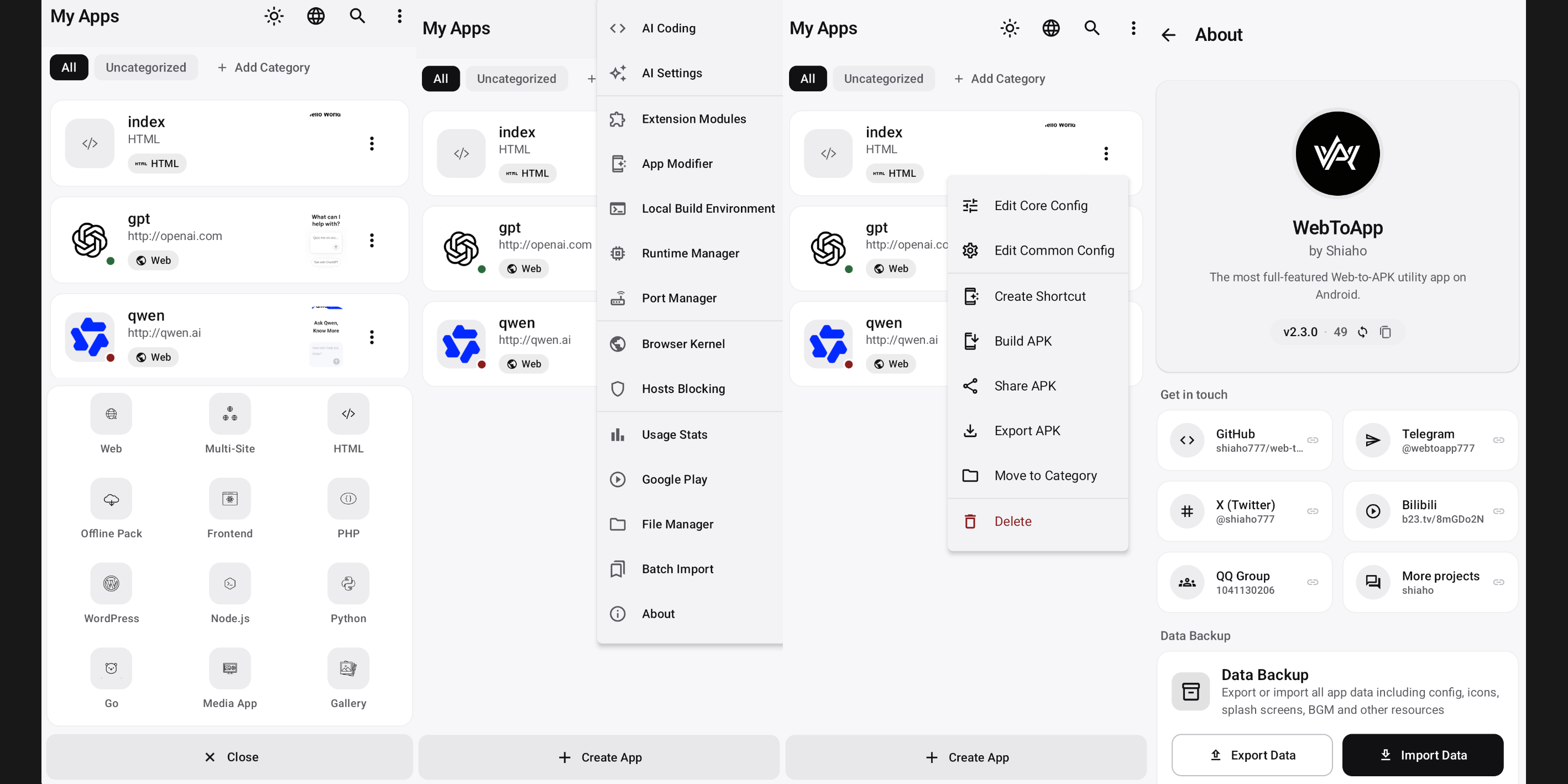
If you have a working web project (a React app, a Flask server, a WordPress site) and want to distribute it as an installable Android APK without setting up Android Studio, WebToApp handles the build on-device. Fill in the app name and URL, enable the relevant runtime from About, and build.
If you need to ship to iOS or need a cross-platform framework targeting both Android and iOS from a single codebase, WebToApp does not cover that use case.
The on-device runtime support (Node.js, PHP, Python, Go) lets you package a small server app as a self-contained APK that runs entirely offline, with no external dependencies. This works for demos, admin tools, offline viewers, and portable prototypes that need backend logic.
If your app only needs to call a remote API and a simple URL wrapper suffices, the basic Web type is simpler and the advanced runtime is unnecessary overhead.
The hardened network stack (DoH, TLS fingerprint spoofing, ECH, SOCKS5 proxies, CORS bypass) is configurable per app in the editor. Developers targeting users in regions with aggressive filtering can set the network layer each APK needs without writing any networking code.
If your app serves a general consumer audience in unrestricted markets, the network hardening options add configuration complexity with no benefit for most users.
The problem
Building an Android app from a web project normally means a desktop machine with Android Studio, the Android SDK, an emulator for testing, and several gigabytes of tooling. For web developers who want a mobile presence for a personal project, a self-hosted tool, or a WordPress site, the setup barrier is out of proportion to the app itself. Conventional web-to-app services address this by running the build in the cloud, but they trade one problem for another. The build happens on their servers at their price, with their packaging defaults and no control over signing keys, APK permissions, or network behavior. A developer who wants a custom network stack, an on-device server runtime, or a Play-ready AAB with their own keystore cannot get that from a hosted service at any tier.
How it works
Node.js 18.20, PHP 8.4 with Composer 2.10, Python 3.14, Go 1.26, and WordPress 7.x over SQLite run as native fork+exec'd binaries from app storage, without any remote connection. Each runtime is downloaded once and managed from the Linux Environment screen. PHP and Python support custom native extensions; Go handles on-device build and run. URL-wrapper tools cannot do this at all.
V1, V2, and V3 signing all happen inside the app via apksig, using a keystore you manage. Exporting to Google Play produces a signed AAB with targetSdk rewritten to the current requirement and generates the Play metadata, entirely on-device. No account with a third-party build service is needed at any stage.
Each generated app can be configured with DNS-over-HTTPS (7 providers), TLS fingerprint spoofing (Chrome 131, Firefox 133, or Safari 18 JA3 profiles), Encrypted Client Hello to encrypt the SNI on both the system WebView and GeckoView, per-app SOCKS5/PAC proxies, and CORS bypass for SPAs calling external APIs.
Generated apps can bundle MV3 Chrome extensions with content scripts in isolated or main worlds, with chrome.* polyfills for runtime, storage, tabs, and scripting. Userscripts follow the Greasemonkey/Tampermonkey API (GM_* bridge, promise-based GM.* variants). Extensions can be searched live from the Chrome Web Store or imported manually.
App types include Web (URL wrapper), HTML/static frontend, Node.js, PHP, Python, Go, WordPress, image viewer, video player, gallery, multi-site hub, and installed-APK clone. Server-backed types require enabling Advanced features in About; gallery and the Web type are available from first install. Each type previews in the same runtime the export will use.
Features
- On-device server runtimes
- On-device APK signing and Play Store export
- Hardened anti-censorship network stack
- MV3 Chrome extensions and Tampermonkey userscripts
- 12 app types from URL wrapper to full-stack APK
How to install
Download the WebToApp builder APK from GitHub Releases onto an Android 7.0 or newer device: https://github.com/shiaho777/web-to-app/releases/latest
Recommended for this setup
Strengths
- No PC, no account, no remote build queue: The entire build pipeline runs on the Android device. Signing keys never leave the phone, no account is required with any service, and no build queue is involved. Hosted web-to-app services require uploading your project to a third-party server and accepting their signing and packaging defaults; WebToApp gives you the full pipeline locally.
- Unlicense: true public domain with no restrictions: The Unlicense dedicates the code to the public domain. There are no usage restrictions, no attribution requirements, and no copyleft conditions. Fork it, embed it, or ship it commercially without any license compliance overhead.
- Real server runtimes, not just URL wrapping: With 7,147 GitHub stars and active development through October 2026, WebToApp ships Node.js, PHP, Python, Go, and WordPress as native on-device binaries. These are the same runtimes you would run on a server, packaged into an installable APK. No commercial web-to-app service offers on-device server execution at any price point.
- 50+ fingerprint vectors and AES-256-GCM resource encryption: Each app can disguise browser fingerprint across over 50 vectors: User-Agent, WebGL, Canvas, AudioContext, ClientRects, timezone, language, memory, media devices, WebRTC, fonts, battery, and more. Resource encryption uses PBKDF2 + AES-256-GCM on packaged config, HTML, and media. Activation-code gating supports local verification or a custom HTTPS endpoint.
Trade-offs
- Android-only, no iOS path: WebToApp produces Android APKs and AABs. There is no iOS equivalent: no macOS build path, no Xcode integration, no Apple Developer account flow. Developers who need to ship to both platforms will need a separate workflow for iOS.
- Advanced runtimes require a manual toggle: Node.js, PHP, Python, Go, WordPress, image, and video app types are disabled by default and require navigating to About and enabling Advanced features. Gallery is the only media type that works without this step. First-time users who do not read the setup notes may miss these types entirely.
- Distributed as a GitHub APK, not via the Play Store: Installing WebToApp itself requires sideloading an APK from GitHub Releases, which means enabling installation from unknown sources on the device. The builder is not available through the Google Play Store. This is a friction point for users unfamiliar with Android sideloading.
Tech stack
FAQ
No. The entire build pipeline runs on the Android device, including signing and Play Store export. Install the builder APK on any Android 7.0+ device and build from there. A PC is not needed at any stage.
Yes. The Google Play export option builds the APK, converts it to a signed AAB with targetSdk rewritten to current Play requirements, and generates the Play metadata, all on-device. You still need a Google Play developer account to submit the app; WebToApp handles the technical packaging.
Node.js 18.20, PHP 8.4 (with Composer 2.10), Python 3.14, Go 1.26, and WordPress 7.x over SQLite. These are disabled by default; enable them from About > Advanced features. Each runtime is downloaded once on first use and stored in app storage. The Linux Environment screen manages dependencies for Node, PHP, and Python.
Yes. WebToApp is released under the Unlicense, which places it in the public domain. There is no subscription, no account, and no per-build fee. Download the APK from GitHub Releases and use it without restriction for any purpose, including commercial.
Yes. Generated apps support MV3 Chrome extensions (content scripts in isolated or main worlds, chrome.* polyfills) and Tampermonkey/Greasemonkey-style userscripts (GM_* bridge with promise-based GM.* APIs). Extensions can be searched by keyword and installed live from the Chrome Web Store within the builder, or imported manually.