
Namazu Elements
Self-hosted game backend with matchmaking, leaderboards, and LiveOps.
Replaces Playfab, Unity Gaming Services, Accelbyte, Beamable, Lootlocker, Pragma Platform
Who it's for
Elements removes backend engineering from a solo or small-team project. Auth, matchmaking, and leaderboards work from docker-compose up with no Java installation required. The Unity SDK and the open-source Pong example project give a complete working reference to build from.
Skip if your game targets GameMaker or Godot as the primary engine: SDK support is not yet available for those engines, and calling REST APIs from GML or GDScript adds significant integration effort.
Elements enforces server-authoritative state by design, which removes a class of client-side exploits. Studios layer proprietary game logic as private JVM plug-ins without opening that logic to the public, keeping competitive features internal while extending the open core.
Skip if your studio requires SLA-backed support or enterprise contracts. Commercial support is available directly from Namazu Studios, but the project is early-stage with a small team.
The modular plug-in architecture collects game backend features (auth, leaderboards, inventory, matchmaking) into one deployable unit. Each feature runs in an isolated ClassLoader within the same JVM process, reducing operational overhead without sacrificing separation of concerns.
Skip if your team works in a polyglot stack and is not comfortable with JVM languages. Plug-in development requires Java, Kotlin, or Scala.
The problem
Commercial game backend services (PlayFab, Unity Gaming Services, Beamable, LootLocker) charge per monthly active user. A breakout game that scales quickly can generate unexpected infrastructure bills before monetization catches up. Your player data lives in the vendor's database, behind their API, with no export path you control. Building in-house avoids lock-in but costs months of backend engineering before gameplay is even testable. Auth, matchmaking, leaderboards, and inventory are table-stakes infrastructure for any connected game, yet each requires non-trivial implementation. Most indie teams and small studios cannot staff a backend engineer dedicated to this plumbing before they know whether the game is worth shipping.
How it works
The server owns game state, preventing client-side exploits. REST and WebSocket APIs connect players, synchronize sessions, and push real-time events. The Pong multiplayer example on GitHub demonstrates a complete working implementation with matchmaking, P2P networking via WebRTC, leaderboards, and accounts, using zero custom backend code.
Pairs players into matches based on configurable criteria. The matchmaking service integrates with the Crossfire signaling layer for WebRTC P2P transport, so the same backend handles both session brokering and peer connectivity without a separate matchmaking service.
Player inventories, item grants, and a digital marketplace ship as core Elements features. The system handles item types, quantities, and transactions without requiring a custom database schema. Useful for in-game stores, loot tables, and progression economies.
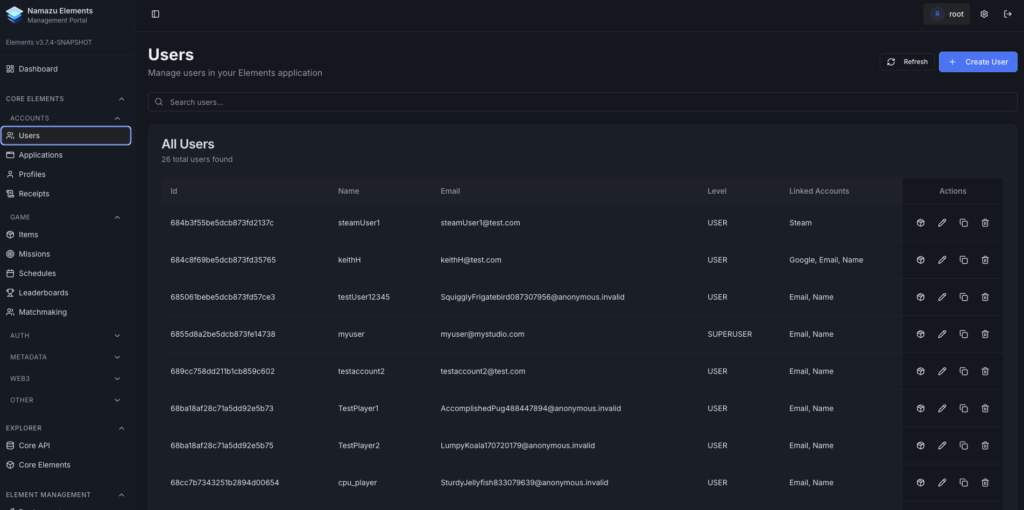
A built-in CMS lets teams configure quests, events, and item definitions without code deployments. Non-technical staff can update LiveOps content through the admin dashboard, useful for time-limited events, battle pass configuration, and content drops managed outside the game client.
Custom server logic ships as modular Elements written in Java, Kotlin, Scala, or any JVM language. Plug-ins run in isolated ClassLoader environments with no dependency conflicts. Starting with Elements 3.7, open-source plug-ins can be published to Maven Central and installed into any Elements instance directly.
A generated C# API client covers the full Elements REST API surface, available on the Unity Asset Store. WebRTC transport runs through Unity Netcode. Reduces Unity integration to configuration rather than hand-written network code, as demonstrated by the open-source Pong multiplayer example project.
Features
- Server-authoritative multiplayer core
- Matchmaking and lobbies
- Digital inventory and economy
- LiveOps CMS
- JVM plug-in system
- Unity engine integration
How to install
Self-hosting uses Docker Compose with no Java installation required on the host.
git clone https://github.com/NamazuStudios/docker-compose
cd docker-compose
docker-compose up
Recommended for this setup
Strengths
- MPL-2.0: game code and plug-ins stay yours: MPL-2.0 is file-level copyleft: only changes made to Elements source files must stay open. Your game code and plug-ins built on the Elements SDK are not derived works and carry no licensing restriction. The project moved from AGPLv3 to MPL-2.0 in Elements 3.8 specifically to remove the source-release trigger for commercial backends.
- Full data ownership on your own infrastructure: Player accounts, match history, leaderboards, and inventory all live in a MongoDB instance you control. No third-party vendor can revoke access, change pricing, or sunset the API. Docker Compose and AWS Terraform deployment paths are both documented in the repository.
- No backend code required for Unity developers: The generated C# client covers the full REST API. A Unity game can have working auth, matchmaking, leaderboards, and cloud saves without the developer writing network code. The open-source Pong example project demonstrates this end-to-end, and the client is available on the Unity Asset Store.
- Extensible without forking the core: Custom server logic deploys as independent plug-in modules into a running Elements instance. Each plug-in runs in its own ClassLoader, so there are no dependency conflicts between modules. Extending Elements does not require patching or rebuilding the core server.
Trade-offs
- Early-stage project with a small community: Namazu Elements opened its public repository in March 2025 and has 18 stars and 36 open issues as of the research date. The small contributor base means community answers to edge cases may be sparse, and the issue backlog is large relative to the active maintainer count. Teams adopting Elements today should be prepared to work from source code and documentation.
- CI pipeline is mid-migration: The project is actively migrating from Bitbucket Pipelines to GitHub Actions. External contributors building from source follow the internal Maven path; the GitHub Actions workflow is not yet complete. Tests take approximately 30 minutes to run and are recommended only for contributors modifying the core.
- GameMaker and Godot SDKs not yet available: The README lists Unity as the only engine with a complete SDK and Asset Store listing. GameMaker and Godot integrations are marked as coming soon. Teams on those engines must call Elements' REST and WebSocket APIs directly from game code until official SDKs ship.
Tech stack
FAQ
Yes. Elements is licensed under MPL-2.0, which allows you to run it on your own infrastructure for free, including for commercial games. The MPL-2.0 only requires that changes made to Elements source files be shared under the same license; your game code and custom plug-ins are unrestricted. Namazu Cloud offers managed hosting with commercial pricing for teams that prefer not to operate their own servers.
Unity has the most complete integration: a generated C# API client is on the Unity Asset Store, with WebRTC transport through Unity Netcode. GameMaker and Godot integrations are listed as coming soon in the README. Teams using those engines can call Elements' REST and WebSocket APIs directly from their game code until official SDKs are released.
The quickest path is Docker Compose: clone the NamazuStudios/docker-compose repository and run docker-compose up. The server and CMS start on localhost with no Java installation required. For production on AWS, the community-edition-aws repository provides a Terraform deployment. Namazu Cloud is also available as a managed option.
Yes. Elements uses a JVM plug-in system that accepts modules written in Java, Kotlin, Scala, or any JVM language. Plug-ins run in isolated ClassLoader environments, so dependency conflicts between modules are not an issue. Starting with Elements 3.7, open-source plug-ins can be published to Maven Central and installed into any Elements instance without manual packaging.
Elements covers the same feature categories (auth, matchmaking, leaderboards, inventory, quests) but is self-hosted and MPL-2.0 licensed. PlayFab and Unity Gaming Services are managed cloud services with per-MAU pricing and no self-hosting option. Elements is the better fit when data ownership, cost predictability at scale, or running without vendor dependency matters; PlayFab and Unity Gaming Services are better fits when fully managed infrastructure with no operational overhead is the priority.