
Gramps Web
Self-hosted genealogy with collaboration and Gramps Desktop sync
Replaces Ancestry, Myheritage, Family Tree Maker
Who it's for
Researchers who have built up a Gramps Desktop database over years can share it with family by running Gramps Web on a home server or VPS. The bidirectional sync means the existing research workflow does not change, and family members can browse and contribute without installing desktop software.
Users migrating from Ancestry or another commercial platform will need to export their data to GEDCOM first, since Gramps Web does not have direct import paths from commercial platforms. Some media files and source attachments may not transfer cleanly through GEDCOM export.
Multiple family members across different locations can contribute to the same genealogy database in real-time through the web interface. Role-based permissions let the primary researcher control who can edit records versus who can only browse the family tree.
Families who need automated record matching, access to digitized record databases, or a DNA testing service to order a kit and receive matches from a provider's database will not find those capabilities in Gramps Web and may need a commercial service for discovery work alongside it.
Genealogy databases often contain sensitive information about living relatives: birth dates, addresses, and family relationships. Gramps Web keeps that data on infrastructure the researcher controls, not on a third-party platform subject to that platform's privacy policies and practices.
Researchers who prioritize ease of use and built-in record access over data location will get more value from Ancestry or MyHeritage than from setting up and maintaining a self-hosted instance.
The problem
Most families documenting genealogy end up on commercial platforms like Ancestry or MyHeritage. These services host your data on their servers, control access through paid accounts, and may change terms or pricing over time. For families doing multi-decade research, dependence on a commercial service raises concerns about long-term access, data portability, and privacy for living relatives whose information ends up in the database. The harder challenge is sharing. Collaborating on a commercial genealogy platform typically requires every contributor to have their own paid account. Researchers who want to keep sensitive family data away from third-party servers have limited options within the commercial genealogy ecosystem without returning to unshared local files.
How it works
Data changes made in Gramps Web sync to Gramps Desktop, and changes in Gramps Desktop sync back to the web app. Genealogists who do primary research locally can share results with family members browsing the web interface without manually exporting and re-importing GEDCOM files.
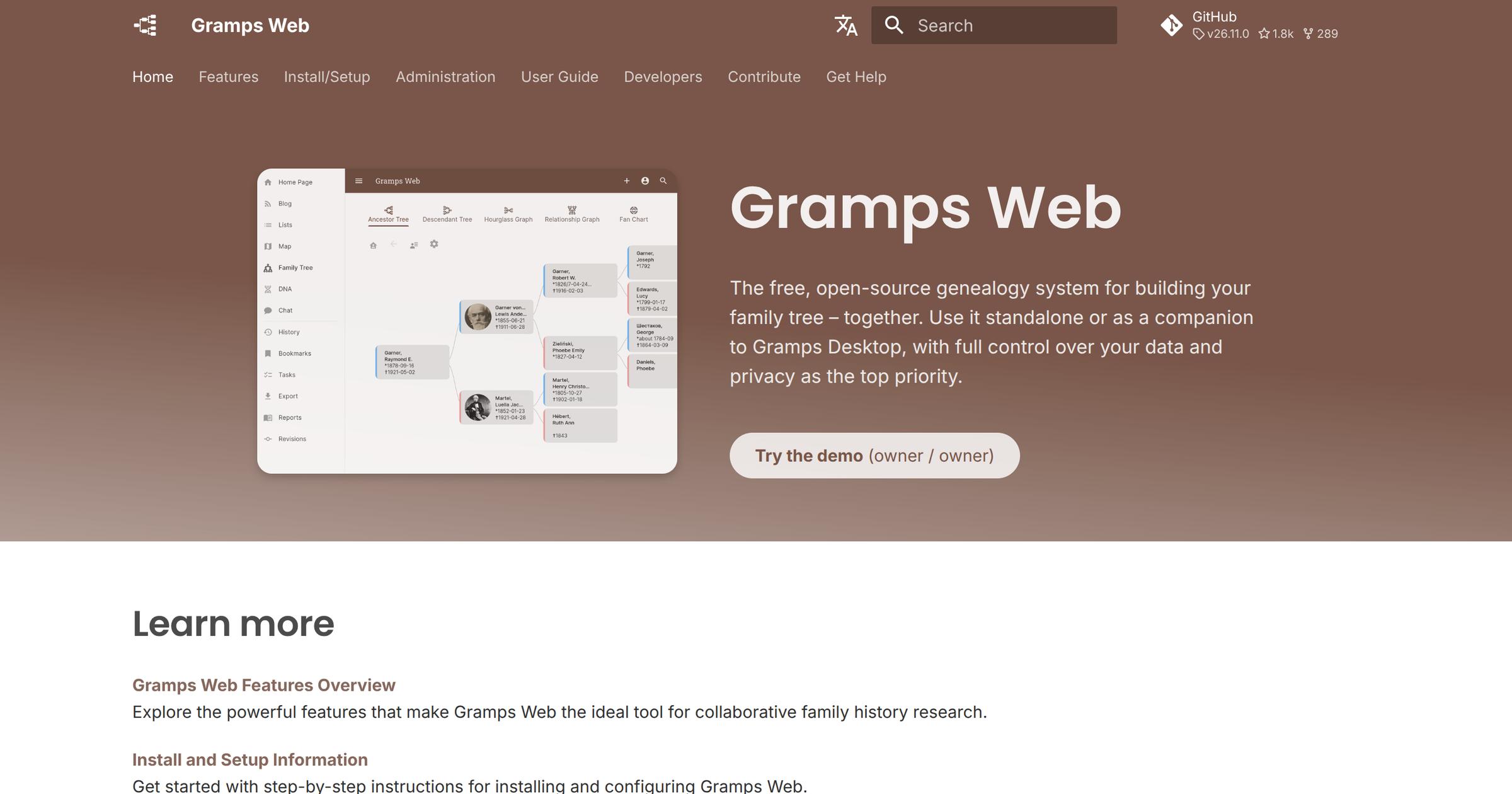
Renders ancestor, descendant, fan, and hourglass charts from the genealogy database. All chart types are interactive and browsable from any web-enabled device, so family members do not need to install desktop software to explore the family tree visually.
Multiple users can browse and edit the family tree simultaneously via the web interface. The demo deployment shows four access levels (owner, editor, contributor, member), giving administrators control over who can edit records versus who can only view the database.
Places in the genealogy database can be visualized on interactive maps, with support for custom historical map overlays. This lets researchers view migration patterns and place relationships across time periods, not just on a modern base map.
View DNA matches and analyze chromosome data directly within the web interface. Researchers can explore genetic connections alongside the family tree, linking DNA evidence to specific ancestors and relationships in the database.
Chat with your family tree in your native language, powered by AI. The assistant can answer questions about the genealogy database, helping family members explore their history without needing to learn the application's full interface. Note that some features are not available in the demo.
Features
- Bidirectional Gramps Desktop Sync
- Interactive Family Tree Visualizations
- Collaborative Multi-User Editing
- Mapping with Historical Overlays
- DNA & Chromosome Tools
- AI Chat Assistant
Recommended for this setup
Strengths
- Full Data Ownership Under AGPL-3.0: The database lives on your server and you retain full control over backups, exports, and sharing. AGPL-3.0 licensing means the source code is auditable and you are not dependent on a commercial provider keeping the service operational or affordable.
- No Subscription Fees for Self-Hosted Deployment: Unlike paid genealogy services, Gramps Web is free to run on your own hardware. The only costs are your server infrastructure, and the AGPL-3.0 license places no per-seat or usage fees on families running their own instance.
- Companion to the Leading Open Source Desktop App: The README describes Gramps Desktop as the leading open source genealogy desktop application. Gramps Web is built to extend it to the web, making the combination the most complete open source genealogy setup available. Existing Gramps Desktop databases import directly.
- Active Development: 1,803 Stars and Recent Commits: With 1,803 GitHub stars, 289 forks, and a last commit in November 2026, Gramps Web has an active development community. The project participates in Hacktoberfest and publishes a development board showing prioritized feature work and ongoing contributions.
- Support for 40 or More Languages: Gramps Web ships with internationalization support covering 40 or more languages across the full interface. This makes it usable by families whose genealogy research spans multiple countries and languages, without requiring custom configuration.
Trade-offs
- No Built-In Record Libraries or Hint Engine: Gramps Web is a database and collaboration layer, not a subscription genealogy research service. It does not include the record libraries, census indexes, or automated hint engines that Ancestry and MyHeritage provide. Researchers who rely on those resources for active discovery will still need a separate commercial subscription.
- Docker Deployment Requires Some Technical Setup: Installing Gramps Web requires running Docker containers for both the web frontend and the backend API. This is straightforward for someone with server administration experience but requires following the official documentation carefully. Families without Docker knowledge will need to invest time in learning container basics or find technical assistance.
- Frontend and Backend Are Separate Components: The web frontend and the server-side API are maintained in separate GitHub repositories, each with its own issue tracker. The 56 open issues tracked against the frontend repository do not capture issues in the gramps-web-api backend. Troubleshooting a problem may require checking both repositories.
Tech stack
FAQ
No. Gramps Desktop is a standalone desktop application for genealogy research. Gramps Web is a separate web application that uses the same Gramps database format and syncs with Gramps Desktop bidirectionally. You can run Gramps Web without Gramps Desktop, but it is designed to complement it for families who want web-based access alongside a local desktop workflow.
Yes, via GEDCOM export. Both Ancestry and MyHeritage support GEDCOM export; download the file from the commercial platform and import it into the Gramps database that Gramps Web uses. Some data may not transfer cleanly through GEDCOM, including media files and source citations stored in platform-specific formats, so plan to review the import manually after bringing the data over.
No. Gramps Web is a database and collaboration layer, not a genealogy record service. It does not include access to census records, immigration indexes, or automated hint engines. Users who rely on those records for active research will still need subscriptions to commercial services alongside Gramps Web.
Gramps Web runs as Docker containers: one for the web frontend and one for the backend API. Someone familiar with Docker and basic server configuration can follow the official documentation at grampsweb.org and have an instance running. Users without Docker experience will need to learn container basics; a one-click managed hosting path is not documented in the README.
AGPL-3.0 allows you to run Gramps Web on your own server for personal, family, or internal organizational use at no cost. The license requires that if you distribute a modified version as a network service to others outside your organization, you release the source changes. Standard self-hosting for a family does not trigger this requirement.