
Camber
Open source Arc alternative with spaces, sidebar, and no account
Replaces Arc, Dia, Vivaldi
Who it's for
Camber's import reads Arc's sidebar file and brings spaces, profiles, pinned tabs, nested folders, and today tabs over in one step. Users who have invested time organizing their Arc setup get a working browser without rebuilding from scratch. The layout is familiar enough to reduce the transition time significantly.
You need DRM streaming (Netflix, Prime Video, Disney+, Spotify web) in your browser. Camber's lack of Widevine means protected content will not play; keep a secondary browser for those services.
No account, no analytics, and no telemetry. The browser keeps data locally, runs Chrome Web Store extensions, and supports per-space logins for separating work, personal, and project contexts. The GPL-3.0 source is auditable and forkable.
You need 1Password browser integration. It does not work in camber yet. Bitwarden installs and opens, but autofill with a logged-in vault is untested.
Camber ships installer packages for all three platforms and runs the same Chromium version on each. Spaces with separate browser profiles work on Windows and Linux, not only on macOS. Linux users get both .deb and AppImage packages for x64 and arm64.
You are on Windows arm64. That build is not available yet.
The problem
When Arc announced it would stop working on December 22, 2026, it left users who had organized their browsing around spaces, per-space logins, and pinned tabs without a direct replacement. Other browsers offer variations on tab management, but none ship the same combination: a vertical sidebar, Spaces with separate browser profiles, pinned tabs with custom names, nested folders, a command bar, and direct import of an existing Arc setup. The deeper challenge is that Arc was closed source, making a fork impossible. Every existing open source browser either starts from a different mental model or requires users to rebuild their workflow from scratch on a tool that was not designed around spaces at all.
How it works
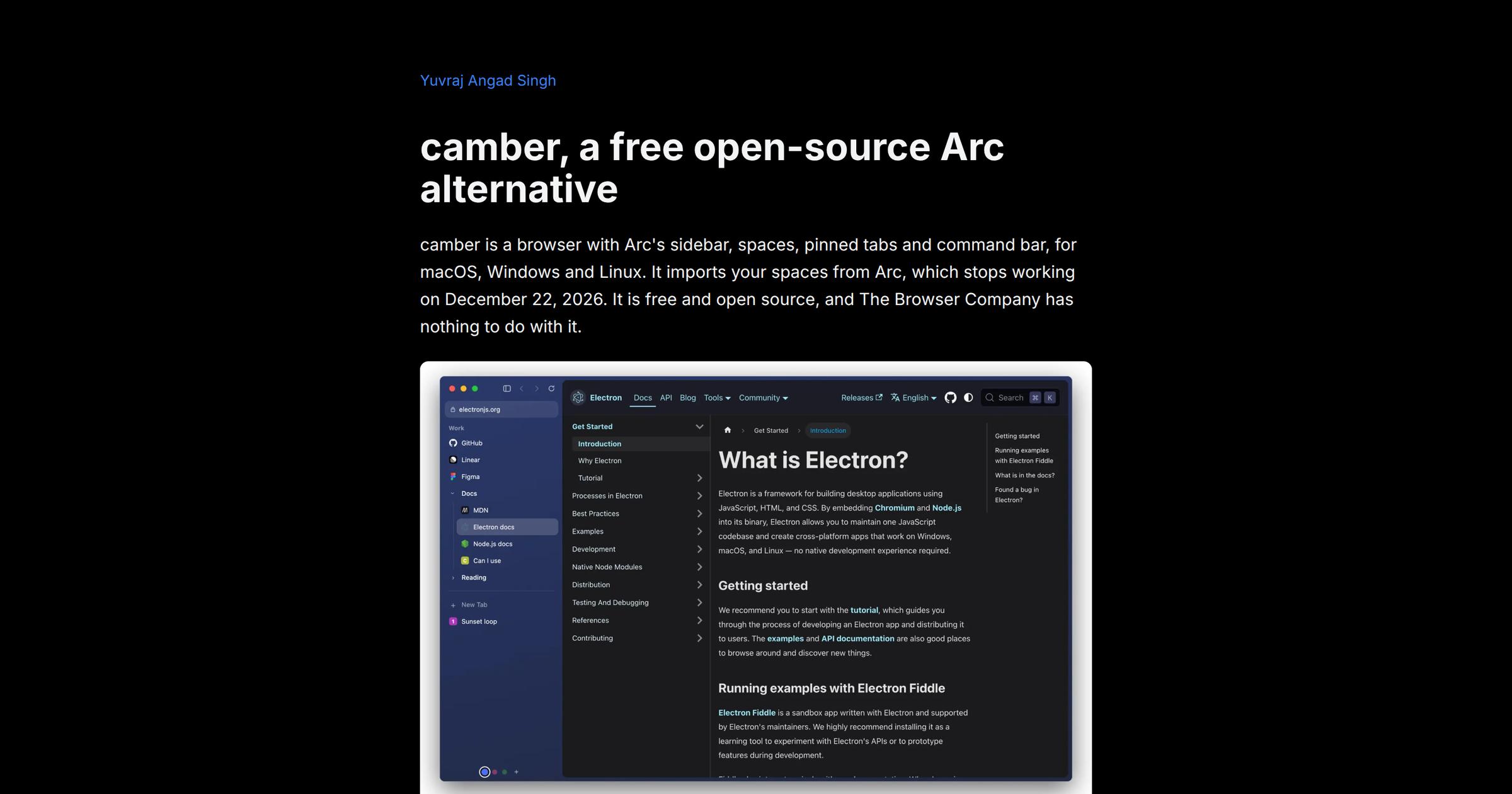
Each space is an independent browser profile, so Gmail, Slack, and work tools in one space stay logged in and separate from a personal space. Spaces have names, colors, and can share a profile as in Arc. They are displayed in a vertical sidebar with favorites, pinned tabs, and nested folders per space.
File > Import from Arc reads Arc's StorableSidebar.json from its default location on macOS and Windows. On Linux, copy the file and use File > Import Arc File. What transfers: spaces with names and colors, profiles, favorites, pinned tabs with custom names, nested folders, and today tabs. Importing again replaces the earlier import without adding duplicates.
Tabs you have not looked at for an hour unload from memory and stay as entries in the sidebar. With 23 tabs open across three spaces, camber measured 4.9 GB RSS, dropping to 0.85 GB after the idle unload on an M5 MacBook Air. The unload timer is configurable: 30 minutes, 1 hour, 3 hours, or off.
No sign-in is required. The browser has no analytics pipeline and no data collection. The only network request it makes for itself is a GitHub check for newer releases, once on startup and every 6 hours. All tabs and settings are stored locally in the app's user data folder.
Extensions install from the Chrome Web Store through File > Chrome Web Store. Their buttons appear in the sidebar. Camber runs on Chromium via Electron, the same rendering engine as Chrome, so most Chrome extensions work without modification.
Tab > Split with opens two tabs side by side within a space; click a side to make it active. Cmd+Shift+click a pinned tab to Peek at it in a panel over the current page without leaving it. Links from other apps open in a small camber window, and Cmd+O moves them into the current space.
Features
- Arc spaces with per-space browser profiles
- One-step Arc spaces import
- Idle tab memory unloading
- No account, no telemetry
- Chrome Web Store extension support
- Split view, Peek, and little windows
How to install
Download the installer for your system from GitHub Releases: https://github.com/yuvrajangadsingh/camber/releases/latest
Recommended for this setup
Strengths
- GPL-3.0 with public, forkable source: The full source is on GitHub under GPL-3.0-only. Unlike Arc (closed source, no fork possible), camber can be audited, modified, and forked. Releases include SHA256SUMS.txt for verification. The build pipeline runs on GitHub Actions with CI for macOS, Windows, and Linux.
- No account or telemetry, ever: There is no sign-in flow, no analytics SDK, and no usage tracking. The browser's only outbound request for itself is a GitHub release check. Settings and tabs stay on your machine. The project's privacy page documents exactly what it sends and keeps.
- Direct Arc migration in one step: The import reads Arc's StorableSidebar.json from its documented location on macOS and Windows (or from a manually copied file on Linux). Spaces with names, colors, and profiles transfer, as do favorites, pinned tabs with custom names, nested folders, and today tabs. Subsequent imports replace the previous one without adding copies.
- Cross-platform from day one: Installer packages ship for macOS (Apple Silicon and Intel .dmg), Windows x64 (.exe), and Linux x64 and arm64 (.deb and AppImage). The same Chromium version runs on every platform. No platform-specific source build is required to get a working browser.
Trade-offs
- No Widevine: DRM streaming does not work: Camber ships the standard Electron distribution, which includes no Widevine module. Netflix, Prime Video, Disney+, and Spotify web will not play protected content. Users who rely on streaming video services in their browser need a secondary browser for those sites.
- Builds are not code-signed: The installers are not notarized or signed. Opening camber on macOS requires right-clicking and selecting Open, or going to System Settings > Privacy & Security > Open Anyway after a first blocked attempt. On Windows, SmartScreen warns about an unknown publisher; More info, then Run anyway bypasses it.
- Version 0 feature gaps: 1Password does not work yet. Bitwarden installs and opens but autofill is untested. No sync across devices, no Boosts, no Live Folders, no Windows arm64 build. The README's known gaps list is the authority; check it before committing to camber as a daily driver. The README describes it as not yet ready for daily driving.
- Electron base overhead: Camber is built on Electron, not a native macOS or Windows shell. The idle-unload feature reduces memory use significantly: 4.9 GB to 0.85 GB with 23 tabs on an M5 MacBook Air per the README. The base overhead remains higher than a native browser. The README notes explicitly that Electron is not lighter than Arc's native shell.
Tech stack
FAQ
No. Camber is an independent project by Yuvraj Angad Singh and is not affiliated with The Browser Company. The Browser Company made Arc and is now building Dia, an AI-first macOS browser. Camber reuses the Arc layout concept with original code written from scratch, not Arc's closed source.
No. Camber uses a standard Electron build that does not include the Widevine DRM module. Netflix, Prime Video, Disney+, and Spotify web will not play protected content. If you rely on streaming services in your browser, you need to use a secondary browser for those sites or choose a browser that ships Widevine.
Yes. File > Import from Arc reads StorableSidebar.json from its default location on macOS and Windows automatically. On Linux, or when migrating from another computer, copy the file and use File > Import Arc File. Spaces with names, colors, and profiles transfer, as do favorites, pinned tabs with custom names, nested folders, and today tabs. Passwords, history, extensions, and bookmarks do not transfer.
It is functional but at v0, and the README describes it as not yet ready for daily driving. The installers are unsigned, which requires extra steps to open on macOS and Windows. Missing features include 1Password integration, sync across devices, and Widevine DRM. For general browsing and Arc-compatible spaces the browser works; for tasks that depend on the missing features, keep a backup browser.
No account is required. Camber has no analytics, no telemetry, and no usage tracking. The only network request it makes for itself is to GitHub to check for newer releases, once on startup and then every 6 hours. Your tabs, spaces, and settings are stored locally in the app's user data folder. The project's privacy page documents exactly what it sends and keeps.