
BetterCmdTab
Per-window Cmd+Tab switcher for macOS
Replaces Witch, Command Tab Plus, Contexts, Tabtab
Who it's for
BetterCmdTab lists every terminal session, every editor project window, and every browser window as a separate entry. Fuzzy search and per-app hotkeys let developers jump to a specific window by name rather than cycling through all apps.
You work in a single terminal and editor at a time; the native Cmd+Tab may be sufficient for that workflow.
Browser tab drill-in lets researchers jump to a specific Chrome or Safari tab from the switcher without visiting the browser and scrolling through tabs. The main window list can display each browser tab as its own row for even finer navigation.
You keep all sources in one browser window with tabs; the standard tab bar is enough for tab navigation in that case.
BetterCmdTab's live JSON config at ~/.config/bettercmdtab/config.json works directly with dotfile setups. Edit the file to change settings and they apply immediately; a generated schema.json gives editors autocomplete for every available key.
You do not use dotfiles or prefer GUI-only configuration; the in-app settings panel covers every option without touching the JSON file.
BetterCmdTab covers per-window switching, search, layouts, browser tab drill-in, and tiling, matching the core features of paid tools like Witch and Contexts, without a purchase. The Homebrew cask makes migration as simple as one command.
You rely on a feature exclusive to your current paid tool, such as a specific integration or support channel that BetterCmdTab does not yet offer.
The problem
The macOS built-in Cmd+Tab switches between apps, not individual windows. If you have three Chrome windows open, pressing Cmd+Tab shows one Chrome entry, and you get whichever window Chrome last focused. Minimized windows disappear from the switcher entirely; they can only be reached by holding Cmd+Tab, pressing Option, and clicking with the mouse. For anyone who works across multiple browser windows, multiple code editors, or multiple documents in the same app, the native switcher is a constant source of friction. The only way around it has been a paid macOS window switcher, most of which carry a one-time purchase fee or split features across free and Pro tiers.
How it works
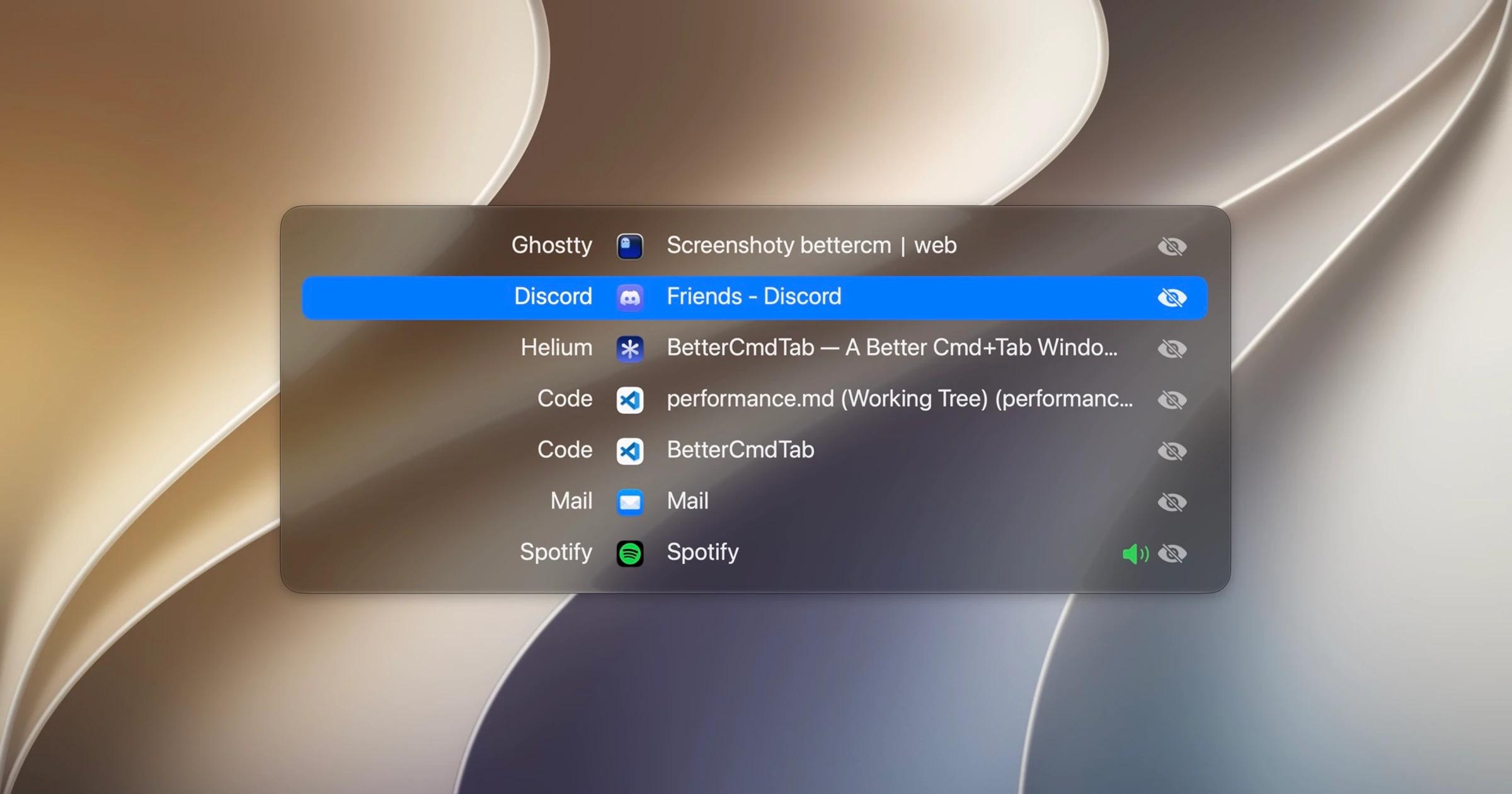
Every open window gets its own row in the switcher, including minimized windows and windows on other Spaces. Two Chrome windows or three terminal sessions each appear as separate entries, so you can reach any window directly without cycling through all windows of the same app with Cmd+`.
Switch between a window title list, an app icon grid, and live previews of every open window. Live previews show actual window contents in real time and require Screen Recording permission. Without that permission, the previews layout falls back to app icons instead of window captures.
Press / in the switcher to open a fuzzy search that matches both open windows and every installed app. Launch any installed app from the search results, even if it is not currently running. Type any letter without pressing / to jump directly to the first matching window by name.
Press the backslash key in the switcher to pick one specific tab inside Safari, Chrome, Arc, Brave, Edge, Vivaldi, Opera, Dia, Finder, or Terminal without leaving the switcher. Tabs can also appear as individual rows in the main window list. Each browser requires separate Automation access.
Tile any selected window to left half, right half, two-thirds, one-third, maximized, or centered using Ctrl+Cmd+arrow keys; pressing again cycles through the half, two-thirds, and one-third presets. Send a window to the next display without dragging. Close, minimize, zoom, hide, quit, and force-quit (Cmd+Opt+Q) are also available from within the switcher.
Features
- Per-window switching
- Three layout modes
- Fuzzy search and app launch
- Browser tab drill-in
- Window tiling and display management
How to install
Install via Homebrew or download the signed .dmg from GitHub Releases.
brew install --cask bettercmdtabRecommended for this setup
Strengths
- Fully free, no Pro tier or paywall: Every feature in BetterCmdTab is free, with no Pro tier, trial, license key, or account required. The product site lists 31 features, all unlocked in the free download. Paid macOS window switchers in the same category, including Witch and Contexts, charge for comparable functionality.
- Zero telemetry and no outgoing data: BetterCmdTab collects no analytics, crash data, or usage information. Its only network requests go to GitHub to check for updates, as documented in the README. No account is created and no data leaves the device, which matters for a tool that holds Accessibility permission.
- Live JSON config for dotfiles versioning: Every setting syncs with ~/.config/bettercmdtab/config.json in real time. Edit the file and the switcher reflects the change immediately without a restart; change a setting in the app and the file updates to match. A generated schema.json enables editor autocomplete for the config keys.
- Signed, notarized, and open source: The app is signed and notarized so Gatekeeper opens it without a security warning. Every line of code is public on GitHub under GPL-3.0, so the binary can be compared against the published source. For a tool that requires Accessibility permission, public source code is a material trust signal.
Trade-offs
- macOS 13+ only, no Windows or Linux support: BetterCmdTab runs on macOS 13 Ventura and later, on Apple Silicon and Intel. No Windows or Linux version exists. Users on macOS 12 Monterey and below cannot install it.
- Live previews require Screen Recording permission: The live window preview layout needs Screen Recording access. Without it, the preview layout shows app icons rather than window content, reducing its usefulness compared to the list or grid layouts. Users who prefer not to grant Screen Recording access get a less informative preview mode.
- New project launched May 2026: BetterCmdTab launched in May 2026 and has 853 GitHub stars and 9 open issues as of November 2026. It lacks the multi-year compatibility track record of paid alternatives like Witch or Contexts. Users who depend on a window switcher for critical workflows may prefer a more established tool while BetterCmdTab matures.
Tech stack
FAQ
Yes. Every feature is free with no Pro tier, trial, license key, or account. The source code is GPL-3.0 on GitHub. The app has no telemetry, analytics, or crash reporting, and its only network requests go to GitHub to check for updates.
Accessibility is required: without it, the app cannot intercept Cmd+Tab or read the list of open windows. Screen Recording is optional and needed only for live window previews; without it, the preview layout shows app icons instead of window content. Each browser you want tab drill-in for requires separate Automation access.
Both are open-source macOS window switchers. AltTab covers per-window switching with live window thumbnails. BetterCmdTab ships the same core switching plus app launching, browser tab drill-in, window tiling, per-app hotkeys, and force-quit from the switcher, all without any paid tier. If AltTab covers your window-switching needs, there is no reason to switch; BetterCmdTab fits users who want those extras without installing a second tool.
Choose Quit BetterCmdTab from its menu-bar icon and the native Cmd+Tab resumes immediately. To uninstall, quit first, then move the app to Trash or run `brew uninstall --cask bettercmdtab`. If the app is force-killed rather than quit, Cmd+Tab stops working until BetterCmdTab is relaunched.
macOS 13 Ventura and later, on both Apple Silicon and Intel Macs. On macOS 26 the panel uses Liquid Glass; on macOS 13 to 15 it falls back to the standard blurred material. Screen-sharing hide requires macOS 14.6 or later. A few features that need newer system APIs are noted in the app.