archify
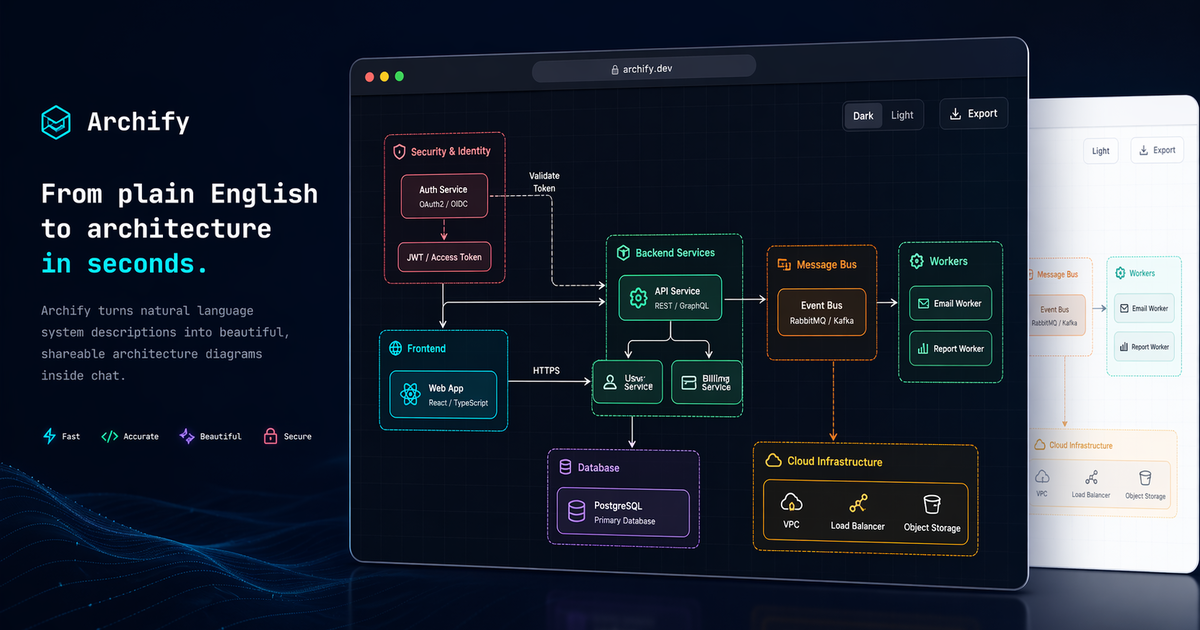
Technical diagrams from plain English in your coding agent.
Replaces Miro, Lucidchart, Eraser Io, Diagrams So, Napkin Ai
Who it's for
Ask the agent to generate a runtime architecture diagram from the repository before or during a pull request review. Archify produces a validated HTML artifact you can attach directly to the PR comment, giving reviewers a verifiable map of what changed without a separate diagram tool.
Skip if your team already maintains architecture diagrams in a dedicated tool that integrates into your PR workflow and the diagram format is agreed on. Archify adds the most value when no current diagram exists or diagrams are consistently out of date.
Describe planned components, connections, and cloud boundaries in chat. The agent generates a validated architecture diagram with service groupings, trust boundaries, and external dependencies. Use Architecture Delta to compare a planned topology against a previous snapshot before merging infrastructure changes.
Skip if your infrastructure-as-code tooling already generates topology graphs from your Terraform or Kubernetes manifests. Archify documents design intent described in prose, not live infrastructure state.
Use the Data Flow diagram type to map ETL pipelines, PII isolation boundaries, warehouse sync paths, and downstream consumers. The typed JSON source and generated HTML serve as a reference for governance reviews without requiring a separate diagramming subscription.
Skip if your data platform already generates lineage graphs from metadata, such as dbt docs or OpenLineage. Archify documents authored intent rather than extracting lineage from runtime telemetry.
Ask the agent to draw a request lifecycle, cache fallback path, or auth check flow as a Sequence diagram. The output shows who calls whom, in what order, and what returns, with interactive route tracing built into the HTML artifact and 4x PNG export for inclusion in docs or wikis.
Skip if your API documentation tooling such as Swagger UI or Redoc already generates sequence diagrams directly from your OpenAPI spec. Archify is for documenting flows described in prose or chat, not flows extracted from a machine-readable spec.
The problem
Technical diagrams start out useful and drift into fiction. Architecture docs drawn in Miro or Lucidchart are disconnected from the code: you open a separate tool, manually position nodes, and update by hand when the system changes. For teams who work in AI coding agents, this friction compounds: the agent can modify a codebase in minutes while the diagram lives in a separate browser tab, last updated before the previous sprint. The deeper challenge is verifiability. A hand-drawn diagram represents someone's intent, not the actual system. There is no source of truth, no validation step, and no way to check whether a drawn route reflects the real code path. Teams end up with diagrams they distrust and documentation that requires constant manual curation.
How it works
Architecture, Workflow, Sequence, Data Flow, and Lifecycle diagrams each use the visual language that fits the subject: swim lanes for workflows, participant timelines for sequences, state transitions for lifecycle diagrams. The agent picks the right type from your description, or you specify it directly in the prompt.
Every diagram renders from typed JSON that the skill validates before delivery. Schema, layout, HTML/SVG, route, and label-to-route clearance checks must all pass before a verified artifact replaces the previous output. Validation failures return machine-readable diagnostics naming the exact subject and its supported repair controls, not a Node.js stack trace.
The generated file is one HTML artifact with no external dependencies, no server, and no runtime. Open it in any browser and it works. Share it as a PR comment attachment, an email attachment, or a GitHub release asset without requiring recipients to install anything or hold an account.
PNG, JPEG, and WebP exports are rasterized natively at up to 4x source resolution by the browser, with no upsampling blur. SVG export ships with both dark and light variable sets plus a @media prefers-color-scheme rule, so one SVG file follows the reader's theme in a GitHub README. WebM captures motion for presentations.
Architecture Delta compares validated Before, Delta, and After snapshots and produces a machine receipt listing exact added, removed, changed, moved, and rerouted facts. Run it with the archify CLI compare command to attach a checked diff artifact to any pull request without manual annotation.
Every generated HTML file includes semantic node search, route tracing, upstream and downstream reach inspection, role comparison, guided stories, and a live overview radar. Readers can inspect and navigate the diagram with keyboard shortcuts without installing any additional tool or opening the agent again.
Features
- Five diagram types with distinct visual languages
- Typed JSON IR with atomic validation
- Self-contained HTML output, zero dependencies
- Ultra-crisp 4x export across five formats
- Architecture Delta for PR and design review
- Interactive viewer built into every artifact
How to install
Install archify by cloning the repository into your agent's skills directory; Claude Code reads skills from ~/.claude/skills/.
git clone https://github.com/tt-a1i/archify ~/.claude/skills/archifyRecommended for this setup
Strengths
- Validated output you can trust as documentation: Unlike hand-drawn diagrams in Miro or Lucidchart, every archify artifact passes atomic validation before delivery. Schema, layout, HTML/SVG, and route checks run on every generation. If any check fails, the previous verified diagram stays in place and diagnostics identify the exact subject. Teams can reference a generated diagram in a PR knowing it passed machine checks.
- MIT license with no hosted infrastructure required: The skill is MIT licensed, so you can modify it, distribute it, and use it commercially with no restrictions. Generated HTML artifacts are standalone files with no dependency on any archify server or service. Compare this to Miro or Eraser.io, where your diagrams live in the vendor's cloud and become inaccessible if you cancel your subscription.
- Conversational iteration without a diagram editor: Refine diagrams in natural language: 'add Redis', 'move auth to the left', 'highlight the rollback path'. The typed JSON source preserves unmodified structure between iterations, so the agent updates only what you named. No diagram editor to learn, no canvas to manage, no export-and-upload cycle.
- Four visual presets with coordinated dark and light themes: Classic, Signal Flow, Blueprint, and Editorial presets share one geometry contract and include coordinated dark and light themes that switch with a single key press. All four export cleanly at 4x resolution. Every artifact generated at any preset level looks production-ready without manual styling.
Trade-offs
- Requires an AI coding agent to generate diagrams: Archify is a skill for AI coding agents, not a standalone diagramming tool. You need Cursor, Claude Code, Codex CLI, OpenCode, or a compatible harness running to generate diagrams. If your team does not work in these environments, the setup overhead is higher than opening Miro or Lucidchart in a browser.
- Active development version with API changes expected: The current release is versioned as v2.16.0-dev.0, which signals an active development cycle. The typed JSON IR format and CLI command interface may change between versions. Teams building automation or CI pipelines around archify should monitor the changelog before upgrading.
- Node.js dependency for CLI validation and preview: Diagram generation happens inside the agent, but CLI commands for validation, preview, and delivery require Node.js. The preview loop also binds to localhost and requires a desktop environment to open the browser automatically. Team members who only need to view generated HTML artifacts are unaffected, but maintaining the CLI workflow adds a Node.js dependency.
Tech stack
FAQ
Archify supports Cursor, Claude Code, Codex CLI, OpenCode, and Raven. A community integration for the DeepSeek Harness is also available as a separate plugin. Install the skill globally with: npx skills add tt-a1i/archify -g. An agent switcher on the project page generates exact commands for each supported environment.
No. Archify is an agent skill with no hosted service requirement. The output is a self-contained HTML file that runs in any browser with no dependencies. The only runtime requirement is Node.js for optional CLI commands such as validation, the preview loop, and the Architecture Delta compare command. No API key or cloud account is needed to generate or view diagrams.
Miro and Lucidchart are manual diagramming tools you open in a browser and edit by dragging and dropping shapes. Archify generates diagrams from natural-language descriptions inside your AI coding agent, with typed JSON source and atomic validation before delivery. You iterate in chat rather than in a visual editor. The output is a portable HTML file you own, not a cloud document behind a vendor login. Archify does not support freeform whiteboarding or general-purpose shape libraries.
Archify supports five diagram types: Architecture (system components, cloud resources, databases, and trust boundaries), Workflow (swim-lane processes with branching paths and approval gates), Sequence (API call chains, cache fallback paths, and request lifecycles), Data Flow (pipelines, lineage, PII boundaries, and downstream consumers), and Lifecycle (state machines and transition diagrams with retries and cancellation paths). Each type uses the visual language best suited to its subject.
Yes. Archify is MIT licensed, which means you can use it, modify it, fork it, and use it commercially with no restrictions. The skill itself is free; the only ongoing cost is the AI coding agent subscription or environment you already use. Generated HTML artifacts carry no additional license from the skill.