
Concat
Watermark-free CapCut alternative for desktop video editing
Replaces Canva, Adobe Express, Veed Io
Who it's for
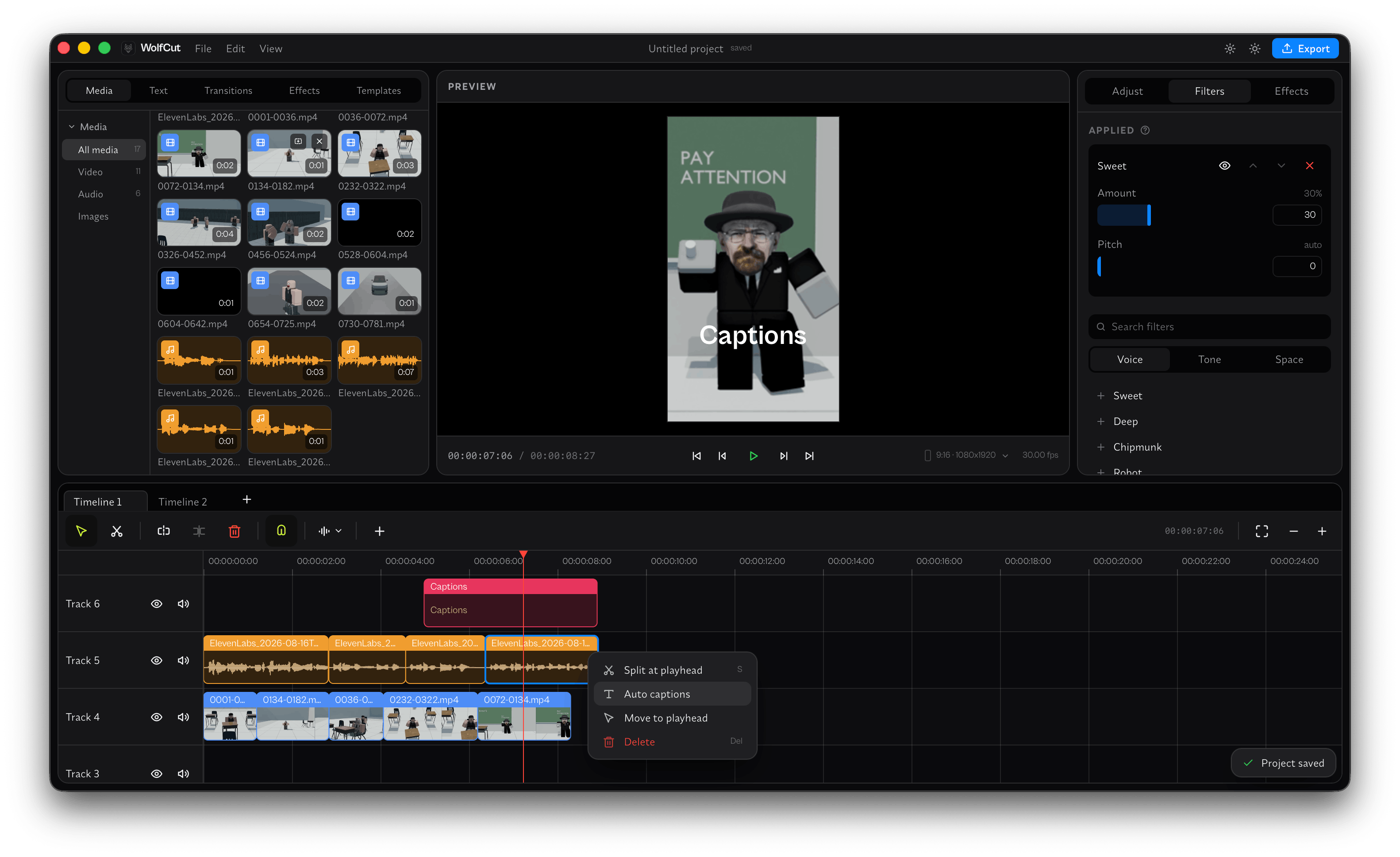
WolfCut covers the core short-form editing workflow: multi-track timeline, voice filters, and auto-captions. Creators who use CapCut mainly to trim clips, add captions, and apply a simple audio effect can replicate that workflow in WolfCut without the watermark or subscription.
Creators who rely on CapCut's built-in library of effects, stickers, transitions, or green screen tools will find WolfCut's current alpha feature set too limited for their workflow.
WolfCut processes all footage locally. No video or audio is sent to a remote server during captioning or export. Client footage never leaves your machine, unlike VEED.IO or CapCut, which process media server-side.
Editors who need cloud storage, multi-device access, or team collaboration features will not find those capabilities in WolfCut, which has no cloud component.
WolfCut runs natively on Linux as a Tauri application and is one of the few free video editors targeting Linux as a first-class platform. CapCut has no official Linux client and VEED.IO requires a browser with no offline path.
Linux users who need a mature, feature-complete editor with broad export format support and GPU acceleration should consider DaVinci Resolve or Kdenlive while WolfCut matures.
WolfCut is built with Tauri (Rust) and React (TypeScript), a modern stack for native desktop apps. The project is actively seeking contributors and points to a GitHub Discussion for onboarding. With a small codebase and daily pushes, new contributors have a clear surface area to work on.
Developers wanting an established contributor workflow with a full test suite, triage process, and issue backlog should look elsewhere; WolfCut is at an early organizational stage.
The problem
Consumer video editors have moved to a subscription model where the basic free tier is deliberately limited. CapCut adds watermarks to exports unless you subscribe. VEED.IO caps resolution and download quality on free accounts. Adobe Express restricts the template and asset library behind a paid plan. Canva free-tier video exports are watermarked or downgraded. For content creators making clips, short-form videos, or social media content, this creates a constant ceiling: the tool works until you need to export clean footage, at which point you either pay or accept a degraded result. Self-hosted or locally installed tools sidestep this entirely, but most video editors have no offline path at all.
How it works
Arrange video and audio across multiple independent tracks on a single timeline. Layers clips, audio, and effects without bouncing down to a single track first. Standard in desktop editors like DaVinci Resolve and Premiere, but absent from most browser-based tools like VEED.IO.
Applies audio effects and voice filters using ffmpeg, an industry-standard open source media processing library. Runs locally without uploading audio to a cloud service, keeping voice recordings private. Works on any audio track in the timeline.
Transcribes speech and generates captions directly on your device using whisper.cpp, a local implementation of OpenAI's Whisper speech recognition model. No audio leaves your machine and no API key is required. Supports the languages covered by Whisper's base models.
Save video compositions as reusable templates and apply them to new projects. Avoids rebuilding common layouts from scratch each session. The roadmap plans a community template registry similar to npm, though that feature is not yet shipped in the current alpha.
All exports are clean with no watermarks, no branded end cards, and no quality downgrade on free accounts. This is a hard guarantee in the codebase, not a paid unlock. Directly addresses CapCut's behavior of appending its watermark to free exports.
Installs and runs natively on Windows (tested), macOS (tested), and Linux. Built with Tauri (Rust plus a native WebView), so it uses system resources efficiently rather than bundling a full Chromium instance. Linux support covers a platform where CapCut has no official client.
Features
- Multi-track timeline
- Voice filters via ffmpeg
- Local auto-captions via whisper.cpp
- Save and reuse templates
- No watermarks on export
- Cross-platform native app
Recommended for this setup
Strengths
- No account or subscription required: Download and run WolfCut with no sign-in, no email address, and no subscription tier. Commercial editors like CapCut and VEED.IO require accounts to save projects or access features. WolfCut starts editing immediately without any registration step.
- Local-only processing: Video files, audio tracks, and auto-captions are all processed on your device using ffmpeg and whisper.cpp. Nothing is uploaded to a server. For creators handling client footage or sensitive content, this eliminates the data handling risk that comes with browser-based editors.
- AGPL-3.0 license with no paywall: Licensed under AGPL-3.0, which allows personal and commercial use of the application. You can create and distribute content without restriction. No premium tier sits behind the free download, and no feature is locked to a paid plan.
- Actively maintained: First committed in August 2026 and already at version 0.2.0 with a functional core editing pipeline. The repository shows daily pushes and a detailed roadmap with specific planned features. Early-stage but clearly under active development with a Discord community.
Trade-offs
- Alpha pre-release stability: WolfCut is at version 0.2.0 and self-describes as pre-release alpha. The README explicitly encourages users to download builds and find where the application breaks. Crashes, missing features, and rough edges are expected. Not suitable for professional or client work where losing a project would be costly.
- Very young project with a small community: The repository was created in August 2026 and had 142 stars and 4 forks at time of writing. Third-party tutorials, documentation, and community support do not yet exist. Support means reading the README or joining the Discord server. Contributors are the primary testers.
- Effects and transitions not yet shipped: The roadmap lists a scalable effects and transitions library, noise cancellation, auto reframe, and object tracking as future features. The current alpha does not include the variety of visual effects, stickers, or preset transitions that CapCut provides. Creators whose workflow depends on ready-made effects will find the tool limited at this stage.
Tech stack
FAQ
Yes. WolfCut is licensed under AGPL-3.0 and free to download and use without any subscription or paid tier. There is no premium unlock, no watermark on exports, and no usage cap. The cost is zero for personal and commercial use alike.
No. WolfCut explicitly guarantees no watermarks ever on any export. This is its primary differentiator from CapCut, which watermarks free-tier exports, and from VEED.IO, which watermarks or quality-degrades exports on the free plan. All WolfCut exports are clean regardless of use.
WolfCut runs on Windows (tested), macOS (tested), and Linux. It is a native desktop application built with Tauri, so it installs as a regular desktop app. Download the binary for your platform from the GitHub Releases page. No account or browser required.
Not yet. WolfCut is at version 0.2.0 and self-describes as alpha and pre-release. The core editing pipeline is functional, but crashes and rough edges are expected. The project encourages users to test builds and report where things break. Use it for personal projects and experimentation, not for client deliverables where losing work would be a problem.
Yes. WolfCut uses whisper.cpp, a local implementation of OpenAI's Whisper speech recognition model, to generate captions directly on your device. No audio is sent to a remote service. Caption text highlighting with timestamp sync is listed on the roadmap but is not yet shipped in the current alpha.