
Torrentplayer
Stream any torrent instantly, skip anywhere in a second
Replaces —
Who it's for
TorrentPlayer preloads the best search result so pressing play starts immediately, and sub-second seeking means you can skip the opening credits or jump to a specific scene without waiting for sequential download to reach that point.
You need playback on a TV or mobile device.
The queue downloads in lecture order, natural-sorting filenames so Lecture 2 precedes Lecture 10. You can skip to a specific timestamp in a later lecture while earlier ones continue downloading in the background.
You need mobile or offline sync to a phone.
M4B and other audio formats stream and seek with the same engine used for video. The now-playing view tracks chapter position, and the queue preserves book order across restarts using locally stored watch progress.
You want a dedicated audiobook app with library sync across devices.
The built-in WireGuard tunnel requires no administrator rights and no separate VPN application, and the kill switch prevents any traffic from reaching the internet over the direct connection if the tunnel drops. No account or telemetry means there is no usage record on a third-party server.
You already use a VPN client with its own kill switch and do not need an additional built-in option.
The problem
Standard torrent clients download files sequentially from the beginning, so jumping to the middle of a film or lecture requires waiting for all preceding data to arrive first. Dedicated streaming torrent players either depend on a local relay server, lack a kill-switch VPN, collect analytics, or stopped receiving updates years ago. TorrentPlayer addresses all of these gaps with its own streaming engine built specifically for random-access playback, a built-in WireGuard tunnel with a kill switch, and a zero-telemetry design.
How it works
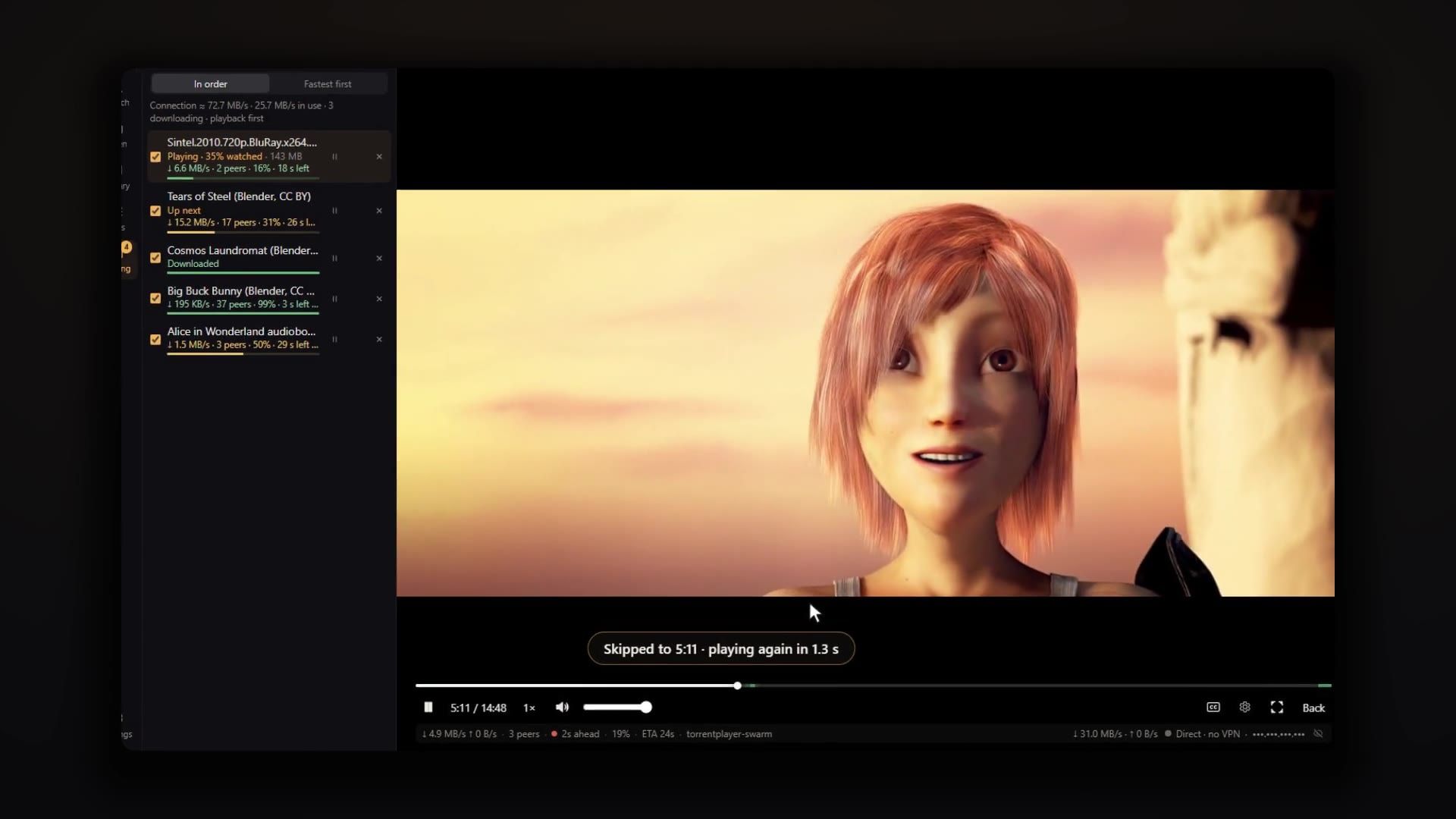
TorrentPlayer's own engine cancels stale requests after a seek and immediately asks the fastest peers for the new playhead position, duplicating the most urgent blocks to a second peer so a single slow peer cannot stall playback. Measured median skip times are 0.27 s on a fast link and 0.70 s on a public swarm.
Every torrent you add downloads in the background while you watch. TorrentPlayer measures your connection every second and gives the actively playing torrent first access to bandwidth; the rest of the queue pauses briefly only if the playback buffer runs short, then resumes automatically.
A WireGuard tunnel runs inside the app without administrator rights or a separate VPN application. Both WireGuard and SOCKS5 modes include a kill switch: if the tunnel or proxy drops, all traffic stops and no connection falls back to the direct route.
MP4, MKV, WebM, FLAC, AAC/M4A/M4B, Ogg, Opus, and WAV files all stream with the same skip-anywhere behaviour. Dolby and DTS audio tracks are converted to AAC in real time by a bundled FFmpeg instance. Subtitles found in the torrent are matched to the video automatically.
Fully downloaded video and audio files are saved with their original names and formats in the system Downloads folder. A Copy path button appears beside Play once saving is complete, and the Library's Remove torrent action deletes saved files and cached pieces after confirmation.
The app sends no telemetry, analytics, or crash reports. The only outbound traffic is BitTorrent data for active torrents, an optional public torrent index search, linked .torrent file fetches, and an optional public-IP check that carries no identifiers and can be disabled in Settings.
Features
- Sub-second random-access seeking
- Background queue with playback priority
- Built-in WireGuard and SOCKS5 with kill switch
- Video, music, and audiobook support
- Complete saved files with Copy path
- Zero telemetry and no account required
Recommended for this setup
Strengths
- Streaming engine built for playback, not bulk download: Unlike clients that treat playback as a side effect of downloading, TorrentPlayer's `torrentplayer-swarm` engine was written specifically for random-access streaming. It manages piece priorities, peer selection, and buffer sizing around playback needs rather than download completion.
- Fully open source including the streaming engine: Every component, including the streaming engine, is released under MIT or Apache-2.0. Stremio's streaming server, by contrast, is proprietary according to the project's own comparison table.
- Privacy by design with no server dependency: There is no TorrentPlayer server, cloud cache, or relay. Your computer connects directly to the swarm, and the built-in kill switch ensures no traffic escapes over the direct connection if the VPN tunnel drops. Watch history is stored in a local SQLite database and never transmitted.
- Actively maintained with documented performance benchmarks: The project ships a bundled benchmark tool, `torrentplayer-bench`, that measures start-up and skip latency from an empty cache. Version 0.3.2 was current as of the page capture, and the comparison table was last checked against competitor products on 20 October 2026.
Trade-offs
- Desktop only; no mobile or TV support: TorrentPlayer runs on Windows 10/11 (x64), macOS 13 or later (Apple Silicon and Intel), and Linux (x64). It does not run on Android, iOS, tvOS, or smart TV platforms. The project's own comparison notes that Stremio and Kodi are better fits when TV or phone playback is needed.
- Codec support limited by the system web engine: Video decoding uses the system's web engine, so playback is limited to formats that engine supports, commonly H.264, VP9, and AV1 with AAC, Opus, or MP3 audio. The app warns when a file uses a codec the system cannot decode. Players built on VLC or libmpv support more codecs today, as the project documentation acknowledges.
- Early preview; installers are not yet code-signed: TorrentPlayer is described as an early preview. Releases are not code-signed, so Windows SmartScreen and macOS Gatekeeper present a warning on first launch and require an extra click to proceed.
- Speed depends entirely on the swarm: Because video comes directly from peers with no server cache, a torrent with few seeders can only stream as fast as those seeders allow. Debrid or cloud services buffer content server-side and can deliver at plan-level speeds regardless of the original swarm size.
Tech stack
FAQ
When you drag the seek bar, TorrentPlayer's own streaming engine cancels piece requests that are no longer needed and immediately asks the fastest connected peers for the pieces at the new position. It also sends the most urgent pieces to a second peer simultaneously so that a single slow peer cannot stall playback. The measured median skip time is 0.27 s on a fast local link and 0.70 s on a public swarm.
No. There is no account to create, no login screen, and no paid tier. The app is free and licensed MIT or Apache-2.0. Open it and paste a magnet link, drop a .torrent file, or use the built-in search.
BitTorrent traffic for torrents you play or queue, an optional search query sent to a public torrent index, .torrent files fetched from their hosting location, and an optional public-IP check using icanhazip.com that carries no identifiers. There is no telemetry, analytics, or crash reporting. The public-IP check can be disabled in Settings. All traffic routes through the selected VPN, WireGuard tunnel, or proxy, and nothing is sent while the kill switch is engaged.
In WireGuard and SOCKS5 modes, the kill switch halts all traffic and closes open connections immediately. Nothing falls back to the direct connection. Traffic resumes automatically when the tunnel is restored.
Finished video and audio files are saved with their original names and formats in a TorrentPlayer folder inside the system Downloads directory by default. The save location is shown in Settings under Downloads and storage. Once a file is fully saved, a Copy path button appears beside Play. The Library's Remove torrent action deletes both the saved file and the cached pieces after confirmation.