
Techo5
Local voice satellite firmware for Echo Show and Echo Dot devices
Replaces Amazon Alexa
Who it's for
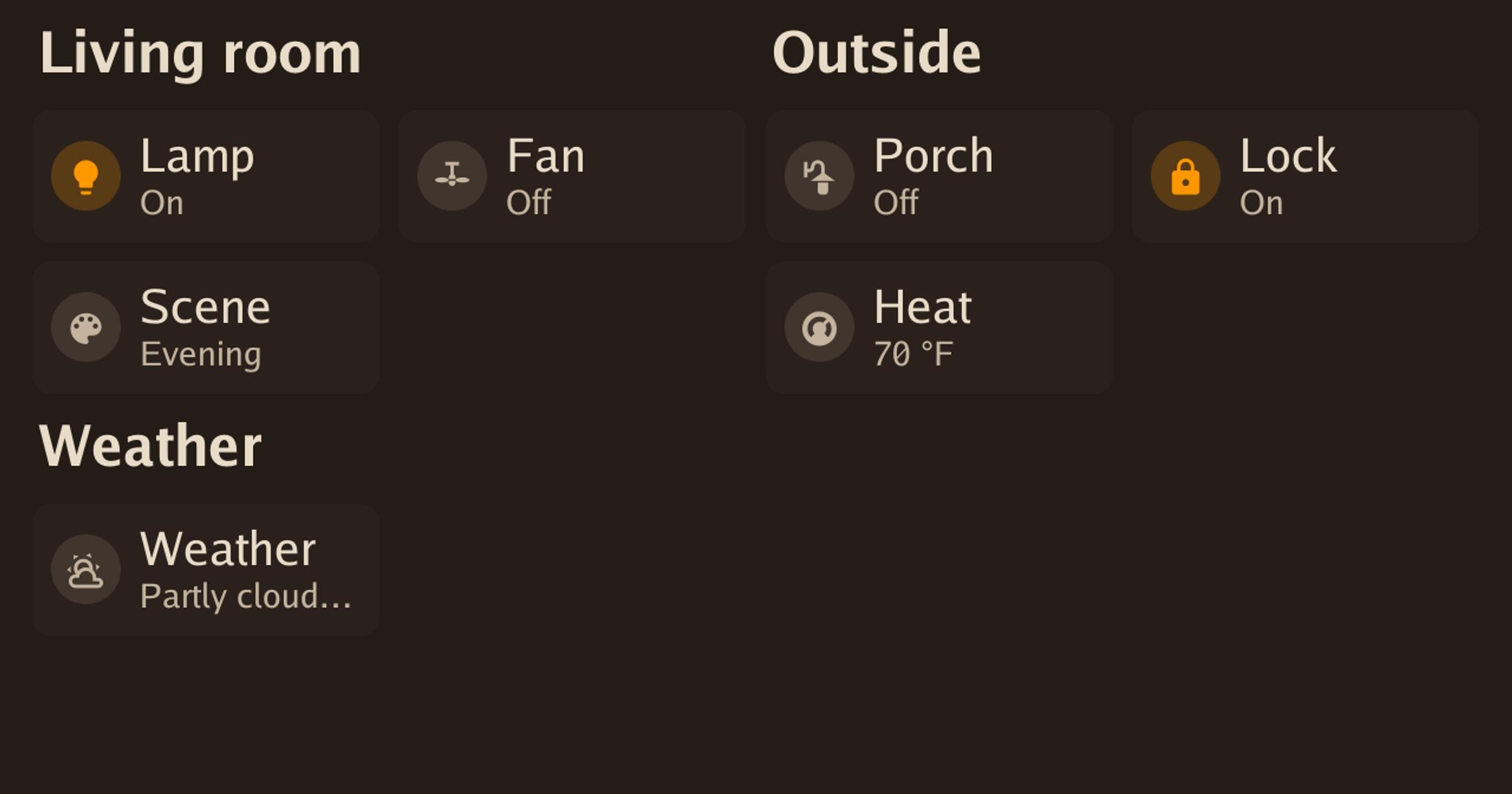
TECHO5 turns the Echo Show's touch screen into a fully integrated Home Assistant control panel, with alarms, to-do lists, entity tiles, weather, and media. Voice commands go directly to Home Assistant Assist, with no cloud relay. The hardware cost has already been paid.
If your Echo is newer than 2021, no public unlock exists and TECHO5 cannot be installed. Also skip if your household relies on Alexa Skills, Amazon Music, or any Amazon cloud feature, all of which are unavailable after flashing.
Every voice request is processed locally by microwakeword and Home Assistant. No audio leaves the device for detection or transcription unless you configure an external speech-to-text service. The firmware records nothing to Amazon.
If you need a commercially supported voice assistant with guaranteed uptime and feature parity to Alexa or Google Assistant, a commercial subscription service is a more reliable choice. TECHO5 requires Home Assistant and comfort with flashing hardware.
TECHO5 turns each Echo into a synchronized Snapcast client, joining it to the same audio stream as other Snapcast speakers in the house. The Echo's speaker hardware becomes a network audio endpoint without any Amazon Music subscription.
If you do not run a Snapcast server, this feature is not relevant to your setup.
With AirPlay switched on, the Echo Show or Echo Dot joins an AirPlay 2 group alongside Apple HomePod or other AirPlay 2 speakers. The iPhone's volume slider controls the device's volume directly, and the Echo can be a speaker in a whole-house AirPlay 2 setup.
If you use Android or Windows as your primary audio source and do not have an Apple device, AirPlay 2 is not applicable.
The problem
Amazon Echo Show and Echo Dot devices have good microphones, usable screens, and decent speakers. But every voice request flows through Amazon's servers, the wake word activates Amazon's software, and the data-sharing agreement comes with the device. When Amazon layers Alexa+ as a subscription tier and gates features behind it, the value proposition of that hardware shifts without the owner's consent. Repurposing the hardware for a local smart home setup has historically required either accepting Amazon's terms or scrapping the device. The devices run a locked-down fork of Android (Fire OS), and the bootloader is not intended to be opened. Without a firmware replacement, there is no path to running a local voice assistant on this hardware.
How it works
TECHO5 flashes a minimal Alpine Linux image onto the Echo Show or Echo Dot hardware, removing Fire OS, the Alexa agent, and the Amazon cloud dependency entirely. The resulting system boots in seconds, leaves more RAM available for the daemon and the UI, and gives SSH access to the running device.
The Go daemon uses microwakeword to detect a wake word entirely on the device's own microphones, then sends the transcribed request to Home Assistant via its native API. No audio leaves the device until the wake word triggers, and even then it goes to your local Home Assistant instance, not to Amazon.
The daemon draws clock, weather with animated rain and sunrise effects, alarms, to-do lists from Home Assistant, music playback with Now Playing, and tile dashboards for controlling home entities. Text size is adjustable from 70% to 125%, and brightness goes as low as 5%.
Updates write to the inactive A/B partition; the device boots from it on success, leaving the previous working image available if anything goes wrong. SSH is available throughout for diagnostics and manual configuration.
With AirPlay switched on, an iPhone or Mac can stream audio to the device or include it in an AirPlay 2 group. The device can also join a Snapcast setup as a synchronized client, playing in step with other Snapcast speakers in the house.
TECHO5 supports six Echo models in daily use, including both generations of the Echo Show 5 and Show 8. The Echo Show 8 2nd gen runs a 64-bit mainline Linux kernel; the Show 5 and older models share the same daemon binary. TECHO5 Panel extends support to Android tablets and the Meta Portal via an app.
Features
- Alpine Linux base, no Fire OS or Alexa
- On-device wake word and Home Assistant integration
- Touch screen UI with weather, alarms, and media
- A/B over-the-air updates and SSH access
- AirPlay 2 and Snapcast client support
- Runs on Echo Show 5, Show 8, Echo Spot, and Echo Dot
How to install
Download the TECHO5 firmware image for your Echo Show or Echo Dot model from GitHub Releases: https://github.com/HuskerMinion/techo5/releases/latest
Recommended for this setup
Strengths
- MIT license with no cloud dependency or account required: The firmware is MIT licensed and routes no data to Amazon or any third party unless you configure it to. Voice processing happens on the device or on your local Home Assistant instance. There is no Amazon account required after flashing; the device no longer contacts Amazon's servers.
- On-device wake word detection via microwakeword: The microwakeword engine runs the wake word entirely on the device's own processor, with no audio streaming to an external server for detection. Wake word scores are visible in the setup page so you can tune the threshold for your room. Custom wake words can be trained offline using the companion wakesmith tool.
- Active development across multiple Echo models: The project had 636 stars and 110 forks as of November 2026, with updates shipping frequently through the fall. Releases add features such as call-by-wake-word, external microphone processing, Snapcast support, and additional screen language support. The project is used daily across six Echo hardware variants.
- Full Linux environment with SSH on the device: TECHO5 gives full SSH access to a standard Alpine Linux environment running on the Echo hardware. This means you can install additional packages, inspect logs, modify the daemon configuration, and troubleshoot hardware directly, something the locked Fire OS never permitted.
Trade-offs
- Requires an irreversible bootloader exploit to install: Installing TECHO5 requires running a bootloader exploit (amonet) to unlock the Echo hardware. This step is irreversible: once unlocked, the device cannot return to its original locked state from Amazon's perspective. The process requires physical access and comfort with hardware flashing procedures.
- No support for Echo hardware made after 2021: No Echo device manufactured after 2021 has a known public unlock, so TECHO5 only runs on older hardware. The Echo Show 5 (1st and 2nd gen, 2019 and 2021) and Echo Show 8 (1st and 2nd gen, 2019 and 2021) are supported; newer Echo devices with updated bootloaders are not.
- Amazon Alexa features are unavailable after flashing: TECHO5 replaces Alexa entirely. Amazon shopping, Alexa Skills, Amazon Music, Drop In to other Alexa devices in the household, and any feature tied to Amazon's cloud are gone after installation. Voice control works through Home Assistant only; capabilities depend on what Home Assistant and its integrations support.
Tech stack
FAQ
Installing TECHO5 uses a bootloader exploit to unlock the device, which is an irreversible step. The device will no longer run Fire OS or Amazon's software. It does not physically brick the hardware, and A/B OTA updates mean a failed software update does not leave the device unbootable. The warranty with Amazon is voided. If you need to retain Amazon support or the original Alexa experience, do not proceed.
TECHO5 supports Echo Show 5 (1st and 2nd gen, 2019 and 2021), Echo Show 8 (1st and 2nd gen, 2019 and 2021), Echo Spot 1st gen, Echo Dot 2nd and 3rd gen, and the Echo 2nd gen. No Echo made after 2021 has a public unlock. Android tablets and the Meta Portal are supported via the TECHO5 Panel app. The Skylight Calendar 15 is supported as an experimental port.
Yes. TECHO5 connects to your local Home Assistant instance for voice commands, alarms, to-do lists, entity control, and media. Without a running Home Assistant instance on your local network, most of the device's features will not work. Home Assistant is free and self-hosted.
Yes. The companion wakesmith tool trains a custom wake word on your own computer using synthetic speech and real recordings taken from the device. The setup page can record takes of a wake word directly on the device's microphones. Wake word sensitivity is tunable from the setup page, and wake word scores are shown live so you can calibrate for your room.
Both are supported. AirPlay 2 lets an iPhone or Mac stream audio to the device or include it in an AirPlay 2 group, with volume control from the Apple device. Snapcast client support lets TECHO5 join a Snapcast server as a synchronized speaker alongside other Snapcast clients in the house. Both features are opt-in and configured from the setup page.