
Snipe It
Self-hosted IT asset management for hardware, licenses, consumables.
Replaces Asset Panda, Manageengine Assetexplorer, Lansweeper, Invgate Asset Management, Ezofficeinventory
Who it's for
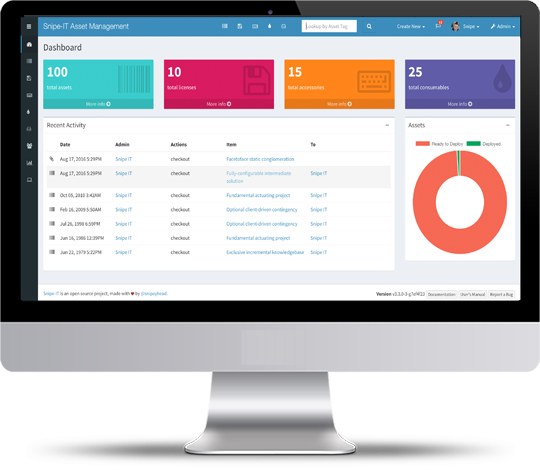
Teams managing laptops, desktops, servers, and peripherals across multiple users and locations use Snipe-IT to keep a live inventory. Each asset has a record tied to its assigned user, location, and history, which matters for onboarding, offboarding, and compliance reporting.
If your hardware inventory is under 50 items and changes rarely, a shared spreadsheet is faster to set up and cheaper to maintain.
The check-in and check-out workflow tracks whether a device is currently assigned and who has it. Consumable tracking handles supplies like cables and adapters. The AGPL-3.0 self-hosted path means no subscription cost, which fits organizations with tight technology budgets.
Organizations without server infrastructure or an IT admin to maintain a PHP application should consider the paid cloud hosting plan rather than self-hosting.
License management tracks purchased seats, expiration dates, and current assignments in one place. This gives compliance officers a single source for verifying license counts before a software audit and identifying unused seats worth canceling or reassigning.
Teams using a dedicated software asset management platform that already includes license tracking will find Snipe-IT's license module redundant.
Third-party scripts for Jamf, Kandji, and UniFi auto-sync devices into Snipe-IT, removing manual entry of hardware specs. This suits teams already running MDM tooling who want a separate asset register with audit trails and no double data entry.
If your MDM platform already provides a full asset register with audit trails, such as Microsoft Intune's device inventory, adding Snipe-IT creates duplicate records that need ongoing reconciliation.
The problem
IT asset management without a dedicated system is a slow-motion failure. Hardware disappears between desk moves, software licenses expire while renewal notices pile up in inboxes, and the audit trail for a decommissioned laptop is whatever someone typed into a spreadsheet six months ago. Small teams manage with shared documents; larger teams eventually produce lists that are months out of date and missing the details that matter for insurance, compliance, or budget planning. The challenge compounds at scale. Tracking hundreds of assets across dozens of users means the inventory data is outdated before it is finished. When an auditor, an insurance claim, or a compliance review requires accurate records, the gap between what the spreadsheet says and what is actually true becomes expensive to explain.
How it works
Tracks each physical asset through its lifecycle from purchase date and cost through assigned user, location, and depreciation schedule. Depreciation is calculated automatically, giving finance teams the numbers they need for accounting without manual spreadsheet work. Serial numbers, warranty expiration dates, and custom fields are stored per asset.
Tracks software licenses by seat count, purchase type, and expiration date. Snipe-IT flags licenses nearing expiration and shows how many seats are in use versus available across the organization, preventing both over-purchasing and compliance violations from too few seats.
Every asset assignment is logged with a timestamp and the user responsible. When hardware is checked out to a new employee or returned after a project, the full history stays on the asset record. This audit trail supports HR handoffs, compliance reviews, and incident investigations.
A documented JSON REST API covers core operations including creating assets, querying inventory, and managing users and assignments. Third-party integrations exist for Jamf, Kandji, UniFi, and Google Apps Scripts. Community-built libraries cover PowerShell, Python, .NET, Perl, and Go.
Assets can be labeled with barcodes or QR codes and scanned using third-party mobile apps available for iOS and Android. This speeds up physical inventory audits and removes manual lookup by serial number during check-in and check-out workflows.
Beyond hardware assets and licenses, Snipe-IT tracks consumables (items that deplete, like cables and toner) and components (items installed into assets, like RAM and storage drives). Minimum quantity alerts fire when consumable stock falls below a set threshold.
Features
- Hardware Asset Tracking with Depreciation
- Software License Management
- Asset Check-in and Check-out with Audit Trail
- REST API for Custom Integrations
- Barcode and QR Code Scanning
- Consumable and Component Tracking
How to install
Self-hosting uses a PHP server with MySQL or MariaDB, or Docker via the official image at snipe/snipe-it.
git clone https://github.com/grokability/snipe-itRecommended for this setup
Strengths
- Free to Self-Host with No Per-Asset Fees: Self-hosting Snipe-IT is free under AGPL-3.0 with no per-asset, per-user, or monthly subscription charges. Asset Panda, ManageEngine AssetExplorer, and EZOfficeInventory all charge recurring fees tied to asset count. A Snipe-IT deployment costs only the server it runs on.
- Over a Decade of Continuous Development: The project started in 2013 and has been maintained without interruption, with releases every few weeks. More than 330 contributors have made over 12,000 commits. This history means most common IT asset management edge cases have already been addressed in the codebase.
- Active Third-Party Ecosystem: The REST API has generated a documented ecosystem of integration libraries and sync scripts. PowerShell, Python, .NET, Perl, and Go wrappers exist; dedicated sync tools cover Jamf, Kandji, and UniFi; and a Snipe-IT plugin for Jira Service Desk is available on the Atlassian Marketplace.
- Security Controls Included in Every Installation: Snipe-IT ships with bcrypt password hashing, brute-force prevention, two-factor authentication, and HTTPS-only cookie enforcement. For IT teams managing access to sensitive hardware and license records, these controls are included in every installation rather than sold as premium add-ons.
Trade-offs
- AGPL-3.0 Restricts Offering It as a Hosted Service: Internal use and self-hosting for your own organization are permitted under AGPL-3.0, including in commercial environments. What AGPL-3.0 prohibits is offering a modified version of Snipe-IT as a hosted service to third parties without publishing your source changes. Teams running it for themselves face no practical restriction.
- Self-Hosting Requires PHP Server Maintenance: Snipe-IT runs on PHP and MySQL, so someone on your team must handle PHP version upgrades, database backups, and security patching. The Docker image reduces this effort but does not eliminate it. Organizations with no server experience should evaluate the paid cloud hosting option before starting a self-hosted deployment.
- No Official First-Party Mobile App: The official Snipe-IT project does not ship a native mobile app. Barcode scanning and field inventory work depend on third-party apps built against the REST API. The apps work for the core check-in, check-out, and scanning use case, but feature parity with the web interface varies by app.
Tech stack
FAQ
Yes, when self-hosted under AGPL-3.0. There are no per-user, per-asset, or feature-tier fees on a self-hosted installation. Paid plans are available through the official provider for teams that want managed cloud hosting with a 99.99% SLA and dedicated support.
Snipe-IT tracks hardware assets such as laptops, desktops, servers, and peripherals; software licenses with seat counts and expiration dates; accessories like keyboards and cables; components such as RAM and storage drives; and consumables that deplete over time. Each asset type has its own fields and workflows.
There is no official first-party mobile app from the Snipe-IT project. Several third-party apps connect via the REST API for barcode and QR code scanning: SnipeMate (iOS, Android, and Huawei AppGallery), Snipe-Scan (iOS), and additional options on Google Play. These apps handle on-site inventory audits and check-in and check-out workflows.
Snipe-IT is open source and free to self-host under AGPL-3.0, while ManageEngine AssetExplorer is a proprietary tool with annual subscription pricing. Snipe-IT focuses on hardware and license tracking with a clean web interface; ManageEngine covers a broader ITSM scope that includes native helpdesk and patch management integration. Teams that need only asset tracking will find Snipe-IT's scope appropriate; teams that need a full ITSM suite may prefer ManageEngine for the native integrations.
Snipe-IT requires PHP and a MySQL or MariaDB database on a standard web server. It runs on Linux, macOS, and Windows. An official Docker image is available through Docker Hub at snipe/snipe-it, which simplifies the setup. The application is entirely web-based with no desktop installer; users access it through a browser.