
Sniffnet
Network monitor with real-time charts, geolocation, and app tracking.
Replaces Glasswire, Commview, Colasoft Capsa, Macos
Who it's for
Sniffnet shows which programs on your machine are using bandwidth and which remote IPs they are connecting to, with geographic labels that make the data readable without network expertise. You can run it in the background and check the thumbnail view when you notice a slowdown or unexpected data usage.
You need active traffic blocking or a built-in firewall. Sniffnet monitors and alerts but cannot stop a connection from within the app. Use it alongside your OS firewall, not instead of it.
During development, you can use Sniffnet to verify which endpoints your application actually calls, check that it is not sending data to unexpected third-party services, and inspect the protocol distribution of its network activity. PCAP export lets you bring the capture into Wireshark for deeper analysis when needed.
You need sub-millisecond packet timing or full protocol dissection. Sniffnet gives you a readable overview; Wireshark or tcpdump are the right tools for detailed protocol-level debugging.
Sniffnet can run on each workstation to give per-machine visibility into outgoing connections, flagging connections to known-bad IPs via custom blacklists and alerting on bandwidth spikes. The 26-language support and non-technical interface reduce onboarding time for less technical staff.
You are managing more than a handful of machines. Sniffnet has no centralized monitoring console; each instance runs independently. For fleet-wide visibility, a centralized SIEM or network monitoring platform is a better fit.
The problem
Most network monitoring tools fall into one of two camps: packet analyzers designed for network engineers with deep protocol knowledge, or commercial tools that lock real-time visibility behind paid licenses. Packet analyzers capture everything but require expertise to extract meaning from raw frames. Commercial monitoring tools provide readable dashboards but are proprietary products aimed at professional or enterprise use cases. The result is that home users, developers, and small-office IT staff have no straightforward way to answer basic questions: which program is consuming bandwidth right now, which remote IP address their machine connected to this morning, or whether a device on the network is behaving unexpectedly. These are legitimate questions for anyone running a home server or developer workstation, but the tools that answer them have traditionally assumed either professional training or a paid subscription.
How it works
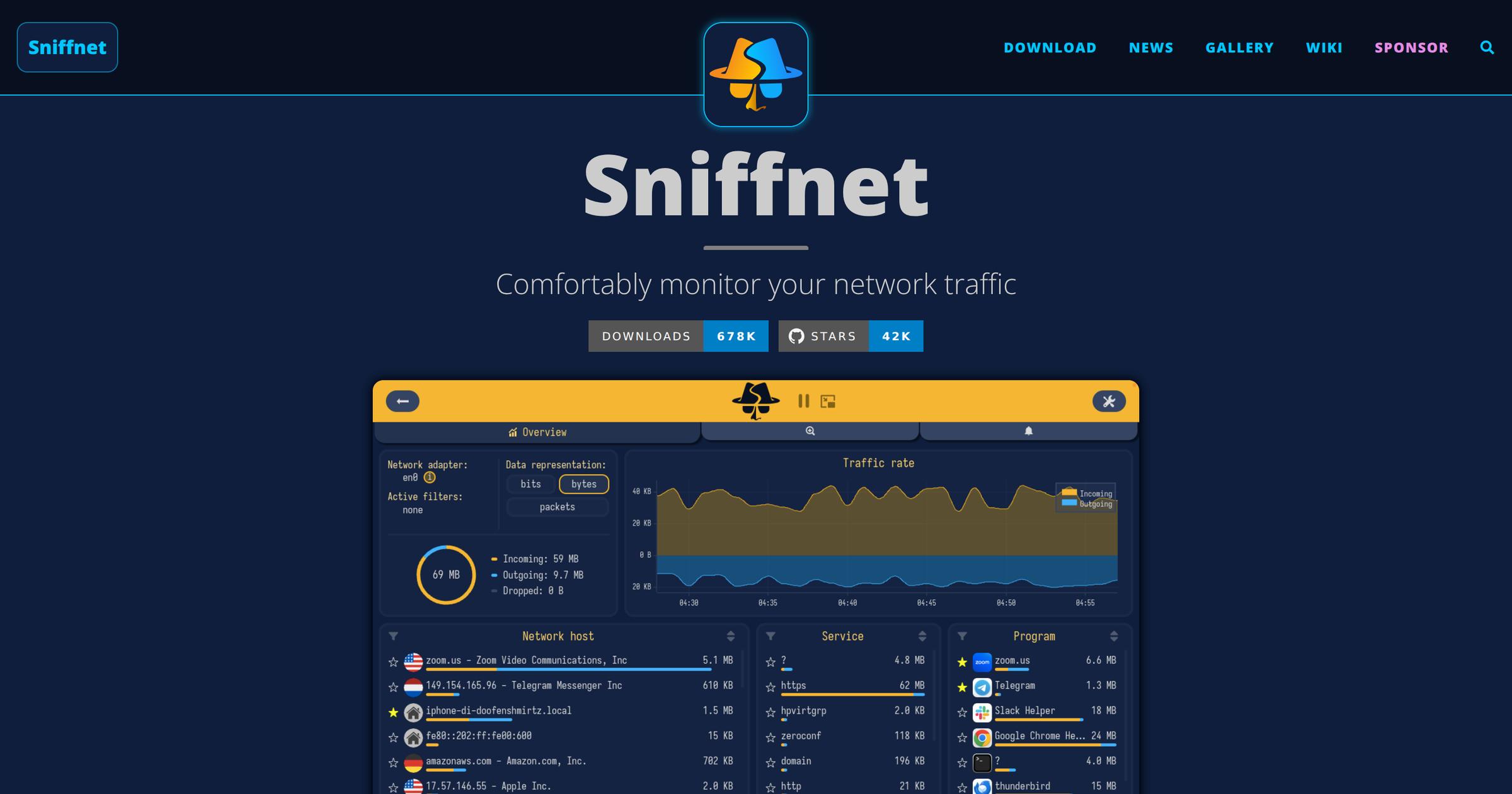
Sniffnet displays live charts of incoming and outgoing traffic intensity, broken down by protocol and direction. The overview page shows cumulative bandwidth totals alongside the per-second rate, giving you an instant picture of network activity without navigating menus.
The inspect page shows which programs on your machine are actively using the network, with per-connection detail for each. You can see the remote host, protocol, and data volume for every active connection tied to a specific application.
For every remote host your machine connects to, Sniffnet resolves the geographic location, domain name, and Autonomous System Number (ASN) using MaxMind's GeoLite2 database. This makes it straightforward to spot connections to unexpected countries or unfamiliar ASNs.
Sniffnet recognizes over 6,000 upper-layer services, protocols, trojans, and worms from its traffic database. Connections are labelled by service name in the inspect view, so you can tell a DNS query from a BitTorrent handshake without reading raw port numbers.
Traffic captures can be exported as standard PCAP files and loaded back for review, or shared with tools like Wireshark for deeper analysis. Standard PCAP import is also supported, so existing captures from other tools can be browsed in Sniffnet's interface.
You can define notification rules that trigger alerts when specific network events occur, such as a connection matching a blocked IP range or a bandwidth threshold being exceeded. Custom IP blacklists highlight potentially dangerous connections in the interface.
Features
- Real-time traffic charts and statistics
- Per-application bandwidth tracking
- IP geolocation and ASN lookup
- 6,000+ protocol and service identification
- PCAP import and export
- Custom notifications and IP blacklists
How to install
Download the signed installer for Windows (.msi), macOS (.dmg), or Linux (.deb, .rpm, .AppImage) from GitHub Releases: https://github.com/GyulyVGC/sniffnet/releases/latest
Recommended for this setup
Strengths
- Runs on Windows, macOS, and Linux: GlassWire, one of the most direct paid alternatives in this category, focuses on the Windows platform. Sniffnet works identically on all three major desktop platforms from a single signed native installer, making it a cross-platform option that prioritizes readability over protocol depth.
- No account, no cloud, no subscription: All traffic data stays on your machine. There is no account to create, no analytics to opt out of, and no subscription to maintain. The Apache-2.0 license means you can run Sniffnet on as many machines as you want at no cost.
- Accessible to non-technical users: Sniffnet is translated into 26 languages and explicitly designed so users without network engineering backgrounds can understand what they are looking at. Its graphical interface shows geographic maps, plain-language service names, and program-level attribution that make raw network data interpretable.
- Signed native installers for every platform: The Windows MSI is code-signed through SignPath.io's free open source program. macOS ships as a DMG with both Intel and Apple Silicon builds. Linux users get DEB, RPM, or AppImage packages depending on their distribution. Sniffnet uses the iced GUI library written in Rust, with no browser dependency or Electron overhead.
Trade-offs
- No firewall or network blocking: Unlike GlassWire, which includes a firewall integration to block individual apps from network access, Sniffnet is a monitor-only tool. It can alert you to suspicious connections but cannot block them from within the app. Users who need active traffic control must use a separate firewall.
- Requires platform dependencies: On Linux, Sniffnet requires libpcap and may need additional system libraries depending on the distribution. On macOS, the app needs a network entitlement that triggers a system security prompt on first launch. The wiki documents the required dependencies, but users on unusual or older systems may need extra steps.
- Rendering issues on older hardware: The default GPU renderer (wgpu via the iced framework) can produce visual glitches on old graphics hardware or systems with outdated drivers. The fallback is a CPU-only renderer set with the ICED_BACKEND=tiny-skia environment variable, which the README documents. This workaround is not obvious for non-technical users.
Tech stack
FAQ
Yes. Sniffnet is free and open source, available under the Apache-2.0 license. The website also states it is dual-licensed with MIT. There is no paid tier, no subscription, and no account required. You can run it on as many machines as you want at no cost.
Yes. Sniffnet provides DEB packages (amd64, arm64, i386, armhf), RPM packages (x86_64, aarch64), and AppImage files for Linux. The app requires libpcap and potentially other system libraries. The wiki's required dependencies page lists exactly what each distribution needs before the app will start.
No. Sniffnet is a monitoring-only tool. It can alert you when a connection matches a custom rule, highlight IPs on your blacklist, and show you exactly which program is responsible, but it cannot stop a connection. For active blocking, use your operating system's firewall alongside Sniffnet.
Wireshark is a full packet analyzer for network engineers. It captures every frame and allows protocol dissection at the byte level. Sniffnet is a monitoring app designed for readability, showing traffic in terms ordinary users can understand: geographic maps, program names, and service labels. Wireshark is the right choice when you need raw protocol data; Sniffnet is better when you want everyday network visibility without expertise.
No. All traffic data stays on your local machine. The app resolves IP geolocation and ASN data using a local database (MaxMind GeoLite2 bundled with the app) and does not require an internet connection to show geographic information. The website notes that security audits have been conducted on the application.