
Rallly
Group meeting polls without the back-and-forth
Replaces Doodle
Who it's for
Creates a poll with candidate times, shares it across departments or external stakeholders, and finalizes the slot once votes are in. The availability grid shows the best option without counting manually, and the finalize step sends calendar invites to everyone.
If your calendar system already has built-in group scheduling and all participants share the same platform (Google Calendar 'Find a time', for example), a dedicated poll tool adds a step without enough benefit.
Sends a link to external participants who do not have or want to create an account on a scheduling service. Participants vote in one click; times display in each person's local time zone automatically, so there is no back-and-forth over time zone math.
If the meeting is a one-on-one and the other person uses a self-service booking link, that is faster than a poll.
Self-hosts Rallly on company infrastructure so scheduling data, participant names, and meeting topics never leave the internal network. AGPL-3.0 licensing covers internal commercial use with no additional cost.
If your compliance review requires OSI-approved licenses only, verify AGPL-3.0 meets your requirements before deploying, as the self-hosted AGPL version is distinct from the hosted Pro tier.
Creates polls for contributors across dozens of time zones without requiring anyone to sign up. The 10+ language support means the voting interface can match participants' preferred language.
If the community is small enough that a single organizer can check availability directly (fewer than five people), a poll adds unnecessary overhead.
The problem
Coordinating a meeting across four or more people quickly turns into a scheduling problem. Reply-all email threads asking for availability grow unwieldy, later responses overwrite the earlier picture, and the organizer has to reconcile everything manually. Calendar invite chains assume every participant shares the same calendar system. The practical result is repeated rounds of messaging and friction when someone says the agreed slot no longer works. Teams often fall back to free-text spreadsheets or availability surveys, then start the loop over when a response comes in late. Hosted scheduling services store scheduling data on third-party infrastructure and add costs at higher usage tiers, which matters for teams with privacy requirements or tight budgets.
How it works
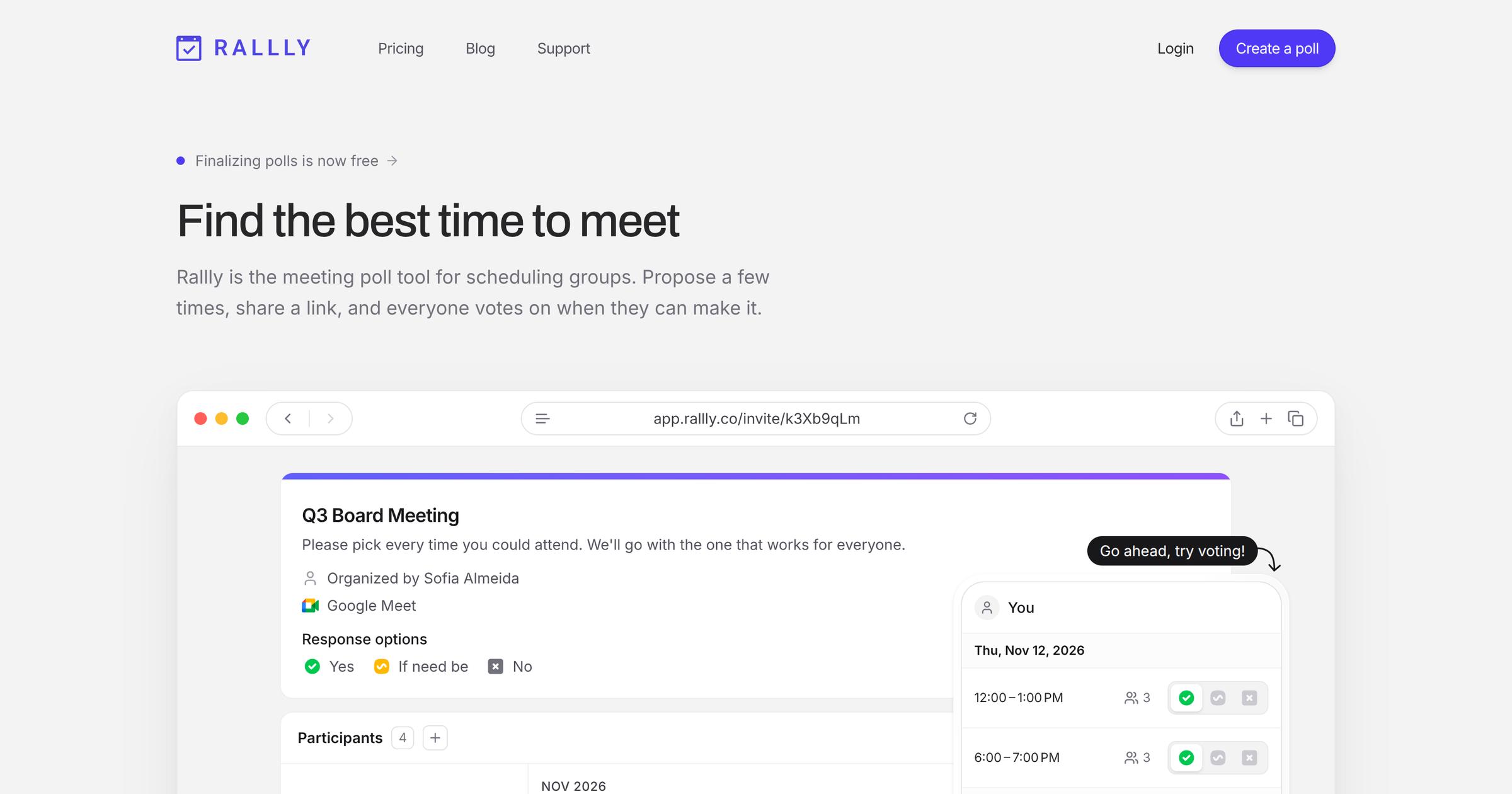
Participants open the shared poll link and vote without creating an account. All three response options (yes, if-need-be, no) are available from the link alone. This matters for external collaborators or large groups where requiring sign-up would reduce response rates.
Each participant sees proposed times in their own local time zone, detected automatically from their device. Organizers enter times once in their own time zone; Rallly handles the conversion for every participant. This removes a common failure mode in international scheduling where one side does the math wrong.
Responses render as a grid showing who is available, who can attend if needed, and who cannot make each slot. The best option is visible at a glance without counting responses manually or exporting to a spreadsheet.
Once the organizer selects the winning slot, Rallly finalizes the poll and sends email notifications to all participants with a calendar invite. This closes the loop in one action, with no separate step of sending individual calendar invitations.
Participants and the organizer can leave comments directly on the poll. Discussion about the meeting stays in one place instead of continuing across separate email threads, which helps when participants want to flag conflicts or propose alternatives.
The voting interface is translated into more than ten languages through Crowdin. International teams can vote in their native language, which reduces friction for non-English speakers in distributed groups.
Features
- No-login voting for participants
- Automatic time zone conversion
- Visual availability grid
- Poll finalization with calendar invites
- Comments on polls
- 10+ languages via community translation
How to install
Self-host Rallly with Docker; full setup and configuration are documented at support.rallly.co/self-hosting.
docker pull lukevella/ralllyRecommended for this setup
Strengths
- Free self-hosting under AGPL-3.0: The self-hosted version is AGPL-3.0 licensed and costs nothing beyond your server. You can run unlimited polls with any number of participants, with no per-user pricing or usage caps. This makes it practical for teams that run many scheduling polls across the year.
- No participant accounts required: Participants vote with no sign-up at all. External collaborators, clients, and large groups can respond without creating yet another account. This is a meaningful differentiator over tools that require all participants to authenticate before voting.
- Scheduling data stays on your infrastructure: With self-hosting, polling data, participant names, and meeting topics never leave your server. For teams that handle sensitive meeting topics or operate under data residency requirements, this is a property that the hosted Doodle and similar commercial platforms cannot match.
- Active maintenance since 2015: The repository has been under continuous development for over a decade, with 5,337 GitHub stars, 589 forks, and only 3 open issues. The most recent push was November 2026. Longevity and a low open issue count indicate a stable tool, not an abandoned side project.
Trade-offs
- PostgreSQL required for self-hosting: Self-hosting needs a PostgreSQL database alongside the Docker container. If your server setup does not already include a managed database, this adds provisioning and maintenance overhead. The hosted version at rallly.co removes this requirement but stores scheduling data on third-party infrastructure.
- No native calendar sync in self-hosted mode: Rallly finalizes meetings by sending email notifications with calendar invites, but it does not sync directly with Google Calendar or Outlook in the self-hosted configuration. Teams that want organizers to book the confirmed slot directly from their calendar app need a different tool or additional configuration.
Tech stack
FAQ
Yes. Rallly detects each participant's local time zone automatically and displays proposed times in that zone. Organizers enter times once in their own time zone and do not need to list separate times for different regions. The conversion happens per participant, so international groups see the correct local times without any manual adjustment.
Yes. Rallly is AGPL-3.0 licensed and ships as a Docker image you can run on your own server at no licensing cost. The self-hosted setup requires a PostgreSQL database and configuration via environment variables. Full documentation is at support.rallly.co/self-hosting. You can run unlimited polls with any number of participants on a self-hosted instance.
No. Participants open the shared link and vote without signing up. Creating a free account is optional and lets you manage your polls from any device and receive notifications when participants respond. The no-account path covers the full voting experience.
Rallly Pro is a paid subscription on the hosted version at rallly.co. It adds custom branding on polls, removal of Rallly attribution, and indefinitely stored polls (free-plan polls are automatically deleted after inactivity). The Pro tier applies to the hosted service only. The self-hosted version under AGPL-3.0 includes all features without a Pro subscription.
Yes. The repository at github.com/lukevella/rallly was most recently pushed to on November 4, 2026, and has 5,337 GitHub stars with only 3 open issues. It has been under active development since 2015.