
Plannotator
Plan and code review for AI coding agents
Replaces —
Who it's for
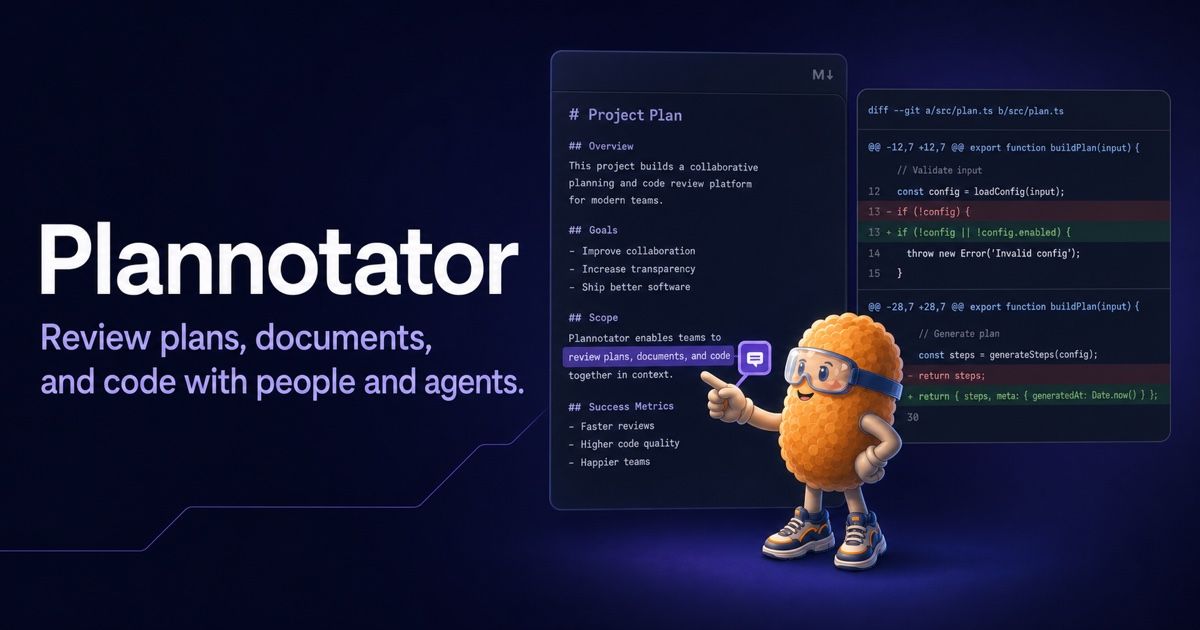
When the agent proposes a plan, Plannotator opens it in the browser before any code is written. You mark which sections to keep, cut, or change, and the agent revises the plan before touching the file system. Code review after the fact uses the same diff-annotation surface.
Running `/plannotator-review <github-pr-url>` opens the pull request diff with line-level annotation and code suggestions. Feedback goes back to the agent session that opened the review rather than requiring manual comments in the GitHub UI.
You only need individual developer review, not team-level PR workflows
The Plannotator Inbox collects questions, files, and guided reviews from several agents into one local window. Each agent keeps working independently; replies route back to the session that asked without requiring you to switch terminal tabs.
You only run one agent session at a time
Any markdown file, folder of files, or public URL can be annotated with `/plannotator-annotate` and sent back to the agent as structured feedback. This applies to PRDs, API specs, README files, and rendered HTML artifacts from agent output.
The problem
AI coding agents present their plans and code changes as raw terminal text, forcing developers to approve or reject work they cannot comfortably annotate, comment on, or track across revisions. There is no structured way to mark specific lines, record what changed between plan iterations, or send precise feedback back to the agent without retyping it manually.
How it works
Plannotator hooks into each agent's plan step automatically. When the agent proposes a plan, the markdown review surface opens in the browser. You can select text, add inline comments, mark deletions, or write replacements, then approve or deny with structured feedback the agent acts on directly.
Running `/plannotator-review` opens a side-by-side or unified diff viewer for local uncommitted changes or remote GitHub and GitLab PRs. The view includes a file tree, line-level annotations with code suggestions, and the ability to stage or unstage files before committing. Also works with GitButler, Jujutsu, and Perforce.
A single local window that collects messages, questions, files, and guided reviews from multiple agent sessions. Agents keep working while you respond; replies go back to the exact session that sent the question. Claude Code, Pi, and OpenCode connect through Plannotator's plugins; any other agent can reach the Inbox over MCP.
Agent-generated HTML artifacts can be rendered and annotated directly in the browser. The `/plannotator-annotate` command accepts a local file, a folder to browse, or any URL fetched through Jina Reader by default.
Every plan revision is saved with diffs between versions so you can track exactly what changed between iterations. Annotations survive server crashes and restarts through automatic draft saving.
Native integrations cover Claude Code, Codex, Copilot CLI, Gemini CLI, OpenCode, Kiro, Droid, Amp, DeepSeek Harness, and Pi through each agent's own hooks and plugin system. VS Code, Obsidian, Bear, and GitHub PRs also have dedicated integrations.
Features
- Plan interception with inline annotation
- PR-style code review
- Plannotator Inbox
- HTML artifact annotation
- Version history and draft auto-save
- Broad agent compatibility
How to install
curl -fsSL https://plannotator.ai/install.sh | bash
Recommended for this setup
Strengths
- Fully local with no telemetry: Plans, diffs, annotations, drafts, history, and configuration stay local by default. Plannotator does not collect usage telemetry or analytics. Content only leaves the local machine when a specific network feature like URL annotation, GitHub PR review, or Ask AI is used.
- Structured feedback loop: Annotations export as structured feedback the agent understands directly, eliminating copy-pasting or retyping. The agent revises based on exactly what you marked, rather than a freeform follow-up message.
- Single installer for every agent: One `curl` command installs the `plannotator` binary, auto-detects installed agents, and configures hooks, skills, and slash commands for each. A `--minimal` flag installs only the binary if you prefer to configure agents manually.
- Terminal-native alternative via Herdr Annotate: For users who prefer the terminal, Herdr Annotate brings Plannotator-style review to terminal text and markdown documents inside the Herdr shell. Annotations save to the same Plannotator data directory, so terminal and browser reviews compound.
Trade-offs
- Workspaces team sharing is not yet generally available: The hosted layer for shared plans, review history, and team verification standards is on a waitlist. The legacy open-source link-sharing feature is moving toward deprecated status, with Workspaces as the intended replacement.
- Release check cannot be disabled: Each plan review, annotate, and code review surface checks GitHub for the latest Plannotator release on load. The project's README notes there is currently no opt-out setting for this check, though it sends no plan or review content.
- Plan interception varies by agent: Automatic plan interception through hooks is available on Claude Code, Codex, Copilot CLI, Gemini CLI, and others, but Droid currently supports commands only with no plan interception. Native Windows Codex hook support is described as experimental.
Tech stack
FAQ
No. All review data, plans, diffs, annotations, drafts, and history stay local by default. Content only leaves the local machine for specific network features you invoke: URL annotation uses Jina Reader, GitHub and GitLab PR review uses your authenticated CLI, and Ask AI sends context to your configured provider. The project collects no usage telemetry.
Plannotator has native integrations for Claude Code, Codex, Copilot CLI, Gemini CLI, OpenCode, Kiro, Droid, Amp, DeepSeek Harness, and Pi. Any other agent can reach the Plannotator Inbox over MCP.
Plannotator wires itself into each agent's hook system during installation. When the agent reaches its plan approval step, the hook fires automatically and opens the markdown review surface in your browser. No slash command is needed for plan review specifically.
Yes. Herdr Annotate brings Plannotator-style review to the terminal through the Herdr shell. A standalone Plannotator TUI is also available via `brew install plannotator/tap/plannotator-tui` and runs without Herdr. Annotations from terminal reviews save to the same data directory as the browser app.
No. Workspaces is an optional hosted layer for shared plans, review history, and team collaboration and is currently on a waitlist. The local plugin is entirely free and open source. A legacy open-source link-sharing feature exists for smaller shares, though it is moving toward deprecated status in favor of Workspaces.