
Planning With Files
File-based task planning for AI agents, survives /clear and crashes.
Replaces —
Who it's for
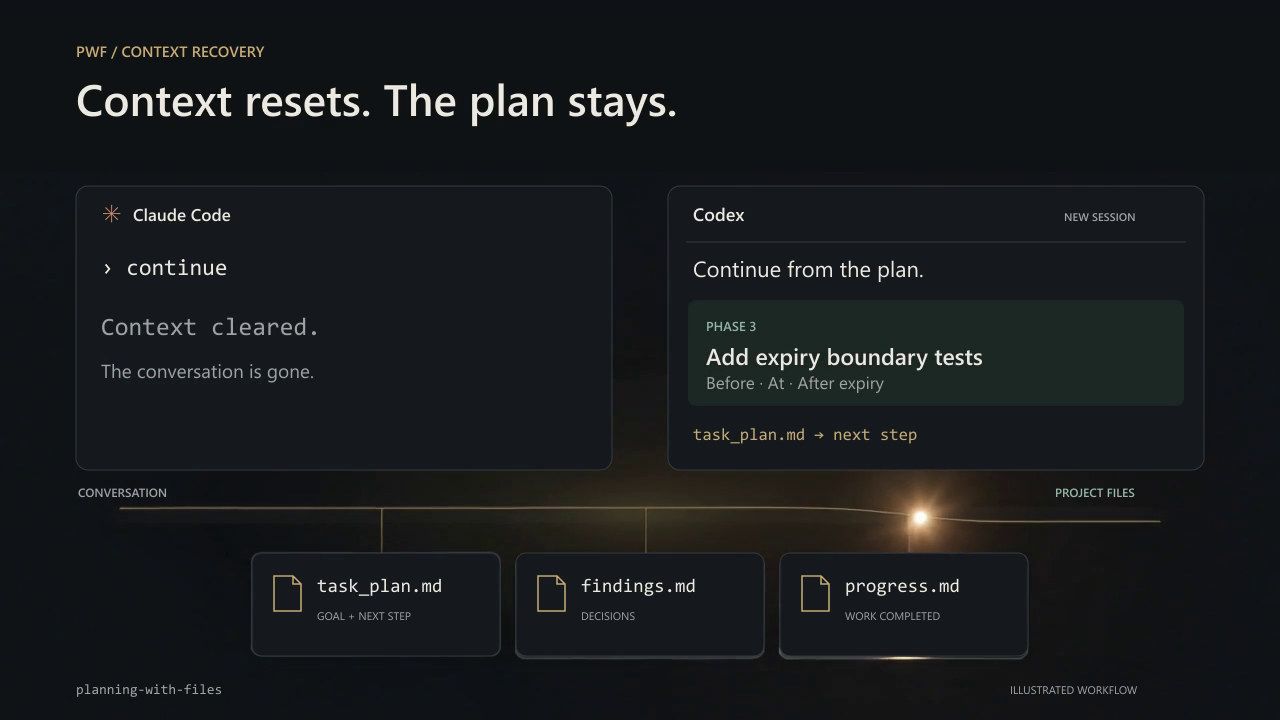
Keeps the goal, current phase, and next step in the project directory across sessions. When the context compacts or /clear fires, the next session picks up from the saved resume point in progress.md rather than starting from scratch. Best for refactors, bug investigations, and feature builds that span more than one conversation.
Tasks that fit in a single session with no risk of context reset. If the entire plan and execution are short enough to stay in context, the files add overhead without benefit.
The Agent Skills standard means the same planning files work across Claude Code, Codex, Cursor, OpenCode, Pi, and others. If the team uses different agents for different tasks, the plan in the project directory is accessible to all of them without reformatting or re-entry.
Teams with a single agent and stable session management who have not hit context limits. The cross-agent portability is the main value here; a single-agent workflow with short tasks gains less.
The gated completion mode and structured plan files are directly useful for evaluating whether an agent follows a multi-step plan to completion. Published benchmarks (96.7% pass rate, 3/3 blind A/B wins) make it possible to compare agent behavior with and without the skill. File-based planning of this kind is documented as an approach for long-running agent systems.
Agent evaluation frameworks with their own plan-tracking mechanisms. If your evaluation pipeline already tracks task state externally, the files may duplicate rather than supplement it.
The problem
AI coding agents have no memory between sessions. When you clear the conversation, hit the context limit, or switch between tools, any task plan held only in the chat disappears. The agent either starts over, invents a plan from scratch, or requires you to manually re-establish the goal and next step. For long tasks (refactors, feature builds, multi-step investigations), this is a recurring cost paid at the start of every new session. The workaround most developers use is pasting context manually into each new session or keeping a separate task document open and copying from it. Neither approach is durable: the plan is not version-controlled with the code, the agent cannot read it automatically, and a mid-task crash or unexpected /clear leaves the work in an unknown state with no structured recovery path.
How it works
Keeps task_plan.md (goal and phases), findings.md (decisions and what to avoid), and progress.md (completed steps and the resume point) in your project directory. All three are plain markdown, version-controlled with your code, and readable by any agent or developer without special tooling.
Activated integrations surface selected planning context at supported lifecycle points, so the agent sees the current plan and next step at the start of each turn without manual copy-paste. Claude Code, Codex CLI, Hermes Agent, and others each get their own host-specific integration.
A configurable gate can block the agent from stopping a task when phases remain unfinished, with retry and stall limits. This prevents the common failure mode where the agent reports done before the plan is fully executed. Some hosts can only notify; the gate requires host support.
Installs across 60+ AI coding agents (Claude Code, Codex, Cursor, OpenCode, Pi, Hermes Agent, DeepSeek, and more) via the Agent Skills standard. Native plugins exist for first-class hosts. Available via npm, the Claude Code plugin marketplace, or the skills.sh registry.
Each parallel task can be pinned to its own plan file, or separate worktrees can hold independent plans. This prevents one shared plan from colliding with concurrent agent sessions working on different branches or tasks.
Features
- Three planning files kept on disk
- Lifecycle hook injection
- Optional gated completion mode
- 60+ agent support via Agent Skills standard
- Parallel work and worktree support
How to install
Install the planning skill globally via npm; hooks and native plugins for specific agents need additional per-host setup after the base install.
npm install -g planning-with-filesRecommended for this setup
Strengths
- MIT license with no server requirement: MIT licensed and runs entirely in the project directory. No server, no database, and no paid tier. The three planning files are plain markdown and version-controlled with your code. Install once and all sessions on the same project share the same plan state.
- Benchmarked: 96.7% pass rate and 3 blind A/B wins: Published benchmarks show a 96.7% assertion pass rate (29 of 30) with the skill enabled. Three blind A/B tests all favored the skill over running without it. This is the only planning skill in the category with published, verifiable evaluation results.
- Plan files are version-controlled with the code: The three planning files are plain markdown and tracked in git alongside the codebase. Any change to the plan is a diff, any revert is a git reset, and the plan history is part of the project history. No external service, subscription, or separate database holds the work state.
Trade-offs
- Recovery depends on what was saved before the reset: Automatic recovery reads only what was written to the three planning files before the session ended. Any work or decision not saved to progress.md or findings.md before a /clear or crash is not recoverable. Discipline about saving state mid-task is a user responsibility; the skill cannot reconstruct unsaved context.
- Hooks and native plugin setup varies by host: The npx install command is cross-agent, but lifecycle hooks and native plugins require additional configuration steps that differ per host. Claude Code, Codex, and others each have their own setup; some hosts can only notify rather than inject context or gate completion. Consult the per-host setup guide before expecting full functionality.
Tech stack
FAQ
When /clear fires or the context compacts, the three planning files (task_plan.md, findings.md, progress.md) remain on disk in the project directory. The next session reads those files to find the current phase, the recorded findings, and the resume point. Recovery depends on what was written to those files before the reset; any unsaved in-conversation work is lost, so the skill works best when the agent saves state regularly.
It installs across 60+ agents via the Agent Skills standard. Native plugins exist for Claude Code, Codex CLI, Qoder CLI, Pi, Hermes Agent, OpenCode, and DeepSeek. For agents without a native plugin, install via npm with npm install -g planning-with-files, or use the Claude Code plugin marketplace. Lifecycle features (hook injection, gated completion) depend on what the host supports; consult the per-host setup guide for details.
Yes. The repository is MIT licensed: free to run, modify, and use commercially. No paid tier, no cloud service, and no account required. The three planning files live in your project directory alongside your code.
Run npx skills add OthmanAdi/planning-with-files --skill planning-with-files -g in a terminal. It is also available via the Claude Code plugin marketplace and the skills.sh registry. After the base install, hooks and native plugins for specific agents may need additional configuration steps described in the per-host setup guide.
An optional mode that blocks the agent from marking a task done when plan phases remain unfinished, with configurable retry and stall limits. It prevents the common failure where the agent reports completion before all checklist items are addressed. The gate requires host support; on hosts that can only notify, it fires a notification instead of blocking.