
Orbit Workspace
Self-hosted team workspace: tasks, docs and chat in one binary.
Replaces Linear, Notion, Clickup, Basecamp, Jira
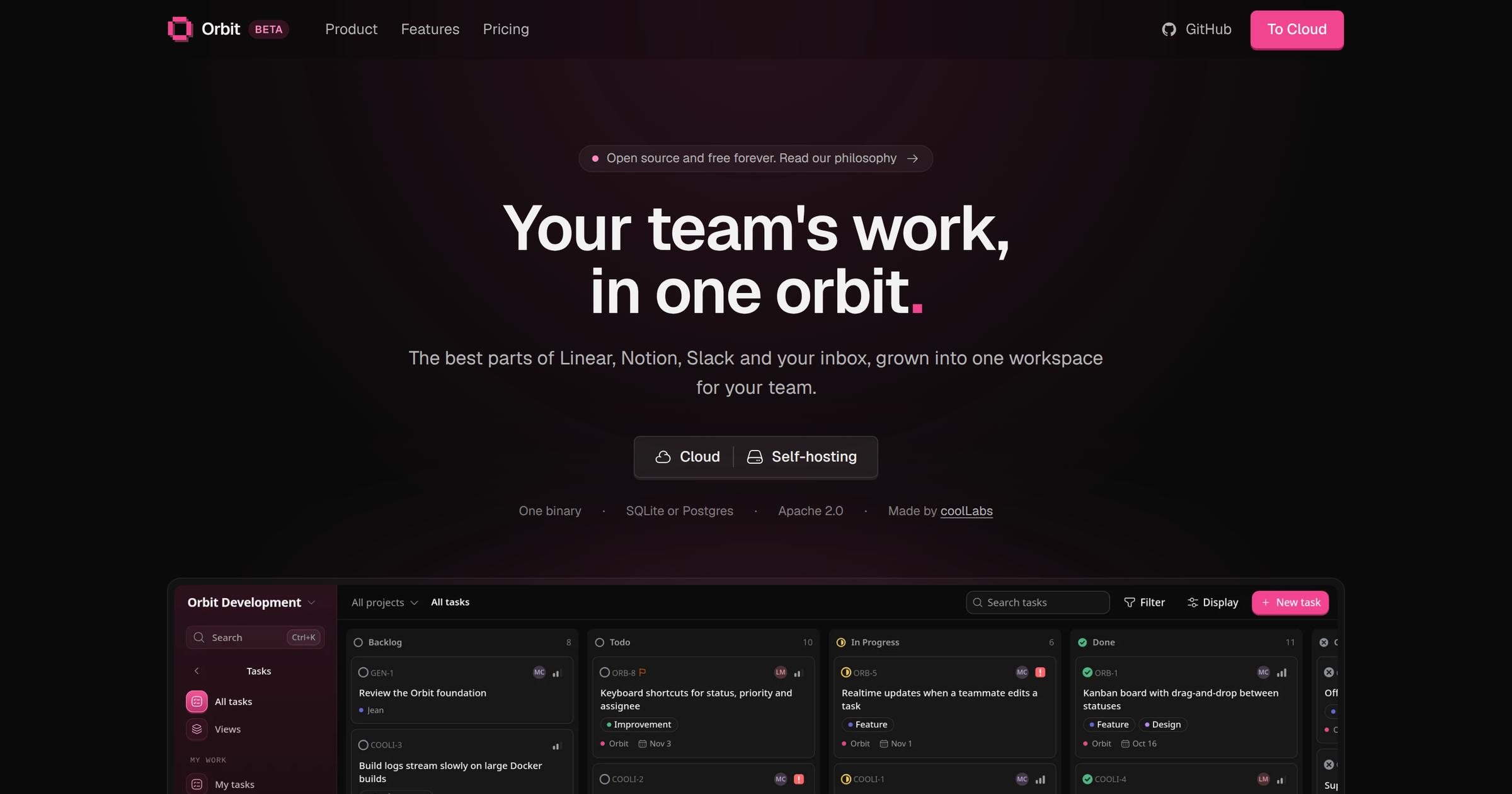
Who it's for
Teams running Linear for tasks, Notion for docs, and Slack for chat can consolidate onto one self-hosted binary. All three surfaces share one search index, one member list, and one database, so there is no data sync to maintain and no per-seat bill for each tool.
Your team is not technical enough to manage a Linux server and a reverse proxy for HTTPS. Orbit has no one-click managed self-hosting today beyond the paid Orbit Cloud.
The MCP server lets Claude, Codex, or Grok read your Orbit workspace directly. Because Orbit runs on your server, the AI client accesses your data without routing it through a third-party API, which matters for teams with confidentiality requirements around tasks and internal docs.
You need the full in-workspace AI assistant today. The built-in assistant is listed as coming soon; only the read-only MCP endpoint exists in the current release.
Orbit runs on a small VPS, a home server, or a Raspberry Pi with a single binary and minimal config. Apache 2.0 means no licensing concern for internal team use. GitHub sync means issues and pull requests stay in sync with tasks without manual updates.
You need a production-stable tool with a proven upgrade path. The README warns against production use; this is an alpha with active development still setting foundational infrastructure.
The problem
Small technical teams commonly split their work across three separate SaaS tools: a task tracker for project management, a wiki or notes app for documentation, and a chat app for team communication. Each tool charges a monthly per-seat fee, stores your data on the vendor's servers, and requires separate logins, search, and permission management. The friction compounds when work overlaps. A question about a task requires leaving the task tracker, opening chat, hunting through channel history, and returning. AI assistants that try to surface context across these tools need broad API access to multiple services, and the data never lives in one place. Teams that want to self-host one of these tools still have to manage two others from a vendor.
How it works
Projects get their own status columns, groupable by category. Switch between list, board, and timeline views with one click. Break work into sub-issues, add labels, and sync GitHub issues and pull requests through a one-click GitHub App per workspace.
A page tree with teamspaces, favorites, and trash. The rich editor supports tables, code blocks, and checklists; multiple editors see each other's cursors in real time. Import pages from Notion with files included, or export a workspace backup.
Channels, direct messages, and threads with file sharing, code blocks, reactions, and search. Links to tasks and pages open as inline previews without leaving the conversation.
A read-only MCP endpoint at /mcp with built-in OAuth lets Claude, Codex, or Grok read your projects and tasks. You choose which workspace and projects each client can access; because Orbit runs on your server, the AI reads your data locally without routing it through a third-party host.
A Rust server serves the API and the embedded web app from a single HTTP listener. Start with one SQLite file for simplicity; switch to Postgres for multi-node setups. Attachments go to local disk or any S3-compatible store, and scheduled backups are supported.
Invite members, assign roles, manage sessions, and issue API tokens with scoped project access. Every admin action is recorded in an audit log that exports as CSV.
Features
- Tasks with per-project workflows
- Docs with live co-editing
- Team chat with task and doc links
- MCP server for AI clients
- One binary, SQLite or Postgres
- Workspace administration
How to install
Download the pre-built binary for linux/amd64 or linux/arm64 from GitHub Releases at https://github.com/coollabsio/orbit/releases, then start the server:
./orbit serveOrbit serves the API and embedded web app from a single HTTP listener. Data is stored in SQLite by default; pass a Postgres connection string to switch. Put a reverse proxy in front for HTTPS. Full deployment and operations guide at https://github.com/coollabsio/orbit/blob/main/docs/operations.md
Recommended for this setup
Strengths
- True single-binary self-hosting: Orbit ships as one Rust binary that starts with a single command. No external service dependencies for the base install; SQLite means no separate database process for teams that do not need multi-node setups. This is simpler to operate than multi-container alternatives.
- Apache 2.0 license: The permissive Apache 2.0 license lets teams run Orbit for any internal commercial or personal use, fork it, and build on it without restriction. No AGPL virality concerns or dual-license upsell to a commercial tier.
- Full context for AI clients via MCP: The MCP server exposes tasks, docs, and chat in one endpoint with built-in OAuth. Because Orbit runs on your server, AI clients read that context locally rather than routing it through a third-party API, which matters for teams with confidentiality requirements.
- Notion import included: Teams migrating from Notion can import pages and their files into an Orbit teamspace directly from the web app. This removes the most common migration blocker for teams considering a switch.
Trade-offs
- Public alpha: not production-ready: The README explicitly warns 'PRETTY ALPHA, DO NOT USE IT IN PROD.' The project was created in August 2026 and has 77 GitHub stars. Infrastructure around data integrity, upgrade paths, and reliability at scale is still being established; there are 3 open issues as of this writing.
- Mail feature is a work in progress: The shared inbox feature uses mock data and is not yet functional. Teams that need a shared email inbox for handling customer threads will have to wait for a future release.
- AI assistant is planned, not built: The website describes an in-workspace AI assistant that can draft email replies using tasks, docs, and chat context. As of the current release, only the read-only MCP endpoint exists; the full assistant is listed as coming soon and is not yet implemented.
- Mobile app feature gaps: The iOS and Android apps are not yet released. Per the README, once available they will not support saved views, timeline, tasks trash, GitHub integration settings, workspace export, API tokens, or Notion import. These features require the web app.
Tech stack
FAQ
No. The README carries an explicit warning: 'PRETTY ALPHA, DO NOT USE IT IN PROD.' The project launched in August 2026 and is still in active early development. Use it to evaluate the concept, follow its progress, or contribute to development; do not run it as the primary work tool for a team that depends on uptime and data integrity.
Apache 2.0 is a permissive open source license. You can run Orbit internally for any commercial or personal team use, modify the source, and redistribute it. The main requirement is preserving the copyright notice and license text. You are free to self-host it as a service for your own team; the team also offers a managed Orbit Cloud at $10 per workspace per month for teams that prefer not to manage the binary.
Orbit bundles the core features of all three into a single app: task boards and timelines for project management (comparable to Linear and Jira), a page tree with live co-editing for docs (comparable to Notion), and channels with threads for chat (comparable to Slack). The main differences are self-hosting and the single-binary architecture. Linear, Notion, and Slack are mature commercial platforms with larger feature sets and years of reliability; Orbit is in alpha and not yet feature-complete.
Yes. Orbit includes a Notion import that copies pages and their files into an Orbit teamspace. The import is available from the web app. The mobile app, once released, will not support it; use the web app for the import.
Yes. Orbit Cloud runs at app.orbit.so and costs $10 per workspace per month, with a 7-day free trial. The self-hosted path runs the same binary on your own server at no license cost; you pay only for the server.