
Openusage
AI usage limits tracker for your menu bar
Replaces —
Who it's for
A developer running Claude Code, Codex, and Cursor simultaneously pins their session and weekly limits to the menu bar and glances up before starting a long generation run to confirm they have headroom, avoiding mid-task cutoffs.
You use only one AI coding tool with a single subscription tier.
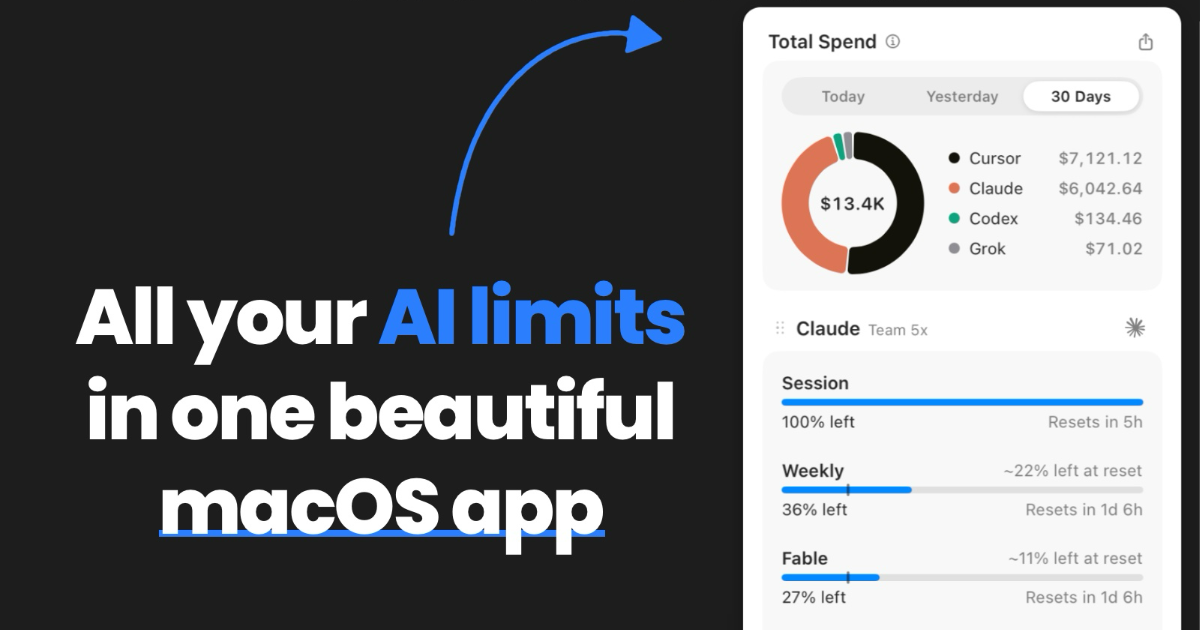
A lead monitoring team AI costs pins the 30-day spend ring to the menu bar and checks the Today / Yesterday breakdown each morning to see which provider is driving cost before the billing cycle closes.
Your organization manages AI billing centrally through a dashboard with its own alerting.
A developer building a VS Code status bar extension or an AI agent that should pause when Claude limits are low queries `localhost:6736/v1/limits` to read the cached JSON snapshot without needing direct provider credentials in the tool.
You are not building tooling that needs programmatic access to current usage data.
The problem
Developers using multiple AI coding tools -- Claude Code, Codex, Cursor, Devin, Grok -- have no single place to see how much of each subscription remains. Each provider has its own dashboard hidden behind a browser tab, session limits reset on different schedules, and there is no warning before a session is cut off mid-task. The result is unexpected interruptions and difficulty understanding which tools are actually driving cost.
How it works
Tracks Claude, Codex, Cursor, Copilot, Devin, Grok, Ollama, OpenCode, OpenRouter, Antigravity, and Z.ai in one popover, with provider-grouped meters showing session, weekly, credit, and spend metrics alongside live reset countdowns.
Pin up to two metrics per provider directly into the macOS menu bar, rendered as compact text or mini bars. The strip hides metrics with no data rather than showing empty placeholders.
Visual pace markers signal when you are consuming a limit faster than the reset window allows and show the exact time until you will exhaust a quota, so you can throttle before being cut off.
A loopback-only API on `127.0.0.1:6736/v1/limits` and the `openusage` CLI command let editors, status line plugins, and AI agents read stable limit JSON from the same five-minute cache with no tokens or authentication required.
For most providers, the app reads credentials already stored on your Mac via keychain and local auth files. Usage numbers are hidden automatically when you share your screen.
Multiple Claude and Codex accounts can be tracked side by side, with usage history synced across your Macs over iCloud.
Features
- 11-provider dashboard
- Menu bar pins
- Pace indicators and flame warnings
- Local HTTP API and CLI
- No extra login, no data leaks
- Multi-account and iCloud sync
How to install
brew install --cask openusage
Recommended for this setup
Strengths
- Credential-free setup for most providers: Claude, Codex, Cursor, Copilot, Devin, Grok, and several others are read directly from your Mac's keychain and local app state files, so there is no separate API key to generate or service to authorize for day-to-day use.
- Native Swift performance: Built with Swift 6 strict concurrency and SwiftUI, OpenUsage is a fully native universal binary rather than an Electron or web wrapper. It launches instantly and uses minimal system resources.
- Composable with other tools: The local HTTP API and CLI mean the app acts as a shared data source. Your terminal status line, VS Code extension, or custom agent script can all read the same cached usage snapshot without each polling provider APIs independently.
- Active open source community: The GitHub repository lists 59 contributors and ships with documented conventions for adding new providers, a contributing guide, and an issue-first PR workflow that keeps the provider list growing.
Trade-offs
- macOS 15 and above only: OpenUsage requires macOS 15 Sequoia or later and is macOS-only. Developers on Windows, Linux, or older macOS versions have no equivalent supported path.
- OpenRouter and Z.ai require manual API keys: Unlike most providers, OpenRouter and Z.ai have no local credential to reuse, so you must supply an API key in settings before those providers appear in the dashboard.
- Five-minute polling interval: Data refreshes every five minutes by default. If you need real-time limit readings -- for example, during a heavy batch run -- you can force a refresh via the CLI with `openusage --force`, but the app does not push live updates between poll cycles.
Tech stack
FAQ
OpenUsage supports 11 providers: Claude, Codex, Cursor, Copilot, Devin, Grok, Ollama, OpenCode, OpenRouter, Antigravity, and Z.ai. The contributing guide documents how to add additional providers.
The app reads credentials already stored on your Mac (keychain, local auth files, app state) and uses them only to contact the corresponding provider. The local HTTP API is loopback-only and never exposes credentials. Separate anonymous summaries and public pricing downloads are documented in the project's privacy policy.
Run `brew install --cask openusage` via Homebrew, or download the universal DMG from the GitHub releases page and drag it to Applications. The app requires macOS 15 Sequoia or later and updates itself automatically via Sparkle.
Yes. The `openusage` CLI command reads the same five-minute cache and works independently. Pass `--force` to bypass the cache. The local HTTP API at `127.0.0.1:6736` is also available when the app is running.
Yes. The current stable release is v0.7.15 and a beta channel ships pre-release builds (v0.7.16-beta.1 at the time of writing). You can opt into beta updates from within the app's settings.