
Openmw Web
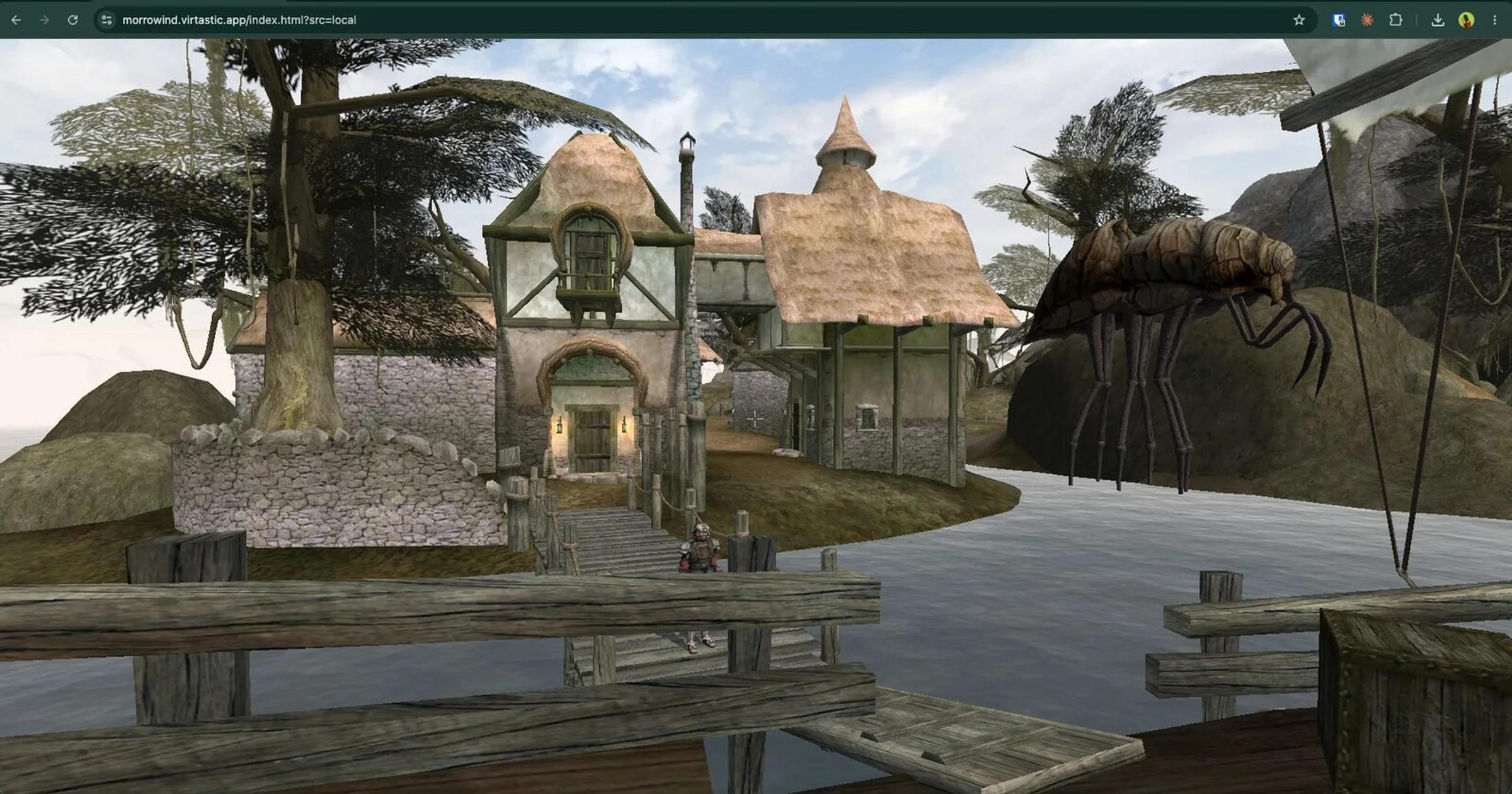
Morrowind in your browser, self-hosted, with mods and multiplayer
Replaces —
Who it's for
Players on Chromebooks, Linux machines, or macOS can load their Steam or GOG copy of Morrowind in a Chrome tab without installing Wine or a native game client. Game files stream from disk on demand and nothing is permanently uploaded unless the cloud locker is used.
Skip if you are on desktop Chrome on a Windows machine with a working native Morrowind install and no need to access your save on other devices.
The admin dashboard lets you stage a modded Morrowind installation, manage user accounts, and enable multiplayer so friends can join through their browsers. Save state is server-side, and the host controls the mod list rather than requiring each player to configure their own install.
Skip if your group needs stable multiplayer for a long campaign. The experimental flag and noted rough edges make it better suited for casual sessions than an ongoing run.
The repo includes the full OpenMW engine source with local WASM patches against upstream, Emscripten 6.0.1 build scripts, and WASM_ADAPTATIONS.md documenting how the desktop engine was adapted for the browser. It serves as a reference implementation for porting large multithreaded C++ codebases to WebAssembly.
Skip if you only want to play the game. The prebuilt release handles that entirely without requiring a build from source.
The problem
Playing The Elder Scrolls III: Morrowind on a Chromebook, a borrowed machine, or any computer without a Windows gaming setup means either wrestling with Wine, buying a second copy for a different platform, or going without. These workarounds are fragile across system updates and do not work at all on locked-down hardware. For players who want to run a modded Morrowind installation for a group, the older options were a native dedicated server with high system requirements or a cloud gaming subscription that does not support custom mods. Neither offered browser-based access, a built-in mod manager, or savegame portability across devices without additional infrastructure.
How it works
The OpenMW engine compiles to WebAssembly via Emscripten 6.0.1 and runs the full Morrowind game logic entirely in the browser. WebGL2 via ANGLE handles graphics. The File System Access API streams game assets from your local disk on demand, so nothing is uploaded until you choose to use the cloud locker. Chrome or Chromium 133+ is required.
A dashboard at http://localhost/admin covers the complete server setup with a wizard, a drag-to-order mod manager (with Tamriel Rebuilt support), savegame export, backups, log viewer, and user account management. All administration happens in the browser without SSH or config file editing.
Choose between a free demo world (no Morrowind copy required), reading game files from your local disk on demand, streaming the server host's staged copy, or signing in to access your own Morrowind from any machine. Saves are stored locally, server-side, or in browser storage depending on the active play mode.
Party mode lets up to 32 players enter one world hosted by the owner. NPCs, combat resolution, and loot are simulated server-side by a headless engine copy, preventing modified clients from authoring world state. Players retain skills and carried inventory between visits.
The setup script requires no compilation. It pulls a prebuilt server image from ghcr.io/virtastic/openmw-web-server and downloads the ~150 MB game engine, verified against SHA256 checksums. Update with ./setup.sh --update or the dashboard's Update button. Roll back by setting the previous tag in .env.
Features
- WebAssembly game engine in a browser tab
- Browser-based admin dashboard
- Multiple play modes with cloud locker
- Experimental multiplayer up to 32 players
- One-command setup with prebuilt images
How to install
Self-hosting uses Docker with a setup script that pulls a prebuilt server image and game engine.
git clone https://github.com/Virtastic/openmw-web.git
cd openmw-web
./setup.sh
Recommended for this setup
Strengths
- Client-side engine with no streaming overhead: Unlike cloud gaming platforms that encode and transmit video frames from a remote server, openmw-web runs the OpenMW engine directly in the browser tab. Gameplay performance scales with the player's local hardware, not datacenter proximity. The server only handles saves, accounts, mods, and multiplayer state.
- GPL-3.0 with full self-hosting rights: openmw-web is GPLv3, the same license as OpenMW. You can run a self-hosted instance on your own infrastructure, inspect the WASM adaptations, modify the source, and distribute changes under the same license. The release ships a corresponding source archive alongside every prebuilt binary.
- Built-in mod management with load-order control: The admin dashboard includes a drag-to-order mod manager where each mod can be toggled, reordered, and inspected for file conflicts. Tamriel Rebuilt, one of the largest Morrowind fan expansions, is supported directly through the dashboard alongside standard .esm and .esp mods.
Trade-offs
- Chrome and Chromium desktop only: Desktop Chrome or Chromium 133+ is the only supported browser. The engine requires SharedArrayBuffer with threads, WebGL2 via ANGLE, EXT_clip_control, and the File System Access API. Firefox, Safari, and all mobile browsers lack one or more of these capabilities and are unsupported with no planned exception.
- Requires a legally-owned copy of Morrowind: No game data is included. You must supply your own Data Files from a Steam, GOG, or disc purchase. On Steam, the default install location under Program Files causes a folder access error in Chrome. Copy the Data Files folder to a user folder like Documents before playing.
- Multiplayer is experimental: The multiplayer feature launched in v1.1.0 and carries an explicit experimental label. Party mode works for casual play, but the README notes rough edges to expect. Production-grade reliability has not been claimed by the project.
Tech stack
FAQ
No. openmw-web distributes only the OpenMW engine and server software. You must supply your own legally-purchased copy of Morrowind from Steam, GOG, or disc. On first play, you point the browser at your Data Files folder and the engine reads them on demand. No Bethesda assets are included or redistributed.
Only desktop Chrome or Chromium version 133 or later. The engine requires MEMORY64, SharedArrayBuffer with threads, WebGL2 via ANGLE, and the File System Access API. Firefox, Safari, and all mobile browsers do not yet provide all of these capabilities.
Install Docker, then clone the repo and run ./setup.sh. The script pulls the prebuilt server image, downloads the game engine archive (verified against SHA256 checksums), and opens the admin dashboard at http://localhost/admin to walk through the rest. Full documentation is in SELF_HOSTING.md in the repo.
Multiplayer is playable but experimental. Up to 32 players can join one world, with NPCs and combat resolved server-side. The README flags rough edges and the feature is behind an experimental flag in the dashboard. For casual groups it works, but production-grade reliability has not been claimed by the project.
GPL-3.0 lets you run openmw-web on your own infrastructure for personal or internal team use without restriction. You can inspect and modify the source. If you distribute a modified copy to others, you must release the corresponding source under the same license. The license does not restrict running a private hosted instance for your own group.