
Onefetch
Command-line Git repo stats and code insights for your terminal.
Replaces —
Who it's for
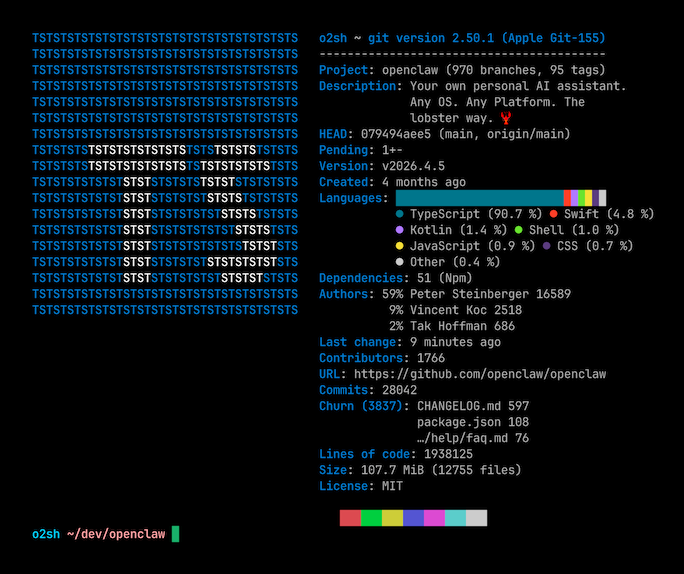
Running `onefetch` in a new repository gives you an instant overview: primary language, license, total contributors, and commit range. This replaces the steps of opening GitHub, navigating to the Insights tab, and cross-referencing the README for license information.
The repository is hosted on GitHub and you have browser access. GitHub's Insights tab covers the same stats visually with no installation required.
Onefetch requires no internet connection and no external services at runtime. In environments without outbound network access, it provides structured language statistics and project metadata from a local repository where hosted dashboards are unavailable.
You have reliable internet access and your repositories are on a public platform. In that case, the hosted platform's built-in stats are equivalent and require no installation.
With `onefetch /path/to/repo` you can inspect multiple repositories quickly from a shell script or a loop. The JSON output mode makes it scriptable for batch analysis of repository metadata across a monorepo or a directory of projects.
You need centralized reporting across a team's entire codebase history. Tools like GitHub Insights or self-hosted GitLab analytics offer aggregated views that Onefetch, as a per-repo local tool, does not provide.
A common use case is calling `onefetch` from a shell configuration or project welcome script so that entering a repository directory automatically shows project stats. This fits workflows where developers use Neofetch-style terminal information displays.
Your team does not primarily work in terminals. Onefetch has no IDE integration, so its value is limited to terminal-centric workflows.
The problem
Getting a useful summary of a local Git repository usually means opening a browser and navigating to GitHub's web interface, which requires an internet connection and only works for repositories that have been pushed to a remote host. Running individual git commands (git log, git shortlog, git ls-files) gives fragments of information that you have to assemble manually; none of them show language breakdowns or project-level metadata in a readable format. For developers working with multiple local repositories, reviewing a new codebase, or working in environments without internet access, this gap creates friction. There is no built-in way to get a quick, unified view of a local repository's language composition, contributor history, and license from the command line.
How it works
Onefetch identifies the languages present in a repository and renders an ASCII art logo for the primary one, matched by file extension and content. The website lists 124 supported languages. By default only programming and markup types are counted; passing `--type prose data` adds Markdown, JSON, YAML, and TOML to the breakdown.
All data comes from the local `.git` directory. Onefetch makes no network requests at runtime, reads no external APIs, and requires no authentication tokens. This makes it usable in airgapped environments and on repositories that have never been pushed to a remote.
Alongside the default terminal display, Onefetch outputs repository data as structured JSON or YAML via `--output json` and `--output yaml` flags. This fits CI pipelines and shell scripts that need machine-readable repository metadata without parsing terminal color codes.
Command-line flags control which information lines appear, adjust text styling, set the color palette, and specify which file types to count. You can ignore specific directories, disable any section, and adjust the display to show exactly what you need in the space available.
Onefetch reads author data from the Git history and lists top contributors with commit counts. If the same person appears with different names or email addresses, adding a standard `.mailmap` file to the repository root merges the duplicate entries correctly.
Features
- Language detection for 100+ programming languages
- Fully offline operation
- JSON and YAML output for scripting
- Customizable terminal display
- Contributor history from Git log
How to install
Install Onefetch using your system package manager; binaries for Linux, macOS, and Windows are also available on the GitHub releases page.
brew install onefetchRecommended for this setup
Strengths
- MIT licensed with no runtime dependencies: Onefetch is MIT licensed, meaning you can use it in commercial environments, modify it, and distribute modified versions with no restrictions. At runtime it has no external dependencies beyond the local Git repository. No API keys, no accounts, and no analytics calls.
- Rust performance with 12,000 GitHub stars and active development: Written in Rust, Onefetch runs fast even on large repositories. With over 12,000 GitHub stars, active development since 2018, and a last push in October 2026, it has a stable community and a history of maintained releases across Linux, macOS, and Windows.
- Works on any local repository regardless of hosting: Because Onefetch reads the local `.git` directory directly, it works on any repository regardless of where it is hosted or whether it has a remote configured. GitHub's web stats require the repo to be on GitHub; Onefetch works on GitLab-hosted, self-hosted, or entirely local repositories the same way.
Trade-offs
- CLI only, no GUI or shareable reports: Onefetch is strictly a terminal tool. There is no web dashboard, no IDE plugin, and no shareable report URL. If your workflow requires a visual interface or you need to share stats with non-technical stakeholders, you will need to export JSON or YAML and process the output yourself.
- Duplicate contributor entries without .mailmap: When contributors use different email addresses or display names across commits, Onefetch shows them as separate entries. This is a limitation of reading raw git history. Merging duplicates requires manually creating a `.mailmap` file in the repository, which not every project maintains.
- Language detection excludes prose and data files by default: By default, Onefetch counts only programming and markup languages, hiding Markdown, JSON, YAML, TOML, and similar files from the stats breakdown. Repositories with significant documentation or configuration may show skewed language percentages unless you pass `--type prose data`.
Tech stack
FAQ
No. Onefetch reads entirely from the local `.git` directory and makes no network requests. It works on any local repository regardless of whether it has ever been pushed to a remote, and requires no accounts or API keys. This makes it usable in fully offline or airgapped environments.
By default, Onefetch counts only programming and markup file types. Languages classified as prose (Markdown, Org mode, plain text) or data (JSON, YAML, TOML) are excluded from the default display. Pass `--type programming markup prose data` to include all file types in the language breakdown.
Onefetch reads author data from the git log. If the same person committed with different names or email addresses across their commit history, git treats them as separate authors and Onefetch reflects that. To merge duplicate identities, add a `.mailmap` file to the repository root using the standard git mailmap format documented at git-scm.com/docs/gitmailmap.
Yes. Onefetch supports `--output json` and `--output yaml` flags that print repository metadata as structured data instead of the styled terminal view. This is useful for shell scripts, CI pipelines, or any tooling that needs to consume repository statistics programmatically.
Yes. Onefetch is MIT licensed. You can use it in personal projects, commercial environments, internal tooling, and CI pipelines without restriction. The source code is on GitHub at github.com/o2sh/onefetch and modifications or forks are welcome under the same MIT terms.