
Omicron
Federated blogging over ActivityPub, self-hostable in one command
Replaces Ghost
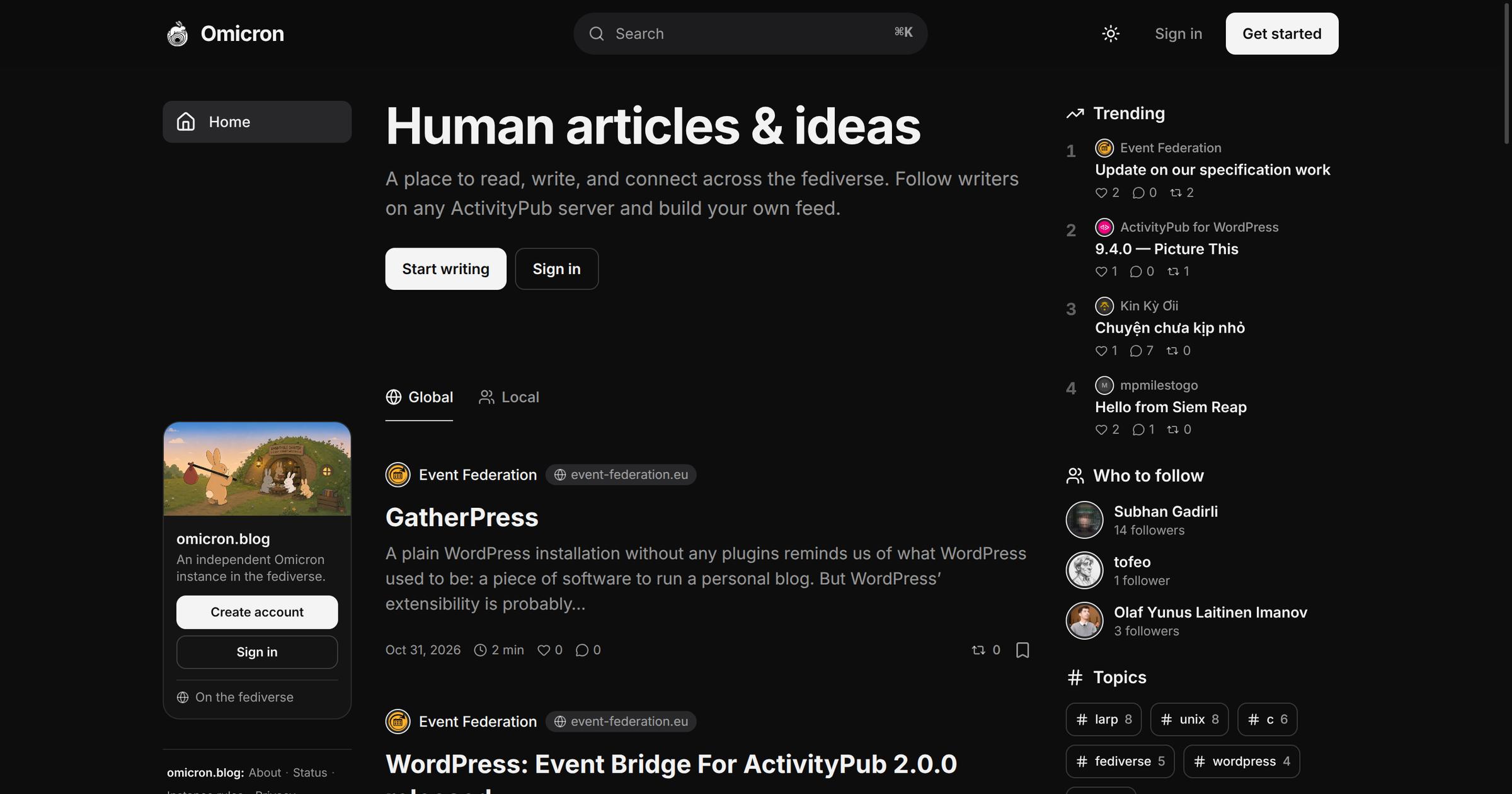
Who it's for
Writers leaving Substack or Medium who want their posts to appear in Mastodon feeds and other fediverse timelines benefit from Omicron's built-in ActivityPub federation. Each post federates automatically, and the import tool handles bringing existing content over from those platforms.
If you need subscriber email newsletters, paid member tiers, or a polished analytics dashboard, Omicron does not ship those features yet. A hosted platform like Ghost Pro or Substack covers that workflow today.
Omicron runs the full blog stack on your own server or VPS with Docker Compose. Automatic TLS setup, self-contained secrets generation, and built-in backup support via restic make it a credible choice for technically comfortable users who want to own their data and infrastructure.
If Docker and basic server administration are unfamiliar, the setup process requires working knowledge of domain DNS and Linux. A managed hosted service is a lower-friction starting point.
Omicron exposes an open client API with OAuth/PKCE scoped access, allowing external apps to publish, read, and interact with the same APIs as the official clients. The webhook endpoint accepts Markdown posts from any external CMS or static-site pipeline, with title, slug, tags, and upsert semantics.
If you only need ActivityPub outbox federation without a user-facing blog interface, a lighter ActivityPub library may be a simpler fit.
The problem
Hosted blogging platforms tie your content, your audience, and your distribution to their infrastructure. Ghost Pro, Substack, and Medium grow expensive as readership scales, and switching platforms means rebuilding your audience from scratch on a new URL. For writers who want to reach readers across the fediverse, conventional blogging platforms require maintaining a separate social media presence to drive traffic. The pain of migration also compounds vendor dependence. Exporting posts is usually possible, but subscriber lists, SEO history, and social connections typically stay behind when you move.
How it works
Every Omicron account is an ActivityPub actor with its own @user@your-domain address. Readers on any fediverse server, including Mastodon, Pixelfed, and Misskey, can follow your blog without creating an account on your instance. Follows and posts propagate across the fediverse automatically.
The installer pulls the full stack (Deno backend, SvelteKit frontend, PostgreSQL, Redis, Caddy) with one curl command. Secrets and the database password are generated automatically on first boot. There is nothing to configure before the setup wizard appears at localhost.
Posts are written in a block-style Tiptap editor with full Markdown support. The editor provides a distraction-free writing experience. Draft saving, tags, and a custom slug are available from the same writing interface.
Writers can import posts from Medium, Substack, WordPress WXR, or RSS exports from other tools. Full export of posts, drafts, and local images is available from Settings under Content, so moving to or from Omicron does not strand your writing history.
External apps register with the instance and use scoped OAuth authorization to read, write, and interact via the same APIs as the official clients. Developers can also publish directly via a webhook endpoint by POSTing Markdown with a title, slug, and tags.
Features
- ActivityPub Federation
- One-Command Docker Deployment
- Tiptap Editor with Full Markdown Support
- Content Import and Export
- Open Client API with OAuth/PKCE
How to install
Self-hosting Omicron uses Docker Compose with Caddy for automatic HTTPS.
curl -fsSL https://raw.githubusercontent.com/the-jk-labs/omicron/main/install.sh | shRecommended for this setup
Strengths
- Fediverse reach without a separate social account: Every account federates over ActivityPub from the moment the instance starts. Writers get a fediverse address that works across Mastodon and the wider fediverse without any plugin or additional configuration.
- Single-command install with automatic TLS: The curl-based installer fetches the stack, generates secrets, starts the database, and completes auto-migration before showing the setup wizard. Caddy handles Let's Encrypt certificate issuance automatically when you point a domain at the server.
- Content portability with no proprietary format: Omicron imports from Medium, Substack, and WordPress WXR exports, and allows full export of posts, drafts, and local images from settings. There is no proprietary storage format that would complicate a future migration to another tool.
- AGPL-3.0: free to run, fork-friendly: The project is licensed under AGPL-3.0. Anyone can run it on their own infrastructure at no cost, including for business or team use. If you run a modified version as a public-facing network service, the license requires making your changes available, which keeps contributions flowing back to the project.
Trade-offs
- Early-stage project with a small community: Omicron was created in June 2026 and has 26 GitHub stars and 3 forks as of October 2026. The contributor community is still small and the long-term maintenance commitment is unproven for a production blogging deployment. Teams with low tolerance for early-stage software risk should evaluate self-hosted Ghost or a hosted service instead.
- No member subscriptions or newsletter delivery: Ghost Pro and similar commercial platforms include subscriber management, email newsletter delivery, and paid-member gating out of the box. Omicron does not ship these commerce features. Writers who need a paywall or newsletter pipeline will need to combine it with a separate email service.
- Multi-component stack requires server familiarity: The full stack runs Deno, PostgreSQL, Redis, SvelteKit, and Caddy together. The installer abstracts the initial setup, but debugging or scaling individual components requires familiarity with each layer. A single-binary or managed hosting option is not available.
Tech stack
FAQ
Yes. Omicron is AGPL-3.0 licensed and free to run on your own server. There is no managed cloud version, so the only cost is your own server or VPS hosting. The AGPL requires sharing source changes if you run a modified version as a public-facing network service, but using the unmodified version has no such requirement.
Yes. Every Omicron user account is an ActivityPub actor with an address like @user@your-domain. Anyone on Mastodon or another ActivityPub-compatible server can follow that address and see new posts in their home feed without creating an account on your Omicron instance.
Omicron adds native ActivityPub federation that self-hosted Ghost does not ship as a core feature. Ghost's open source version has a more mature membership and newsletter system. Omicron is the better choice if fediverse integration is the priority; self-hosted Ghost is the stronger choice if you need subscriber management and email delivery today.
The AGPL-3.0 lets you run Omicron on your own infrastructure, including for a business or team, at no cost. If you deploy a modified version as a public-facing service, the license requires making those source modifications publicly available. Running the unmodified version has no such requirement, and the app surfaces a built-in source link to satisfy AGPL section 13.
Omicron supports importing from Medium, Substack, WordPress WXR export files, and RSS exports. The import option is in the Settings panel of your Omicron instance. Exporting posts, drafts, and local images is available from Settings under Content.