
Lazyrsync
Rust TUI for rsync with saved profiles, dry-run diff, and SSH.
Replaces —
Who it's for
Define a task once with source directory, remote destination, and the `snapshot` action. Each nightly systemd run writes a hardlinked backup without duplicating unchanged files, and the TUI lets you preview what the next run will change before it happens.
If your backup destination is a cloud object store like S3 or Backblaze B2 and not an rsync-capable server, lazyrsync will not help. rsync requires an rsync or SSH endpoint on the destination.
SSH support and headless mode make it practical to manage syncs across servers from one profiles.toml. Tasks addressed by ID run in isolation, so a failing remote server does not block transfers to healthy ones.
If you need bidirectional sync or conflict resolution for changes happening on both sides at once, rsync and lazyrsync handle one-direction transfers only. Tools like Syncthing handle two-way sync.
The profiles.toml file is hand-editable with a documented key format. Unknown keys are rejected with a named error pointing to the offending line, so provisioned configs fail loudly on typos rather than silently skipping options.
If your team uses shared network drives or a central storage server with its own client software, a purpose-built backup agent with central management may serve the use case better.
Test your transfer in the TUI first, preview the diff, run it once to verify, then schedule the same task headless. The headless command runs the identical config you verified, so the 2 AM cron job is not a guess.
If you need block-level delta sync for large datasets, a dedicated tool like Restic or Borg may be faster. rsync operates at the file level.
The problem
rsync is one of the most reliable tools for file syncs and backups, but its command-line interface punishes small mistakes. A missing trailing slash copies the folder itself rather than its contents. The `--delete` flag, which mirrors deletions to the destination, will remove files from the target if you add it without reviewing what the sync would change. Writing flags by hand for each run repeats the same risk every time, and shell scripts wrapping rsync grow into maintenance work of their own. For developers and sysadmins who work over SSH, the problem compounds. Desktop GUI tools for backup and file sync cannot reach a remote server without a separate graphical session, and most run only on macOS or Windows. The standard fallback is a hand-crafted rsync command pasted into a cron job, with no preview step, no way to verify what changed last time, and no quick path to retrying a single failed task.
How it works
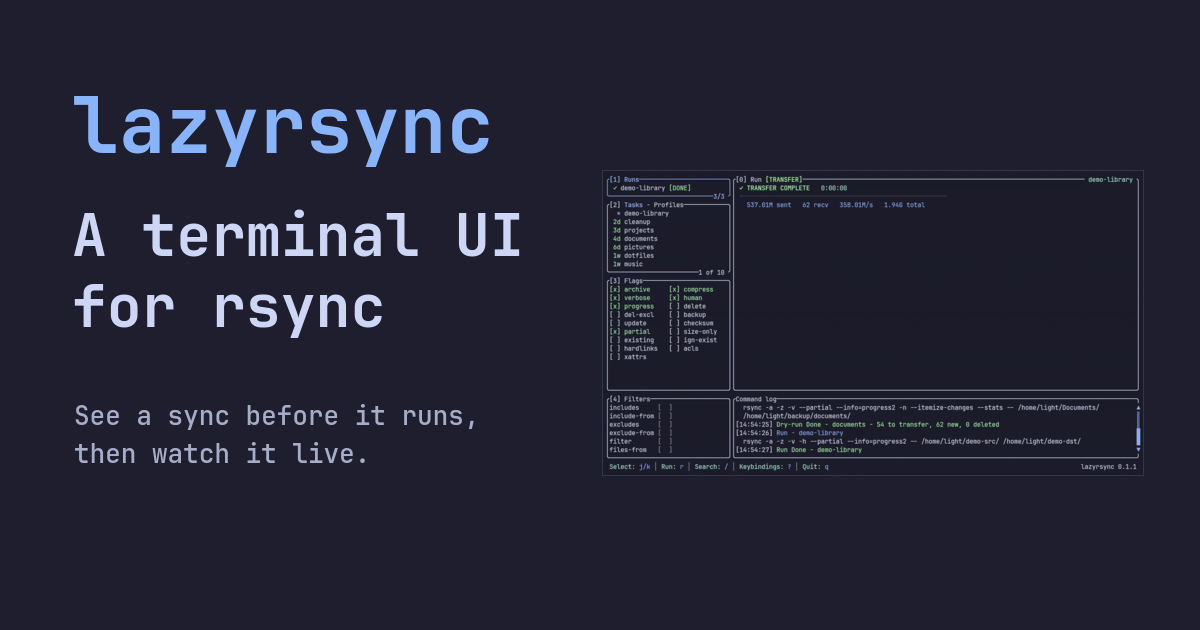
Press `p` before any transfer runs to resolve the sync into a `+`/`~`/`-` structured diff. You see exactly which files will be added, changed, or removed, along with transfer stats. Nothing is written until you press `r` to confirm the run.
Save a Source and Destination as a named task inside a profile. Rerun with a single keystroke, or address it directly with `lazyrsync run backups/photos-3f2a` from a script. Profiles are stored in a hand-editable TOML file under `~/.config/lazyrsync/` and can be versioned in a dotfiles repo.
Every profile you build in the TUI runs without it via `lazyrsync run`. The README includes a ready systemd timer example with `Persistent=true` to catch missed runs. Cron output goes to stdout on success and stderr on failure, so cron mail fires only when something needs attention.
Enabling the `--delete` flag requires a confirmation before any files are removed from the destination. The headless runner refuses a delete task without `--yes`, printing that nothing ran and exiting with code 1, so a cron job cannot accidentally mirror deletions without an explicit opt-in.
Put a `user@host:/path` on either side of a task, and lazyrsync passes it to rsync natively. Remote source downloads and remote destination uploads both work. Headless runs use `ssh -o BatchMode=yes`, so they fail fast on a missing key rather than hanging on a password prompt.
With `action = "snapshot"`, each run writes to a new numbered subdirectory and uses rsync's `--link-dest` to hardlink unchanged files from the previous run. Storage grows only by the delta; earlier versions remain fully browsable. The destination chain is computed at run time, so no static cron command can express it.
Features
- Dry-run diff preview
- Reusable profiles and tasks
- Headless mode for cron and systemd
- Destructive flag gate with mandatory confirmation
- SSH support for remote endpoints
- Snapshot mode with hardlinked versions
How to install
Install lazyrsync via Cargo, Homebrew (macOS/Linux), or the AUR; rsync 3.1 or later must be on your PATH first.
cargo install lazyrsync
brew install lazyrsync
yay -S lazyrsync
Recommended for this setup
Strengths
- MIT license with no per-machine fees: The entire tool is MIT licensed. There are no seat limits, no device counts, and no cloud accounts to configure. Running it on any number of servers costs nothing beyond the machines already running your files.
- Built-in safety gates on destructive operations: Unlike running rsync directly, lazyrsync intercepts `--delete` and `--delete-excluded` at the flag toggle level and requires explicit confirmation. A dry-run preview is a built-in step, not an optional flag you might forget. Both protect against the data-loss mistakes that raw rsync commands make easy.
- TUI and headless share one profile store: A transfer you verified in the TUI is the exact one `lazyrsync run` executes headless. There is no second config to maintain for automated runs. The TOML profiles file is hand-editable and compatible with Ansible provisioning and dotfiles repos.
- Single binary with no runtime dependencies: The binary has no runtime dependencies beyond rsync itself. `cargo install lazyrsync` produces a single self-contained binary. The TUI is built with Ratatui, an active Rust TUI framework published on crates.io.
Trade-offs
- Requires rsync 3.1 or later on the host: The dry-run preview needs rsync's `--itemize-changes` flag, and the live progress bar needs `--info=progress2`, both added in rsync 3.1.0. On macOS 15.4 and later, the system `/usr/bin/rsync` is openrsync, which supports neither. Users on those systems must install a separate rsync via Homebrew and add it to `$PATH` or configure `rsync_path` in `settings.toml`.
- Terminal-only, no desktop GUI: Lazyrsync runs in a terminal. There is no web interface, no Electron app, and no graphical file browser for picking sources and destinations. Users who want point-and-click transfers are better served by dedicated GUI tools. The design is intentional (terminal-native and SSH-capable), but it requires a terminal environment.
- Delete gating does not parse raw_args: The flag confirmation gate reads the task's explicit `delete` and `delete_excluded` toggles. A `--delete` written by hand in the Advanced `raw_args` field bypasses the gate entirely. This is documented in the README as a known caveat but could affect users who prefer to hand-write rsync flags.
Tech stack
FAQ
Lazyrsync wraps rsync; it does not replace it. It constructs and executes the rsync command based on your profile's task settings. rsync 3.1 or later must already be installed on the system and available on your `$PATH`. The TUI and headless runner both call the same underlying binary.
`lazyrsync run <profile>` runs every task in a profile without the TUI. The README includes crontab and systemd timer examples. For systemd, `Persistent=true` ensures runs missed while the machine was off execute at the next startup. Cron output goes to stdout on success and stderr on failure, so cron mail fires only on errors.
Yes. Use a `user@host:/path` address on either side of a task's source or destination. Remote source downloads and remote destination uploads both work. Headless runs require passwordless SSH keys because the runner uses `ssh -o BatchMode=yes` and cannot prompt for a passphrase.
When you enable the `--delete` toggle on a task, lazyrsync shows a confirmation prompt before any run that would delete files from the destination. The headless runner exits with code 1 and reports that nothing ran unless you pass `--yes` explicitly. This prevents accidental deletions when the flag is on but you forgot to opt into it for a given run.
Lazyrsync is MIT licensed. You can run it commercially, modify it, fork it, and distribute it without restriction. There is no community edition vs. enterprise edition split; the full tool is a single MIT-licensed binary.