InvokeAI
Self-hosted AI image generation for artists and professionals
Replaces Midjourney, Leonardo Ai, Dreamstudio
Who it's for
InvokeAI's canvas lets you combine AI generations, photography, and hand-painted elements on independent layers. Inpainting and outpainting extend or refine sections without regenerating the full image. Artists who work with reference photos or composite multiple subjects get more precise control than a text-only interface provides.
Your workflow is primarily text-to-image with minimal post-processing. For simple prompt-to-output work, a cloud service like DreamStudio provides faster iteration with no local setup required.
Without per-image billing, studios can generate thousands of variations per session for concept art, style exploration, or client presentations. Batch generation and gallery management with stored metadata make it practical to trace specific settings that produced a useful result.
Your team generates a modest number of images per month and prefers managed infrastructure. At low volume, a Midjourney subscription is simpler to manage than self-hosted hardware and model maintenance.
The node editor supports multi-step pipelines. You can chain generation, ControlNet passes, upscaling, and LoRA application in a repeatable graph. Specific parameters can be exposed to a shared UI for non-technical collaborators while the pipeline logic stays intact. This level of automation is not available on cloud services without building against a paid API.
You need a quick setup with no pipeline configuration. The node editor has a learning curve; for straightforward generation without custom workflows, the standard canvas is sufficient and less complex.
InvokeAI runs entirely offline after model download. Prompts, generation settings, and output images never leave your machine. For commercial work on unreleased products, medical illustrations, or content involving privacy-sensitive subjects, local generation removes the data exposure question entirely.
Your use case has no privacy requirements and you prefer managed infrastructure. Cloud services handle model updates and GPU costs without local hardware investment.
The problem
AI image generation tools with professional-grade output, like Midjourney and DreamStudio, are cloud-only services. Every image costs credits or a monthly subscription, your prompts go to a third-party server, and the generation pipeline is fixed: you cannot swap models, adjust sampling parameters beyond what the UI exposes, or build custom multi-step workflows without using their API. For artists and studios who generate hundreds of images per project, the per-credit model becomes expensive quickly. For anyone working with sensitive subjects (unreleased product mockups, private character designs, commercial illustrations), sending prompts and images to a third-party platform creates a data exposure question. And for technical users who need custom generation pipelines, ControlNet conditioning, or their own fine-tuned models, cloud services offer no self-hosting path.
How it works
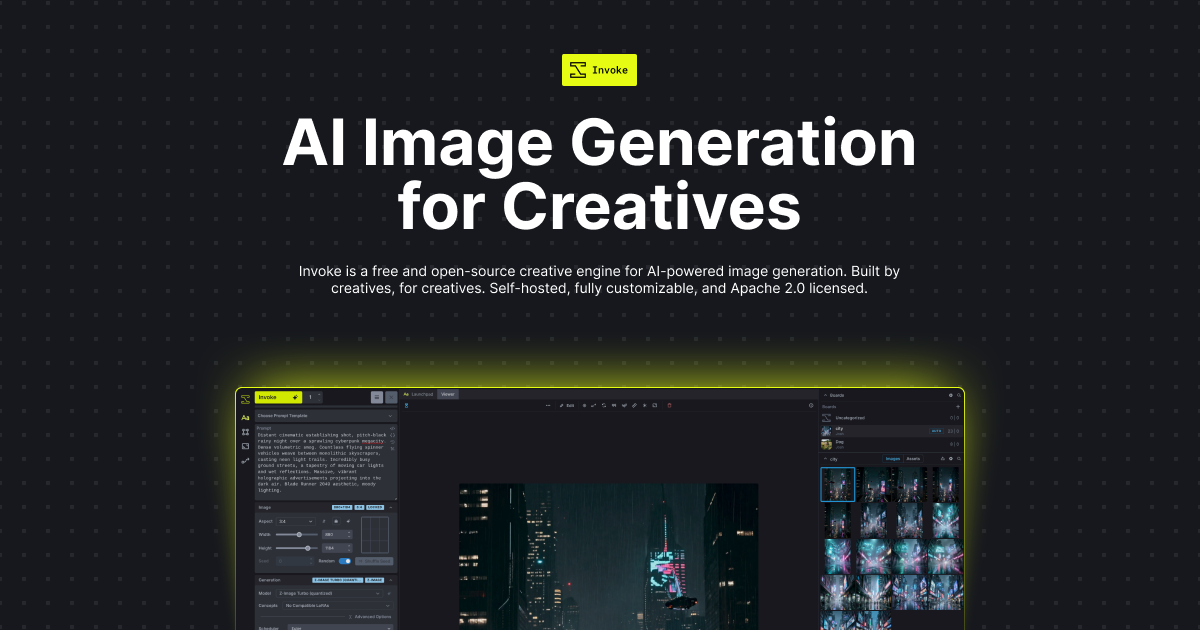
The Unified Canvas combines inpainting, outpainting, and compositing on independent layers. Each layer can be manipulated separately, letting you build complex scenes by combining AI-generated elements, photography, and sketches. Brush, paint, and draw tools are built in, so you can guide generations without switching to a separate application.
A fully visual node editor lets you design generation pipelines by connecting operations in a graph, rather than writing code. Pipelines are shareable and reusable. You can expose specific parameters as custom UI controls so collaborators adjust settings without editing the underlying graph.
InvokeAI ships with out-of-the-box support for Flux.1, SDXL, SD 3.5 Medium and Large, SD 1.5, and many other architectures. The Model Manager handles checkpoints, LoRAs, Textual Inversions, and ControlNets from one interface, so you can switch between model families without manual file placement.
ControlNet support accepts depth maps, edge detections, and pose guides as conditioning inputs, so generations conform to a specific composition rather than following prompt text alone. Useful for maintaining character poses, product angles, or scene layouts across multiple generations.
InvokeAI runs on your own hardware with no network calls during generation. Prompts, model weights, and output images never leave your machine. For commercial work or sensitive subject matter, there is no data retention policy to review because no data leaves your system.
Features
- Layer-based Canvas Editor
- Node-based Workflow Builder
- Model Manager and Broad Architecture Support
- ControlNet Composition Control
- Fully Local with No Data Transmission
Recommended for this setup
Strengths
- Apache 2.0 license permits commercial use: Apache 2.0 means you can use InvokeAI commercially, modify the source, and include it in proprietary workflows without licensing fees or restrictions. The GitHub README notes the license is commercially friendly. There is no per-seat fee, usage cap, or requirement to share modifications with any third party.
- No per-image billing after hardware setup: Running InvokeAI on your own GPU has no per-generation charge. Cloud services like Midjourney and DreamStudio bill by credits or monthly subscription tier, with limits on concurrent fast generations. For studios running batch sessions or iterating through dozens of variations, local compute removes the billing ceiling entirely.
- Actively maintained with fast model coverage: The repository saw a commit as recently as October 2026, with support for Flux.2 Dev, Flux.2 Klein 4B and 9B, Ideogram 4, and other recent model releases. New architectures are added directly to InvokeAI's model library rather than waiting for a cloud provider to expose them through their interface.
- Full generation pipeline control: InvokeAI exposes the full generation stack. You control sampler settings, ControlNet conditioning, LoRA weights, and custom node chains. Midjourney's interface controls style and aspect ratio; InvokeAI's node editor supports custom preprocessing, intermediate refinement passes, and multi-model chains that no cloud service UI exposes.
Trade-offs
- GPU required on all platforms: InvokeAI requires a qualified GPU to run. On Windows and Linux, that means NVIDIA or AMD hardware. On macOS, only Apple Silicon (M-series) is supported; Intel Macs are not. There is no CPU fallback for production workloads, so machines without a qualifying GPU cannot run InvokeAI at all.
- More setup than cloud alternatives: Midjourney and DreamStudio work from a browser with no local install. InvokeAI requires downloading the Launcher, installing dependencies, and managing model files locally. First-time users also need to download multi-gigabyte model weights before generating anything. The setup is launcher-assisted and documented, but it is not zero-effort.
- Commercial backing changed after platform shutdown: The original Invoke.ai hosted platform shut down when the founding team joined Adobe. Stewardship of the open-source project passed to core maintainers Lincoln Stein and Blessedcoolant. The project remains actively developed, but users who relied on the hosted service no longer have that option, and the project runs without the original commercial team.
Tech stack
FAQ
Yes. InvokeAI is licensed under Apache 2.0, which permits commercial use, modification, and redistribution without restriction. You can use it for client work, incorporate it into commercial workflows, and modify the source code. The only costs are your own hardware and electricity.
On Windows and Linux, InvokeAI requires an NVIDIA or AMD GPU. On macOS, it requires Apple Silicon (M-series); Intel Macs are not supported. GPU requirements vary by model: SDXL needs more VRAM than SD 1.5, and Flux and SD 3.5 models need more still. The official documentation covers specific requirements for each model family.
Midjourney is a cloud service with subscription pricing, no model access, and no self-hosting option. InvokeAI runs on your own hardware with full model access, no per-image cost, and complete privacy. Midjourney's prompt interface is simpler and requires no hardware; InvokeAI requires a GPU and installation but gives you canvas compositing, node workflows, and model choice that Midjourney does not expose.
InvokeAI supports Flux.1 Dev, Flux.1 Schnell, Flux.1 Kontext, SDXL, SD 3.5 Medium and Large, SD 1.5, SD 2.0, Flux.2 Dev, Flux.2 Klein 4B and 9B, Ideogram 4, and many others. The Model Manager handles checkpoints, LoRAs, Textual Inversions, and ControlNets across all supported families from one interface.
Yes. InvokeAI can be run on hosted GPU services including AI Badgr, RunPod, and Railway, removing the local hardware requirement. The Invoke.ai cloud-hosted platform was shut down when the founding team joined Adobe, so that specific service no longer exists. Third-party GPU hosting remains a supported path via the community.