
Gitdrive
Your GitHub repos as a native drive in macOS Finder
Replaces Icloud Drive
Who it's for
Developers already working in GitHub daily can extend the same workflow to personal documents, notes, and assets without adding another cloud service. Files in Finder and code in repos share the same GitHub account, authentication, and version history model.
Skip if your team includes Windows or Linux users who need access to the same files. GitDrive is macOS-only and does not expose files to non-Mac collaborators.
Users who want personal file storage without handing plaintext data to Apple or Dropbox benefit from GitDrive's private-by-default repos and optional post-quantum encryption. On macOS 26, enabling encryption makes GitHub's copy of any file completely unreadable to GitHub.
Skip if you need storage accessible from Windows, iOS, or Android devices. GitDrive has no mobile client and no Windows app.
Each file save in GitDrive creates a git commit, so the complete edit history of any document is available from GitHub's web interface or any git client. Deleted files remain in the repo history until a Compact History operation removes them, giving a recoverable archive for notes, contracts, or creative work.
Skip if your archive needs exceed GitHub's recommended 1 GB repo size limit, or if you need point-in-time backups of a large media library. GitDrive works best for text-heavy documents and moderately sized files.
The problem
Personal cloud storage puts your files on servers you do not control, at prices that increase as your storage grows. iCloud Drive and Dropbox charge monthly for storage above their free tiers, and every file you store is readable by the provider unless you add your own encryption layer. The practical alternative for most people is to live within free-tier limits and accept the trade-offs: limited space, provider visibility into your content, and a file format you cannot take with you if you leave. For developers, the pain is sharper. The tools they trust for code, including git and GitHub, already handle branching, history, and access control better than any cloud drive. But those tools are built around code, not arbitrary files, so personal documents, notes, and assets end up in a separate cloud service with weaker versioning and no terminal access. The result is two systems: code in GitHub and files in Dropbox or iCloud, with no overlap.
How it works
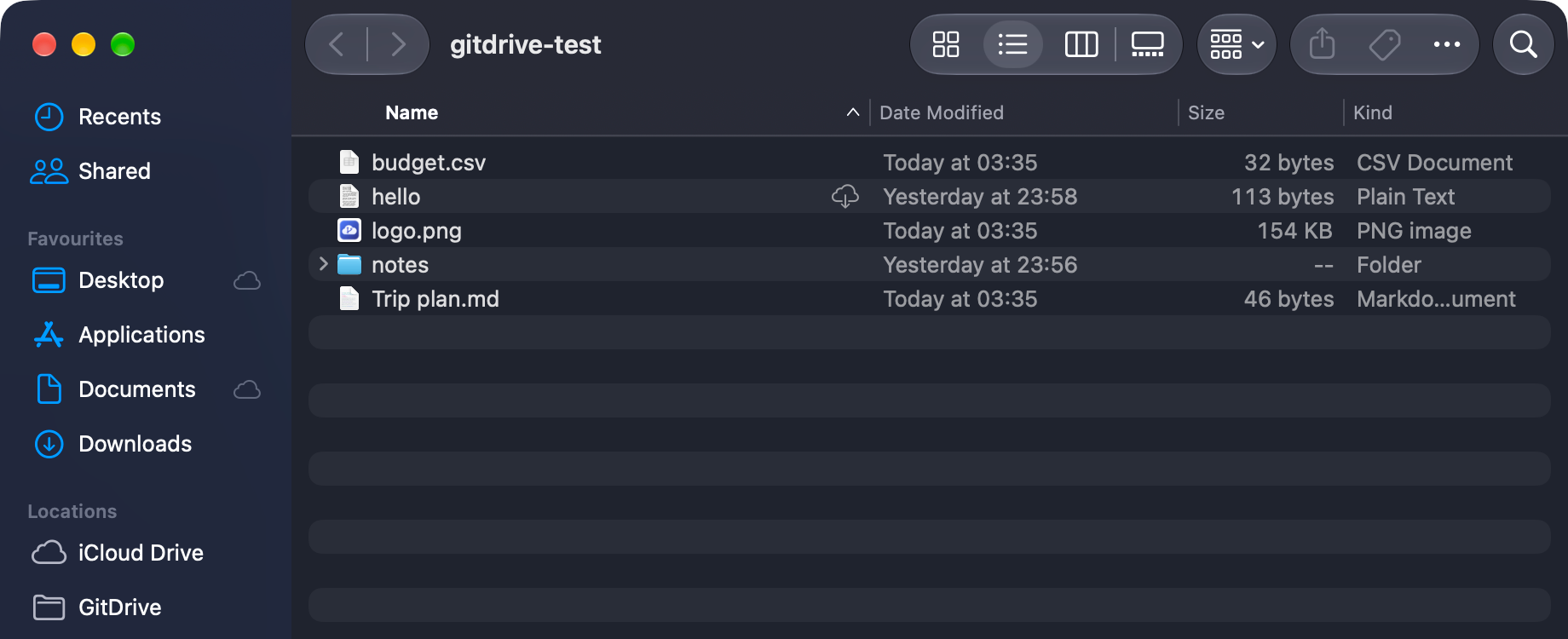
GitDrive appears in the Finder sidebar alongside iCloud Drive and Dropbox, built on Apple's File Provider framework. The drive behaves like any other macOS drive: drag to add files, right-click to remove downloads, and search for files that have not been downloaded yet.
Every file in a linked GitHub repo appears in Finder immediately, but content downloads only when you open the file. Unused files can be removed from your Mac with a right-click or via Free Up Space in the menu bar, and macOS can reclaim them automatically when disk space runs low.
Each file save creates a real git commit in the backing GitHub repo. Any previous version of any file is recoverable directly from GitHub's history. Conflicts from edits made on github.com or a separate clone show up in Finder within a minute, with a side-by-side diff viewer available in the extras.
Optional encryption using ML-KEM-768 combined with X25519 hybrid key exchange stores only random ciphertext in GitHub. File names, folder layout, and file sizes are all hidden; GitHub sees none of it. The encryption key lives in iCloud Keychain, not on GitHub. Requires macOS 26.
Files exceeding a user-set size threshold are stored via Git LFS instead of standard git objects, supporting individual files up to 2 GB. GitHub Free includes 10 GiB of LFS storage and 10 GiB of monthly LFS bandwidth. The menu bar warns when a repo approaches GitHub's recommended 1 GB size limit.
Features
- Native Finder Integration via File Provider
- On-Demand File Downloads
- Full Git History for Every File
- Post-Quantum End-to-End Encryption
- Git LFS for Files Over 100 MB
How to install
Install from source on macOS 14 or later using Xcode and a free Apple ID.
git clone https://github.com/deeeeone/gitdrive.git
cd gitdrive
./scripts/install.sh
Recommended for this setup
Strengths
- No subscription cost within GitHub's included storage: GitDrive itself is free to build and run. Storage uses your existing GitHub account; the README documents that GitHub Free includes 10 GiB of LFS storage and 10 GiB of monthly downloads. There is no GitDrive subscription at any tier; you pay only for extra GitHub storage if you exceed the free limits.
- No server to provision or maintain: Most self-hosted file sync tools require a server, a database, and ongoing infrastructure management. GitDrive uses the GitHub API as its entire backend, so there is nothing to provision or maintain beyond the app itself. There is no VPS to set up, no SSL certificate to renew, and no uptime to monitor.
- Files stay in standard git repos accessible from any tool: Every GitDrive folder is an ordinary GitHub repo. You can clone it, push to it from the terminal, or browse its history in any git interface. Files are not stored in a proprietary format and remain fully accessible if you stop using the app.
- Encryption hides the entire file graph, not just contents: Most cloud storage encryption protects file contents but reveals file names, folder structure, and access patterns. GitDrive's optional encryption (ML-KEM-768 + X25519) hides all of these from GitHub, storing only anonymous blobs. The encryption key stays in the user's iCloud Keychain, not with any third party.
Trade-offs
- macOS only, no cross-platform support: GitDrive is a Swift and SwiftUI app built on Apple's File Provider framework, which does not exist outside macOS. Windows and Linux users have no path to use it. Teams with mixed operating systems cannot share GitDrive folders with non-Mac members.
- No prebuilt downloads; requires Xcode and Apple ID to install: macOS only loads File Provider extensions signed by a developer team, and GitDrive does not ship signed release builds. Every user must clone the repo, install Xcode (free), and run the install script with their own Apple ID. This is a meaningful setup cost for non-developers.
- Subject to GitHub's storage and rate limits: GitHub is built for code, not general file storage. Free accounts include 10 GiB of LFS storage and 10 GiB of monthly LFS bandwidth; opening a large file counts as a download against that quota. GitHub recommends repos stay under 1 GB. Storing large media libraries or multi-gigabyte archives will hit these ceilings.
- Post-quantum encryption requires macOS 26: The ML-KEM-768 + X25519 encryption feature depends on APIs available only in macOS 26. Users on macOS 14 through 25 can use GitDrive without encryption, but their content in GitHub repos is readable by GitHub. The encryption toggle is unavailable until the OS requirement is met.
Tech stack
FAQ
Downloaded files open and save normally when you are offline; GitDrive uploads changes when the connection returns. Files that have not been downloaded yet cannot be opened offline because the content has not been fetched from GitHub.
Yes. Every GitDrive folder is a standard GitHub repo, accessible from the GitHub web interface, the GitHub CLI, or any git client. Changes pushed to the repo from outside GitDrive appear in Finder within about a minute.
Nothing on GitHub changes. All your files remain in their GitHub repos exactly as you left them. Sign out of GitDrive before uninstalling to remove locally downloaded copies from your Mac. The repos stay accessible via the GitHub web interface or any git client.
GitDrive is MIT licensed and free to build and run. Storage is provided by your GitHub account at no additional cost. GitHub Free includes 10 GiB of LFS storage and 10 GiB of monthly LFS bandwidth for larger files. Most personal use cases fit within those limits without extra cost.
Keeping each folder in its own repo limits the size and API traffic per repo, lets you share or archive individual folders separately, and keeps git history for one folder independent of the others. The trade-off is that you cannot place files directly at the root of the drive; everything goes inside a named folder.