
FableCut
Browser video editor AI agents can drive via MCP
Replaces —
Who it's for
Developers building Claude Code or MCP-based automation can point an agent at a footage directory and instruct it to cut to beat markers, add captions, apply a grade, and export — watching the timeline update live in the browser without writing a custom video pipeline.
Creators who produce regular short-form content (reels, shorts, podcast clips) can use FableCut's silence removal, auto-transcription, and reference analysis tools to automate the mechanical parts of editing while retaining full manual control over the timeline.
Already comfortable with a cloud-based editor that lacks agent integration
Engineers building products that incorporate video editing can use FableCut's REST API and JSON timeline as a local prototyping environment for agent-driven edit logic before committing to a custom renderer or commercial API.
Project requires a managed cloud rendering service or multi-user collaboration
Users who want a Premiere-style editor with full NLE features, no subscription, no install step beyond Node 18, and a portable project format can run `npx -y fablecut` and keep all footage and exports on their own machine.
Requires team collaboration, cloud sync, or browser other than Chromium-based
The problem
AI video tools typically hide the edit behind a black-box API, making it impossible for agents or scripts to inspect or modify the timeline directly. Meanwhile, browser-based editors that do expose their data model are usually too limited for professional work. Developers and AI-powered workflows need a full-featured NLE where the project file is the interface — readable, writable, and hot-reloadable by any process that speaks JSON.
How it works
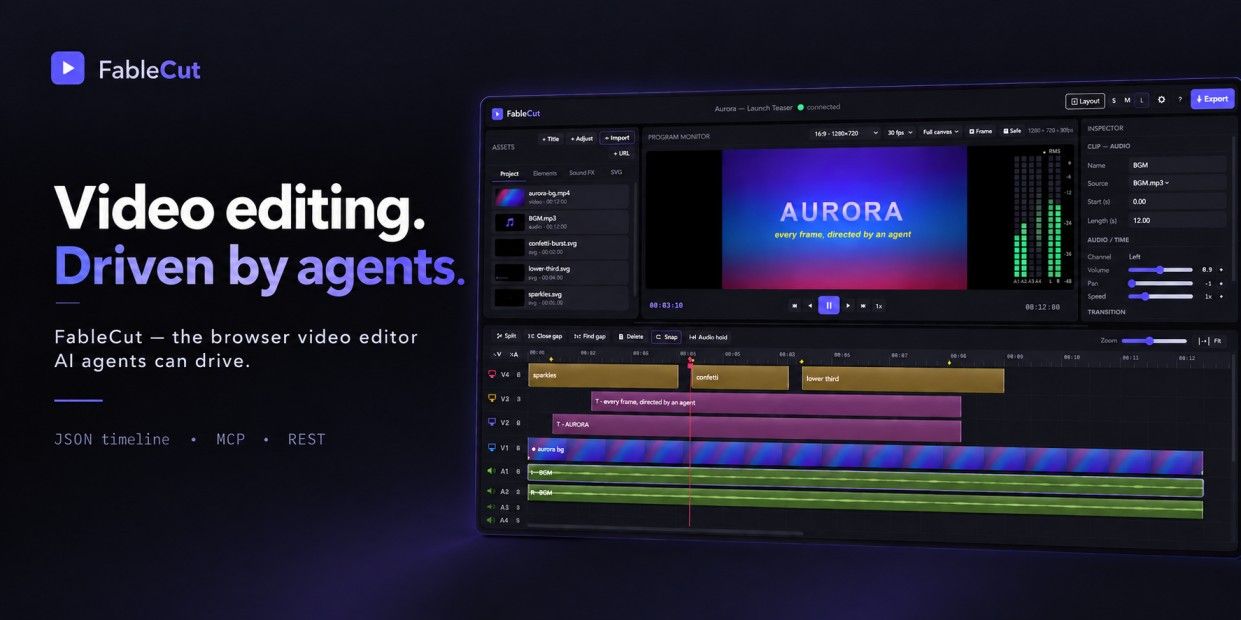
`project.json` is the single source of truth for media, clips, tracks, effects, keyframes, and transitions. Any process that can read and write JSON can edit the timeline; the browser UI hot-reloads within ~150 ms via server-sent events whenever the file changes.
A bundled zero-dependency MCP stdio server exposes tools including `fablecut_patch_project`, `fablecut_transcribe`, `fablecut_captions`, `fablecut_auto_duck`, `fablecut_denoise`, `fablecut_silence`, `fablecut_export`, and `fablecut_frame`. The same edits are available over REST at `GET/PUT /api/project` and related endpoints.
`fablecut_frame` returns a JPEG of any clip moment or a 12-frame contact sheet; passing a timeline time renders the composed, graded output identically to export. `fablecut_scopes` returns waveform, parade, and histogram readings so agents can verify grades numerically.
`fablecut_analyze_reference` (also available as `node analyze.js ref.mp4` or `POST /api/analyze`) extracts shot boundaries, beat timestamps, BPM, per-shot energy, the drop, and the music track from a reference reel, returning a blueprint agents use to rebuild the edit with different footage.
Per-clip and per-track audio effects chain (EQ, compressor, limiter, noise gate, delay, reverb, distortion, pitch shift), submix buses, ITU-R BS.1770 loudness normalization, auto-duck, noise reduction via ffmpeg, in-browser Whisper transcription, and silence removal with single-undo extraction.
A revision counter on `project.json` means simultaneous human and agent edits are detected rather than silently overwritten. The REST API returns 409 on a stale revision; `fablecut_set_project` surfaces a conflict error; the UI toasts when an agent write supersedes an unsaved local change.
Features
- JSON timeline as the interface
- MCP and REST control surfaces
- Frame and scope vision for agents
- Reference video analysis
- Professional audio tooling
- Conflict-safe concurrent editing
How to install
npx -y fablecut # → http://localhost:7777 # Or from a clone: git clone https://github.com/ronak-create/FableCut.git cd FableCut node server.js # Register MCP server with Claude Code: claude mcp add -s user fablecut -- npx -y fablecut mcp
Recommended for this setup
Strengths
- Zero npm dependencies: The entire server is one `node server.js` file with no npm install step. Starting the editor is `npx -y fablecut` or cloning the repo and running `node server.js`. FFmpeg on PATH is optional and only needed for fast export, proxy generation, and audio processing.
- Client-neutral MCP server: The bundled MCP server speaks stdio and requires no Claude-specific environment variables, making it compatible with Claude Code, Claude Desktop, OpenCode, and any other MCP client. It is listed on the official MCP registry as `io.github.ronak-create/fablecut`.
- Full NLE feature set: Ripple/roll/slip/slide trim tools, up to 16 video and 16 audio tracks, keyframe animation on ~25 properties, motion tracking, chroma key, AI background removal, color grading with curves and HSL secondaries, 17 blend modes, compositions (nested sequences), 33 animation presets, and delivery presets for every major platform.
- Token-efficient agent API: Agents patch the timeline with small ops via `fablecut_patch_project` rather than round-tripping the whole document. `fablecut_get_project {compact:true}` returns a one-line-per-clip summary. `fablecut_docs` serves only the requested manual section, keeping context usage low.
Trade-offs
- Runs on localhost only by default: Since v1.3.1 the server binds `127.0.0.1` only. Exposing it on a LAN requires opting in with `HOST=0.0.0.0 FABLECUT_ALLOWED_HOSTS=<your-ip>`. There is no built-in multi-user or cloud-hosted mode.
- FFmpeg is optional but practically required for full capability: Fast export, upload remuxing, proxy generation, noise reduction (`fablecut_denoise`), and silence removal all depend on `ffmpeg` being on PATH. Without it, only the WebCodecs and MediaRecorder export paths are available.
- Chromium-based browser required: The editor requires a Chromium-based browser for the canvas compositor, WebCodecs export, and in-browser Whisper transcription. Firefox and Safari are not listed as supported.
- Not a cloud or SaaS product: FableCut is self-hosted on the local machine. Projects, media, and exports are stored in `~/FableCut` (or a custom `FABLECUT_DATA_DIR`). There is no cloud storage, shared workspace, or managed rendering infrastructure.
Tech stack
FAQ
Run `npx -y fablecut` in a terminal with Node 18+ installed. The editor opens at `http://localhost:7777` and stores projects, media, and exports in `~/FableCut`.
Run `claude mcp add -s user fablecut -- npx -y fablecut mcp` once. Claude Code can then use the MCP tools (`fablecut_status`, `fablecut_patch_project`, `fablecut_export`, and others) to drive the editor. From a local clone, point the command at `node /absolute/path/to/FableCut/mcp-server.js` instead.
No, but it is strongly recommended. Without FFmpeg, only the WebCodecs and MediaRecorder export paths are available. With it, fast export, proxy generation (H.264 copies of 4K/HEVC/ProRes footage), noise reduction, silence removal, and upload remuxing all become available.
Yes. FableCut uses a revision counter on `project.json`. If the human edits a clip while an agent is mid-task, the agent's next write is rejected with a 409 (REST) or a conflict error (MCP) rather than silently overwriting the human's change. The UI also toasts when an agent write supersedes an unsaved local tweak.
Delivery presets cover YouTube, YouTube Shorts, Instagram Reels, TikTok, X, LinkedIn, a lossless FFV1 archive, ProRes 422 HQ (Broadcast), and Custom. Codec options include H.264, HEVC, AV1, VP9, ProRes, DNxHR, XDCAM HD422, and FFV1. Loudness normalization to −14/−16/−23/−24 LUFS with true-peak ceiling is available per preset.