
DiscImageStudio
Burn visible images into standard CD, DVD, or Blu-ray discs.
Replaces Lightscribe Toolbox
Who it's for
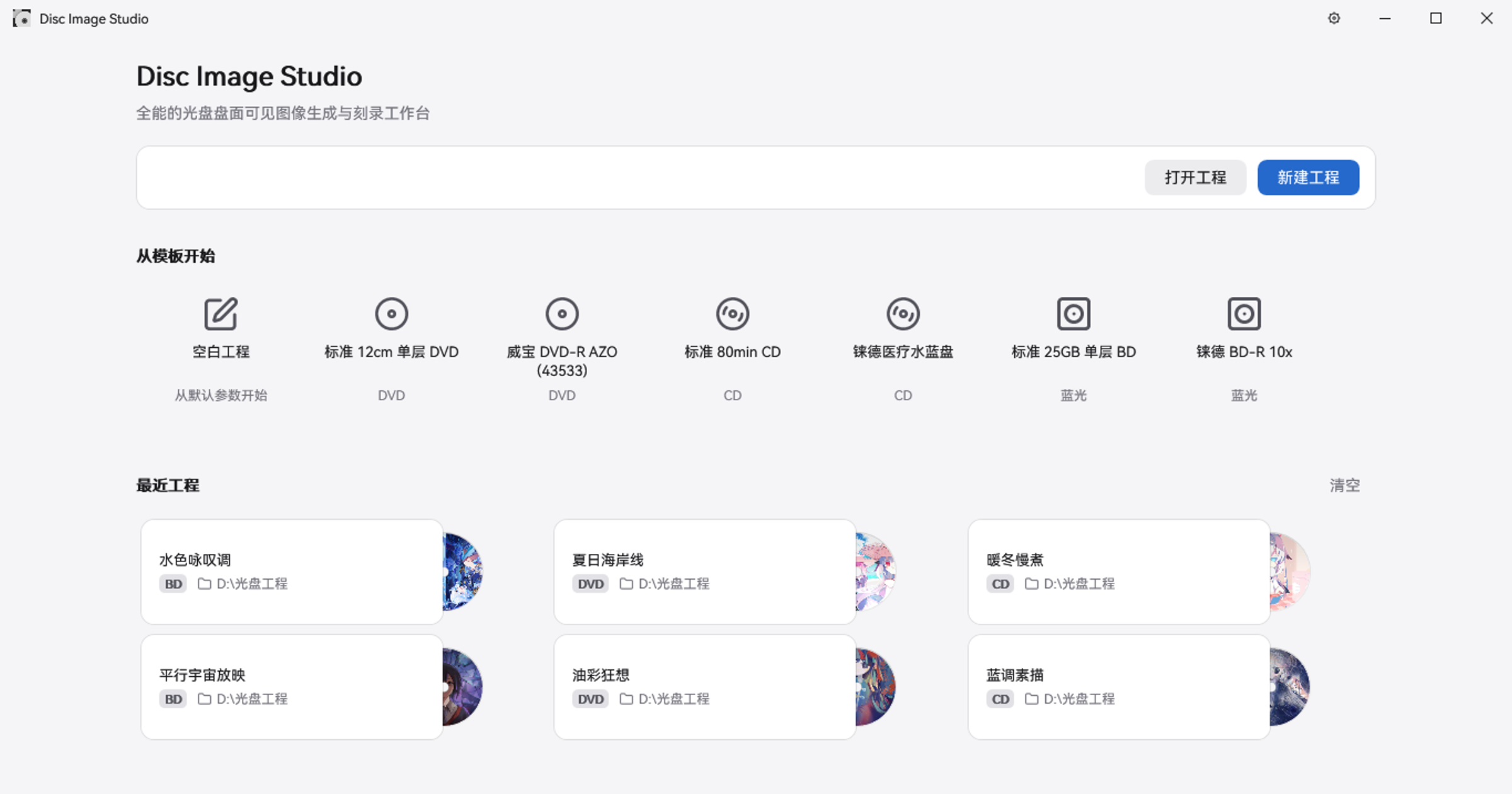
Burn a custom image directly into a disc's data tracks for a permanent, hardware-compatible label that does not require a label printer or inkjet disc coating. The Windows GUI covers the full workflow: import an image, adjust tone and dithering, preview the design, and export or burn directly.
You have a working LightScribe drive and a supply of LightScribe discs. DiscImageStudio works with standard media, but if you already have LightScribe hardware, the LightScribe workflow requires less calibration effort.
Create a disc that visually identifies its content through the data encoding itself, without attaching a paper label that could peel or smear. Data disc support lets you include the actual backup files alongside the visible image on the same disc for all three formats.
Your archive discs are stored in labeled sleeves or cases rather than identified by disc surface. The workflow is primarily useful when the disc surface needs to carry the identification.
The documented physical models, source structure separated by disc type, and CLI interface make DiscImageStudio a reference implementation for CD, DVD, and Blu-ray encoding constraints. The CLI commands cover DVD solving, CD-DA generation, BD-R generation, calibration projection, and readback simulation.
You need a production-grade disc mastering tool with commercial support. DiscImageStudio is a community-maintained project with an experimental burn path and 61 open issues at time of indexing.
The problem
The only consumer-grade way to burn a visible label directly into a disc surface was LightScribe, an HP technology that required purpose-built drives and special discs with a photosensitive coating on the label side. LightScribe hardware is no longer manufactured. Paper labels peel and can unbalance a disc in a drive; inkjet-printable disc coatings fade over time and require a printer with a disc print tray. Encoding a visible image into the actual data tracks of a plain blank disc requires accurately modeling sector encoding, scrambling domains, and track pitch geometry for three separate disc formats. For CDs this means generating CD-DA audio tracks that produce visible grayscale contrast. For DVDs it means working within the NRZI scrambling domain. The physical models for each format are distinct enough that building support for all three is months of engineering work, which explains why no cross-platform open source tool addressed this before DiscImageStudio.
How it works
Generates valid disc images for all three formats. CD exports WAV+CUE audio tracks compatible with cdrecord and ImgBurn, or RAW audio. DVD exports ISO. Blu-ray exports UDF 2.01 files for single-layer BD-R 25 GB discs. Each format has disc presets for multiple brands built in, and all three support adding a folder of files to the design alongside the visible image.
A layered design interface lets you compose multiple images, adjust track pitch and tone curves, and preview how dithering and grayscale levels will render on the disc surface. The tone panel includes gamma, brightness, and grayscale step adjustments so you can tune output for a specific disc and burner combination.
A calibration workflow estimates inner and outer radius and track pitch distribution from photographs of test burns, using coarse, boundary, and fine stages. After calibration, a cubic track pitch parameter corrects radial distortion, producing straighter lines on the disc surface. The docs include a Verbatim AZO DVD-R tutorial showing before-and-after calibration results.
The Windows release ships as a single executable with the .NET 10 runtime bundled: download, run, done. No installer, no dependency management. Linux and macOS CLI binaries are self-contained as well. No network access, no telemetry, no account required.
The experimental CLI supports PNG, JPEG, BMP, and GIF inputs (first frame for animated GIFs), and covers commands for DVD solving, CD-DA generation, BD-R generation, calibration projection, and readback simulation. Available for linux-x64, linux-arm64, osx-arm64, and osx-x64 as a self-contained archive download from GitHub Releases.
Features
- CD, DVD, and Blu-ray disc format support
- Layer canvas with dithering and tone controls
- Three-stage disc calibration from photographs
- Self-contained executables with no installation
- Command-line interface for Linux and macOS
How to install
Download the Windows GUI or experimental Linux/macOS CLI from GitHub Releases: https://github.com/JiaFeiMiao-K-Cat/DiscImageStudio/releases/latest
Recommended for this setup
Strengths
- Works with any standard disc and any burner: LightScribe required HP's proprietary disc format and a matching drive. DiscImageStudio works with any blank CD, DVD, or single-layer BD-R and any optical drive. The image encodes into the data tracks themselves using the disc's own physical structure, so there is no proprietary hardware dependency.
- GPL-3.0 licensed and fully local: No telemetry, no uploads, no network connection. The tool processes everything locally on the user's machine. GPL-3.0 means the source is freely auditable and distributable with modifications, as long as the source remains available under the same license. No subscription, no account.
- Detailed physical model documentation: The docs cover the CD, DVD, and Blu-ray physical models, the ECMA and ISO standards referenced, the encoding chain, the ECC structure, and the NRZI solver. For users who want to understand sector-level behavior or extend the tool to new disc types, the documentation is complete enough to follow independently.
- Seven-language GUI with no manual configuration: The Windows GUI ships with Simplified Chinese, Traditional Chinese, English, Japanese, Turkish, Spanish, and Czech interfaces. Language falls back to system language automatically, with no manual configuration needed.
Trade-offs
- Linux and macOS support is CLI-only and experimental: The full GUI runs on Windows 10 2004+ and Windows 11 only. Linux and macOS users get a command-line interface labeled experimental by the developers. The instant burn feature requires Windows as well, since it uses the Windows IMAPI2 API. For non-Windows users, the CLI generates image files that must be burned with separate software.
- Instant burn is experimental; use test media only: The streaming burn mode generates and writes to a blank disc simultaneously without saving a full image file. Available for CD, DVD, and BD-R, but labeled experimental. An interrupted burn can ruin the disc: BD-R offers no spare area remapping and usually cannot continue after interruption. The tool warns to use only disposable test media.
- Visible image quality depends on hardware: Quality varies with disc brand, burner model, firmware, and write strategy. The calibration workflow reduces radial distortion, but no guaranteed result exists for an untested disc or drive combination. First burns on an uncalibrated setup will show some distortion; the calibration tutorial uses a Verbatim AZO DVD-R as the reference disc.
Tech stack
FAQ
No. It works with any standard blank CD, DVD, or single-layer BD-R disc and any optical burner. Unlike LightScribe Toolbox, there is no proprietary disc coating or drive requirement. The image encodes into the data tracks of a plain blank disc.
Yes, the Windows GUI and CLI are free to download and run. GPL-3.0 means you can run it, study it, and distribute it, but if you distribute a modified version you must also distribute the source under the same license. There is no subscription or account required.
Download the experimental CLI archive matching your CPU (linux-x64, linux-arm64, osx-arm64, or osx-x64) from GitHub Releases. Extract it and run `./disc-image-studio --help` for the full command list. The CLI generates image files; burn them with a separate tool that supports the format. The instant burn feature is not available outside Windows.
The CLI reads PNG, JPEG, BMP, and GIF files. For animated GIFs, it uses the first frame only. The Windows GUI imports the same formats through its layer canvas interface.
Results depend on the disc brand, burner model, firmware, and write strategy. The three-stage calibration workflow estimates track pitch from photographs of test burns and reduces radial distortion. The docs include a Verbatim AZO DVD-R calibration tutorial showing before-and-after results with radial lines straightening after the cubic pitch correction.