DevToys
Cross-platform dev toolbox with 30+ offline tools for daily tasks.
Replaces Devutils, Exabox, Developer Tools Pro
Who it's for
DevToys covers JSON formatting, YAML conversion, JWT encoding and decoding, and Base64 operations in one place. Smart Detection picks up clipboard content automatically, so pasting a JWT from an HTTP response triggers the decoder without manual navigation.
You rarely format or decode data in your workflow and prefer a browser extension for a single specific task.
Teams operating under data handling policies that restrict sending credentials to third-party sites can format, decode, and generate data locally. This covers API keys, certificates, JWT tokens, and private configuration values.
You work exclusively with non-sensitive, public data where online tools carry no compliance or privacy risk.
DevToys CLI exposes most tools as terminal commands, letting pipelines perform data transformation locally without calling external APIs. The Windows-native WinUI integration makes it a natural fit for Windows-focused development workflows.
Your CI environment runs on a platform where DevToys CLI has not been tested or is not easily installable.
The built-in RegEx tester accepts an expression and a test string, highlights matches, and updates in real time. Because it runs locally, there is no latency and no submission to an external service, which matters when test strings contain production data.
Your IDE already includes an integrated regex tester that covers your workflow without switching context.
The problem
Developers constantly juggle small data tasks throughout the day: decoding a JWT token, formatting a messy JSON blob, generating a secure password, testing a regex. Each task has traditionally meant opening a new browser tab and trusting a random website with potentially sensitive data. Those sites may log inputs, inject ads, or simply return wrong results. The risk multiplies when working with credentials and tokens. Pasting an API key or a JWT into an online decoder means that data crosses the wire to an unknown server. Many teams operate under data handling policies that restrict this, but writing a quick script or installing a one-off tool for each task takes longer than the task itself.
How it works
DevToys monitors your clipboard and automatically identifies the best-fit tool for the copied content. When only one tool matches, it pastes the content automatically. When multiple tools could apply, a lightbulb indicator shows the options. This removes the lookup step for common formats like JSON, JWT, and Base64.
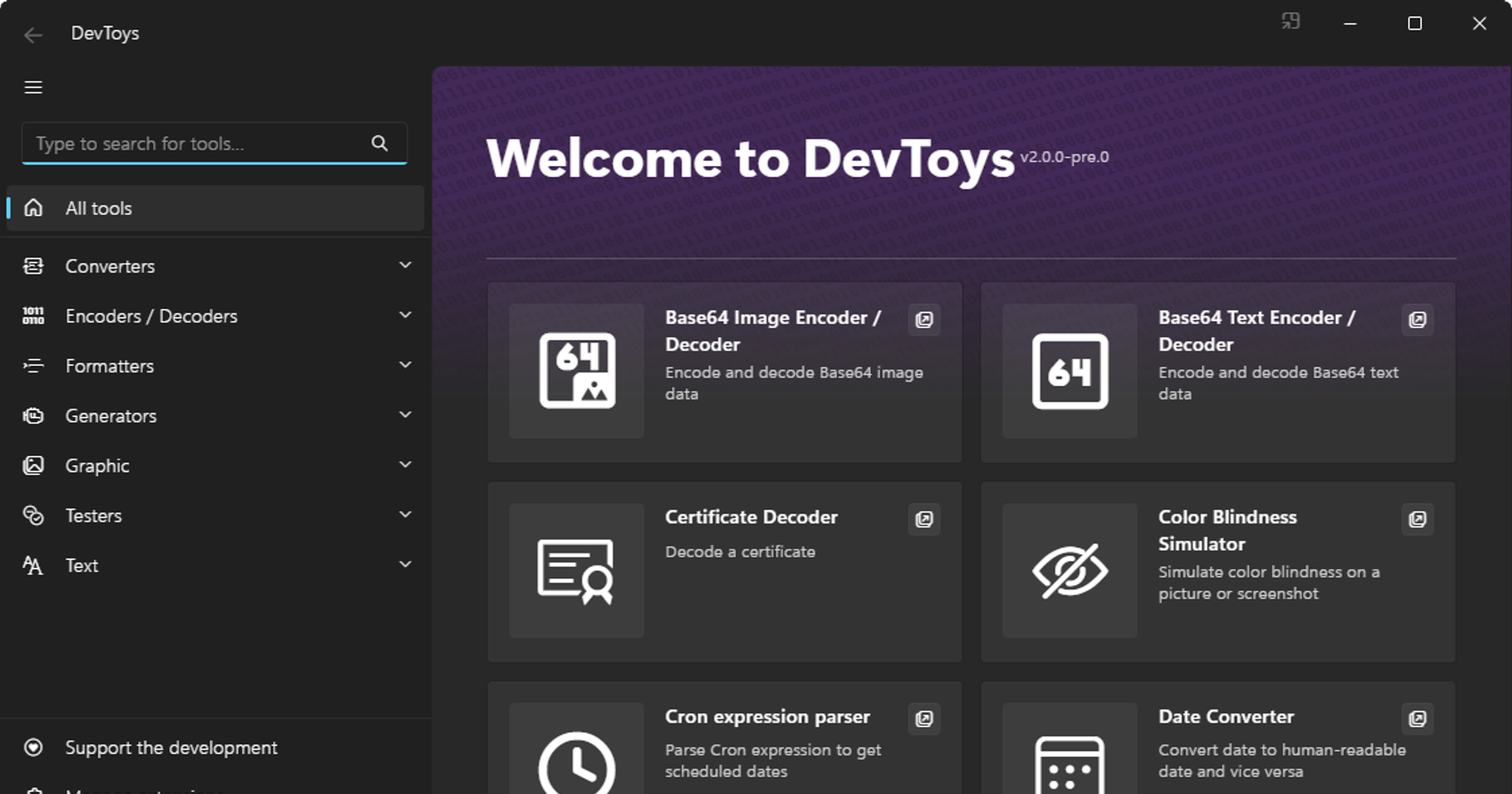
Tools span Converters (JSON/YAML, Number Base, Date), Encoders/Decoders (Base64, JWT, URL, HTML, Certificate, GZip), Formatters (JSON, SQL, XML), Generators (Hash, UUID, Password, Lorem Ipsum), Graphics (Color Blindness Simulator, PNG Compressor), Testers (RegEx, JSONPath, XML/XSD), and Text Utilities (Text Comparer, Markdown Preview). All run locally.
DevToys CLI is a separate installable that exposes most tools as terminal commands. This lets teams use the same local tooling in automated pipelines, shell scripts, or CI environments, without relying on third-party API calls for data transformation.
Third-party tools install directly from NuGet.org, covering additional use cases like JSON-to-C#, PNG Compressor, RSA Generator, and Semver Calculator. The SDK and documentation at devtoys.app/doc let teams build and distribute their own tools into the same UI.
DevToys runs on Windows 10/11 (WinUI and Fluent Design), macOS, and Linux using a shared C# and Blazor codebase. On Windows it integrates with Task Bar jump lists, Compact Overlay mode (picture-in-picture), system search, and multiple instance support.
Features
- Smart Detection for clipboard content
- 30+ offline tools across seven categories
- Command-line interface for CI and scripting
- Extensible with community and custom tools
- Cross-platform with native OS integration
How to install
Download the DevToys installer for Windows, macOS, or Linux from GitHub Releases: https://github.com/DevToys-app/DevToys/releases/latest
Recommended for this setup
Strengths
- MIT license with no purchase required: DevToys is fully MIT licensed, free to download and run, with no trial period, no license key, and no recurring fee. Unlike paid alternatives like DevUtils and Exabox, there is no cost to get started or to keep using it.
- All data stays on your machine: Every tool runs entirely offline. No data is sent to external servers, which matters when working with tokens, API keys, credentials, or private certificates. The app was built specifically to address the risk of pasting sensitive developer data into random websites.
- Active project with 32,000+ GitHub stars: DevToys has 32,183 GitHub stars and was last updated in September 2026. It runs on Windows, macOS, and Linux using a shared C# and Blazor codebase, so feature parity across platforms is maintained across the same build.
- CLI included for automation and CI pipelines: Most tools are available from the terminal via DevToys CLI, a separate installable that works independently of the GUI. This lets teams use the same local tooling in scripts and pipelines without third-party API dependencies.
Trade-offs
- 329 open issues as of November 2026: The issue tracker shows 329 open issues. For a tool covering 30+ workflows across three operating systems, that volume reflects active use and cross-platform complexity, but it also means some edge cases in specific tools may not be patched quickly.
- No web or mobile access: DevToys is desktop-only. There is no web interface, browser extension, or mobile app. If you need to run a quick format or decode operation on a phone or a machine where you cannot install software, you will still need an alternative.
- CLI installs separately from the desktop app: DevToys CLI installs and updates independently of the GUI app. Users who want both the visual interface and the terminal tooling need to set up and maintain two separate installations.
Tech stack
FAQ
Yes. DevToys is MIT licensed and free to download and use with no subscription, no license key, and no paid tier. The source code is on GitHub at github.com/DevToys-app/DevToys.
DevToys runs on Windows 10/11, macOS, and Linux. All three platforms receive the same set of tools. The Windows version uses WinUI with Fluent Design; the macOS and Linux builds share the same C# and Blazor codebase.
DevToys is the desktop GUI application. DevToys CLI is a separate command-line tool that exposes most of the same tools as terminal commands, useful for scripts and CI pipelines. Both are MIT licensed and extensible with the same SDK.
DevToys monitors your clipboard. When you copy content, it checks which tools can process it and displays a lightbulb indicator. If only one tool matches, it pastes the content automatically. This behavior can be turned off in app settings.
Yes. DevToys has an extensibility SDK with documentation at devtoys.app/doc. Third-party tools are available on NuGet.org and install directly into the app. Teams can also build and distribute private tools using the same SDK.