dbx
Manage 100+ databases with a 25 MB open source client
Replaces Tableplus, Jetbrains Datagrip, Dbvisualizer
Who it's for
A backend developer working with PostgreSQL, Redis, and MongoDB in one project can keep all three connections in a single lightweight client, with one editor and one export flow.
You only use one engine and already rely on a dedicated IDE for it.
Deploy the Docker version on your own infrastructure so teammates can reach databases from a browser, and use the desktop app for local work from the same project.
You need enterprise features such as managed access policies that the project does not document.
The MCP Server lets Claude Code or Cursor read from a connected database while the confirmation prompts on dangerous operations guard the desktop client.
Your policy forbids giving AI tools any access to database contents.
The problem
Working with databases usually means working with several clients. A relational client covers MySQL and PostgreSQL, another tool opens Redis or MongoDB, and a third handles a vendor-specific engine such as ClickHouse or a Chinese domestic database. Each tool has its own connection manager, its own export format, and its own habits. The all-in-one options have their own costs. Commercial database IDEs charge per seat, and free multi-engine clients built on the JVM can feel heavy on a low-spec laptop. Teams that want browser-based access to internal databases often end up deploying yet another separate product. DBX targets that gap with one small client that connects to many engines and runs as a desktop app, a Docker web deployment, or a CLI.
How it works
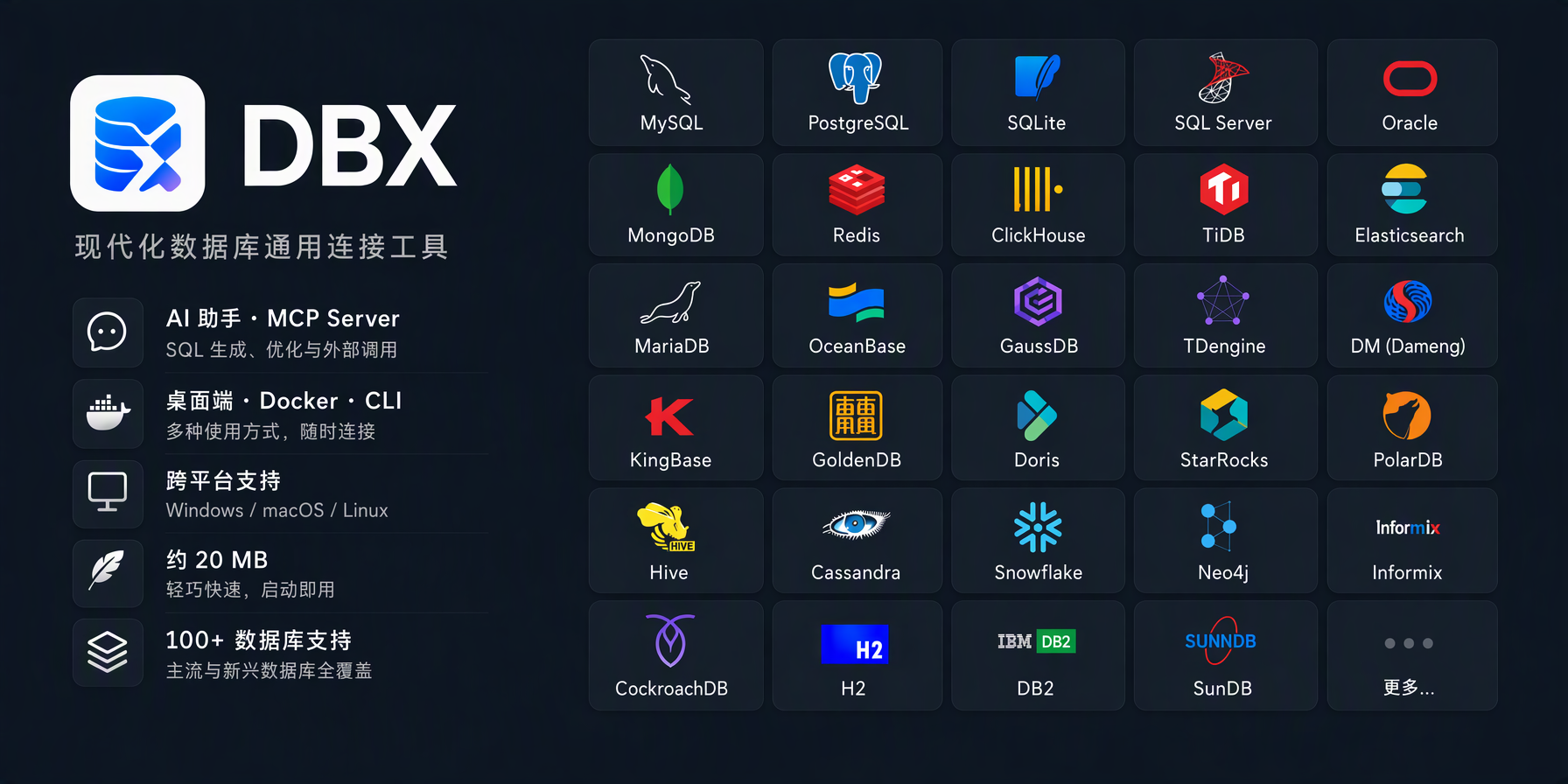
Connects to SQL, NoSQL, vector, time-series, embedded, and message-queue systems, including MySQL, PostgreSQL, SQLite, Redis, MongoDB, DuckDB, ClickHouse, SQL Server, Oracle, Elasticsearch, Qdrant, Snowflake, BigQuery, and Dameng. A JDBC option covers engines without a native driver.
The editor is built on CodeMirror 6 with metadata autocompletion, formatting, query history, and execution of selected SQL. The data grid uses virtual scrolling, inline editing, WHERE and ORDER BY controls, SQL preview, and export tools.
The sidebar lists databases, schemas, tables, columns, indexes, foreign keys, and triggers. ER diagrams, schema comparison, and field lineage cover deeper analysis, and light and dark themes are both available.
Import CSV, Excel, and SQL files, run SQL files, export whole databases, and move data between different database engines from inside the same app.
An optional AI assistant helps generate, explain, optimize, and fix SQL. The MCP Server lets tools such as Claude Code and Cursor connect to your databases and query data.
Use the desktop app on Windows, macOS, and Linux for local work, deploy the Docker version for browser access, or use the CLI. SSH tunnels, encrypted configuration export, and confirmation prompts for dangerous operations are built in.
Features
- 100+ database engines in one client
- SQL editor and editable data grid
- Schema browsing, ER diagrams, and comparison
- Import, export, and cross-engine transfer
- Built-in AI assistant and MCP Server
- Desktop, Docker, and CLI from one project
Recommended for this setup
Strengths
- Small download with native drivers: The desktop installer is about 25 MB, and the drivers are native Rust code with no JDBC runtime. That makes it practical on low-spec laptops and office machines.
- Very wide engine coverage: One tool reaches mainstream databases, analytics engines, vector stores, message queues, and a long list of Chinese domestic databases such as Dameng, GaussDB, and KingbaseES, which many Western clients do not list.
- Free under Apache-2.0: The license permits commercial use and modification, so there is no per-seat fee and no license server. The repository has over 305 listed contributors and active development.
- Same project for desktop and self-hosted web: Teams can run the desktop app locally and deploy the Docker version when browser access is needed, without adopting a second product.
Trade-offs
- Young project with a large issue backlog: The repository was created in April 2026 and lists about 1,250 open issues. Expect rough edges and fast-changing behavior, especially on less common database engines.
- Fewer features than the largest clients: Community reviewers quoted on the project site say it does not have everything DBeaver offers, though the features it has are well done. Check that your specific workflows are covered before switching from a mature IDE.
- Site and community are Chinese-first: The product website and much of the community discussion are in Chinese. The README and the GitHub repository description are available in English.
- AI features depend on a provider you configure: The AI assistant is optional and needs a model provider. Sending schema or query text to an external model is your decision, so review your data policy before enabling it.
Tech stack
FAQ
Yes. DBX is released under the Apache-2.0 license, which allows commercial use, modification, and self-hosting. The source is on GitHub at t8y2/dbx.
The project lists more than 100 engines, including MySQL, PostgreSQL, SQLite, Redis, MongoDB, DuckDB, ClickHouse, SQL Server, Oracle, Elasticsearch, Snowflake, BigQuery, and Dameng. JDBC is available for others. The full list is on the product website.
Yes. Besides the desktop app for Windows, macOS, and Linux, the project provides a Docker version for browser access. The website suggests the desktop version for local work and Docker when you need browser access.
No. The website describes the AI assistant as optional. It helps generate, explain, optimize, and fix SQL, and the separate MCP Server lets tools like Claude Code and Cursor query your databases.