
Caret
Your design canvas is backed by real files in git
Replaces Plasmic, Builder Io Visual Copilot
Who it's for
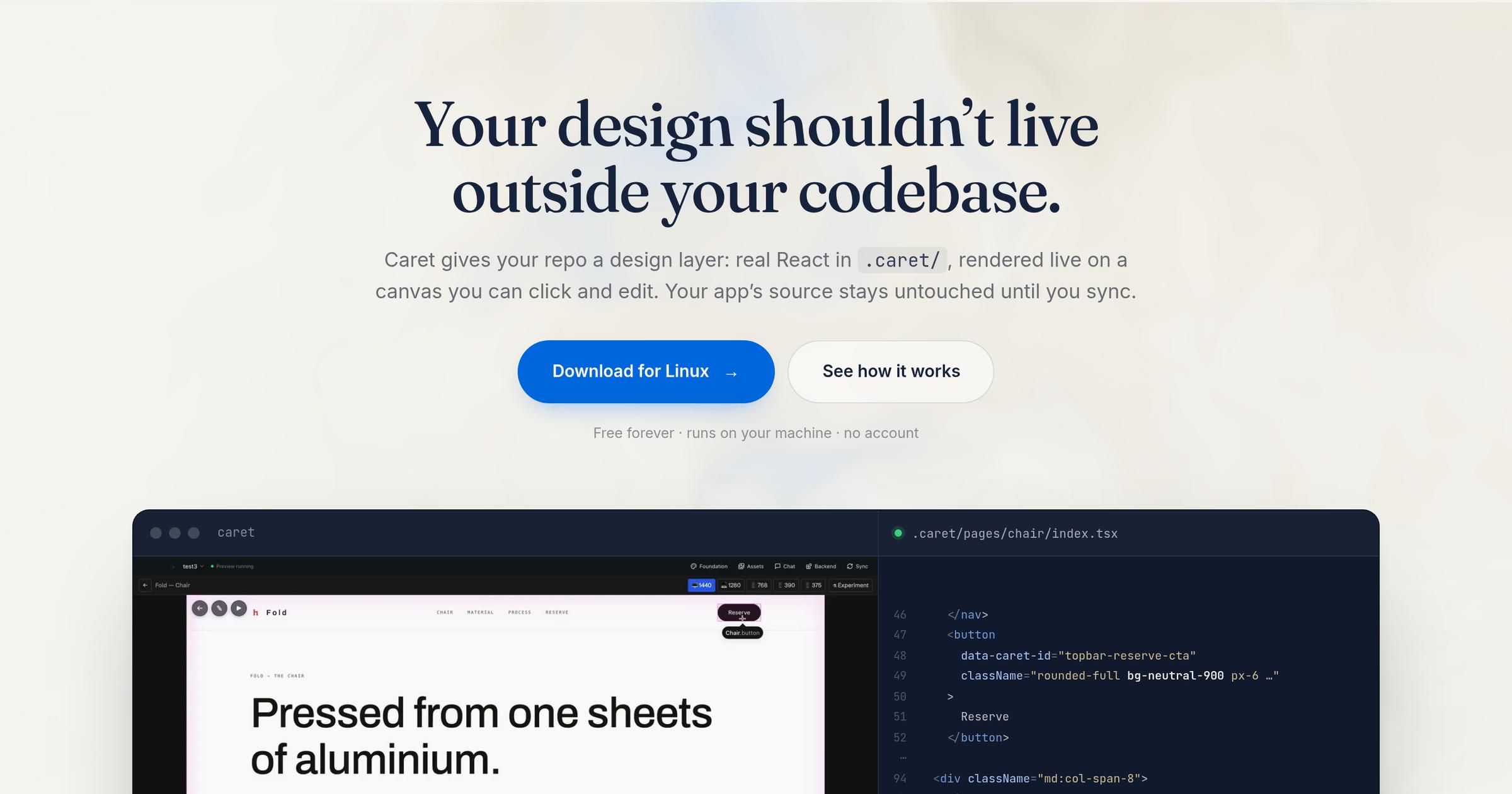
Caret keeps visual edits in .caret/ as real .tsx files, so changes made on the canvas survive the next AI-generated rebuild. Instead of describing layout changes in words and verifying whether the agent interpreted them correctly, the developer paints the region and states the intent directly, giving the agent exact element references.
Teams with a dedicated designer producing Figma handoff assets and a working design-to-code plugin process have no immediate problem Caret solves. Caret is for teams where the developer is also doing the design work.
Caret creates .caret/ inside any project folder and touches nothing else. The developer sets a color palette, type scale, and spacing system at the start (Caret can interview them or accept manual input), then builds pages by asking in the chat or writing the file. Everything produced is real React, readable in a diff.
Developers who need to ship in a framework that Caret's sync step does not support should verify compatibility before adopting it as the primary design tool.
When the design file has not been trusted for months and no one knows which artifact is authoritative, Caret offers a path by making the design layer part of the repo. The design becomes a .caret/ directory tracked in git, versioned alongside every code change.
Teams with an established Figma contract and a dedicated designer producing handoff assets are better served by design-handoff tools than by a tool that replaces the design file with in-repo React components.
Caret exposes a MCP server that Claude Code and Codex can call directly, so the sync step from design to app can be handed off to the terminal agent without switching contexts. The developer designs in Caret and hands the diff to the agent, which applies it in the framework the app actually ships.
Developers using agents without MCP support will not benefit from the terminal handoff. All other Caret features (canvas editing, AI chat, sync) still work without MCP.
The problem
Every project that uses a design tool eventually splits into two sources of truth. The mockup looked right in week one. By week four, someone fixed a spacing issue directly in the code, and now neither file is fully correct. Everyone on the team knows which one not to trust, but no one decided which one wins. AI coding assistants make this worse. When you describe a visual change in words and ask an agent to implement it, the agent rebuilds the component from scratch. Tweaks made last month get overwritten because they were context in a conversation, not files in git. You fix the same thing twice, sometimes three times. Describing visual changes in words is the other half of the problem. Three sentences about the padding on a card come back wrong, because language was never the right tool for pointing at a specific element on a screen.
How it works
Right-clicking any text, color, or image on the canvas changes the corresponding .tsx file in .caret/ immediately. Caret checks color picks against your design tokens and writes the token name instead of a raw hex value when a match exists, so changing a brand color later changes everywhere that used it.
Paint over any section of the page and describe what you want in words. The agent receives the exact elements you marked rather than guessing from a text description alone. This is the intended path for changes too fiddly to make by clicking directly on the canvas.
Ask for multiple versions of a layout or component at once. Caret generates them live, side by side on the canvas, and picking one leaves an undo step. This avoids committing to an approach before seeing the options.
When a design is ready, Caret determines which .caret/ files changed since the last sync and your agent updates the app to match, in Next, Remix, Vue, Svelte, Rails, or any other framework. Sync is explicit and snapshot-based, so undo always works. If someone edits the app directly, Caret detects the drift and offers to bring the design back in line.
Caret exposes the design layer over MCP so Claude Code, Codex, and other terminal-based agents can call into it directly. Design stays in Caret; the sync step can be handed off to whichever agent is already running in the terminal. The protocol is one-way: the external agent calls in, Caret does not push work back out.
Caret writes color, type, spacing, and radius tokens into AGENTS.md, CLAUDE.md, and .cursor/rules and keeps them current. An agent building a new component reads the actual token values from the repo instead of inventing spacing that will not match the rest of the UI.
Features
- Canvas editing that writes to source files
- Region-based AI instructions
- Side-by-side layout variants
- Bi-directional sync with any framework
- MCP server for terminal agents
- Design token injection into agent context
How to install
Install Caret by building from source; Node 20 or newer is required.
git clone https://github.com/precious112/caret-desktop
npm install
npm run dev
Recommended for this setup
Strengths
- Design changes are git commits: Every canvas edit produces a file change in .caret/. Visual changes are diffable in pull requests, revertible with git revert, and permanent through subsequent AI code generation. A fix made once survives the next time an agent regenerates a component, because it is a file in git, not context in a conversation.
- Apache-2.0, no account, no subscription: The app is free forever and requires no cloud account or API key of its own. The only ongoing cost is the AI model subscription the developer already has. Unlike Builder.io Visual Copilot and Locofy.ai, which are paid commercial platforms, there is no per-seat fee and no code sent to a third-party server.
- Bring your own AI model: Caret connects to OpenCode's built-in engine and supports any AI provider: an API key or an existing subscription (ChatGPT Plus, Pro, and Go; Kimi For Coding; GitHub Copilot; Z.AI and Zhipu coding plans). Anthropic requires an API key. There is no model lock-in and no vendor controlling which AI the tool uses.
- Isolated design sandbox with explicit sync: Caret only reads from and writes to .caret/. The application source, routes, and business logic are outside its blast radius during design iteration. Sync is a deliberate step, snapshot-based, so undo always works and nothing is merged without the developer choosing to.
Trade-offs
- Early-stage project with 33 GitHub stars: The repository was created in June 2026 and had 33 stars and 7 forks as of October 2026. The project is under active development (last push: October 2026) but has not been widely adopted. Production teams should evaluate it on a non-critical project before relying on it for primary UI work.
- Node.js required for the live canvas: The canvas renderer runs a local dev server and requires Node.js LTS 20.19+ or Node 22.12+. Without it, the preview panel sits on a loading screen indefinitely while the rest of the app (chat, file editing) works normally. This is easy to miss on first install because the app opens and responds with only the canvas broken.
- Windows builds are not code-signed: The Windows installer triggers SmartScreen warnings and may be quarantined by Defender on download. The app is safe to run, but teams with managed Windows environments or strict antivirus policies need to manually allow the install. macOS builds are signed and notarized; Linux packages require no signing.
Tech stack
FAQ
No. Caret creates a .caret/ directory inside your project folder and only reads from and writes to that directory. Application source code, routes, and business logic are untouched until you explicitly run a sync. Sync takes a snapshot first, so undo always works and nothing is ever merged automatically.
The design layer in .caret/ is always React (.tsx files). The sync step translates that into whatever framework the app ships: Next.js, Remix, Vue, Svelte, Rails, or others. The app-side framework does not need to match the design layer. See the product website for the current compatibility details.
No. Caret runs locally and requires no account. Source files go to the AI model you have signed in to (via API key or a subscription like GitHub Copilot or ChatGPT Plus) and nowhere else. The only other data sent is anonymous usage and crash statistics, which can be turned off in one click. The telemetry document in the GitHub repo lists exactly what is and is not collected.
Yes. Caret is Apache-2.0 licensed, free forever, and has no tier, subscription, or per-seat charge of its own. The only ongoing cost is the AI model subscription or API key you bring to it. Canvas editing features work without any connected model.
Partially. The canvas renderer requires Node.js LTS 20.19+ or Node 22.12+, because it runs a local dev server. Without it, the preview panel will not load, though chat, file editing, and all other features still work. Install the Node.js LTS build from nodejs.org and restart Caret to enable the canvas.