
atlas
Source control, checkpoints, and shared memory for coding agents
Replaces —
Who it's for
Atlas maintains a shared memory index across every agent run, so context built in one session persists into the next without manual briefing. Plans, failed approaches, and architecture decisions stay queryable alongside the commit graph, with each entry attributed to the session that wrote it.
If you run a single coding agent on simple, self-contained tasks with no need to resume context, the overhead of Atlas is unnecessary. A direct terminal session with your chosen agent is simpler.
When developers on the same project use different agents, Atlas's shared memory means decisions from one agent's session are visible to another. Organisation sync lets the team share context across machines once they sign in.
Atlas's team sync requires signing in to create an organisation. Fully air-gapped teams or teams with strict no-cloud policies should evaluate whether the sync path meets their requirements before adopting Atlas.
Atlas integrates arXiv and Semantic Scholar search, lets you read papers in-app, and makes any paper `@`-mentionable in a prompt. Papers become searchable context alongside code notes and past sessions, retrievable via the same on-device semantic index.
If your workflow does not involve academic literature or technical papers, the research integration adds no value over a standard code editor.
Checkpoints link every commit to the session that produced it: the prompt, tool calls, and patches applied. Select any checkpoint and query it directly. This gives code review a source of truth that the commit message alone cannot provide.
Skip if your team treats agent-authored commits the same as human-authored ones, with no interest in the session context that produced them.
The problem
Coding agents write code but keep none of the reasoning behind it. Every session starts from zero: the plan from yesterday, the architecture decision from last week, the failed approach from two runs ago, all gone once the terminal closes. Switching between Claude Code and Codex makes this worse: neither agent can read the other's history, so changing tools means starting from an empty context every time. The commit graph shows what landed, but not which agent session produced it, what you asked for, or why the implementation took the shape it did. Debugging a decision made three weeks ago means scrolling through terminal output that no longer exists.
How it works
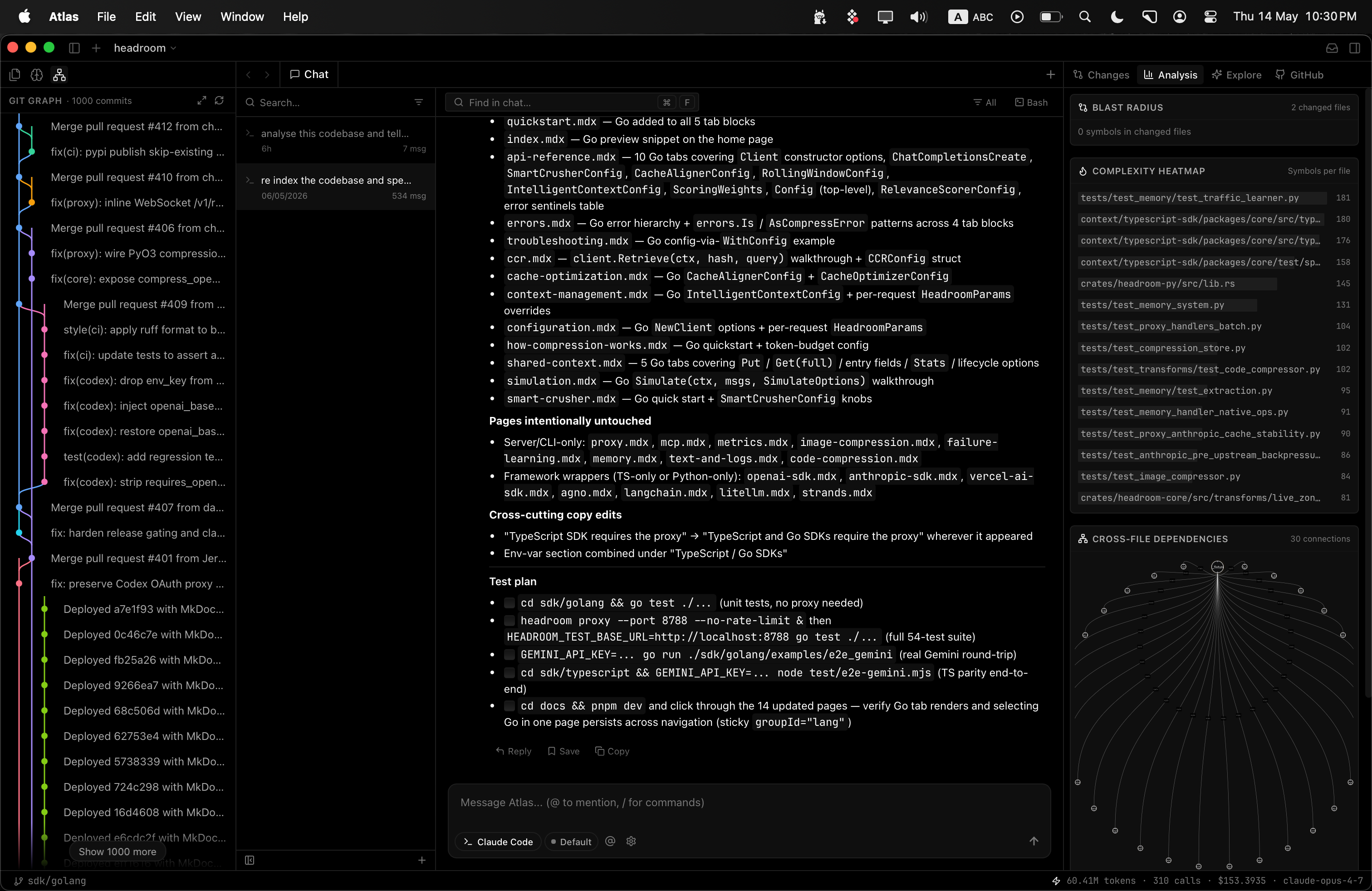
Atlas records every agent session in `.atlas/sessions.db` and links each commit back to the session that produced it, including the prompts, tool calls, and file patches. Links survive rebases and amends via patch-id reconciliation. Select any checkpoint and query it directly to recover the reasoning behind a change.
An on-device semantic index (local embeddings, HNSW search) that every agent reads from and writes to automatically. Plans, decisions, file changes, failures, and architecture notes written by Claude Code are visible to Codex in its next session, and vice versa, without any manual handoff.
Run Claude Code, Codex, and Atlas's native agent in parallel tabs against the same codebase. Atlas pulls in agents from the ACP registry (Cursor, OpenCode, Kilo Code) by downloading each one's official binary automatically. Sessions are independent of tabs, so switching views never drops a run in flight.
`@`-mention files, folders, symbols, branches, commits, notes, skills, papers, or past sessions directly in a prompt. Atlas resolves all of these locally in Rust before the prompt is sent. Large files send a path pointer rather than inlining the full content, preserving context window space.
Markdown notes in `.atlas/knowledge/` feed every agent in the project automatically. Atlas folds in `CLAUDE.md`, `AGENTS.md`, Claude Code's memory files, and Codex's history into one index. Notes can be exported to HTML or served as a standalone binary.
Search arXiv and Semantic Scholar from within Atlas, read papers in-app, and `@`-mention them directly into a prompt. Papers become first-class context alongside code and notes, queryable through the same on-device semantic index as agent sessions and knowledge notes.
Features
- Checkpoints: Commits Linked to Agent Sessions
- Shared Agent Memory Across All Agents
- Multi-Agent Sessions in Parallel
- @ Mention Context Resolution
- Knowledge Base as Agent Context
- Research Integration: Papers as Context
How to install
Install Atlas from source on macOS using Bun, Rust (stable), and Xcode Command Line Tools.
git clone https://github.com/pacifio/atlas
cd atlas
bun install
bun run dev:app
Recommended for this setup
Strengths
- MIT Licensed and Fully Local: The entire codebase is MIT licensed. Sessions, notes, checkpoints, and agent memory all live on your machine in `.atlas/`. Nothing is uploaded until you explicitly opt into team sync. Secrets are scrubbed before anything is written to disk, not before upload.
- Checkpoint Links Survive History Rewrites: Checkpoint links re-point through `git rebase` and `git amend` via patch-id reconciliation. When a squash makes a link genuinely ambiguous, Atlas orphans it rather than guessing wrong. Most agent history tools lose attribution on any history rewrite; Atlas preserves it.
- Agent-Agnostic: No Subscription Lock-In: Atlas does not replace Claude Code or Codex: it runs them through ACP, adding context and recording history. You continue using your existing subscriptions. Switching from Claude Code to Codex, or running both simultaneously, does not require changing your billing arrangement with either provider.
- Backfill Existing Claude Code History: Atlas backfills your existing Claude Code session history on first run, so the checkpoint record does not start the day you install Atlas. Prior sessions appear in the timeline alongside new ones, making the full history of agent-authored changes queryable from day one.
Trade-offs
- macOS Only (Official Support): The release binaries target macOS. The README documents that Linux and Windows build from the same Tauri codebase but are marked as untested. Developers on Linux or Windows can build from source but should expect rough edges and no official support.
- Early-Stage Codebase: Active Development: The repo was created in May 2026 and has 26 open issues. With active development, users should expect some rough edges and breakage between releases. The README notes that QA on the long tail of ACP registry agents is ongoing, so not all registry agents have the same level of polish.
- Build from Source Requires Bun and Rust: Building Atlas requires Bun, a stable Rust toolchain via rustup, and Xcode Command Line Tools on macOS. The first Rust compile takes several minutes. This is a non-trivial setup for developers not already working in the Rust ecosystem.
Tech stack
FAQ
No. Atlas runs Claude Code and Codex as external processes through ACP (Agent Client Protocol). Your existing subscriptions continue to work; Atlas adds shared memory, session history, and checkpoints on top of the agents you already use. It also ships its own native agent for users who do not have a Claude Code or Codex subscription.
Yes. Atlas is MIT licensed and the source is on GitHub at pacifio/atlas. The macOS `.dmg` is available free from the releases page. Team sync and organisation features require signing in, but local use with no account is fully supported and works offline.
macOS is the officially supported platform, with releases distributed as a `.dmg`. The codebase (Tauri and Rust) also compiles on Linux and Windows, but the README marks those builds as untested. Download the `.dmg` for macOS, or build from source for other platforms.
All session data is stored locally in `.atlas/sessions.db` inside your project directory. No data is sent to any server unless you opt into team sync by signing in and creating an organisation. Secrets are scrubbed from sessions before anything is written to disk.
Yes. Atlas supports any agent registered in the ACP registry, including Cursor, OpenCode, and Kilo Code. It downloads each agent's official binary automatically. The README notes that QA on the long tail of registry agents is ongoing, so some agents may have rough edges.