ppt-master
Turn any document into a natively editable .pptx. Runs locally, MIT.
Replaces —
Who it's for
PPT Master converts analyst reports, research papers, or earnings documents into properly structured decks with real chart objects. The output opens natively in PowerPoint for further refinement, fitting the standard review-and-polish cycle in professional services.
If your firm's IT policy prohibits local Python execution or using third-party AI APIs, the setup will be blocked before the first deck is generated.
Drop in an academic PDF or a Markdown outline and PPT Master structures the narrative, designs the slides, and optionally adds audio narration from the speaker notes. The deck is a real .pptx you can continue editing, not a static export.
If you need SmartArt diagrams for your presentation structure, those elements must be added manually after generation.
Organizations that produce many similar slide decks from structured data or reports can automate generation through the pipeline. With a large-context LLM, each pass converts a full document in one API call. The MIT license allows internal deployment with no per-deck cost.
Teams with no Python infrastructure or AI API access will need to establish both before this becomes a repeatable pipeline.
PPT Master is a Python workflow that runs inside any agent-capable AI tool. Developers can integrate it into larger document-processing pipelines, customize the prompts, or extend the templates. The MIT license allows modification for internal tools.
If you need a no-code interface or a hosted SaaS product, PPT Master requires command-line and Python experience to operate.
The problem
Cloud-based AI presentation tools generate visually appealing slides, but the output is typically locked into proprietary formats or exported as flat images that you cannot meaningfully edit in PowerPoint. Any changes require going back to the cloud tool, and if you cancel your subscription, your work disappears or becomes inaccessible. More fundamentally, pasting a confidential research report or a client's financial data into a third-party cloud service is a data privacy risk that many teams cannot accept. Subscription costs for premium AI presentation tiers add up fast: commercial services charge per user or per month, and the per-deck generation fees mount during a heavy presentation season. Teams that produce dozens of decks a quarter end up paying for a presentation subscription on top of every other SaaS tool in their stack, with no path to self-hosting or data ownership.
How it works
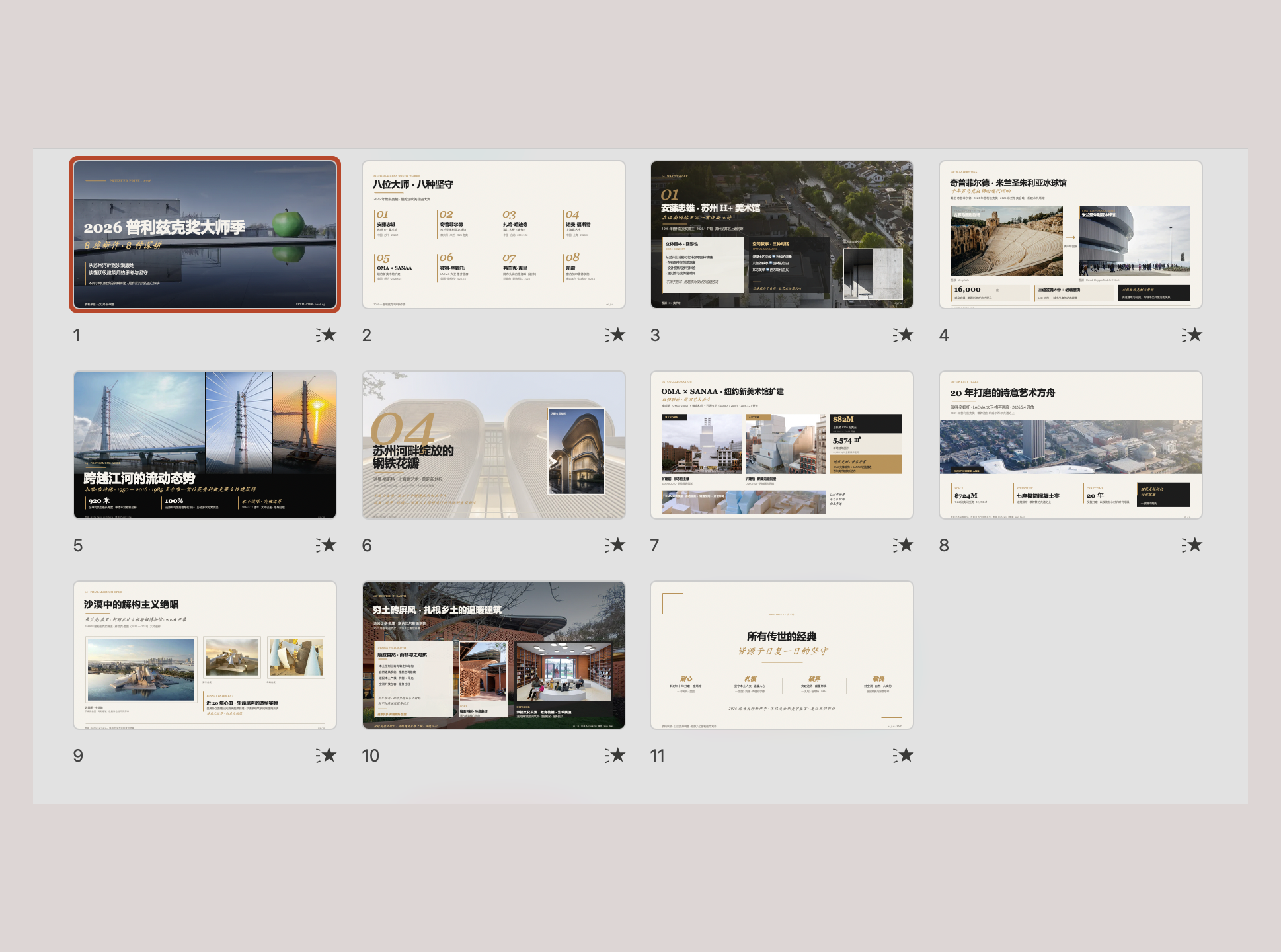
Generates slides using real PowerPoint shapes, connectors, and fill/effect models rather than images or flat text boxes. Every element is a native .pptx object: click any shape in PowerPoint and you can keep editing it with full adjustment handles, formatting options, and compatibility with all PowerPoint features.
Accepts PDFs, DOCX files, URLs, Markdown files, and plain text topics as input. The AI reads the source material, identifies key points, structures the narrative arc, and designs the slides. A large-context model such as Kimi K3 or Claude can digest a full document in one pass.
Charts and tables in the generated deck are native PowerPoint data objects, not screenshots. You can open the chart's data table in PowerPoint, edit the underlying values, and the chart updates exactly as if you had built it by hand.
Speaker notes generated during the AI pass can be converted to audio narration and embedded into each slide. The resulting .pptx file plays itself out loud in PowerPoint's Presenter mode, with every slide reading its own notes.
PPT Master can fill an existing .pptx template with new AI-generated content while preserving the design's slide masters, layouts, fonts, and brand colors. Useful when your organization has an approved deck format that must be followed exactly.
Works with any agent-capable AI tool and any LLM that has a large context window, including Claude, GPT-4 series, Gemini, and Kimi K3. The workflow runs on your machine; switching models requires no code changes to the pipeline.
Features
- Native PowerPoint object model
- Multi-format source document input
- Data-backed charts and tables on demand
- Audio narration from speaker notes
- Custom .pptx template support
- No platform or model lock-in
How to install
Self-hosting requires Python 3.10 or later; clone the repository and install dependencies with pip.
git clone https://github.com/hugohe3/ppt-master
cd ppt-master
pip install -r requirements.txt
Recommended for this setup
Strengths
- Output stays natively editable in PowerPoint: The deck PPT Master produces is a genuine PowerPoint file: native shapes, data-backed charts, slide masters via the template route, and proper .pptx XML, not a static export. Competing cloud AI presentation tools often export to formats that lose editability once you leave their platform.
- Data never leaves your machine: The entire pipeline runs locally except for the AI model API call. No third-party cloud service stores your source documents. For consultants, legal teams, and analysts handling confidential material, that separation is the deciding factor.
- MIT license, no subscription fees: PPT Master is MIT licensed, meaning you can use it commercially, fork it, and modify it without restriction. The only ongoing cost is your AI model API usage, with no per-deck or per-seat charge on top.
- Works with multiple LLM providers: The workflow is model-agnostic. You can run it with whatever AI provider your team already has access to, whether that is Claude, GPT, Gemini, or Kimi K3. The README recommends a large-context, vision-capable model for best results.
Trade-offs
- Output quality depends on the LLM you use: PPT Master is a workflow harness: it structures the pipeline, but the quality ceiling is set by the AI model you provide. Cheaper or smaller models produce decks that need more manual polish. The README explicitly states you should expect to refine the output, not treat the first-pass deck as finished.
- Requires Python 3.10+ and AI model setup: Installation involves cloning the repository, installing Python dependencies, and configuring at least one AI model API key. This is not a one-click tool. Teams without Python experience or access to an AI IDE will face a setup curve before generating their first deck.
- SmartArt is a deliberate omission: PPT Master does not generate SmartArt objects. This is documented as a deliberate design choice, not a gap, because SmartArt's XML model is complex and rarely needed for most presentation types. If your workflow depends on SmartArt diagrams, you will need to add them manually.
Tech stack
FAQ
Yes. PPT Master is MIT licensed and free to run on your own machine. The only cost is your AI model API usage, such as Claude, GPT-4, or Kimi, which you pay to your model provider directly. There is no per-deck fee, no subscription, and no PPT Master account to create.
It works with any model accessible through an agent-capable AI tool that has a large enough context window for your source document. The README recommends a vision-capable model with a large context window for best results. Claude, GPT-4 series, Gemini, and Kimi K3 are all documented as working providers.
Yes. PPT Master supports filling an existing .pptx template with AI-generated content while preserving the slide masters, layouts, and brand design. This is documented as a separate workflow from generating a deck from scratch.
It accepts PDFs, DOCX files, URLs (web pages), Markdown files, and plain text topics. The AI reads and structures the source material before generating slides, so longer documents benefit from a model with a large context window.
Yes. The output is a standard .pptx file with native PowerPoint objects: shapes, charts, tables, and slide masters where applicable. Every element opens and edits normally in PowerPoint. The README's stated goal is to produce a deck that matches what you could build by hand in PowerPoint, not a flat image export.