
pdfcn
React PDF components, install with the shadcn CLI, MIT licensed
Replaces Docraptor, Apitemplate Io, Craftmypdf, Pdf Generator Api, Orshot
Who it's for
pdfcn provides pre-built invoice templates (corporate, minimal) that you drop into your billing flow. Components like page header, key-value, and table are exactly the building blocks an invoice needs, and you own the code so you can brand them to match your product.
Your document volume is very low and you prefer a hosted no-code tool; pdfcn requires frontend development work to integrate.
Financial reports and data summaries built with pdfcn compose tables, sections, and key-value grids into consistent multi-page documents. The shadcn CLI workflow means you can add reporting components without changing your build setup.
Your reports are highly data-dense with complex custom chart types; pdfcn's component library is still early and may not cover every visualization need.
pdfcn is a drop-in replacement strategy for services like DocRaptor or CraftMyPDF that charge per document and process data server-side. The migration path is rebuilding your document templates as React components, which gives you full control over output and eliminates per-call costs at volume.
Your current API integration generates documents from server-side templates without a React frontend; pdfcn requires a React rendering environment.
For teams already using shadcn/ui, pdfcn is zero-friction to add: the registry format and CLI command are identical. You get PDF generation without adopting a new toolchain or API dependency.
You need PDF features beyond structured document layouts, such as form filling, digital signatures, or PDF annotations.
The problem
PDF generation in web applications is a persistent pain point. Browser print dialogs produce inconsistent layouts, HTML-to-PDF conversion libraries often require abandoning the React component model, and server-side rendering approaches add infrastructure complexity. Teams building invoicing features or financial reports end up choosing between brittle workarounds and paid APIs. Commercial PDF generation services charge per document or per API call, which makes high-volume use expensive fast. More importantly, they require sending document data to a third-party server, creating compliance challenges for anything containing financial or personal information. Most services are also renderer-locked: you describe layouts in their DSL or template format with no way to own or extend the output pipeline.
How it works
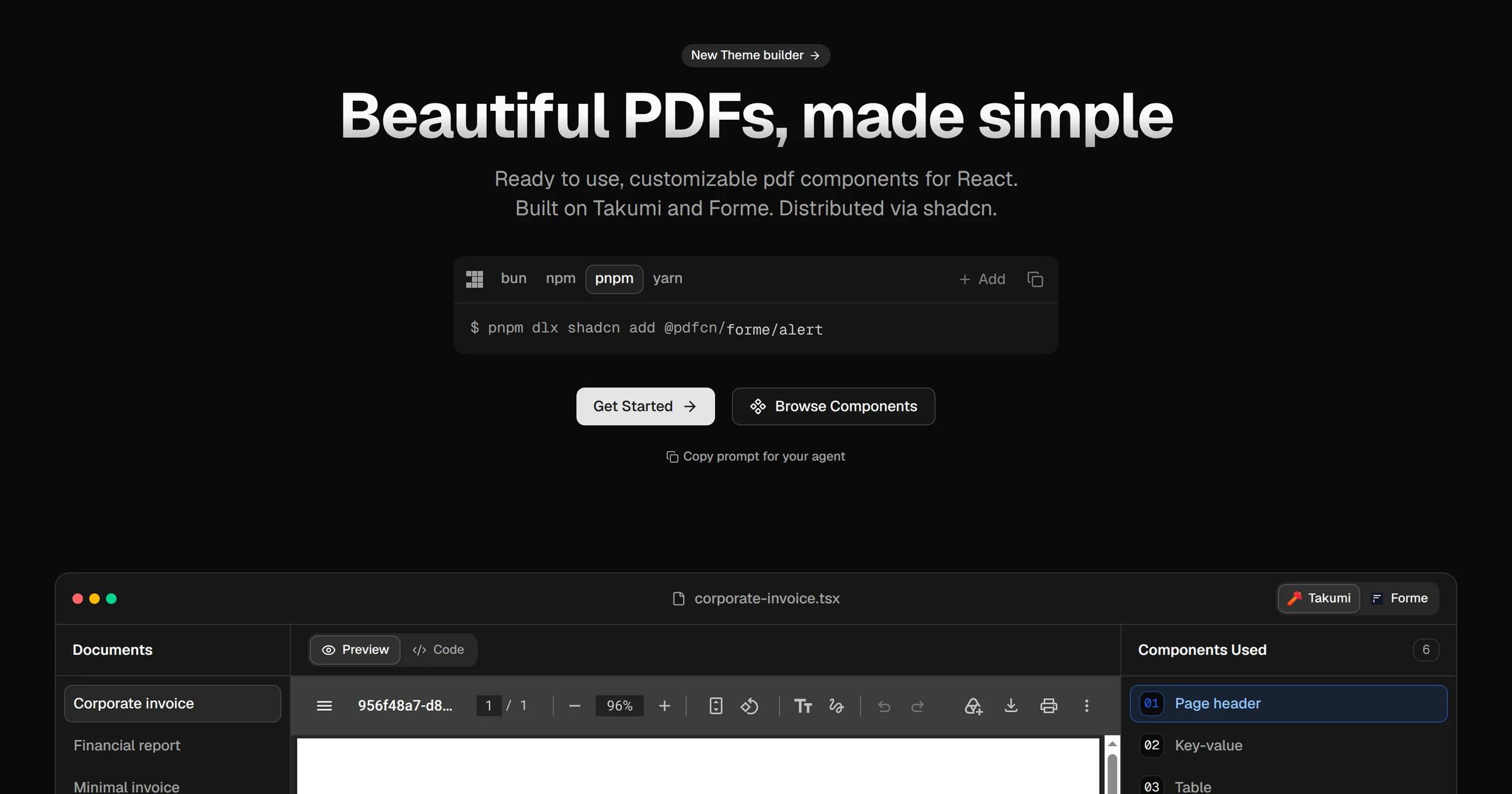
pdfcn supports two open source renderers: Takumi and Forme. You pick the one that fits your stack and switch without rewriting components. Each renderer handles JSX-to-PDF conversion server-side, so you get consistent output across your documents.
Components are distributed through the shadcn registry format, using the same `pnpm dlx shadcn add` command you already know. You add only the components you need, own the code entirely, and update or modify them without a dependency bump.
pdfcn works out of the box with sensible defaults. No renderer configuration, no PDF engine setup, no build tooling changes beyond adding the components. One CLI command and you are generating PDFs.
Documents are built from focused React components: page headers, key-value pairs, tables, sections, text blocks, and page footers. Each component maps to a specific document element, and you compose them in JSX like any other React UI.
Every component and block in the pdfcn documentation renders a live PDF preview alongside the code. You can see the exact output before adding a component to your project.
pdfcn ships with full document templates including a corporate invoice, financial report, and minimal invoice. Each template shows which components are composed and provides a starting point for common document types.
Features
- Two rendering bases: Takumi and Forme
- shadcn/ui CLI workflow
- Zero configuration required
- Composable document components
- Live component previews in documentation
- Pre-built document templates
How to install
Clone the pdfcn repo to browse the component source, then add individual components to your React project using the shadcn CLI.
git clone https://github.com/shadcn-labs/pdfcn
pnpm dlx shadcn@latest add @pdfcn/takumi/page-header
Recommended for this setup
Strengths
- MIT license with no per-document fees: pdfcn is MIT licensed, so you can run it commercially with no restrictions. Unlike DocRaptor or APITemplate.io (API-only, per-call billing), you generate as many documents as your server can handle without paying per output.
- Document data never leaves your infrastructure: Because generation happens inside your own React or Next.js app, document data never touches a third-party server. This matters for invoices, financial reports, and any document containing personal or financial data under GDPR or similar regulations.
- Familiar developer workflow for shadcn/ui users: The shadcn registry format means adding a pdfcn component feels identical to adding any other shadcn/ui component. Teams already using shadcn/ui add zero new tooling or mental models to generate PDFs.
- You own every component after install: Unlike black-box PDF APIs, every pdfcn component lives in your project after install. You can modify the markup, adjust the theme, or extend a component for your exact document requirements without waiting for a library release.
Trade-offs
- Early-stage project with limited component coverage: pdfcn launched in August 2026 and has a focused set of components: invoices, reports, and basic document primitives. Teams needing complex charts, form fields, or specialized layouts may find the component library thin until it matures.
- Dependent on Takumi and Forme upstream releases: pdfcn delegates PDF rendering to Takumi and Forme. Both are separate open source projects; bugs or breaking changes in those upstream renderers affect pdfcn output. Teams using pdfcn in production take on an indirect dependency on two less-established projects.
- React-only: no framework-agnostic path: pdfcn requires a React rendering environment. Projects using plain HTML, Vue, Svelte, or a non-JavaScript backend cannot use pdfcn components directly without adding a React server-side rendering layer.
Tech stack
FAQ
Yes. pdfcn is MIT licensed and free to use commercially with no restrictions. There is no managed cloud service or paid tier; you run it inside your own React application and generate documents without per-call fees.
DocRaptor and APITemplate.io are hosted APIs that generate PDFs server-side and charge per document. pdfcn runs inside your own React app, requires no third-party API call, and has no per-document cost. The tradeoff is that pdfcn requires React and developer implementation work, while the paid services offer no-code template builders.
pdfcn supports two renderers: Takumi and Forme. Both are open source and handle conversion from JSX to PDF. You choose which renderer to use per component; the pdfcn component library provides components for each renderer.
Yes. pdfcn components work in any React environment, including Next.js. Since there is no separate server to host, you add components to your existing Next.js project and generate PDFs inside your own deployment.
Use the shadcn CLI. Run `pnpm dlx shadcn@latest add @pdfcn/takumi/page-header` to add a Takumi-based component, or substitute `@pdfcn/forme/` for Forme components. Each component installs individually and you own the code after installation. The CLI also supports bun, npm, and yarn.