
FckSignups
Open-source tools that work instantly, no signup required
Replaces —
Who it's for
Browse the development or utilities categories to find tools testable immediately in a browser, without creating throwaway accounts. The no-signup criterion means you get a real product experience in the first session, with no registration friction interrupting the evaluation.
Your team needs enterprise tools with SSO, compliance documentation, or SLA-backed support. NoSignups lists free open-source tools only; it does not cover managed or enterprise offerings.
Find text editors, design tools, and productivity apps in the privacy and utilities categories that collect no data and run entirely in-browser. No registration means no cross-site tracking, no welcome email sequences, and no account to delete when you stop using a tool.
You need offline-first desktop applications or tools with persistent cloud storage and sync. Most listed tools are browser-based sessions with no account-backed persistence.
Fork the GPL-3.0 codebase and deploy a curated subset for your team or community. The tool schema is documented with all required and optional fields, and the ten default categories are customizable. Running a private instance requires only Node.js and npm.
You need a managed directory with automated metadata enrichment, API integrations, or contribution workflows beyond GitHub issues. NoSignups is a static React application; enrichment and moderation are manual.
The problem
Most software discovery platforms require registration before you can save, interact, or access full listings. Commercial tool aggregators treat your email address as a product, attaching it to marketing lists and tracking cookies from the first visit. Even evaluating a single tool often means creating a throwaway account, confirming an email, and dismissing a welcome sequence before you can see what the software actually does. The deeper challenge is trust: when a tool directory is itself built on proprietary infrastructure and login walls, you have no visibility into whether the tools it recommends are genuinely privacy-respecting or open. The pain is compounded when the discovery platform models the behavior it claims to help you avoid.
How it works
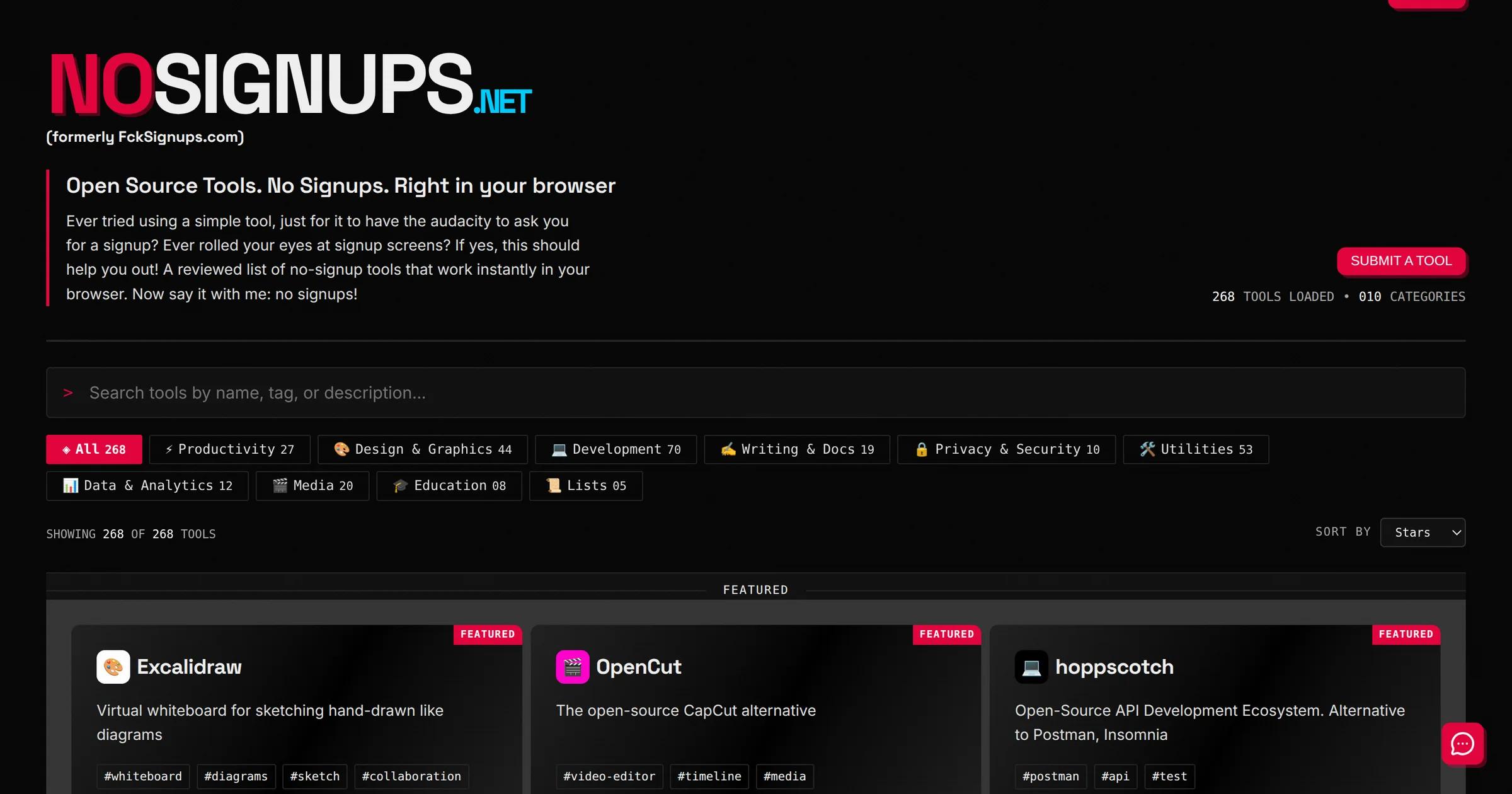
Every tool in the directory must work without creating an account. Contributions that require registration are rejected at submission, so the no-signup filter is enforced by the catalog itself, not just stated in marketing copy.
Tools are organized into ten categories: productivity, design, development, writing, privacy, utilities, data, media, and education. Each category has its own icon and can be filtered independently from the main directory view.
Each listing carries a name, description (under 140 characters), direct URL, category, tags, an optional GitHub link, SPDX license identifier, and star count. The schema is documented and consistent across all entries, making the catalog machine-readable.
A featured flag pins standout tools to the top of relevant listings. Tools are featured for uniqueness rather than popularity, distinguishing rare or innovative entries from the broader catalog. The README notes this becomes meaningful when many similar tools occupy one category.
New tools can be submitted via a GitHub issue template or the website's submit button. Each submission is reviewed against the no-signup requirement before merging. Contributor guidelines specify descriptions under 140 characters and 3 to 5 relevant tags per tool.
Features
- No-signup filter criterion
- Category-organized browsing
- Structured tool schema
- Featured picks for standout tools
- Community-driven submissions
How to install
Self-hosting runs on any server with Node.js and npm installed.
git clone https://github.com/BraveOPotato/FckSignups.git
cd FckSignups
npm install
npm run dev
Recommended for this setup
Strengths
- Zero tracking on the directory itself: NoSignups carries no cookies, no analytics, and no data collection on its own site. The README states this explicitly: 'No cookies. No analytics.' The directory practices what it lists, applying the same privacy standard to itself that it requires of every listed tool.
- GPL-3.0 with full self-hosting support: The codebase is GPL-3.0 licensed and runnable from a local clone using npm. You can fork it, modify the categories, curate your own tool set, and run a private or public instance. Unlike proprietary directories, the source code is fully inspectable and modifiable.
- Strict curation with clear rejection criteria: Tools are reviewed against explicit rules: must work without an account, descriptions under 140 characters, 3 to 5 tags required. The criteria keep catalog quality consistent as it grows. With over 200 tools and a high volume of community submissions, the rules prevent scope creep.
Trade-offs
- Large open issue backlog: The repository has 452 open issues relative to 198 forks, a high ratio suggesting curation velocity may lag behind community demand. Many open issues are likely tool submission requests. Users looking for a specific niche tool may find it is not yet listed.
- No public API for programmatic access: NoSignups is a rendered React front-end with no public query API. If you need to integrate its tool catalog into another system programmatically, you must parse the source data files directly from the repository rather than calling an endpoint.
- GPL-3.0 copyleft for public forks: The GPL-3.0 license requires distributing source code changes if you ship a modified version as a public service. Running a private or internal instance carries no restrictions, but publicly hosted forks of NoSignups must remain GPL-3.0 and open.
Tech stack
FAQ
NoSignups is a curated directory of in-browser, open-source tools that require no account or registration to use. Every listed tool must be usable immediately in a browser. The directory itself carries no cookies, no analytics, and no tracking.
Yes. NoSignups is a React and TypeScript application released under the GPL-3.0 license. Clone the repository, run npm install, and start the development server with npm run dev. You can modify the categories, add your own tools, and run a private or public instance.
The NoSignups directory codebase is released under the GPL-3.0 license. You can run it, modify it, and distribute it, but any modified version you ship publicly must also be GPL-3.0 licensed. Individual tools listed in the directory retain their own separate licenses; NoSignups does not claim ownership of any third-party projects.
Tools can be submitted via a GitHub issue using the provided template or through the 'SUBMIT A TOOL' button on the website. Submissions must meet three criteria: the tool must work without creating an account, the description must be under 140 characters, and 3 to 5 relevant tags must be included.
Yes. The repository was created in May 2026 and last updated in August 2026. The project has over 2,800 GitHub stars and maintains active community channels on Discord and the subreddit r/fucksignups. The high open issue count primarily reflects pending tool submission requests from the community.