Agentic Awesome Skills
Reusable skill catalog for AI coding agents, MIT licensed.
Replaces —
Who it's for
A development team that uses multiple AI coding agents wants consistent, auditable behavior across every engineer's environment. AAS Core lets a tech lead compose a validated stack, commit the `aas-stack.json` manifest to the repo, and have every teammate install exactly the same skills without each person curating from scratch.
The team uses a single paid AI IDE with a locked, built-in skills system and has no need to share or audit playbooks across agents or teammates.
A developer building a new AI agent or MCP server wants guidance on schema design, evaluation loops, and tracing without re-reading documentation each session. The AAS Agent and MCP Builder plugin provides 10 skills covering agentic app design, RAG systems, MCP tool contracts, and quality evaluation.
The developer is building a non-agent backend with no AI or MCP components.
A security engineer wants AI coding agents to follow structured methodologies for OWASP checks, dependency audits, and hardening tasks. The AAS Security Engineer plugin provides 10 authorized security testing and hardening skills that guide the agent through a repeatable, documented process rather than improvising the audit scope each time.
The security work does not involve an AI coding agent or the team handles all audits manually.
A developer picking up an unfamiliar framework or language wants the AI agent to apply established patterns and conventions from the start. Selecting skills from the relevant domain plugin teaches the agent the community's preferred approaches, reducing the number of corrections needed in early project iterations.
The developer is already an expert in all the technologies involved and has no use for guided conventions.
The problem
AI coding agents start each session with no knowledge of your codebase conventions, security standards, or preferred workflows. Writing detailed instructions for every new project is time-consuming and produces inconsistent results across a team. When developers do invest in writing good agent instructions, they live in a project-specific file and are not reusable for the next project. Most teams end up writing shallow prompts and accepting mediocre output, or spending significant time on instruction engineering that cannot be shared. A related problem is trust: knowing which skills an agent will use and when, and reviewing the planned changes before they happen, is difficult when the agent fetches instructions at runtime with no structured handoff. Agentic Awesome Skills addresses this by separating discovery from installation, with an explicit plan step that shows you what the agent selected before any changes land.
How it works
The catalog ships 2,737+ `SKILL.md` playbooks across domains including security testing, API design, full-stack development, DevOps, accessibility, and data analytics. Each playbook is a plain-text Markdown file that the agent reads directly from the local skill directory. You can inspect any skill before it applies and contribute new ones via the standard GitHub pull request workflow.
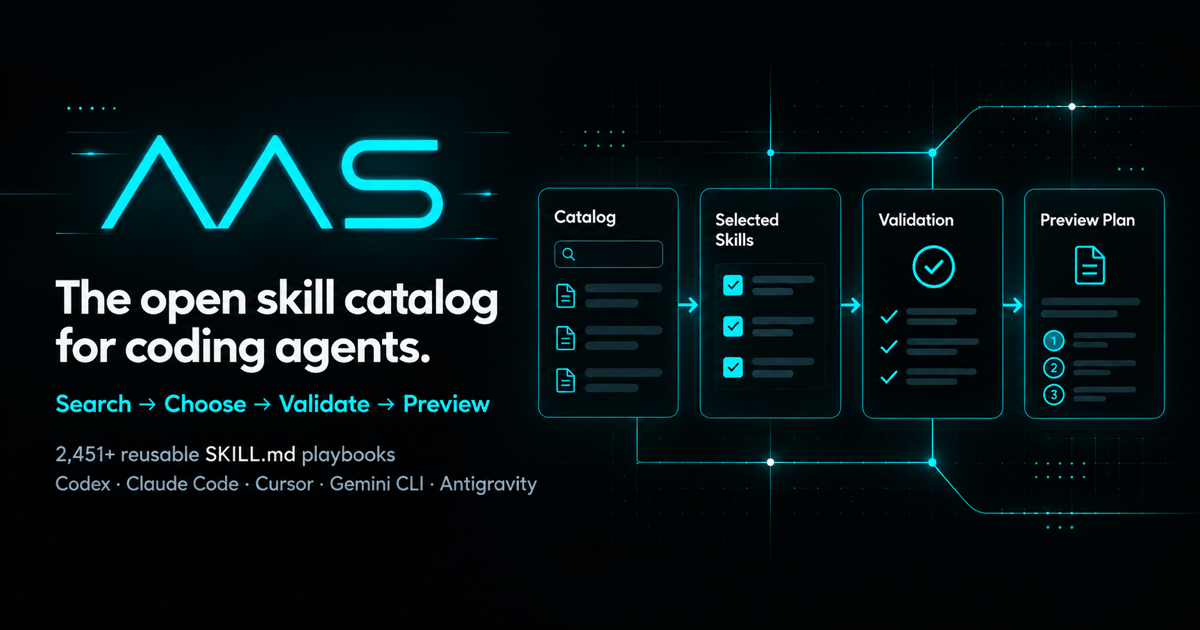
AAS Core is a local MCP server that connects to your agent and exposes the full catalog for inspection. The agent selects exact skill IDs, and Core validates them in memory using the `compose_stack` tool. After validation, `aas stack plan` writes an immutable plan you review before any separate installation step. Core does not rank skills or install anything automatically.
Agentic Awesome Skills provides install targets for Claude Code, Cursor, Gemini CLI, Codex CLI, Kiro, GitHub Copilot, OpenCode, and Antigravity. Each host has a dedicated setup guide. For MCP-enabled agents, use AAS Core for agent-owned selection; for others, install selected skills directly with the npx host flag.
Focused plugins bundle 8-10 of the most relevant skills for a domain, including Web App Builder, Security Engineer, Data Analytics, DevOps and Cloud, Agent and MCP Builder, and QA and Test Automation. Each plugin is available for Claude Code and Codex with a compatible Agent Plugins manifest, so you can activate a focused skill set without loading the full 2,737+ entry catalog.
The Workbench at aaskills.tech/workbench reads a saved Core stack and plan artifact in browser memory, with no access to your filesystem or any server. It lets you review exactly what the agent selected before the installation step, share the plan with a teammate for a second review, or compare a new selection against a prior one.
The repository and every skill in it carry the MIT license. The local MCP server, the CLI, and the skill files all run on your own machine. There is no account creation, no telemetry, and no rate limit tied to a subscription. All catalog discovery happens locally through the filesystem, so the tool works in air-gapped environments and enterprise setups where external API calls are restricted.
Features
- 2,737+ Installable Skill Playbooks
- AAS Core: Agent-Owned Selection with Plan Preview
- Works Across All Major AI Coding Agents
- Specialized Domain Plugins
- Browser-Based Workbench for Stack Review
- MIT License with No Cloud Dependency
Recommended for this setup
Strengths
- Active Community with 48,000+ Stars: With 48,263 GitHub stars and 7,029 forks, Agentic Awesome Skills has substantial developer adoption. The project maintains only 2 open issues despite its scale and has received consistent updates through October 2026, reaching version 19.13.0. Community contributions add and refine skills across domains through the standard pull request process.
- Plain-Text Skills Are Portable and Auditable: Every playbook is a readable Markdown file. You can audit exactly what instructions the agent will receive, version-control your selected stack with `aas-stack.json`, and review a diff when a skill update changes a playbook. There are no binary blobs, compiled instructions, or opaque API calls to a third-party skills service.
- Works With the Tools You Already Use: Agentic Awesome Skills does not require switching to a new editor or agent tool. It adds a skill layer on top of Claude Code, Cursor, Codex, Gemini CLI, Kiro, Copilot, and others you may already have. The install path for each host is documented in a dedicated setup guide.
- Plan Preview Keeps You in the Loop: AAS Core's plan preview step separates agent skill selection from the actual installation, giving you an immutable record of what the agent chose before anything changes. This matters for teams with audit requirements or projects where accidental skill application could introduce security or configuration issues.
Trade-offs
- Apply and Recovery Are Experimental: The README explicitly marks the apply and recovery steps as experimental and outside the supported preview path. The supported workflow ends at plan preview; applying a plan to your project and recovering from a failed apply require opting into experimental features with additional risk. Most production use cases should treat Core as a selection and planning tool only.
- 128-Skill Technical Cap Per Stack: Each AAS Core stack has a technical maximum of 128 skills. Projects that need a broader set must split across multiple stacks or use the direct installer without the Core plan step. For most projects this limit is not a constraint, but very large monorepos with many specialized needs could hit it.
- Skill Fit Requires Human Judgment: AAS Core validates the structural and identity validity of a stack but does not certify semantic fit, compatibility, or operational safety. Choosing which skills are appropriate for a specific codebase requires reviewing each playbook's content. Structural validity is not the same as correctness for your project.
Tech stack
FAQ
AAS Core does not install skills automatically. It stops at plan preview: the agent inspects the catalog, selects skills, and Core writes an immutable plan for you to review. Installing a skill into your project is a separate, manual step that requires your approval. The apply path exists but is marked experimental and requires explicit opt-in.
AAS Core has full local MCP setup guides for Claude Code and Codex CLI. Direct install via npx targets Cursor, Gemini CLI, Kiro, GitHub Copilot, OpenCode, Antigravity, and any custom path. Each host has a dedicated setup guide in the repository's docs directory.
No. Agentic Awesome Skills is an independent community project. The repository notes explicitly that it is not affiliated with or endorsed by Google, Anthropic, OpenAI, or any other platform named as a compatible host. The names appear only to describe compatibility and install targets.
The project and all skills it ships carry the MIT license. You can fork, modify, redistribute, and use the skills commercially with no restriction. There is no server-side dependency, no usage metering, and no license key required to access the full catalog.
Version 19.13.0, released in October 2026, includes 2,737 skills. The catalog is maintained by the community through standard GitHub pull requests, with the maintainer reviewing skill content and safety before merging. The GitHub repository is the canonical source; the hosted catalog at aaskills.tech mirrors it for browser-based discovery.